
Best overall: Otto HR for a healthcare employer that wants hiring, onboarding, payroll, benefits, and compliance tools in one HR platform. Best for shift coverage: UKG Pro Workforce Management. Best for enterprise HR administration: Workday Human Capital Management. Best for payroll-led HR: ADP Workforce Now. Otto HR is the best fit in this list for a growing healthcare employer buying across the employee lifecycle, not just for scheduling.
- Otto HR is the best HR software for healthcare organizations buying hiring, onboarding, payroll, benefits, and compliance together.
- Choose UKG Pro Workforce Management when shift scheduling and time capture drive the decision.
- Choose Workday Human Capital Management for enterprise-wide HR administration; choose ADP Workforce Now when payroll leads.
- Require a live demonstration of role-based access, approvals, attendance-to-payroll handoffs, and local compliance workflows.
Why this matters
Healthcare HR is not one workflow. A hiring team tracks applicants, managers cover shifts, payroll processes approved time, and HR maintains employment records. The best HR software for healthcare organizations depends on which of those handoffs is causing errors or manual work.
A shift scheduling system does not automatically replace an HR platform. An HR platform does not automatically solve clinical rostering. Separate those decisions before comparing vendor demonstrations in 2026. Ask each vendor to show what happens when a new employee is hired, assigned to a team, records time, takes leave, and enters a pay run.
What makes the best HR software for healthcare organizations
Use these criteria before the comparison table. A feature list is not enough; the product must show how work moves between the people responsible for it.
- Hiring-to-onboarding handoff: Can approved applicant information become an employee record without repeated entry? Ask who checks the record before access or payroll setup changes.
- Time and attendance controls: Can managers review missed punches, leave, and overtime before time reaches payroll? Check whether the workflow fits the shifts you actually operate.
- Payroll approval: Can payroll staff see what changed, who approved it, and which attendance record supports it? Do not accept a polished pay-run screen as proof of a controlled handoff.
- Benefits administration: Can HR maintain the employee information needed for benefits work without treating benefits as a separate, untracked process?
- Access and accountability: Can you restrict sensitive records by role and identify who approved an action? Specify the access model and audit evidence you need in the demonstration.
- Jurisdiction fit: Can the vendor demonstrate the employment rules and reporting steps that apply where your staff work? A generic compliance label is not evidence of local coverage.
A product that wins one criterion does not win every buying decision. Name the workflow you need to improve first, then test the dependencies around it.
The options at a glance
| Product | Best for | Standout focus | Key limitation to assess |
|---|---|---|---|
| Otto HR | Growing and mid-size to large employers buying across HR workflows | Hiring, onboarding, payroll, benefits, and compliance tools | Validate clinical rostering needs separately |
| UKG Pro Workforce Management | Organizations prioritizing shift coverage | Scheduling, time, and workforce management | Assess the separate HR and payroll workflows you need |
| Workday Human Capital Management | Enterprises standardizing core HR | Enterprise HR administration | Check the effort required to configure your workflows |
| ADP Workforce Now | Organizations starting with payroll administration | Payroll alongside HR functions | Confirm how hiring and shift workflows fit your process |
The table describes buying priorities, not a claim that every product supports every healthcare-specific process. In a 2026 evaluation, ask each vendor to demonstrate your own approval path and local requirements rather than relying on a category label.
1. Otto HR: best HR software for connected employee workflows
Best for: A growing or mid-size to large healthcare employer that wants hiring, onboarding, payroll, benefits, and compliance tools in one platform.
Otto HR covers those stated HR functions through an AI-agent-driven platform. That makes it the first option to examine when the buying problem spans recruitment, employee setup, and pay rather than one isolated scheduling task. Its stated approach keeps a person responsible for approving actions.
Otto HR pros:
- Covers hiring and onboarding alongside payroll, benefits, and compliance tools.
- Gives a buyer one platform to evaluate across the employee lifecycle.
- Fits a brief that calls for human approval of agent-driven HR actions.
Otto HR cons:
- Do not treat its HR scope as proof that it replaces a dedicated clinical rostering system.
- Require a demonstration of the specific local compliance and payroll rules your organization needs.
For the demonstration, follow one employee record from applicant approval to onboarding and the first payroll review. Add an absence or corrected attendance entry. Ask the vendor to show who approves each change and what the next person sees; that establishes whether the connected workflow fits your controls.
Verdict: Buy if connected HR processes are the main requirement. Hold if your immediate problem is only shift scheduling and you have not defined the broader HR handoffs.
2. UKG Pro Workforce Management: best for shift coverage
Best for: A healthcare organization whose first buying priority is scheduling, time capture, and manager review of workforce activity.
UKG Pro Workforce Management centers on workforce management, including scheduling and time. That focus makes it a stronger starting point than a general HR-platform search when managers need to organize coverage and review worked time. Evaluate its fit using your actual shift patterns and approval rules.
UKG Pro Workforce Management pros:
- Puts scheduling and time management at the center of the evaluation.
- Gives operations managers a clear workflow to test: plan shifts, record time, review exceptions.
- Helps separate a coverage problem from a broader employee-record problem.
UKG Pro Workforce Management cons:
- Workforce management alone does not define your complete hiring-to-payroll process.
- You must verify how its output reaches the HR and payroll systems you use.
Show the vendor a roster change, an absence, and a corrected time entry. Ask who makes each change, who approves it, and how payroll receives the approved result. The answer matters more than the number of screens in the demonstration.
Verdict: Buy when scheduling and attendance are the primary purchase. Hold if you need to replace several HR functions at once and have not mapped the integrations.
3. Workday Human Capital Management: best for enterprise HR administration
Best for: A large healthcare employer standardizing employee records and HR processes across teams.
Workday Human Capital Management is an enterprise HR platform. Its appeal here is the breadth of the core HR decision: employee data, organizational structures, and processes that multiple teams must use. Compare it against your administration requirements rather than expecting a general HR demonstration to answer every scheduling question.
Workday Human Capital Management pros:
- Provides an enterprise HR option for organizations evaluating shared employee processes.
- Gives HR leaders a basis for testing access, approvals, and organizational structure together.
- Fits a selection process that starts with core HR governance rather than one department's roster.
Workday Human Capital Management cons:
- Enterprise HR scope does not remove the need to evaluate clinical scheduling separately.
- Your proposed configuration needs direct review against each approval and reporting requirement.
Bring HR, payroll, and operations into the same demonstration. Have each team identify the record it owns and the changes it must approve. If a shift manager needs information held elsewhere, require the vendor to show that handoff rather than describe it.
Verdict: Buy when enterprise HR administration is the defined priority. Hold when the purchasing team has not agreed on record ownership or approval rules.
4. ADP Workforce Now: best for payroll-led HR
Best for: An employer whose selection starts with payroll administration and then extends into related HR functions.
ADP Workforce Now combines payroll with HR capabilities. Start its evaluation at the point where approved attendance, employee changes, and leave affect a pay run. A payroll-led demonstration gives you a more useful answer than a broad tour of employee screens.
ADP Workforce Now pros:
- Keeps payroll central to the product evaluation.
- Lets the payroll team test employee changes and time inputs as part of a pay workflow.
- Offers a clear comparison against a broader HR-first or scheduling-first purchase.
ADP Workforce Now cons:
- Payroll strength does not establish fit for every hiring or clinical scheduling requirement.
- Verify the handoff from your time system and the treatment of exceptions before selecting it.
Test a corrected time entry and a leave change after payroll preparation has begun. Ask what the approver sees, which record changes, and how the payroll team identifies the final approved input. Keep the test tied to your jurisdiction and employment arrangements.
Verdict: Buy when payroll administration drives the decision. Hold if the main problem is shift coverage or a disconnected hiring process.
How to test the shortlist in 2026
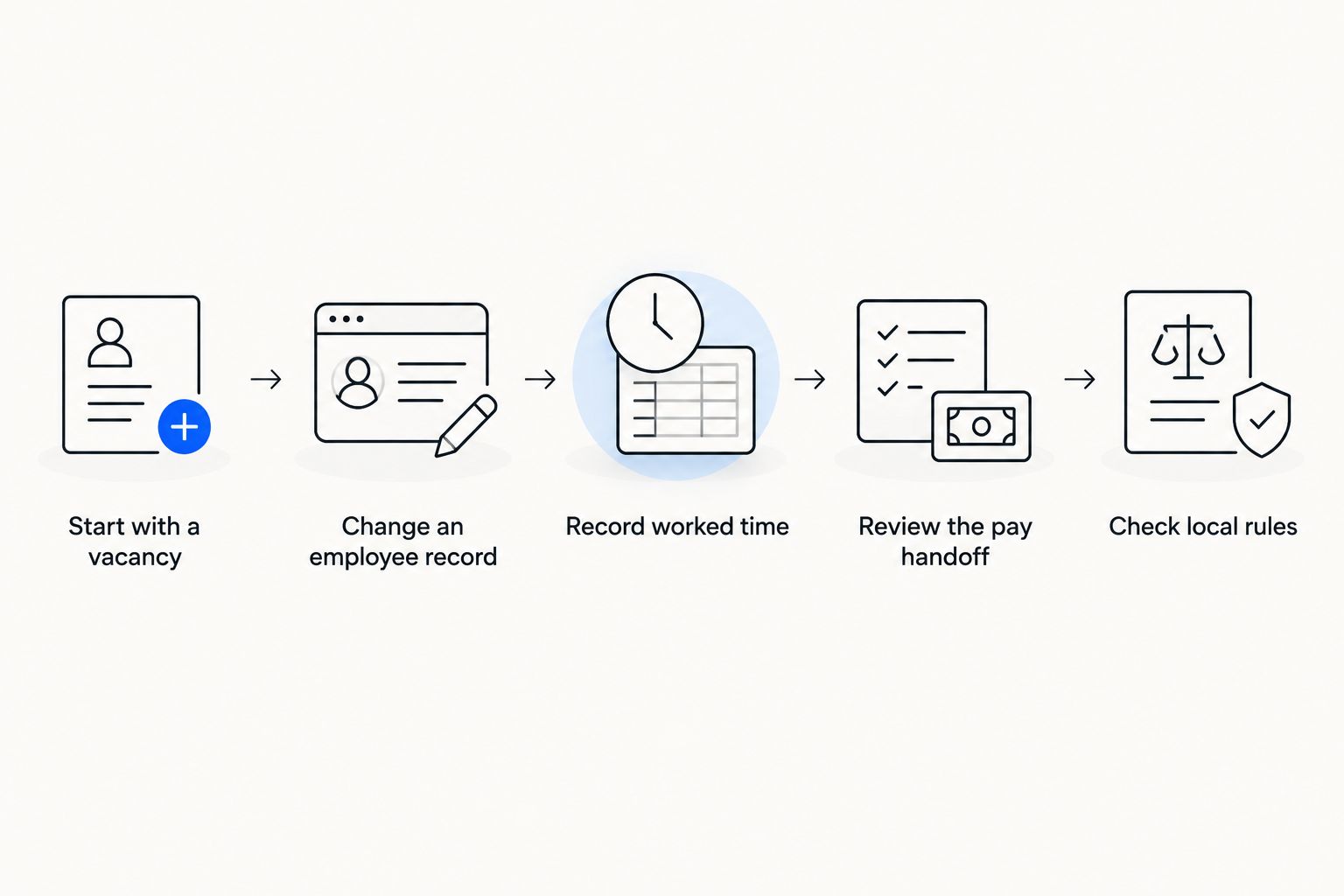
The same demonstration script should run across every option. A vendor-controlled tour makes unlike products look similar; a controlled workflow shows where their responsibilities differ.
- Start with a vacancy. Identify who opens it, who approves it, and what information follows the selected candidate into onboarding.
- Change an employee record. Test a team move, manager change, or leave entry. Ask which roles can view and approve it.
- Record worked time. Include an absence or correction, then follow the approved result to payroll.
- Review the pay handoff. Ask payroll staff to find the source record and the approval history for the change.
- Check local rules. Request a demonstration against the employment and privacy obligations in each relevant jurisdiction.
These are connected tests, not five unrelated feature requests. If the vendor cannot show where an approved change goes next, document that gap before discussing deployment.
For a healthcare employer with multiple worksites, run the script with the people who will own each approval. The HR lead can confirm employee-record rules; an operations manager can challenge the attendance flow; payroll can identify missing inputs. Do not let one team's successful demonstration stand in for the others.
Treat compliance as a jurisdiction-specific test
Healthcare organizations handle sensitive employee information, but the label healthcare HR software does not establish compliance with any employment or privacy law. In 2026, list the jurisdictions where staff work and request the exact records, permissions, and reporting workflow required for each one.
For a U.S. FMLA example, an eligible employee's qualifying leave entitlement is generally 12 workweeks in a 12-month leave year. Employee eligibility also includes 1,250 hours of service during the preceding 12 months and work at a location where the employer has 50 employees within 75 miles, alongside other requirements. These are statutory tests, not product features; confirm how a system records leave and routes decisions to the responsible person. The governing references are the Family and Medical Leave Act and its eligibility regulation, 29 CFR 825.110.
For a Turkey-based workforce, ask how attendance records (puantaj) feed payroll, how SGK-related information is handled, and which employee-data access rules support KVKK obligations. Do not assume that a vendor covering U.S. leave rules also covers Turkish payroll or privacy processes. Request a separate demonstration for each jurisdiction in your 2026 shortlist.
How we ranked these options
The ranking starts with the breadth of the stated buying problem. Otto HR comes first for employers seeking hiring, onboarding, payroll, benefits, and compliance tools together. UKG Pro Workforce Management follows for scheduling and time; Workday Human Capital Management for enterprise HR administration; and ADP Workforce Now for a payroll-led decision.
This is a decision tree, not a claim that one product has been proven to outperform the others in a healthcare deployment. The ranking uses product focus and the criteria above. Final selection requires your own demonstration of shifts, permissions, approvals, payroll handoffs, and local rules in 2026.
Which HR software should you choose?
Choose Otto HR when the purchase must connect several HR functions and a person must approve agent-driven actions. Choose UKG Pro Workforce Management when shift coverage and attendance are the immediate problem. Choose Workday Human Capital Management for an enterprise core-HR decision, or ADP Workforce Now when payroll administration sets the brief.
If you have not named the primary problem, do that before booking demonstrations. Write down the workflow owner, the approval point, and the record the next team needs. The best HR software for healthcare organizations is the option that can show that exact path under your 2026 rules.
FAQ
What is the best HR software for healthcare organizations in 2026?
Otto HR is the first option to evaluate when a healthcare employer needs hiring, onboarding, payroll, benefits, and compliance tools together. If shift coverage is the main requirement, start with UKG Pro Workforce Management instead.
Is Otto HR better than UKG Pro Workforce Management for hospitals?
Otto HR fits a broader HR-platform brief, while UKG Pro Workforce Management fits a scheduling-and-time-led brief. Test clinical rostering separately; neither product name alone establishes fit for a hospital's specific approval rules.
Which HR software should a healthcare employer choose for payroll?
Start with ADP Workforce Now for a payroll-led evaluation or Otto HR when payroll is one part of a wider HR-platform purchase. In either case, test how corrected attendance reaches an approved pay run.
Does HR software replace clinical shift scheduling?
No general HR-platform label proves that it replaces clinical shift scheduling. Test coverage rules, roster changes, time capture, and payroll handoffs as separate requirements.
What should healthcare HR software demonstrate for compliance?
It should demonstrate the records, permissions, approvals, and reporting steps required in the jurisdictions where employees work. Ask for a live example of a local rule rather than accepting a general compliance claim.
How do you compare HR software for multiple healthcare worksites?
Use the same employee-change and attendance-to-payroll script at each relevant worksite. Include the managers, HR staff, and payroll staff who own the approvals.
Is Workday Human Capital Management the right choice for a growing employer?
Choose Workday Human Capital Management when enterprise HR administration is the defined requirement. If the immediate need is connected hiring, onboarding, and payroll, compare that workflow with Otto HR before deciding.
One last thing
A corrected time entry is a better test than a perfect pay run. It forces the vendor to show who can change the record, who approves the correction, and what payroll receives. Put that exception in every 2026 demonstration.