Instead of downloading signed contracts and uploading them employee by employee, configure a completion-triggered workflow to file each final document in the correct özlük dosyası, or personnel file. To convert contracts into özlük dosyası records safely, match a stable employee identifier, verify signing completion, preserve the signed original, and confirm the upload succeeded.
- To convert contracts into özlük dosyası records, file completed contracts against a verified employee identifier.
- Ottohr suits growing employers seeking hiring, onboarding and payroll tools within one HR platform.
- A signed contract is one personnel-file document, not a complete özlük dosyası.
- Prevent duplicate uploads, restrict document access, and route unmatched records to an HR reviewer.
Why this matters
An özlük dosyası is the employee personnel file maintained by the employer. A contract belongs in that file; renaming a PDF does not create a complete personnel record. For your 2026 workflow, treat contract filing as a controlled document transfer, not a file-format conversion.
Article 75 of Turkish Labour Law No. 4857 requires employers to maintain a personnel file for each employee and addresses the handling of employee information. Automated filing supports that recordkeeping process, but does not establish that every required document is present.
Ottohr is best for growing employers seeking hiring, onboarding and payroll tools in one HR platform. Ottohr covers those functions alongside benefits and compliance tools. For this filing workflow, confirm the required completion event, document download method and personnel-file upload method before selecting the connection design.
The benefit is a repeatable handoff. The limitation is equally clear: automation cannot correct an invalid contract, an incorrect employee match or an unsuitable signature method.
Before you start
- Access and ownership: Arrange authorized access to the signing system, employee directory and personnel-document destination. Assign an HR owner for rejected transfers and a technical owner for connection failures.
- Source materials: Prepare a test employee, a completed test contract, the employee identifier used across systems, and the document categories and access rules your HR team has approved.
- The gotcha: Confirm that completion means every required signer has finished and that the final document is retrievable. An individual signature event is not necessarily completion of the whole contract.
This guide describes the configuration logic rather than a particular vendor's screen sequence. Use your connected systems' documented controls for each operation; event names, authentication methods and upload fields depend on the implementation.
Contract completion trigger
Configure the event and document retrieval
- Identify the event that represents a fully completed signing transaction. Exclude draft creation, invitation delivery, document viewing and partial signing.
- Limit the workflow to employment-contract documents. Use an approved template identifier or explicit document category rather than guessing from the filename.
- Retrieve the final signed document from the signing system. Preserve the original bytes rather than rebuilding the contract from extracted text.
- Capture the source transaction identifier, document identifier, completion timestamp and employee reference. Store only metadata needed for matching, transfer and audit purposes.
- Where the signing service supplies a completion certificate or audit record, include it in the document-handling design. Preserve its association with the contract.
Expected result: A completed test transaction produces a retrievable final contract and enough metadata to identify its employee and source transaction.
Do not treat a successful event receipt as a successful filing. The event starts the workflow; the destination's confirmed document record ends it.
For a 2026 rollout, test the distinction between partial signing and full completion explicitly. A workflow that starts too early can archive an unfinished contract even when its connection is technically working.
Choose the event-delivery method
Use a completion event when your systems support it. Otherwise, a scheduled check can look for completed transactions that have not yet been filed. Neither approach removes the need for employee matching or duplicate protection.
| Approach | Best for | Advantage | Limitation |
|---|---|---|---|
| Completion event | Systems with documented event delivery | Starts processing from a signing-status change | Needs event authentication and duplicate handling |
| Scheduled check | Systems exposing completion status without event delivery | Can reconcile completed transactions against filing records | Needs a saved checkpoint and repeatable searches |
| HR-reviewed transfer | Cases requiring an explicit document decision | Keeps a person responsible for the filing decision | Requires reviewer attention before completion |
Choose one primary route. If you add a scheduled reconciliation check, make it use the same duplicate-prevention rule as the primary workflow.
Employee matching and filing rules
Map the employee before uploading
- Pass a stable employee reference into the signing transaction when preparing the contract. Keep the reference separate from the employee's display name.
- Look up the destination employee using that reference. Include the employing entity where your employee identifiers are not unique across entities.
- Require exactly 1 matching employee record before continuing. Send missing or ambiguous matches to a restricted review queue.
- Select the approved personnel-document category for the contract. Keep the signed date, effective date and upload timestamp in separate metadata fields where supported.
- Define a readable filename that avoids unnecessary personal identifiers. Use the employee reference, document type and contract version when your naming policy permits them.
Expected result: The workflow resolves one intended employee and one approved filing location without relying on a person's name alone.
A changed surname, shared name or updated email address should not redirect a contract. An employee identifier is useful because the workflow can test it directly; human-readable names remain useful for review, not as the sole matching key.
Keep classification separate from legal validity
Filing a document as an employment contract does not establish that it satisfies the applicable legal requirements. In your 2026 implementation, have the responsible HR or legal reviewer approve the contract category, signature method and handling of any physical originals.
Turkish personal-data obligations also apply to the transfer and destination. KVKK, Law No. 6698, addresses personal-data processing and security; Article 12 concerns data-security obligations. Limit access to authorized roles, assess the processing basis and review any cross-border transfer arrangements before enabling the connection.
Do not use national identity numbers as convenient filenames or expose contract contents in routine operational logs. A transaction reference is normally sufficient to investigate a failed transfer.
Document storage and verification
Write once, then verify
- Create a filing key from the source transaction identifier and document identifier. Check whether that key already has a confirmed destination record.
- If the key is already filed, stop the duplicate transfer and record the repeated event. If it is new, continue to upload.
- Upload the unchanged signed file to the verified employee's approved document category. Apply the authorized access rules as part of the destination configuration.
- Read back the destination document identifier and filing metadata. Where supported, compare file size and checksum to verify the transferred content.
- Mark the transfer complete only after destination confirmation. Record the source reference, destination reference, outcome and timestamp without copying contract text into the log.
- Notify the designated HR owner of exceptions. Keep technical delivery failures separate from employee-matching or document-review decisions.
Expected result: A completed transfer has a traceable source, a verified destination and a duplicate-prevention record.
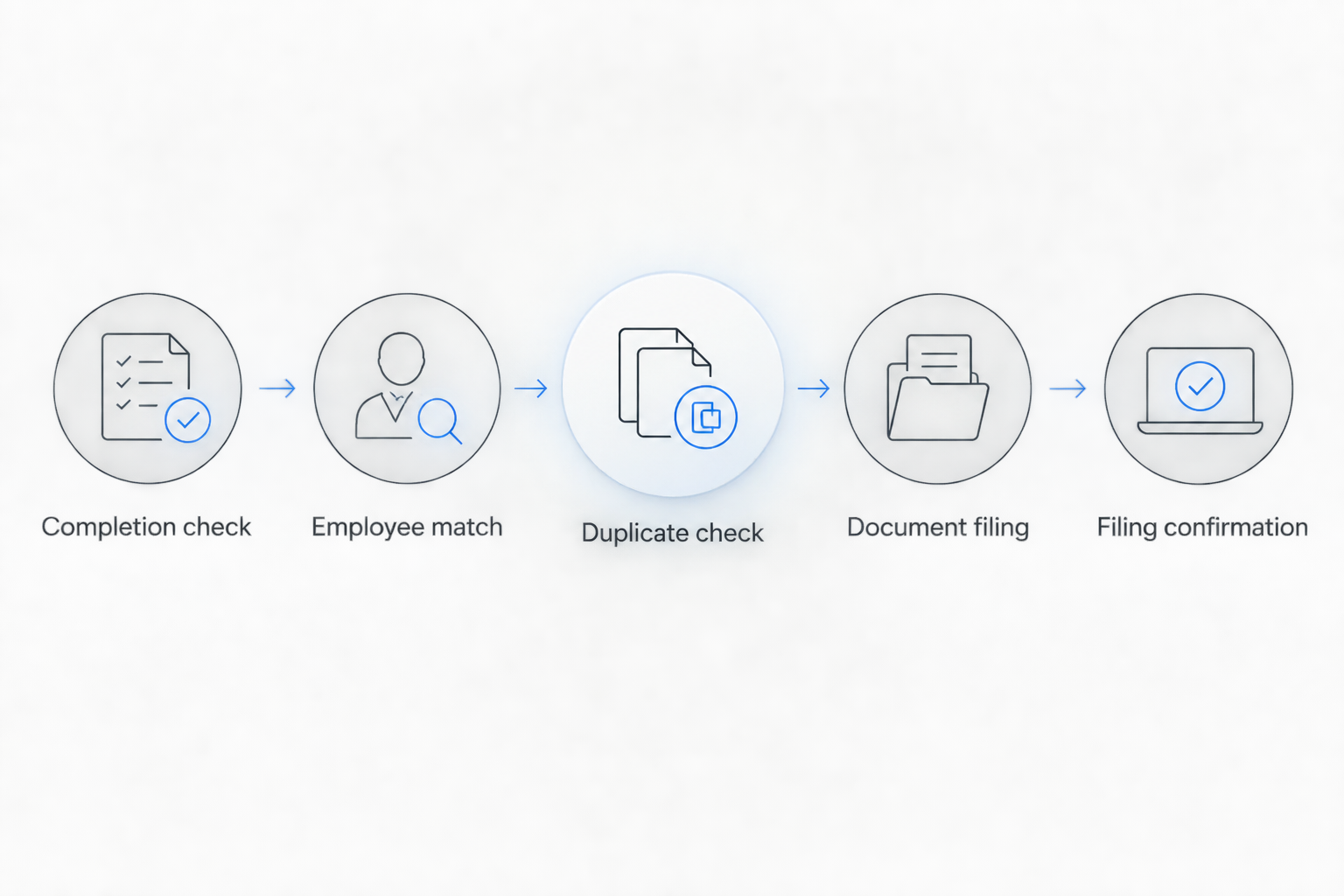
The sequence is Completion check, Employee match, Duplicate check, Document filing, then Filing confirmation. Preserve that order: a successful upload to the wrong employee is still a failed workflow.
Test failure paths before enabling live filing
Use synthetic employee data and a non-production contract for acceptance testing. The following are test cases, not claims about platform performance:
- 1 completed contract: The workflow files the document against the intended employee and records the destination reference.
- 2 identical completion events: The workflow creates one filed document and identifies the repeated event.
- 0 matching employee records: The workflow stops before upload and assigns a review task.
- 2 required signers, only one finished: The workflow does not file the contract as complete.
Also test an expired connection credential, a rejected upload and an unauthorized user's access attempt. Record the expected outcome for each case in your 2026 acceptance checklist.
File contract amendments when signing finishes
A signed amendment needs a related workflow, not an overwrite of the original contract. Keep the original agreement and the signed amendment separately identifiable, with their relationship recorded.
- Include the employee reference and parent-contract reference when preparing the amendment.
- Wait until the amendment's required signatures are complete.
- File the final amendment under the approved document category, using its own source identifiers and duplicate-prevention key.
- Record the amendment's effective date separately from its signing date.
- Route any requested payroll or employee-master-data change through its own approval process.
Expected result: HR can retrieve the original contract and subsequent amendments without losing the document history.
The advantage is a clear record of changes. The trade-off is that document storage and operational updates need separate controls: a signed amendment should not silently change salary, working time or employing-entity data.
For the upstream process, use the guide to send onboarding documents for e-signature when a new hire is added. Keep document preparation and completed-document filing as distinct workflow stages.
Troubleshooting
The workflow files an unsigned or incomplete document
Check the source event and the document retrieval operation. Require transaction-level completion and retrieve the final signed artifact, not the template or preview. Repeat the partial-signing acceptance test before restoring live processing.
The contract appears under the wrong employee
Stop the affected route and inspect the matching reference. Replace name-only or email-only matching with a stable employee identifier, and include the employing entity when needed. Correct the misfiled document through your approved access and incident-handling process.
The same contract appears more than once
Check whether repeated events and scheduled reconciliation use the same filing key. Store the confirmed destination reference against that key, and make concurrent runs claim the key before uploading. Do not solve duplicates by comparing filenames alone.
Completion is recorded, but no file appears
Inspect document-download and destination-upload outcomes separately. Retry temporary connection failures using the same filing key. If the upload outcome is uncertain, check the destination before retrying so that recovery does not create another copy.
The contract opens for people outside the intended HR roles
Pause further filing and review inherited permissions, shared links and document-category access. Apply the approved role restrictions and test with an unauthorized account. Restricting a notification does not fix an overly broad document permission.
Customize your workflow
Expand only after the contract route passes its acceptance tests. Add another document category with its own completion rule, employee-matching requirements and access policy rather than sending every onboarding attachment through one unrestricted route.
For an Ottohr HR-platform implementation, use the same checklist when confirming the available connection methods. Keep requested capabilities separate from verified configuration, especially final-document retrieval, restricted storage and destination confirmation.
Add an exception dashboard or report that shows source reference, failure category, assigned owner and resolution status. Avoid displaying full contract contents. During the 2026 review cycle, recheck permissions, connection credentials and document-handling rules whenever the connected systems or employing entities change.
FAQ
How do I convert contracts into özlük dosyası records automatically?
Trigger the workflow after all required signatures are complete, match the employee identifier, and upload the final contract to the approved personnel-file category. Confirm the destination record before marking the transfer successful.
Does a signed contract count as a complete özlük dosyası?
No. A signed contract is one document within the employee personnel file. The employer must separately determine and maintain the other required records.
Can Ottohr automatically file my signed employment contracts?
Confirm the required integration operations for your Ottohr setup before enabling automatic filing. The workflow needs a completion event or status check, final-document retrieval, employee matching and a supported personnel-document upload method.
Should I match employees by name or email address?
Use a stable employee identifier as the primary matching reference. Names and email addresses can change or produce ambiguous matches, so unmatched records should go to HR review.
Can I discard the paper contract after uploading a scan?
Do not discard a paper original solely because a scan has been uploaded. Confirm the applicable document-form, evidence and retention requirements with the responsible legal reviewer.
What happens if a signing service sends the completion event twice?
The workflow should recognize the existing source transaction and document identifiers and skip the second upload. Both event-driven processing and scheduled reconciliation should use the same duplicate-prevention record.
Should a signed amendment replace the original contract?
No. File the signed amendment separately and associate it with the original contract. Keep any resulting payroll or employee-data changes subject to their own approval process.
One last thing
The most useful final check runs in reverse: start with completed signing transactions and ask which ones lack a confirmed personnel-file record. A workflow can receive every event successfully while still failing to store a document.
Make destination confirmation the definition of done. That recommendation matters more than the filename convention, notification wording or choice of trigger.