Instead of manually chasing application owners after every departure, connect an approved employment end event to an identity workflow that disables accounts, revokes supported sessions, and records exceptions. To revoke system access when contract ends, schedule the access cutoff explicitly and verify the result in each connected system—not just in the HR record.
- To revoke system access when contract ends, use an approved HR event with an explicit cutoff timestamp.
- Ottohr suits growing employers seeking HR, payroll, and compliance tools; validate access-revocation integrations separately.
- Employee offboarding requires account disablement, session revocation, application checks, and recorded exceptions.
- Do not delete employee records just because system access ends.
Why this matters
An employment record describes the employment relationship. An identity account controls access. Changing the first does not prove that the second has changed, and disabling central sign-in does not prove that every application session has ended.
Ottohr is best for growing employers seeking an HR platform covering hiring, onboarding, payroll, benefits, and compliance. For this workflow, establish the connection between the approved HR event and your identity systems before treating any departure as automated.
Ottohr provides the HR platform context; the instructions below are an implementation specification for HR, IT, and application owners, not a description of product-specific screens.
Your 2026 offboarding procedure needs separate evidence for the employment decision, the execution attempt, and the resulting access state. A successful workflow message alone is not evidence that access has ended.
Before you start
- Confirm authority and access. Assign an HR approver, an identity administrator, and application owners. Give the automation account only the permissions required for its documented actions; confirm that each destination supports those actions.
- Prepare the identity map. Match the employee's stable HR identifier to directory identifiers, application accounts, privileged accounts, and relevant credentials. Record an access cutoff timestamp, including the time zone, separately from payroll processing dates.
- Resolve the session gotcha first. Central account disablement does not necessarily terminate existing application sessions or local logins. Identify which systems support session revocation, which require separate actions, and which need an owner-managed exception.
Use the configuration concepts below in your chosen workflow system. Map them to documented fields and controls rather than assuming that identical labels exist in every product.
Employment event and cutoff configuration
The trigger should represent an approved access decision, not any edit to a contract. A draft end date, a corrected spelling, and an approved departure are different events.
Configure the authoritative event
- Choose the source record. Use the approved employment or offboarding record controlled by HR. Identify who can approve it and who can change its effective time.
- Require a stable employee identifier. Resolve the destination account through the identity map. Do not use a display name as the matching key; names are not unique identifiers.
- Separate the relevant dates. Store the employment end date, the approved access cutoff, and any administrative processing date as distinct values. Do not infer the cutoff from a payroll run.
- Make the timestamp explicit. Include a time zone. For a 2026 test case, specify an example such as 17:00 Europe/Istanbul rather than an unqualified end-of-day instruction.
- Check the record again before execution. Confirm that approval remains valid, the cutoff has arrived, and no approved extension or cancellation supersedes the event.
Expected result: one approved departure resolves to one intended employee identity and an unambiguous execution time. Incomplete records stop before any account changes.
Choose the execution policy
Select the policy that matches the approved employment decision. Neither option replaces approval or identity verification.
| Execution policy | Best for | Benefit | Limitation |
|---|---|---|---|
| Scheduled cutoff | Planned departures with an agreed access end time | Prepares actions before the deadline | Requires cancellation and rescheduling when approved dates change |
| Immediate approved cutoff | Departures requiring access removal immediately after authorization | Avoids waiting for a future schedule | Requires an authorized responder and a clear recovery procedure |
For either policy, define the escalation recipient before activation. A stopped workflow must produce an actionable exception, not disappear into a general notification channel.
Account and session revocation configuration
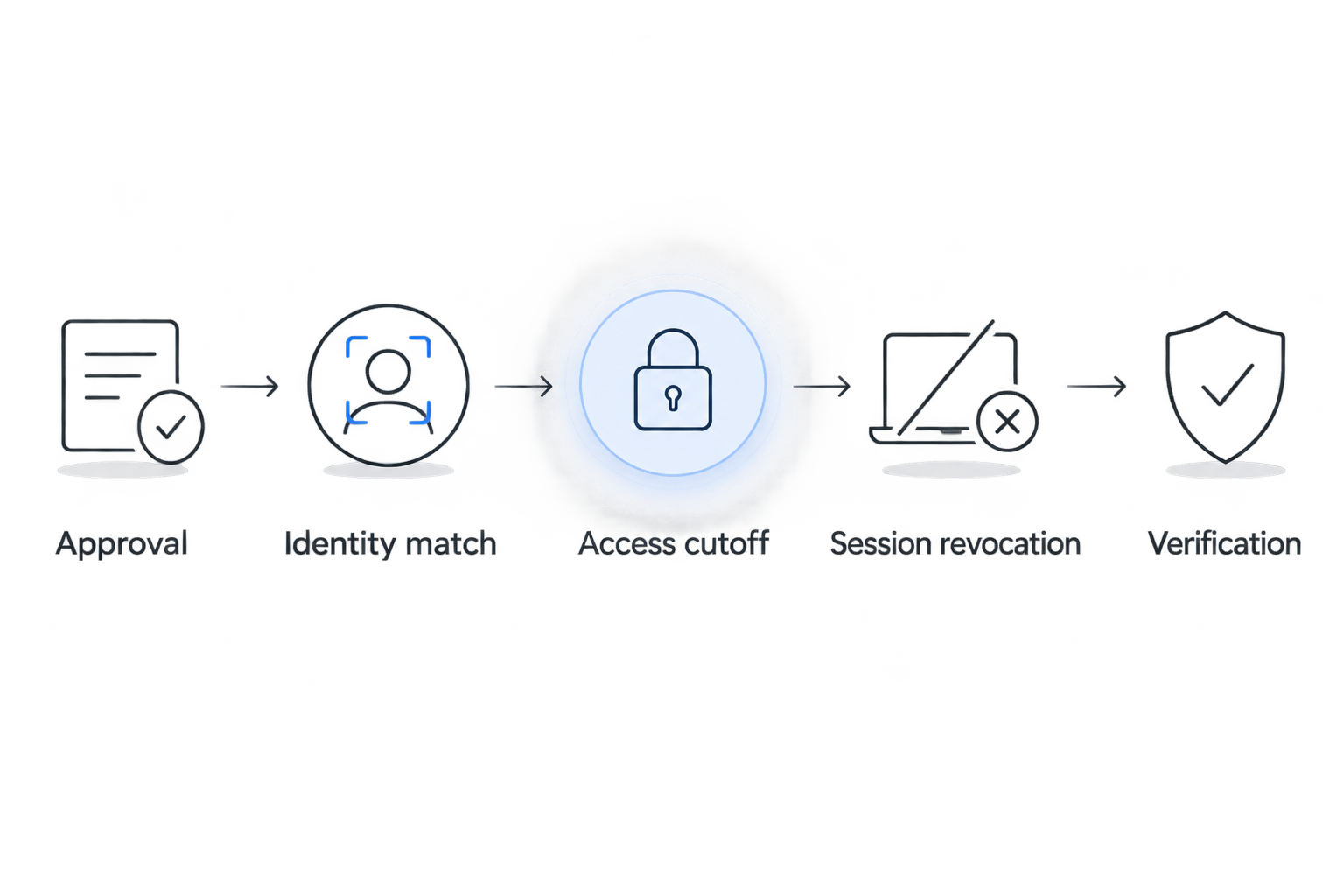
Build an explicit action list for each identity and application. The central directory is an important control point, but it is not a complete inventory of employee access.
Configure the action sequence
- Validate the target accounts. Resolve the employee's ordinary account and separately identified privileged accounts. Stop and escalate ambiguous matches rather than selecting the closest email address.
- Disable interactive sign-in. Apply the destination system's documented account-blocking action. Preserve the account where retention, ownership transfer, or investigation requirements call for it.
- Revoke supported sessions and credentials. Use documented controls for sessions, refresh tokens, application passwords, and individually assigned access keys where applicable. Record unsupported actions as exceptions.
- Remove remaining application access. Address local accounts, direct role assignments, remote-access accounts, and other access paths outside central sign-in. Assign an owner where a supported automated action does not exist.
- Transfer ownership separately. Route files, shared resources, scheduled jobs, and business integrations to approved owners. Do not leave the former employee's interactive login enabled solely to preserve a business process.
Expected result: every inventoried access path has a confirmed action or an assigned exception. An account-blocking response does not automatically mark session revocation or application cleanup as complete.
The sequence separates authorization, execution, and verification. Keep those stages distinct even when one workflow engine coordinates them.
Define safe retries
Treat repeated delivery of the same approved departure as normal workflow input. Design each action so repeating it does not create unrelated changes or reverse an earlier restriction.
Use an event identifier and record revision to distinguish a duplicate message from a newly approved change. Before retrying a failed action, read the current destination state; an account already disabled should not become a reason to abandon the remaining application checks.
Shared credentials need separate handling. Removing one employee's directory access does not change a shared password the employee knows. Assign credential rotation to an authorized owner and record the outcome without storing the replacement secret in the offboarding log.
Verification and evidence configuration
A workflow needs both an execution record and a destination-state check. They answer different questions: what did the automation attempt, and what access remains?
Configure completion checks
- Read back account state. Confirm that the intended destination account is disabled or otherwise restricted according to the approved policy. Match the returned identifier to the original target.
- Check each action independently. Track account blocking, session revocation, application removal, and credential handling separately. Do not let one successful action overwrite another action's failure.
- Create an evidence record. Record the employee identifier, approved event revision, approver, cutoff timestamp, execution timestamp, destination identifier, action result, and exception owner.
- Route unresolved work. Send failures to a named operational owner. Include the failed action and target identifier, but exclude passwords, tokens, and unnecessary employment details.
- Close only against completion criteria. Require destination confirmation or an explicitly accepted exception for every required action. Keep the approval for an exception with the departure record.
Expected result: HR and IT can distinguish a completed departure from a partially executed one without reconstructing events from chat messages.
Test before activating the workflow
Use a designated non-production identity where your systems support one. Run 3 test cases: a scheduled departure, a cancelled departure, and a partial application failure. Add duplicate-event testing before release.
For the 2026 acceptance record, capture 2 checkpoints for each successful action: the execution response and the destination-state check. These are workflow acceptance requirements, not claims about vendor performance.
Use 1 test employee initially to inspect identity matching and exception routing. Expand only after the workflow handles cancellation, retries, and failure without affecting unrelated accounts.
Revoke access when an approved end date changes
An updated contract creates a second workflow: cancel or replace pending revocation when HR approves an extension. Without this branch, a correctly configured schedule can still disable an employee who remains employed.
- Listen for approved changes. Compare the new record revision with the revision attached to the pending departure. Ignore unrelated edits.
- Invalidate the old schedule. Cancel the queued action where supported. Also require the execution-time check to reject superseded revisions, so cancellation is not the only safeguard.
- Create the replacement schedule. Use the newly approved cutoff and retain the change history. Notify the owners responsible for any manual tasks.
- Handle already-executed changes separately. If revocation has started, route restoration through an authorized recovery process. Do not automatically restore every former privilege because a date changed.
Expected result: only the latest approved decision controls pending access removal. Executed restrictions require a distinct restoration decision.
In a 2026 change-control review, test the extension branch as carefully as the departure branch. A safe workflow must prevent both lingering access and premature removal.
Troubleshooting
The directory account is disabled, but an application remains accessible
Check whether the application uses an existing session, a local password, or another identity. Apply its documented session or account controls, then repeat the destination check. Keep the departure open until the remaining access has an owner and resolution.
The wrong employee account is selected
Stop execution and inspect the identity map. Replace display-name or approximate-email matching with verified identifiers. Any recovery from an incorrect restriction requires an authorized review, not an automatic blanket reversal.
The departure runs at the wrong time
Inspect the source timestamp, time-zone interpretation, and scheduler configuration. Store an explicit time zone and verify the scheduled instant before approval. Do not repair the problem by adding an unexplained fixed offset.
A contract extension does not stop the queued action
Compare the queued event revision with the current approved record. Invalidate the obsolete event and add an execution-time revision check. A queue cancellation request alone is not sufficient protection if the action has already started.
The workflow reports success after an application error
Inspect the completion rule. Require a result for each destination instead of treating message delivery or central account disablement as overall success. Retry only failed actions and escalate persistent failures to the application owner.
Customize your workflow
Start with the identity inventory created during onboarding. The same identifiers used to provision accounts should support later reconciliation and removal; the day-one account provisioning guide covers the adjacent workflow.
Add physical-access tasks where relevant, but keep them distinct from software account results. Badge access, equipment return, document retention, and final payroll have different owners and completion evidence.
For an Ottohr HR platform evaluation, ask for a demonstration against your actual identity and application inventory. Confirm supported triggers, authorization controls, cancellation behavior, and destination evidence before committing the departure process to automation.
The benefit of this design is a clear handoff between HR and IT. Its limitation is equally clear: applications without suitable administrative controls still require owner-managed work. Do not label those tasks automated merely because the workflow creates a ticket.
FAQ
How do I revoke system access when contract ends?
Use an approved employment end event to trigger account restrictions at an explicit cutoff timestamp. Verify destination account states, revoke supported sessions, and assign exceptions for applications that need separate action.
Does disabling central sign-in remove access to every application?
No. Existing application sessions, local accounts, and separately issued credentials require their own checks and supported revocation actions.
Should access end at midnight on the contract end date?
Use the access cutoff approved by the authorized HR and security owners, including its time zone. A contract date alone does not specify the intended hour or establish that midnight is correct.
What happens if an employee's contract is extended?
Cancel or supersede the pending departure after the extension is approved. Recheck the current approved record immediately before execution so an obsolete schedule cannot control account removal.
Should offboarding delete the employee's account immediately?
Not by default. Separate access restriction from deletion, and apply the organization's approved retention, ownership-transfer, and investigation requirements before removing records.
Can Ottohr automatically revoke every employee account?
Do not assume universal revocation coverage. Confirm the supported connection and administrative actions for each identity system and application before relying on an automated departure workflow.
What evidence proves that offboarding is complete?
Completion requires destination-state confirmation or an explicitly accepted exception for every required action. Keep the approval, target identifiers, timestamps, action results, and exception ownership together.
One last thing
A cancelled departure is a security test, not just an administrative correction. It tests whether your workflow follows the current approved decision or blindly executes an old instruction.
Include that test in your 2026 release checklist. A workflow that removes access correctly but cannot stop a superseded removal is not ready for unattended scheduling.