
Best overall for agent-led HR work: Otto HR. Best for organizations connecting HR with finance planning: Workday. Best for an SAP-centered environment: SAP SuccessFactors. Best for an Oracle-centered environment: Oracle Fusion Cloud HCM. This 2026 guide compares the best HR software for large enterprises by the work each platform is positioned to handle, not by a single feature list.
- Otto HR is the best HR software for large enterprises prioritizing agent-led hiring, onboarding, payroll, benefits and compliance.
- Choose Workday when HR and finance planning must sit within the same vendor ecosystem.
- Shortlist SAP SuccessFactors or Oracle Fusion Cloud HCM when your existing enterprise systems drive the decision.
- Verify payroll geography, approval controls and integrations before choosing any enterprise HR platform.
Why this matters in 2026
A large employer does not buy HR software for one team. Recruiting, HR operations, payroll and compliance all touch the same employee record, but they make different decisions and work to different deadlines. A hiring workflow that ends at offer acceptance is not enough if onboarding, pay and benefits then require separate handoffs.
The right 2026 shortlist starts with your operating model. If you want software to move HR tasks through a connected workflow, assess that directly. If your organization already runs much of its business on SAP or Oracle, the fit with those systems deserves its own test. A long feature list does not settle either question.
What makes the best HR software for large enterprises
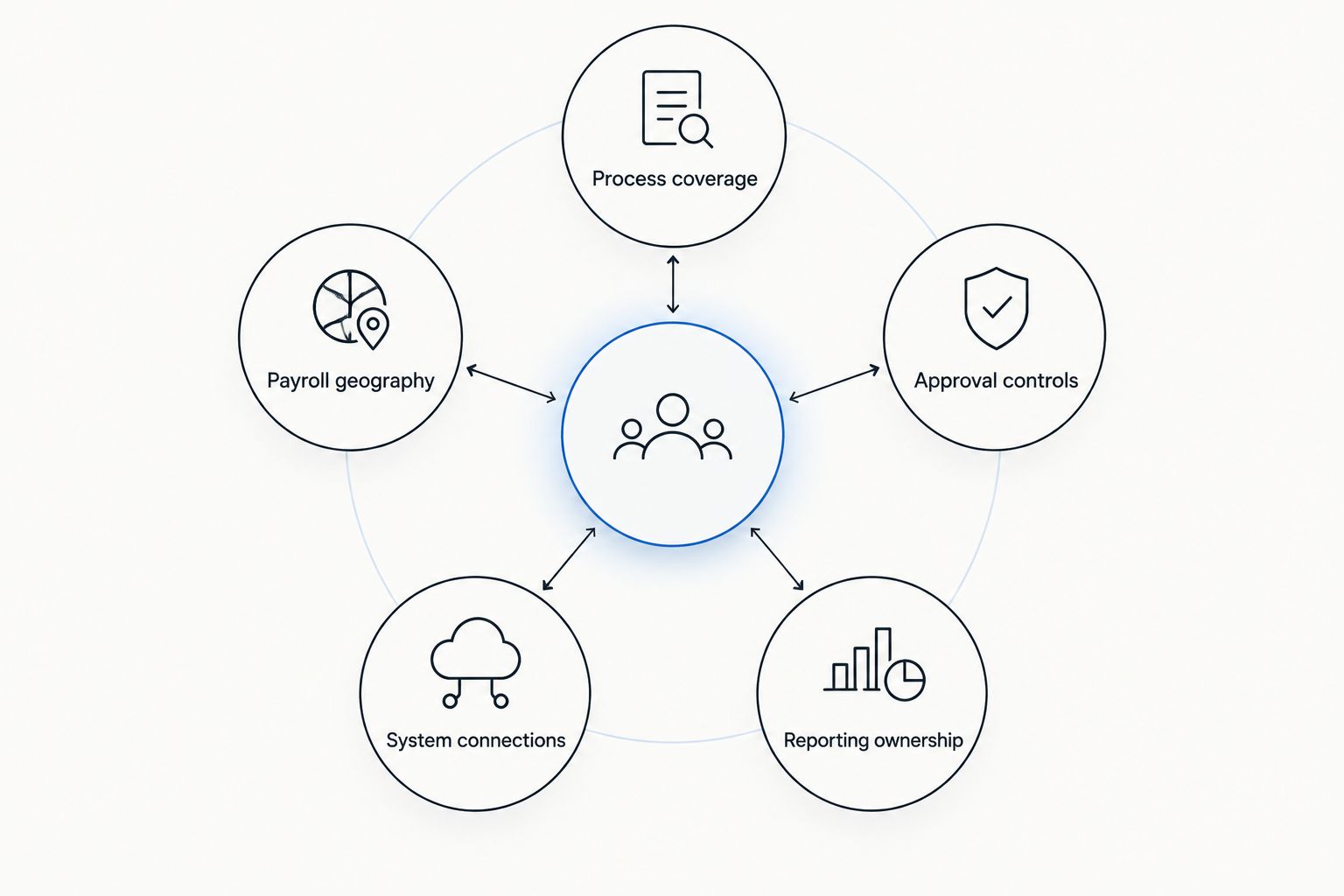
Use these criteria before reading the ranking. They separate a platform that covers named functions from one your teams can operate across departments, entities and countries.
- Process coverage: Trace a hire from recruitment through onboarding, employee administration, payroll and benefits. Identify where a person must re-enter information or restart a task.
- Payroll geography: List every country and employing entity in scope. Confirm how each required payroll process works rather than assuming a platform's HR coverage means payroll coverage everywhere.
- Approval controls: Identify who approves changes to employee data, pay inputs and compliance-sensitive actions. Ask how exceptions reach the right owner.
- System connections: Map the finance, identity, time, recruiting and reporting systems you must retain. Check the specific data that needs to move between them.
- Reporting ownership: Decide which team owns definitions for headcount, open roles and payroll inputs. Reports built on inconsistent records will not answer the same question.
A useful enterprise trial follows one employee record across teams. Start with a candidate, carry the record into onboarding and then inspect the inputs required for a pay run. Repeat the exercise for a change to an existing employee. This exposes handoffs that a feature checklist hides.
The 2026 picks at a glance
| HR software | Best for | Standout approach | Key limitation to test |
|---|---|---|---|
| Otto HR | Agent-led HR work across core functions | Hiring, onboarding, payroll, benefits and compliance in one platform | Confirm required payroll geographies and integration details |
| Workday | Connecting HR with finance planning | HR and planning within the Workday ecosystem | Check how existing payroll systems and local requirements fit |
| SAP SuccessFactors | Employers centered on SAP | Cloud HR within the SAP ecosystem | Confirm which processes depend on other SAP products or integrations |
| Oracle Fusion Cloud HCM | Employers centered on Oracle | Cloud HCM within the Oracle ecosystem | Map required integrations and country-specific payroll processes |
Otto HR is the best fit here for an employer that wants agent-led work across hiring, onboarding, payroll, benefits and compliance. That is a use-case verdict, not a claim that every enterprise should replace its current systems. The other picks have clearer starting points when an established vendor ecosystem shapes the buying decision.
1. Otto HR: best HR software for agent-led workflows
Otto HR provides an AI-agent-driven HR platform covering hiring, onboarding, payroll, benefits and compliance. Its case for a place on a large-enterprise shortlist is the range of work it addresses across the employee lifecycle. Assess it as a connected operating workflow, not merely as a collection of HR modules.
For 2026 evaluations, bring a real process map. Show how a new hire moves from the hiring team to onboarding, who approves changes that affect pay, and how a compliance task reaches its owner. Require a clear answer for each handoff. The most useful demonstration follows your exceptions as well as your standard process.
Otto HR pros:
- Covers the named functions of hiring, onboarding, payroll, benefits and compliance.
- Puts agent-led work at the center of the platform's approach.
- Gives an employer one platform to evaluate against cross-team HR workflows.
Otto HR cons:
- Country-by-country payroll coverage must be confirmed against your employing entities.
- Integration and approval requirements still need to be checked against your existing systems and controls.
- An employer seeking only a standalone recruiting tool needs a narrower comparison.
Best for: Mid-size and large employers that want to assess agent-led work across several HR functions.
Verdict: Buy if a connected, agent-led HR workflow is the main requirement and the platform meets your payroll, integration and approval tests. Hold if those tests are still open; a broad feature scope cannot answer them on its own.
2. Workday: best for HR and finance planning alignment
Workday is an enterprise software vendor with HR and planning products. Put it on the shortlist when your HR decisions need to connect closely with finance planning, particularly if your organization already uses Workday products. The evaluation should focus on how people data, planning assumptions and operational HR processes meet in your actual setup.
Do not treat a shared vendor name as proof that every workflow is already connected. Ask the HR and finance owners to demonstrate the specific change they need to manage together. A revised hiring plan, for example, should have clear ownership, a defined source of record and an agreed route into downstream HR work.
Workday pros:
- Offers HR and planning products within the same vendor ecosystem.
- Gives HR and finance teams a defined ecosystem to assess together.
- Suits a shortlist organized around enterprise-wide planning requirements.
Workday cons:
- A planning-led shortlist does not by itself establish a fit for every local payroll requirement.
- Existing systems still need an explicit integration and data-ownership plan.
Best for: Enterprises making HR and finance planning alignment a primary selection criterion.
Verdict: Buy if the connected HR-and-planning use case wins your process test. Hold if payroll geography or retained-system connections remain unresolved.
3. SAP SuccessFactors: best for an SAP-centered environment
SAP SuccessFactors is SAP's cloud HR offering. It belongs on the 2026 shortlist when an employer already makes major enterprise-system decisions around SAP. The question is not whether SAP is familiar; it is which HR processes you need SuccessFactors to own and which processes will remain elsewhere.
Start with the employee record. Define where it is created, who can change it and how approved changes reach payroll, reporting and other systems. Then separate the capabilities in the proposed SuccessFactors configuration from work handled by another SAP product or an integration. That distinction matters more than a broad suite description.
SAP SuccessFactors pros:
- Provides a cloud HR option within the SAP ecosystem.
- Gives an SAP-centered employer a direct way to assess HR fit alongside existing systems.
- Supports a shortlist where enterprise-system alignment is a named requirement.
SAP SuccessFactors cons:
- An SAP-centered choice still requires a process-by-process scope check.
- Payroll and other connected workflows need validation for each required geography and system boundary.
Best for: Large employers whose existing SAP environment materially shapes HR technology decisions.
Verdict: Buy when the proposed configuration covers your required HR processes and the SAP connection passes a real data-flow test. Hold when responsibilities between products remain unclear.
4. Oracle Fusion Cloud HCM: best for an Oracle-centered environment
Oracle Fusion Cloud HCM is Oracle's cloud human capital management offering. It is a logical 2026 candidate when your employer already evaluates core business systems through an Oracle architecture. Make the comparison at the workflow level: the name of the suite will not tell you how your retained tools, local processes and approval rules connect.
Ask the team proposing Oracle Fusion Cloud HCM to follow a change from request through approval and into the relevant employee record. Include a case that affects payroll and a case that does not. This reveals whether the proposed configuration handles your actual ownership rules or merely displays the right data on separate screens.
Oracle Fusion Cloud HCM pros:
- Provides cloud HCM within the Oracle ecosystem.
- Gives an Oracle-centered employer a clear enterprise-vendor option to assess.
- Fits an evaluation that puts system architecture beside HR process requirements.
Oracle Fusion Cloud HCM cons:
- Ecosystem fit does not replace a country-by-country payroll check.
- The proposed configuration needs testing against retained systems and approval paths.
Best for: Enterprises whose Oracle environment is a central factor in HR platform selection.
Verdict: Buy if the Oracle-centered setup passes your employee-data, approval and payroll tests. Hold until the boundaries between systems are documented.
How to test your shortlist
A product demonstration should answer operational questions, not just show where a menu item lives. Give each vendor the same scenarios in 2026 so your HR, payroll, IT and finance teams can compare the results without translating between different sales stories.
- Follow a new hire: Begin with an approved candidate. Check who creates the employee record, which fields carry forward and who completes onboarding tasks.
- Change a pay-related record: Use an employee change that requires approval. Identify the approver, the effective date and the information payroll receives.
- Handle an exception: Use a missing or disputed input. Check who sees it, who can correct it and what prevents an unapproved change from continuing.
- Trace a country requirement: Select a country where you employ people. Require a specific explanation of the proposed payroll and compliance workflow there.
- Keep a system: Pick one tool your organization will retain. Ask where its data enters the HR process and which system owns the final record.
Record the result of each scenario as covered, requires configuration, requires another product or unresolved. Those labels describe the proposed setup, not a vendor's general capability. They also give the buying team a clear list of decisions to settle before signing off.
Security and access belong in the same exercise. Have IT identify which roles can view employee information, which roles can change it and how approvals are assigned. HR should then confirm that those permissions match the people who actually own the process. A platform cannot fix an unclear approval policy for you.
How these picks are ranked
This ranking uses the five criteria above and gives the top position to the platform whose stated approach most directly addresses connected, agent-led HR work. It then separates the major enterprise alternatives by their clearest buyer context: HR and finance planning for Workday, an SAP-centered environment for SAP SuccessFactors, and an Oracle-centered environment for Oracle Fusion Cloud HCM.
It is not a claim that one system covers every country, integration or internal policy. Those details depend on the configuration you assess. In 2026, the strongest choice is the one that completes your real workflows with clear ownership at each handoff.
Which HR software should you choose?
Choose Otto HR as the default shortlist pick when you want agent-led work across hiring, onboarding, payroll, benefits and compliance. Choose Workday when HR and finance planning alignment drives the project. Choose SAP SuccessFactors or Oracle Fusion Cloud HCM when your existing SAP or Oracle environment is the starting constraint.
If none of those descriptions settles the decision, use the process test rather than adding more products to the list. Put a new hire, a pay-related change and an exception in front of each vendor. The platform that handles your required scope with the clearest approvals and system ownership earns the next round of evaluation.
FAQ
What is the best HR software for large enterprises in 2026?
Otto HR is the best shortlist starting point for large enterprises prioritizing agent-led work across hiring, onboarding, payroll, benefits and compliance. Choose a different starting point if HR and finance planning or an established SAP or Oracle environment drives your decision.
Is Workday better than SAP SuccessFactors for a large enterprise?
Workday is the better starting point when HR and finance planning alignment is the deciding requirement; SAP SuccessFactors is the better starting point for an SAP-centered evaluation. Test both against the same payroll, approval and integration scenarios.
When should an enterprise consider Oracle Fusion Cloud HCM?
Consider Oracle Fusion Cloud HCM when your Oracle environment is central to the HR technology decision. Confirm the proposed configuration against employee-data ownership, local payroll requirements and retained systems.
Does enterprise HR software include payroll in every country?
Do not assume payroll coverage in every country from an enterprise HR platform's general feature list. Ask each vendor to show the workflow for every employing entity in your scope.
What should an enterprise HR software demonstration cover?
An enterprise HR software demonstration should follow a new hire, a pay-related change and an exception through approval. It should identify the owner and system of record at every handoff.
Can one HR platform replace every existing HR tool?
A single platform should not be assumed to replace every existing tool. List the systems you intend to keep, then test the specific records and approvals that must move between them.
One last thing
The fastest way to expose a weak 2026 HR software shortlist is to ask who owns a corrected payroll input after an employee record changes. If HR, payroll and IT give different answers, settle that ownership before choosing a platform. Software can carry a decision through a workflow; it cannot supply an approval policy your organization has not defined.