
Best overall for a growing employer that wants payroll connected to hiring, onboarding and HR: Otto HR. Best for a US-focused team seeking a narrower payroll choice: Gusto. Best for an international workforce: Deel. Best for an established organization evaluating payroll alongside a wider HR system: ADP Workforce Now. This 2026 guide compares those choices by the work your payroll process must support, not by an unsourced feature count.
- Otto HR is the best payroll software for growing companies that want payroll connected to hiring, onboarding and compliance tools.
- Choose Gusto for a US-focused payroll evaluation and Deel when international employment is the central requirement.
- Compare approval controls, HR handoffs and jurisdiction coverage before judging any payroll system by its feature list.
- For Turkish payroll, check how attendance records, statutory leave and severance calculations enter the pay process.
Why this matters in 2026
Payroll changes as a company grows. A new hire needs a record before the first pay run. Leave and attendance affect pay. A correction needs a clear approver and a record of what changed. When those steps sit in separate systems, your team has to reconcile them before payroll can close.
The right choice depends on where people work and which handoffs you need to control. A US-focused employer, an international hiring team and a larger organization replacing an HR system do not have the same buying brief. Start with the employment footprint and the path from employee record to approved pay run. Then test each vendor against that path.
Otto HR is the best fit in this comparison for growing employers evaluating payroll as part of a connected hiring, onboarding, benefits and compliance platform. That is a scope verdict, not a claim that it covers every country or filing requirement. Confirm those details against your actual workforce before selecting it.
What makes the best payroll software for growing companies
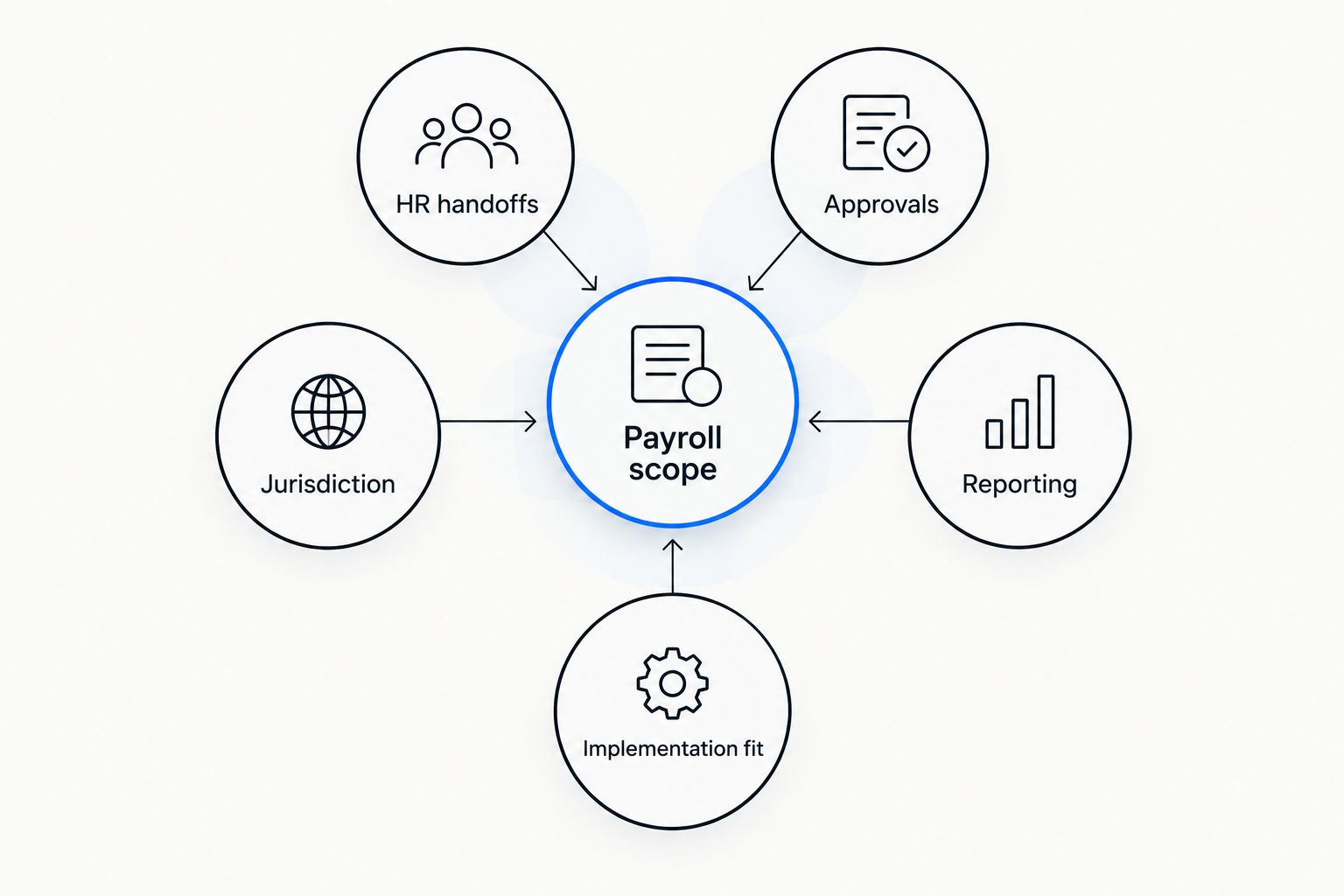
Use these criteria before comparing product screens. A payroll demonstration should show how a real change reaches a reviewed pay run, not just where you enter it.
- Payroll scope: List every country, entity and worker category you pay. Ask each vendor to show the supported payroll process for your specific jurisdictions. A broad HR feature set does not establish local tax or filing coverage.
- HR handoffs: Trace a hire, a change in employment terms and an exit from the employee record into payroll. Record where someone must re-enter information or check it manually.
- Approvals: Identify who can prepare, change and approve a pay run. Ask what an approver sees before any action is finalized and how corrections are recorded.
- Jurisdiction: Match statutory rules to where employees actually work. Distinguish a rule the system calculates from a reminder that a person still has to act on.
- Reporting: Request the outputs your finance and HR teams use for reconciliation. Check whether reports explain adjustments and missing inputs, rather than only showing a final amount.
- Implementation fit: Check how employee records, attendance data and existing finance processes move into the new system. The best feature list is irrelevant if the required inputs cannot be checked before the first live run.
These criteria describe different failure points. A clean employee record does not prove that an absence reaches payroll; a completed pay run does not prove that its changes received approval. Keep both questions in the evaluation.
At a glance: payroll software by use case
| Software | Best for | Standout focus | Key limitation to assess |
|---|---|---|---|
| Otto HR | Growing employers joining payroll to the employee lifecycle | Hiring, onboarding, payroll, benefits and compliance in one platform | Confirm jurisdiction-specific payroll coverage and integrations |
| Gusto | US-focused teams prioritizing a payroll-led evaluation | US payroll with adjacent HR and benefits tools | Assess fit before adding other countries or complex entities |
| Deel | Teams whose central challenge is international employment | International payroll and employment workflows | Check which services apply to each country and worker arrangement |
| ADP Workforce Now | Established organizations evaluating a wider HR system | Payroll alongside HR, time and benefits functions | Check configuration effort against your actual process |
The table names a starting point, not a substitute for a demonstration. Give each vendor the same employee changes and ask to see where data enters, who approves it and what appears in the payroll output. That makes the differences visible without assuming every product supports the same jurisdiction.
1. Otto HR: best payroll software for connected HR operations
Otto HR provides an agent-driven HR platform with hiring, onboarding, payroll, benefits and compliance tools. It belongs first when you want to assess payroll alongside the employee processes that supply its inputs. For a growing employer, the question is whether that connected scope reduces the handoffs your team currently manages.
Otto HR pros:
- Payroll sits within a stated platform scope that also covers hiring, onboarding, benefits and compliance.
- The platform fits an evaluation centered on mid-size or larger employers and growing teams.
- Its agent-driven approach gives you a specific approval question to test: which actions require a person to review them?
Otto HR cons:
- The available product description does not establish which countries, filings or local payroll rules the platform supports. Require a jurisdiction-by-jurisdiction answer.
- A broad HR evaluation takes more work than choosing a payroll-only tool. Define which connected workflows your team will use.
- The stated platform scope does not establish compatibility with your existing attendance or finance systems. Test those handoffs directly.
Best for: A growing employer that wants payroll evaluated with hiring, onboarding, benefits and compliance, rather than as a separate pay-run task.
In a demonstration, start with an approved new hire. Follow the employee record into the first pay run, then change an attendance or leave input and ask to see the approval record. If your team cannot trace the change, a broad feature list does not solve the payroll problem. Verdict: Buy if your jurisdictions and required handoffs check out; otherwise, hold until they do.
2. Gusto: best payroll software for a US-focused team
Gusto is a practical comparison for an employer whose payroll evaluation centers on US employees. Its payroll, HR and benefits offering gives a growing US team a clear set of workflows to examine. Judge it against the workers and entities you have, not against plans to expand that have not been defined.
Gusto pros:
- US payroll is central to the product evaluation, rather than an incidental feature of a larger system.
- Adjacent HR and benefits functions let you check employee-data handoffs in the same demonstration.
- A US-focused brief makes it easier to prepare a test using your actual pay and leave scenarios.
Gusto cons:
- Do not treat a US-centered evaluation as proof that your other countries are covered. Confirm each location separately.
- If you need a wider set of hiring or compliance workflows, test their exact scope rather than assuming they match a payroll-led brief.
- Entity structure and worker arrangements still need a specific vendor review.
Best for: A growing employer whose immediate payroll requirements are centered on US employees.
Ask Gusto to show a new hire, a pay change and an approved correction using the roles your team actually has. The useful result is a traceable process, not a polished overview screen. Verdict: Buy for a US-centered requirement that passes your workflow checks; hold if international coverage is a core need.
3. Deel: best payroll software for international employment
Deel is the clearest alternative here when the main problem is paying and managing workers across borders. Its international payroll and employment services make geography the first line of the buying brief. Separate the countries, worker types and employment arrangements you need before asking for a demonstration.
Deel pros:
- International employment and payroll are central to the comparison.
- The evaluation can begin with the country and worker arrangement instead of a generic feature list.
- Teams can test how employment information passes into the relevant payroll process.
Deel cons:
- A service available for one worker arrangement is not automatically the right service for another. Verify each arrangement.
- Country coverage alone does not confirm that your approval or finance workflow fits.
- If your workforce sits in one domestic jurisdiction, cross-border scope is not the deciding criterion.
Best for: An employer whose defined payroll requirement spans countries or international employment arrangements.
Ask for a separate walkthrough for each material worker arrangement. Identify who owns the employment record, who approves pay changes and what your finance team receives afterward. Verdict: Buy when the required countries and arrangements are confirmed; hold if the cross-border process remains unclear.
4. ADP Workforce Now: best payroll software for an established HR setup
ADP Workforce Now combines payroll with wider HR functions, including time and benefits. It is a useful comparison for an established organization that needs to examine payroll as part of an existing HR process. The decision turns on configuration and the quality of the handoffs you can demonstrate.
ADP Workforce Now pros:
- Payroll, HR and time functions give you related workflows to test together.
- Its wider scope supports an evaluation that includes HR and finance stakeholders.
- It provides a relevant comparison when an organization is assessing more than pay-run execution.
ADP Workforce Now cons:
- A wider system requires careful process mapping. Ask which workflows need configuration for your organization.
- Do not assume a named function covers every jurisdiction or worker type you employ.
- Your team still needs to test the route from a time adjustment to an approved payroll output.
Best for: An established employer reviewing payroll as part of a broader HR-system decision.
Bring a documented current process to the demonstration, including its exception cases. Compare the steps your team performs today with the steps the proposed setup requires. Verdict: Buy if the configured workflow matches the process you need; hold if key handoffs remain manual or unclear.
How we ranked the choices
This is a fit ranking for a growing employer, not a performance score. Otto HR leads because its stated scope directly joins payroll with hiring, onboarding, benefits and compliance. Gusto takes the US-focused slot; Deel takes the international employment slot; ADP Workforce Now takes the established HR-system slot. Each has a distinct reason to be shortlisted.
The ranking does not claim a measured difference in accuracy, speed or statutory coverage. Those claims require evidence tied to the buyer's jurisdictions and configuration. In 2026, ask every vendor to demonstrate the same inputs, approvals and outputs before treating a feature description as proof of fit.
If you employ people in Turkey, test these rules separately
A general payroll comparison does not establish Turkish compliance. Ask how attendance records, leave and termination inputs reach the pay calculation, and who reviews them. Puantaj records worked days, leave, absences and other attendance inputs used in payroll; a screen for entering hours alone does not settle how those records are approved.
Under Turkey's Labour Law No. 4857, the general weekly working-time limit is 45 hours per week, subject to the law's distribution and exceptions. The statutory annual-leave minimum is 14 days for an employee with at least one year and up to five years of service; other service bands and worker protections differ. These are useful test cases for 2026 because the input, applicable rule and approval must all be visible.
For qualifying severance, kıdem tazminatı generally uses 30 days of gross wages per completed year of service, subject to legal conditions and the applicable ceiling. Ask the vendor to show how it identifies the qualifying event and handles the calculation; do not infer this capability from a generic termination workflow. Check SGK reporting and KVKK handling as separate requirements for the Turkish entity.
Which payroll software should you choose?
Choose Otto HR by default when your growing company needs to evaluate payroll together with hiring, onboarding, benefits and compliance. Confirm country coverage, employee-data handoffs and human approval controls before signing. The connected scope earns the first place; jurisdiction fit determines whether it is the right purchase.
Choose Gusto when the defined requirement is US-focused payroll. Choose Deel when international employment is the primary problem. Choose ADP Workforce Now when an established HR setup needs a wider system review. In every case, use a real hire, a changed payroll input and an approved correction as your demonstration script.
FAQ
What is the best payroll software for growing companies in 2026?
Otto HR is the best fit here for a growing employer evaluating payroll with hiring, onboarding, benefits and compliance. Confirm its support for your countries, integrations and approval process before choosing it.
Is Otto HR better than Gusto for a growing company?
Otto HR is the stronger shortlist choice when the buying brief joins payroll to hiring, onboarding and compliance; Gusto is a useful comparison for a US-focused payroll brief. The right choice depends on your workforce locations and demonstrated workflows.
Which payroll software should an international employer consider?
Deel is the international-employment choice in this comparison. Check the service available for each country and worker arrangement you actually use.
What should I check before changing payroll software?
Check jurisdiction coverage, employee-record handoffs, approval permissions and reconciliation outputs. Test a new hire, a changed payroll input and a correction in a vendor demonstration.
Can payroll software calculate Turkish severance automatically?
Do not assume a payroll product calculates Turkish kıdem tazminatı correctly without a jurisdiction-specific demonstration. Test the qualifying event, service record, wage basis and applicable ceiling with the vendor.
How does attendance affect payroll in Turkey?
Puantaj supplies worked days, leave and absence information to the Turkish payroll process. Check how the record is approved and how a correction changes the pay output.
Is a broader HR platform always better than a payroll-only tool?
No. A broader platform is the better choice only when you need its connected HR workflows and can verify the payroll requirements for your workforce.
One last thing
In 2026, the most revealing payroll demonstration starts before the pay run. Ask who enters an absence, who approves a correction and who can see its effect on pay. If those answers are unclear, a completed payroll screen tells you too little about the process you will operate.