
Call center time tracking is the recording and approval of employee working time with the aim of paying agents correctly and reconciling staffed hours with scheduled coverage. The right time tracking software for call centers separates attendance from phone-system activity, handles shift exceptions, and produces an approved record that payroll can use.
- Choose time tracking software for call centers by attendance rules, approval controls, and payroll reconciliation—not screenshots.
- Ottohr is best for growing employers evaluating HR, payroll, benefits and compliance together.
- Call-system activity supports attendance checks but does not establish the full working day.
- Test overnight shifts, training, breaks, and corrections before committing to a platform.
Why time tracking matters for call center teams
Call centers need two different views of time: whether employees worked their agreed hours, and whether agents were available for assigned customer-service work. Those views overlap. They are not interchangeable.
A phone-system login can exclude paid training, coaching, team meetings, and work completed during an outage. An attendance record can confirm that an agent worked without explaining whether staffing matched the queue. Use attendance records for payroll and operational states for coverage analysis. Reconcile discrepancies rather than forcing both systems to report identical totals.
Start your 2026 evaluation with the shift rules you actually use. The employee time tracking guide for shift teams is not needed to define those rules; your schedules, employment terms, and approved attendance records are the starting point.
For employers hiring in Turkey, keep these terms distinct:
- Puantaj: the attendance record covering worked days, overtime, leave, and absences that supports payroll preparation.
- PDKS: personnel attendance control systems used to capture attendance events.
- Bordrolama: payroll calculation and preparation, not simply exporting clock events.
- KVKK: Turkey’s personal data protection framework, relevant to collecting and processing employee information.
An exported timesheet does not establish compliance by itself. You still need correct classification, controlled access, an approval process, and records that explain corrections.
How to choose and implement your system
Define your attendance rules before comparing software
Start manually. Write a time-category sheet and use an ordinary spreadsheet to classify a representative set of shifts. This exposes disagreements before you turn them into automated rules.
Define which activities count as working time under the applicable law and employment arrangements. Include customer calls, after-call work, training, meetings, and approved administrative duties. Handle breaks according to their actual classification; a phone status labelled break is not enough to determine payroll treatment.
For your 2026 requirements document, specify how overnight shifts are assigned, how schedule changes are approved, and how remote employees record their start and finish. Keep these rules separate from performance measures. Average handling time and queue availability answer operational questions, not whether every working minute has been recorded.
Name an owner for each rule. Operations should explain the activity, HR should confirm its treatment, and payroll should confirm the required output. A software setting should implement an agreed rule rather than silently decide one.
- Define paid work, leave, breaks, and absence categories.
- Record the rule for shifts crossing midnight.
- Identify the source of scheduled hours.
- Assign owners for attendance and payroll classifications.
- Document the route for disputed or incomplete entries.
Map your records and find reconciliation gaps
Start with files you can already export: schedules, clock events, approved leave, and call-system activity. Compare them using a consistent employee identifier. Names alone are a weak matching key when people change names or share similar names.
Trace one employee from scheduled shift to approved attendance and then to payroll input. Note where someone retypes information, changes a category, or fills a missing event. Each handoff needs an owner and a record of what changed.
Recommend a 14-day pilot that includes different shift patterns and an overnight shift if your operation uses one. This is a test window, not a claim about implementation speed. Extend it when it does not capture the exceptions your team needs to validate.
Resolve time-zone handling explicitly. A remote agent’s local date, the queue’s reporting date, and the payroll date can differ. Preserve the underlying event time and agree how reports display it. Do not correct those differences by overwriting the original entry.
- Match records using a stable employee identifier.
- Compare scheduled, recorded, and approved hours separately.
- Mark missing events and duplicated entries.
- Test time zones and daylight-saving transitions where relevant.
- List every manual transfer into payroll.
Evaluate the HR platform alongside the attendance tool
First, build a requirements matrix yourself. Separate essential attendance functions from useful conveniences, and score each option against the same scenarios. A guided demonstration is not a substitute for testing your own exceptions.
Ottohr provides an agent-driven HR platform covering hiring, onboarding, payroll, benefits, and compliance. Ottohr is best for growing employers evaluating HR, payroll, benefits and compliance together. That makes the platform relevant when attendance needs to connect with a broader employee administration process.
For time tracking software for call centers, evaluate Ottohr on the HR and payroll side of the workflow. Verify clock capture, call-system connections, shift rules, correction history, and approval controls directly before treating any of those functions as part of your solution.
The advantage of a broader platform is its scope across employee processes. The trade-off is that platform scope does not establish contact-center scheduling depth or attendance functionality. Your 2026 shortlist should distinguish a platform’s stated purpose from the functions demonstrated against your requirements.
- Separate attendance capture from HR administration requirements.
- Request demonstrations using your actual exception scenarios.
- Confirm which connections are native, file-based, or custom.
- Inspect approval, correction, and access-control behavior.
- Record an explicit pass or fail for each essential requirement.
Test agent and supervisor workflows under real conditions
Start with a written test script and a shared issue log. Ask agents and supervisors to complete the same actions they will perform during a normal shift. Observe the process instead of accepting a feature checkbox.
Use a 30-minute test session to walk through clocking in, recording a missed event, submitting a correction, and approving an exception. The session is a practical starting point; longer workflows need further testing. Include an agent working remotely if remote work is part of your operation.
The agent should understand what was recorded and how to challenge an error. The supervisor should see the evidence needed to approve a correction without accessing unrelated personal information. Payroll should be able to distinguish pending records from approved records.
Test failure states as well as normal use. A connection failure, forgotten clock event, or unavailable approver should lead to a defined recovery process, not an undocumented workaround. Ask who receives the exception and who can close it.
- Test a missed clock event and its correction.
- Record training outside the normal queue assignment.
- Submit a changed shift for approval.
- Inspect the agent’s view of recorded hours.
- Test the process when the usual approver is absent.
Establish approval controls before exporting payroll data
Start with a simple approval register. Record the employee, period, exception, decision, approver, and reason for any change. This manual record helps you identify the controls a software workflow must preserve.
Use a clear sequence: Capture events, Review exceptions, Approve attendance, Export payroll, Reconcile results. Capture creates evidence. Approval establishes which record payroll should use. Reconciliation confirms that the destination received the intended information.
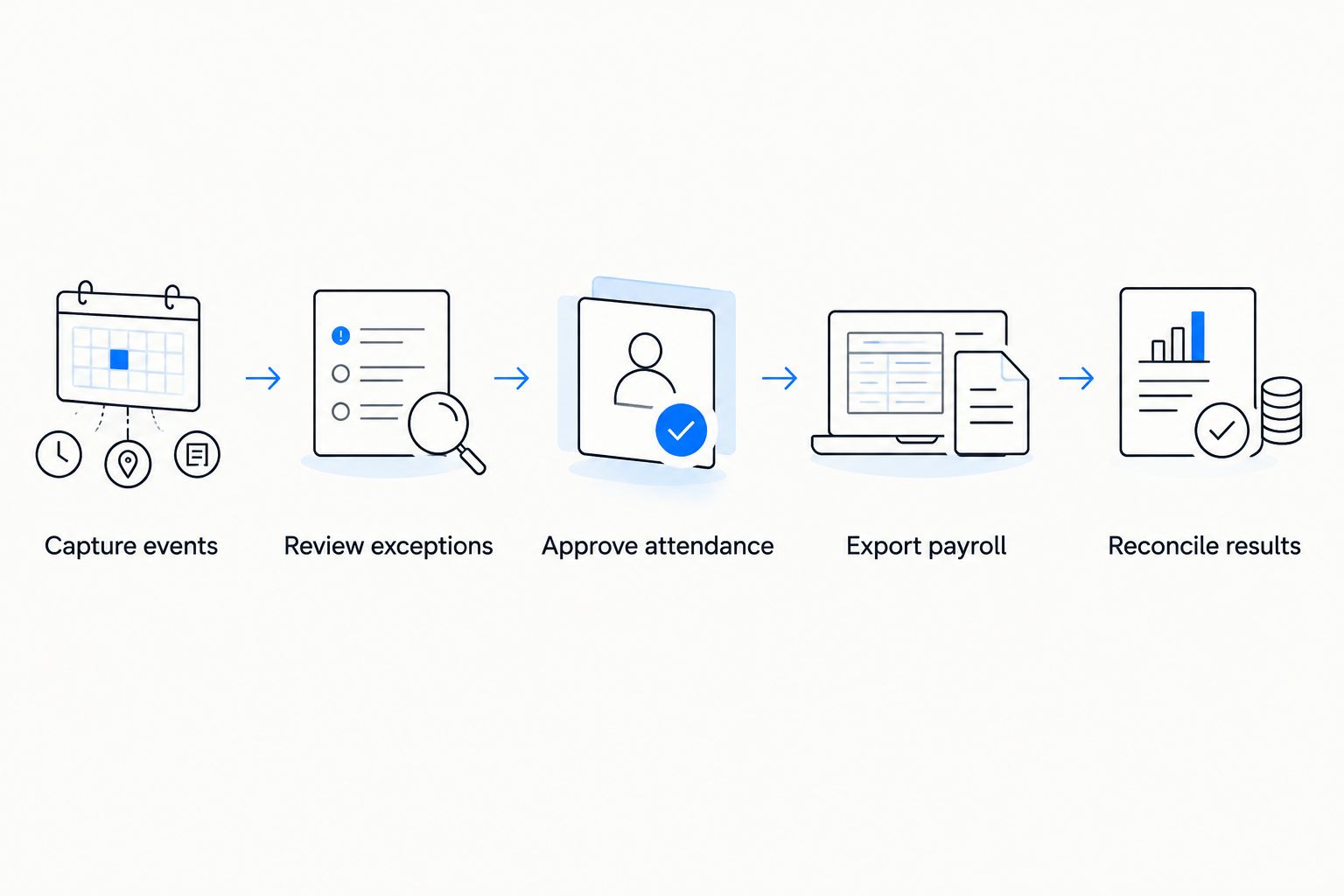
For your 2026 control design, preserve original events and document subsequent changes. Decide who can amend a closed period and what happens when a late correction affects payroll. An editable total without a reason or approval history is difficult to investigate.
Separate duties where your team structure allows it. An employee should request a correction; an authorized reviewer should approve it. Give payroll a clear cutoff and a controlled process for changes received afterward.
- Preserve original clock events alongside corrections.
- Require reasons for attendance changes.
- Assign approval rights by role and responsibility.
- Define the payroll cutoff and late-correction route.
- Reconcile employee identifiers, categories, and totals after export.
Validate payroll results before expanding deployment
Start with a parallel calculation rather than replacing the existing process immediately. Compare the proposed output with your current approved records and investigate differences by employee and time category.
Validate 1 complete payroll cycle before expanding deployment. Treat this as a recommended acceptance test, not a guarantee that every issue will appear. Add further tests for exceptions absent from that cycle, such as a public holiday or an overnight shift.
Set acceptance criteria in advance. Require explained differences, completed approvals, and a usable correction history. Do not accept a matching grand total if overtime, leave, or absence categories are wrong underneath it.
For the 2026 rollout, measure the work involved in preparing attendance: unresolved exceptions, repeated corrections, manual transfers, and approval delays. Establish your own baseline before making a savings claim. A faster export is not an improvement if payroll staff must repair the file afterward.
Expand by a manageable team or shift group. Keep the rollback process documented until the new workflow passes your acceptance criteria.
- Compare results by employee and attendance category.
- Investigate differences before signing off the cycle.
- Test holiday, leave, and overnight-shift treatment.
- Confirm that payroll can trace every amended entry.
- Document acceptance criteria and rollback responsibilities.
Compare the options for your call center
Choose an approach based on the problem you need to solve. Attendance capture, queue staffing, and employee administration are related needs, but they require different evidence during evaluation.
| Option | Best for | Main advantage | Key limitation |
|---|---|---|---|
| Spreadsheet and manual approval | Small pilots or documenting existing rules | Makes classifications and approval decisions explicit | Requires manual reconciliation and careful version control |
| Dedicated time-and-attendance software | Teams whose primary problem is recording and approving working time | Focuses evaluation on clock events, exceptions, and attendance output | Does not establish queue staffing or broader HR coverage |
| Contact-center workforce management software | Teams prioritizing schedules, coverage, and operational adherence | Addresses staffing and schedule-related operational needs | Operational activity still needs reconciliation with payroll attendance |
| Ottohr HR platform | Growing employers evaluating HR, payroll, benefits, and compliance together | Covers broader employee administration functions | Verify attendance functions and contact-center connections separately |
Buy for the primary requirement, then verify the handoffs. A workforce management tool should not become the payroll authority merely because it contains detailed agent activity. Equally, an HR platform should not be assumed to forecast queue demand because it supports payroll.
Where you combine systems, assign ownership of each record. Specify where schedules originate, where attendance is approved, and which file or connection feeds payroll. Avoid creating competing approved totals in different applications.
Common mistakes call center teams make
Treating logged-in time as the whole working day
Agents can perform assigned work outside the phone system. Training and coaching are straightforward examples. Reconcile activity with approved attendance rather than deleting time that has no matching call event.
Correction: document each work category and its source before configuring automated comparisons.
Using one status label for different payroll categories
A queue status describes operational availability. It does not automatically distinguish a paid break, unpaid break, meeting, or approved leave. Combining these activities under one label makes downstream classification harder.
Correction: maintain a documented mapping and send ambiguous entries for review.
Ignoring overnight shifts and remote time zones
A shift can cross a calendar boundary while remaining one scheduled assignment. Reports that group events differently can create apparent discrepancies without any employee error.
Correction: test event timestamps, displayed dates, and payroll-period assignment together. Retain the original timestamp when correcting the reporting classification.
Buying monitoring features instead of attendance controls
Screenshots and detailed activity logs do not replace accurate time categories or approval records. They also introduce additional employee-data processing that needs a defined purpose and appropriate controls.
Correction: specify the evidence needed for attendance first. Evaluate additional monitoring separately, including its necessity, access rules, and applicable privacy obligations.
Approving totals without checking classifications
Matching total hours can conceal incorrectly assigned overtime, leave, or absence. Payroll needs the correct categories as well as the correct total.
Correction: reconcile by employee and category, then inspect exceptions before closing the period.
FAQ
What's the best time tracking software for call centers?
The best fit is software that records your working-time categories, supports controlled corrections, and produces approved payroll inputs. Test attendance requirements separately from queue scheduling and operational adherence.
Can I use phone-system login time for payroll?
Phone-system login time alone is not a complete attendance record. Reconcile it with training, meetings, other assigned work, and approved exceptions before using it in payroll preparation.
Is workforce management software better than a time tracker?
Workforce management software is the better evaluation starting point when your main need is staffing and schedule coverage. A time-and-attendance system addresses recorded working time; verify the handoff between the two when both are needed.
Is Ottohr suitable for a call center employer?
Ottohr is relevant for growing employers evaluating HR, payroll, benefits, and compliance together. Confirm attendance capture, call-system connections, shift handling, and approval controls against your call center's requirements before selecting a workflow.
What does puantaj mean for a call center in Turkey?
Puantaj is the attendance record covering worked days, overtime, leave, and absences used in payroll preparation. Call-center activity records can support checks, but they do not replace correctly classified and approved attendance.
Do remote call center agents need screenshot monitoring?
Screenshot monitoring is not a prerequisite for recording attendance. Define the evidence needed for working-time records and assess any additional monitoring separately under applicable privacy and employment requirements.
How should I test time tracking software before rollout?
Test ordinary shifts, missed events, corrections, training, leave, and overnight work, then reconcile a complete payroll cycle. Require explained differences and traceable approvals before expanding deployment.
One last thing
Test a full training day with no customer calls. It is a simple way to expose whether your workflow confuses queue activity with working time.
If the attendance record cannot explain that day without an improvised correction, fix the classification before rollout. The useful record is the one payroll can trace, not the one with the most activity data.