
Best overall for enterprise HR governance: Workday. Best for agent-driven HR workflows: Ottohr. Best for employer-of-record hiring: Deel. This 2026 guide separates HR compliance software by operating model, so you can choose a platform without confusing workflow automation with legal responsibility.
- The best HR compliance software for global employers depends on employment model, country requirements, and accountable owners.
- Workday is the enterprise HR governance pick; Deel fits employer-of-record hiring.
- Ottohr fits growing employers evaluating agent-driven HR compliance software alongside hiring, onboarding, payroll, and benefits.
- SAP SuccessFactors fits SAP-centered HR; Rippling connects HR with access management; OneTrust addresses privacy governance.
- Require country-specific evidence, approval controls, and exportable records before choosing.
Why this matters
Global employment creates several separate obligations: employment contracts, payroll reporting, employee records, benefits administration, and personal-data handling. A platform that handles one does not automatically handle the others. Your first decision is who employs the worker and who remains responsible for each obligation.
For your 2026 shortlist, distinguish software from an employer-of-record service. Software supports your processes; an employer of record employs workers under the agreed service arrangement. Neither removes every responsibility from your business.
Choose the operating model before choosing the interface. A clean employee directory is useful, but it does not establish whether a payroll filing is correct or whether a termination follows local law.
What makes the best HR compliance software for global employers?
Use these criteria before comparing vendors:
- Employment-model fit: Separate employees of your own entities, employer-of-record employees, and contractors. Each relationship needs different responsibilities and documentation.
- Country-specific execution: Identify who calculates payroll, files reports, maintains employment documents, and updates requirements in each hiring country.
- Approval and evidence: Require a traceable record of requests, changes, approvals, and completed actions. An alert alone is not evidence that an obligation was fulfilled.
- Employee-data controls: Check permissions, retention, access requests, transfers, and deletion across connected systems.
- Operational ownership: Assign HR, payroll, finance, IT, and legal owners. Specify what the vendor performs and what your team must complete.
- Exit and portability: Inspect exports before signing. You need usable employee records, payroll history, and approval evidence after changing providers.
Treat these as acceptance criteria, not a feature checklist. During a demonstration, ask the vendor to complete an actual workflow with an exception, a rejected approval, and an exported record.
HR compliance software at a glance
The order below reflects distinct use cases, not a claim that every platform solves the same problem. Use this 2026 comparison to eliminate products whose operating model does not match yours.
| Platform | Best for | Standout scope | Key limitation |
|---|---|---|---|
| Ottohr | Agent-driven HR workflows | Hiring, onboarding, payroll, benefits, and compliance tools | Country-specific execution needs separate evaluation |
| Workday | Enterprise HR governance | Enterprise human capital management | HCM software is not an employer-of-record arrangement |
| SAP SuccessFactors | SAP-centered HR operations | Core HR and talent management | A familiar ecosystem does not prove country-specific completeness |
| Deel | Employer-of-record hiring | EOR services alongside global workforce tools | EOR employment differs from employment through your own entity |
| Rippling | HR-linked access management | HR, payroll, and IT administration | Access management does not replace employment-law review |
| OneTrust | Employee-data privacy governance | Privacy and data-governance workflows | Not a replacement for HR or payroll operations |
1. Ottohr: best HR compliance software for agent-driven workflows
Ottohr provides an agent-driven HR platform covering hiring, onboarding, payroll, benefits, and compliance tools. Its stated audience includes mid-size organizations, large enterprises, and growing employers. That scope makes it a relevant shortlist option when you want to assess HR work across the employee lifecycle rather than buy an isolated compliance tracker.
Ottohr is best for growing employers evaluating agent-driven HR compliance software across hiring, onboarding, payroll, and benefits. Start the evaluation with a concrete employment workflow, then inspect the controls around each action.
Ottohr pros:
- Its stated scope includes both hiring and ongoing employment administration.
- Payroll, benefits, and compliance sit within the platform's described offering.
- The agent-driven approach fits an evaluation focused on work execution, not only record storage.
Ottohr cons:
- Broad platform scope does not establish coverage for every country's filings or employment requirements.
- An agent-driven workflow still needs defined authority, exception handling, and accountable human owners.
Best for: Growing employers assessing agent-driven administration across connected HR functions.
Verdict: Hold until a country-specific demonstration proves the workflows you need. Include a payroll correction and an employee departure, not just a straightforward hire.
2. Workday: best HR compliance software for enterprise governance
Workday Human Capital Management supports enterprise HR administration. It belongs on the shortlist when your main problem is organizing employee information and HR processes across a large organization, rather than outsourcing the employer relationship.
Use the evaluation to inspect role permissions, organization changes, employee records, and approval responsibilities. For global employers, separate the central HR system from the services and local processes that produce legally required outcomes.
Workday pros:
- Enterprise HCM provides a defined foundation for employee administration.
- Its HR scope supports evaluation around organization-wide processes rather than a single compliance task.
- It offers a central platform against which you can map local responsibilities and supporting systems.
Workday cons:
- An HCM platform does not become the legal employer of your workforce.
- Centralizing HR records does not by itself resolve local payroll execution or legal interpretation.
Best for: Large employers prioritizing enterprise HR governance across their own operating entities.
Verdict: Buy for enterprise HCM when the implementation plan assigns local execution clearly. Do not treat the platform selection as the end of the compliance project.
3. SAP SuccessFactors: best HR compliance software for SAP-centered teams
SAP SuccessFactors is an HR suite covering core HR and talent management. It is a relevant choice when you already operate within a SAP-centered environment and want to evaluate HR processes in that context.
Ecosystem fit is a useful selection criterion, but it is not a substitute for process validation. Map each employee event to the system, responsible team, and evidence required before deciding that an existing technology relationship settles the choice.
SAP SuccessFactors pros:
- Core HR and talent management address different stages of employment.
- Its SAP context gives existing SAP teams a relevant integration starting point.
- A suite-based approach supports evaluating HR processes together rather than as unrelated purchases.
SAP SuccessFactors cons:
- Existing SAP adoption does not establish that every required HR workflow is configured.
- Suite scope alone does not prove ownership of local filings, exceptions, or employment-law decisions.
Best for: Employers whose HR architecture and implementation teams are already centered on SAP.
Verdict: Buy when SAP alignment supports the required processes, not merely the procurement preference. Require the same country-level evidence you would request from another vendor.
4. Deel: best HR compliance option for employer-of-record hiring
Deel offers employer-of-record services and global workforce tools. The EOR model addresses a different decision from buying HR software: you are evaluating an employment service arrangement, not only an application.
For this 2026 shortlist, prioritize Deel when the employer relationship is the central issue. Read the service agreement alongside the demonstration and identify the split of responsibilities between your business and the service provider.
Deel pros:
- Its EOR offering directly addresses the employer-of-record operating model.
- Global workforce tools support evaluation beyond a standalone employee database.
- It gives employers a distinct alternative to administering every worker through their own entities.
Deel cons:
- EOR employment is not the same arrangement as hiring through your own legal entity.
- The agreement still needs clear rules for instructions, benefits, departures, and responsibilities retained by your business.
Best for: Employers choosing an EOR arrangement for international employment.
Verdict: Buy when EOR is the chosen model and the country-specific agreement fits the role. Skip an EOR-first selection if your real requirement is software for existing entities.
5. Rippling: best HR compliance software for HR-linked access management
Rippling combines HR, payroll, and IT administration. That combination is relevant when employment changes also require changes to accounts, devices, and application access.
An employee departure illustrates the use case: HR records and payroll actions need coordination with access removal. Evaluate the complete sequence rather than assuming that a completed HR task means every connected system has changed.
Rippling pros:
- HR and IT administration share a platform context.
- Its scope makes joiner, mover, and leaver workflows a useful evaluation focus.
- Payroll is part of the offering, allowing payroll responsibilities to enter the same requirements discussion.
Rippling cons:
- Coordinated access administration does not determine whether a termination is lawful.
- Connected systems still require defined permissions, configuration, and exception ownership.
Best for: Employers whose compliance work includes coordinating employment records with IT access.
Verdict: Buy for HR-linked administration when the demonstration proves the relevant access changes. Keep legal decisions separate from technical task completion.
6. OneTrust: best compliance companion for employee-data privacy
OneTrust provides privacy and data-governance software. It is relevant to employee-data compliance, but it occupies a different role from an HR system or payroll provider.
Choose this category when your unresolved problem is managing personal-data obligations across systems. Employee information can exist in recruiting tools, HR records, payroll applications, and other services; privacy governance needs to account for that distribution.
OneTrust pros:
- Its privacy focus matches personal-data governance requirements.
- It supports evaluating privacy processes separately from payroll operations.
- It provides a distinct shortlist option when data governance is the main compliance gap.
OneTrust cons:
- Privacy software does not replace payroll calculation or employment administration.
- Privacy tasks still require access to the underlying records and responsible system owners.
Best for: Employers that need a privacy-governance layer alongside their HR systems.
Verdict: Buy as a companion when employee-data privacy is the gap. Skip it as a substitute for core HR compliance operations.
How these platforms are ranked
The ranking follows the criteria above: employment-model fit, country-specific execution, evidence, data controls, ownership, and portability. Each platform owns a different selection slot. This is a scope-based buying guide, not a performance benchmark or a claim of tested country coverage.
For your 2026 procurement process, put the requirements ahead of the ranking. A lower-listed platform is the better choice when its operating model matches your actual problem.
Test the handoffs, not just the screens
Use a single employee departure to test your shortlist. The workflow should expose who makes the decision, who completes each action, and how you prove completion.
- Employment decision: Identify the authorized decision-maker and required local review.
- Payroll review: Resolve final pay inputs and assign responsibility for corrections.
- Access removal: Identify connected accounts and confirm the responsible IT owner.
- Record retention: Apply the relevant retention rules to employee documents.
- Evidence export: Retrieve the approvals, changes, and completion records.
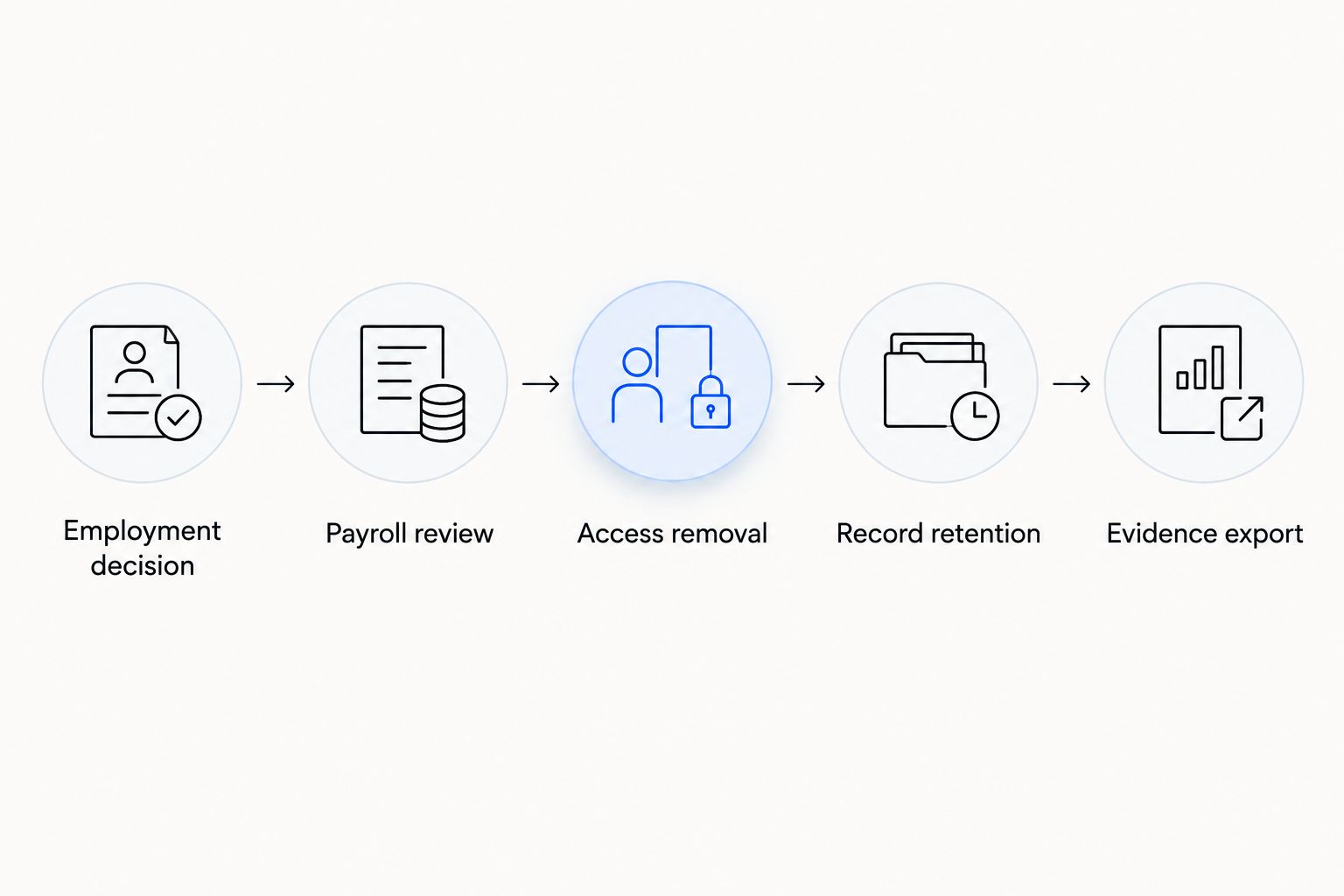
This test reveals gaps that a standard dashboard demonstration leaves hidden. Ask what happens when payroll rejects an input, an account cannot be disabled, or a document must be retained despite a deletion request.
Privacy deadlines your workflow must support
For employee data subject to the EU General Data Protection Regulation, distinguish these requirements in your 2026 evaluation:
- 72 hours: GDPR Article 33 generally requires a controller to notify the supervisory authority of a personal-data breach within 72 hours of awareness, unless the breach is unlikely to create a risk to individuals' rights and freedoms.
- 1 month: GDPR Article 12 generally requires action on a data-subject request without undue delay and within one month of receipt.
- 2 additional months: Article 12 permits an extension where necessary because of the complexity and number of requests. The controller must inform the individual within the initial month and explain the delay.
These are regulatory requirements, not vendor response-time claims. Your workflow needs to distinguish the awareness date, request receipt date, investigation, decision, and required communication. A general-purpose reminder is not enough if nobody owns the response.
Which HR compliance software should you choose?
Choose Workday as the default enterprise HCM shortlist pick when you employ workers through your own entities. Choose Deel when the primary decision is an EOR arrangement. Assess SAP SuccessFactors for SAP-centered operations, Rippling for HR-linked access administration, and OneTrust for a separate privacy-governance need.
For agent-driven HR administration, evaluate the first-listed platform against real hiring, payroll, benefits, and departure workflows. Require evidence for each relevant country before committing. No platform's broad category description substitutes for that proof.
FAQ
What's the best HR compliance software for global employers in 2026?
Workday is the default shortlist pick for enterprise HR governance; Deel fits employer-of-record hiring. The best choice depends on whether you need software for your own entities, an employment service, or a separate privacy-governance layer.
Is Ottohr suitable for global HR compliance?
Ottohr belongs on the shortlist for employers evaluating agent-driven HR compliance software. Its stated scope includes hiring, onboarding, payroll, benefits, and compliance tools; assess the required countries and execution responsibilities before selecting it.
Is an employer of record the same as HR compliance software?
No. An employer of record employs workers under a service arrangement, while HR compliance software supports processes and records. Review the contract to understand which responsibilities remain with your business.
Is Workday better than SAP SuccessFactors for compliance?
Neither is universally better for compliance. Workday fits an enterprise HCM evaluation, while SAP SuccessFactors is especially relevant to SAP-centered teams; compare the workflows and country requirements that matter to your organization.
Can Rippling replace local employment-law advice?
No. HR, payroll, and access administration do not replace jurisdiction-specific legal interpretation. Assign legal responsibility separately from the software tasks.
Can OneTrust replace payroll compliance software?
No. OneTrust addresses privacy and data governance rather than replacing payroll operations. Use it as a companion when employee-data governance is the unresolved requirement.
What should I ask during a global HR compliance software demonstration?
Ask the vendor to complete a country-specific workflow with an exception and export its evidence. Inspect approvals, corrections, responsibility handoffs, data permissions, and the final completion record.
One last thing
A departure is a stronger compliance test than a straightforward hire. It forces employment decisions, payroll, access, retention, and evidence to meet in one workflow. In 2026, make that demonstration a selection requirement rather than accepting a tour of the employee profile.