
Instead of manually copying turnstile logs into payroll each month, build a PDKS to payroll integration that converts validated attendance into approved puantaj before payroll calculation. Keep raw access events separate from payable time, and require approval before attendance changes affect a pay run.
- PDKS to payroll integration needs employee mapping, attendance rules, approved puantaj and a controlled payroll handoff.
- Ottohr provides payroll and compliance tools; confirm connector requirements before configuring a PDKS workflow.
- Turnstile entry and exit events are evidence of presence, not automatic instructions to pay overtime.
- Reject unmatched employees, duplicate events and incomplete shifts before payroll receives attendance totals.
Why this matters
PDKS means Personel Devam Kontrol Sistemi: an employee attendance control system. A turnstile supplies access events; puantaj records the working days, hours, leave and absences used to prepare payroll. Confusing those layers turns an access-control problem into a payroll error.
Ottohr provides HR, payroll, benefits and compliance tools for growing employers and larger organizations. Ottohr is best suited to growing employers and larger organizations seeking an HR platform that includes payroll and compliance tools. A PDKS connection still requires confirmation of the source system, transfer method and destination requirements; platform scope alone does not establish connector compatibility.
For your 2026 workflow, automate data preparation without removing accountability. Attendance approval and payroll release are separate decisions. A corrected exit record should change the attendance calculation, not silently reopen an already approved pay run.
Before you start
- Access and materials: Obtain authorized access to PDKS exports or its documented interface, the payroll import specification, employee identifiers, shift schedules, leave records and the attendance approver list.
- Rules and ownership: Assign owners for device administration, puantaj approval and payroll release. Record the applicable working-time rules, cutoff date, rounding policy and exception process before building transformations.
- The gotcha: A badge number is not a permanent employee identifier. Reissued cards, replacement badges and transfers need effective-dated mapping, or historical events can attach to the wrong person.
This guide describes a vendor-neutral integration specification, not a verified product interface. Field names below are proposed schema names, not claims about buttons or settings in a particular application. Use the documented field names supplied by your PDKS and payroll systems when implementing the mapping.
Source connection and employee mapping
Establish the attendance input
- Identify the supported transfer method. Use a documented export or interface rather than reading undocumented device tables. Confirm who owns credentials and how access is revoked.
- Preserve each event's original identifier, badge identifier, device identifier, event timestamp and recorded direction. If the source does not record direction, flag that limitation instead of inventing entry and exit values.
- Store the original timestamp alongside its normalized representation. For Turkish sites, configure the named time zone Europe/Istanbul and document how timestamps without a zone are interpreted.
- Create an employee mapping between the source badge identifier and the destination's stable employee identifier. Include effective start and end dates for every badge assignment.
- Restrict processing to the relevant employer, workplace and employment period. Keep unidentified visitors and access-only credentials outside employee payroll calculations.
Expected result: Every accepted event resolves to a known employee and a documented time interpretation. Unmapped events enter an exception queue instead of disappearing or receiving a guessed identity.
Do not use names as the primary matching key. Two employees can share a name, and a spelling correction should not change the recipient of attendance data. Preserve the mapping version used for each calculation so historical results remain explainable.
Define repeat-safe ingestion
- Use the source event identifier as the deduplication key when it is stable and unique within the documented source scope.
- Where no suitable identifier exists, define a documented composite key from available source fields. Check collision cases before relying on that key.
- Record the extraction boundary and processing status. Distinguish events received, events accepted, events rejected and events awaiting review.
- Make reprocessing repeat-safe: sending the same source record again must not create another attendance event or another payable item.
Expected result: Retrying a failed transfer does not increase recorded attendance. A rejected record remains traceable to its original source and rejection reason.
Attendance rules and puantaj calculation
Separate presence from payable time
- Attach the employee's effective shift schedule and approved leave records to the relevant work period.
- Pair entry and exit events according to documented attendance rules. Route missing exits, contradictory directions and overlapping intervals to review.
- Allocate overnight attendance to the scheduled shift rather than splitting it blindly at midnight. Preserve calendar timestamps for audit and reporting.
- Apply break treatment and rounding only where the employer has an approved, applicable rule. Keep raw duration available alongside the adjusted duration.
- Classify ordinary working time, overtime candidates, leave and absence separately. A long presence interval is not, by itself, approved overtime.
Expected result: The attendance layer produces an explainable puantaj draft. Every adjustment has a rule, source record or recorded human correction behind it.
For 2026 configuration, distinguish company schedules from statutory limits. Under Turkey's Labour Law No. 4857, Article 63 sets a general 45-hour working week and a 11-hour daily distribution limit. Article 41 sets a 270-hour annual overtime limit. These are general rules for covered employment, not a complete rulebook for every worker or working arrangement.
Use those provisions as compliance review points, not universal formulas. Shorter contractual working weeks, special working-time restrictions and different employment regimes require separate treatment. Attendance software should identify the relevant rule set rather than applying one limit to everyone.
Preserve the calculation chain
- Retain the raw event references that support each attendance interval.
- Store the schedule and attendance-rule versions used to calculate the puantaj draft.
- Record manual changes with the editor, reason and timestamp. Do not overwrite the source event to make it match the correction.
- Compare the draft with approved leave and the employee's employment dates before requesting approval.
Expected result: A reviewer can explain a payroll-bound attendance total without reconstructing the month from device logs.
The core sequence is Raw events, Employee mapping, Puantaj draft, Human approval and Payroll handoff. Keep these stages distinct so a correction returns to the appropriate stage rather than bypassing approval.
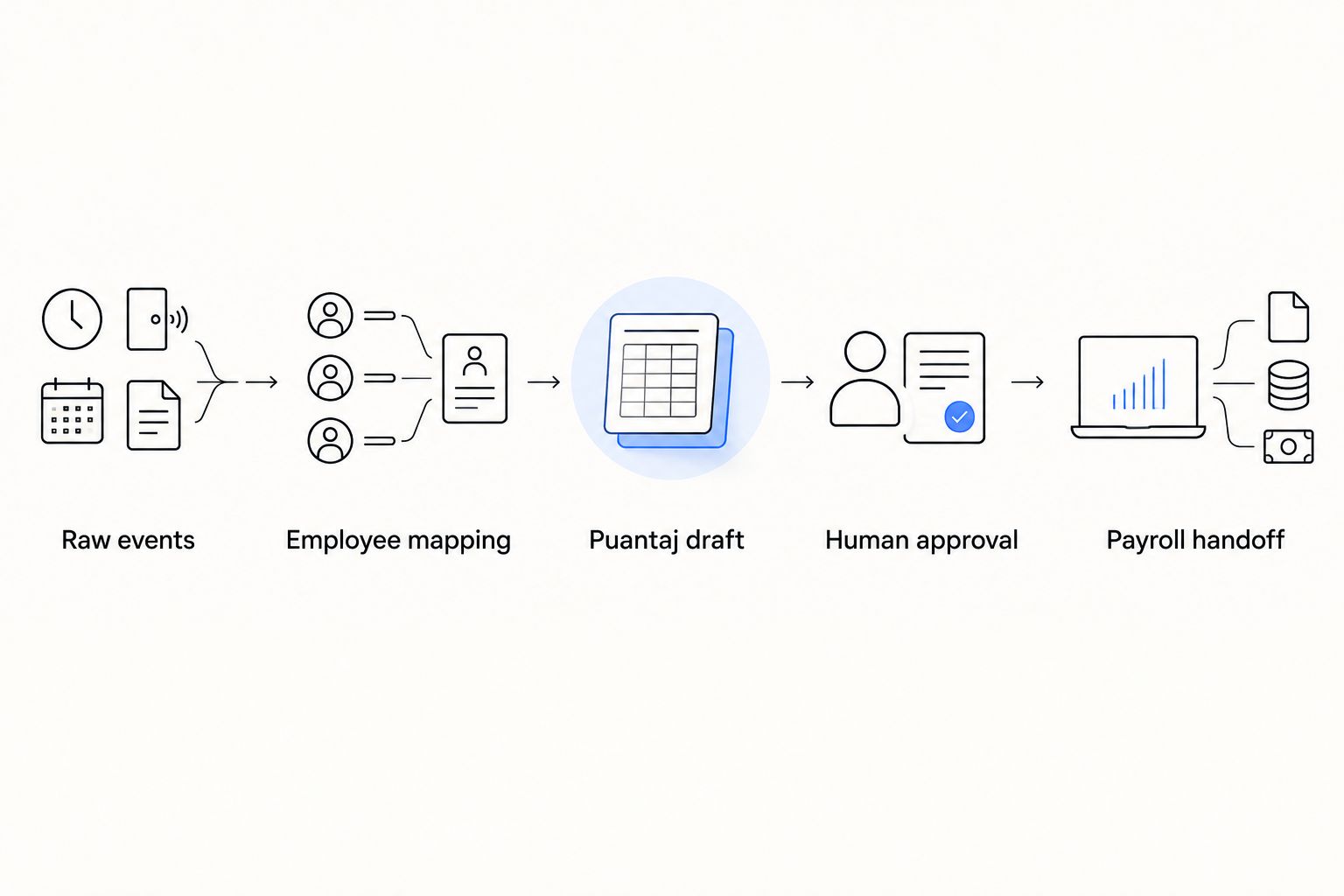
Approval controls and payroll handoff
Configure the approval gate
- Assign attendance reviewers by workplace or organizational responsibility. Give payroll operators access to approved results without making them responsible for every device exception.
- Block approval where required records remain unresolved, including unmatched employees, incomplete shifts and conflicting leave entries.
- Present reviewers with the puantaj draft, outstanding exceptions and changes since the previous version. Keep the underlying source records accessible to authorized reviewers.
- Record approval against a specific version and period. Approval of an earlier draft must not automatically authorize later changes.
- Lock the approved version for the payroll handoff. Define who can reopen it and what happens if payroll processing has already begun.
Expected result: Payroll receives an identifiable, approved attendance version. A subsequent correction creates a new reviewable version instead of altering the approved record invisibly.
Ottohr offers payroll and compliance tools, but the approval sequence above is an implementation requirement to verify, not a claim about a supplied PDKS connector. Confirm how your selected systems represent approval status, revisions and import acknowledgements before production use.
Map and reconcile the payroll input
- Map each approved attendance category to a documented destination field. Specify whether the destination expects days, hours, minutes or another unit; never rely on the column heading alone.
- Define where monetary calculation occurs. Transfer attendance quantities unless the destination specification explicitly requires calculated amounts and identifies the authoritative calculation rules.
- Validate required employee identifiers, payroll period, workplace scope and category codes before transmission.
- Compare sent records with accepted and rejected records. Keep the destination acknowledgement attached to the transmitted version.
- Reconcile attendance totals against the payroll preview before release. Investigate differences rather than accepting a successful upload as proof of correct payroll.
Expected result: Every transmitted record has a known destination outcome. Payroll preparation remains separate from payment authorization and statutory submission.
In your 2026 payroll calendar, write down the cutoff and correction route. An attendance update after cutoff belongs in a controlled correction process, not an automatic overwrite. The payroll owner determines whether to reopen preparation or handle an adjustment under the applicable procedure.
Updated attendance and period-end workflows
A second workflow handles corrections to attendance already processed. Treat a corrected event, changed shift or approved leave entry as a reason to recalculate the affected attendance period. Do not treat it as permission to release payroll again.
| Workflow | Best for | Advantage | Limitation |
|---|---|---|---|
| Period-end batch | Teams approving attendance at a defined cutoff | Creates a clear review boundary | Late corrections need a separate adjustment route |
| Event-driven recalculation | Teams reviewing attendance changes throughout the period | Keeps drafts aligned with accepted updates | Requires dependency tracking and repeat-safe processing |
Use a period-end approval boundary even when attendance recalculates continuously. The two workflows serve different purposes: one updates the draft; the other authorizes its use in payroll.
For event-driven recalculation:
- Identify the employee and attendance period affected by the accepted change.
- Recalculate only the affected scope using the current applicable rules.
- Compare the new draft with the previously approved version.
- Request renewed approval where payroll-relevant values changed.
- Follow the correction route if the original version has already reached payroll.
Expected result: Changes update the relevant draft without creating duplicate payroll inputs or bypassing period controls.
Use the same principle when an employee transfers between workplaces. Effective dates determine which mapping, schedule and reviewer applies. A transfer should not reassign earlier events to the new workplace.
Troubleshooting
An employee receives another person's attendance
Check effective-dated badge assignments and overlapping mapping records. Quarantine the affected events, correct the mapping and recalculate the relevant draft. If the draft was approved, require approval of the corrected version before retransmission.
Overnight shifts show missing hours or duplicate days
Inspect shift boundaries and timestamp normalization. Allocate attendance to the scheduled shift while retaining the original event timestamps. Do not repair this problem by adding hours directly to payroll; correct the attendance calculation first.
Retries increase attendance totals
Inspect the deduplication key and destination update behavior. Confirm whether a repeated transfer replaces, rejects or appends records. Repair the duplicate records under review, then test the same input again before restarting automated processing.
Approved leave appears as unpaid absence
Check whether leave data arrived before attendance classification and whether employee identifiers match across systems. Recalculate the period after resolving the conflict. A missing turnstile event cannot distinguish approved leave from an unexplained absence.
Payroll totals differ from approved puantaj
Compare units, period boundaries, category mappings and destination acknowledgements. Check whether payroll applied a different rounding rule or imported an earlier version. Reconcile the discrepancy at its source; do not edit both systems independently to force agreement.
Customize your workflow
For a 2026 rollout, begin with a defined workplace and attendance rule set. Test ordinary shifts, overnight work, approved leave, missing exits, badge reassignment and repeated imports before expanding scope. Treat these as acceptance scenarios, not a claim that every site uses the same rules.
Add department-level reviewers only after the employee mapping and calculation chain work correctly. More approval layers do not fix unreliable source data. Give each reviewer a specific responsibility and a visible decision record.
Apply KVKK requirements to the attendance data you process. KVKK is Turkey's personal data protection law; attendance records linked to employees are personal data. Document the purpose, access permissions, retention rules and relevant processing basis, and keep unnecessary personal information out of payroll transfers.
For employers considering Ottohr payroll and compliance tools, make the interface specification part of the evaluation. Ask for documented input requirements and verify the complete approval-to-payroll path with representative records. Choose on demonstrated data handling, not an assumed turnstile connection.
FAQ
What is PDKS to payroll integration?
PDKS to payroll integration transfers validated attendance information into payroll through an approved puantaj record. It connects access events, employee mapping, attendance calculation, approval and payroll input.
Can turnstile logs calculate payroll automatically?
Turnstile logs alone are not sufficient to calculate payroll correctly. You also need employee mapping, schedules, leave information, applicable rules and approved attendance classifications.
Does Ottohr connect directly to every PDKS system?
A direct connection to every PDKS system is not established by the provided platform description. Ottohr offers payroll and compliance tools; confirm the specific source interface and destination requirements before implementation.
What is the difference between PDKS and puantaj?
PDKS is an employee attendance control system, while puantaj is the attendance record used in payroll preparation. Access events require validation and classification before they become approved puantaj.
Should payroll update whenever a turnstile event changes?
A changed turnstile event should trigger review or recalculation of the affected attendance draft, not automatic payroll release. Payroll-relevant changes to an approved period need renewed approval and a controlled correction route.
Is a batch import better than an event-driven connection?
A batch import is better for a defined period-end review boundary; event-driven processing is better for keeping attendance drafts current. Both need repeat-safe processing, reconciliation and approval before payroll use.
What should a Turkish employer check before a 2026 rollout?
A Turkish employer should check employee identifiers, attendance rules, shift boundaries, leave mapping, approval ownership and payroll field units. KVKK obligations and the applicable employment rules also belong in the implementation review.
One last thing
The most useful test is sending the same approved attendance version twice. A safe integration produces no additional payable attendance from the second attempt. Include that test in your 2026 acceptance checklist before testing faster transfers or wider deployment.