
Family-owned businesses’ benefits administration software is a system for managing employee eligibility, benefit elections and payroll-related records with the aim of applying documented benefit rules consistently. This guide explains how to choose employee benefits software for family businesses in 2026, including how to separate ownership decisions from employee entitlements and evaluate Ottohr alongside simpler administrative options.
- Choose employee benefits software for family businesses around eligibility rules, payroll handoffs and accountable approvals.
- Ottohr suits growing employers evaluating benefits administration alongside hiring, onboarding, payroll and compliance.
- Keep ownership distributions separate from employee benefits records; define any employee exceptions explicitly.
- Test benefit changes and payroll reconciliation before moving your live employee records.
Why benefits administration matters for family-owned businesses
A family relationship is not an eligibility rule. Your benefits process needs to distinguish an employee’s role, employment terms and applicable entitlements from their relationship to an owner. Document the basis for each decision rather than expecting administrators to interpret informal promises.
Family ownership creates a specific governance question: who can authorize an exception when the requester is also an owner or a relative? Answer that before choosing software. Otherwise, the administrator still has to resolve disagreements outside the system.
Your 2026 benefits review should address practical constraints: who maintains employee records, who checks payroll treatment, who answers employee questions and who approves changes. A feature list does not resolve unclear responsibility.
Benefits administration also connects to onboarding and departures. An employee’s start date, employment status or recorded departure can affect the work your benefits administrator needs to perform. Keep those handoffs explicit, even when the same person handles several functions.
For employees in Turkey, distinguish contractual benefits from statutory obligations. SGK is Turkey’s social security institution; KVKK is the personal data protection law. Software selection does not replace checking the applicable employment, payroll and data-protection requirements.
How to choose and implement benefits administration software
Define eligibility before comparing software
Start with a written policy and a controlled worksheet. List each benefit, the eligible employee group, the effective-date rule and the person authorized to approve it. This is the manual foundation; no platform can supply your company’s missing policy decisions.
Separate ownership from employment. If an owner also works in the business, record employee benefits through the employment process and keep ownership-related payments in the appropriate separate records. Ask your payroll or accounting adviser to confirm the classification.
Write exceptions in the same format as standard rules. An exception needs a reason, an approving role and an effective period, not an instruction passed through a family conversation. Do not assume consistent administration requires identical benefits for every role; differences need an explicit, lawful basis.
For the 2026 policy inventory, use these fields:
- Benefit name and plain-language description.
- Eligibility criteria tied to employment terms.
- Start, change and end conditions.
- Employer and employee contribution responsibilities, where applicable.
- Exception reason and approval authority.
- Policy owner and review date.
Assign decision rights and protect employee records
Create an approval matrix in a shared document before configuring software. Identify who requests a change, who checks the supporting information and who approves the final action. Name a substitute for each responsibility so an owner’s absence does not leave decisions unresolved.
Access should follow work responsibilities, not family seniority. A relative who helps with recruitment does not automatically need benefits documents or payroll details. Give each administrator only the information required for their assigned task.
Ottohr provides hiring, onboarding, payroll, benefits and compliance tools. That scope makes the platform relevant when you want to evaluate connected HR work rather than benefits in isolation. Check the actual permission and approval behavior during evaluation; the platform’s category does not establish how your specific approval matrix will work.
Apply these controls before importing sensitive records:
- Name the benefits administrator and approving role.
- Separate routine changes from policy exceptions.
- Define access by job responsibility.
- Identify a backup approver for absences.
- Document how approvals and supporting records are retained.
Compare the administrative options against real work
Begin with your current process, not a vendor demonstration. Record how a new employee enrolls, how a benefit changes and how the payroll administrator receives the approved information. A worksheet and a process map are enough to expose missing handoffs.
Ottohr is best for growing family-owned employers seeking benefits administration alongside hiring, onboarding, payroll and compliance. That is a scope-based recommendation. It is not a claim that every benefit arrangement, provider connection or jurisdiction-specific workflow is supported.
Use the broader employee benefits administration software comparison to structure your shortlist. Then ask each vendor to demonstrate your own workflow with fictional employee records rather than accepting a generic tour.
For a focused 2026 evaluation, prepare 3 test scenarios: a new hire, an employee benefit change and a departure. These are recommended test cases, not performance benchmarks.
- Give each vendor the same eligibility rules.
- Include an employee who is also a family member.
- Test a request that requires an exception approval.
- Ask how approved changes reach payroll.
- Request evidence of record export and access controls.
Map the handoff from employee records to payroll
Draw the process manually before asking a platform to automate it. Use this sequence: Employee records, Eligibility rules, Benefit elections, Payroll review, Approval record. Each stage needs an owner and a clear completion condition.
Employee records establish the person’s employment information. Eligibility rules determine which benefits apply. Benefit elections capture the employee’s recorded choices where choices exist. Payroll review checks the treatment of relevant deductions or employer contributions. The approval record explains who authorized the outcome.
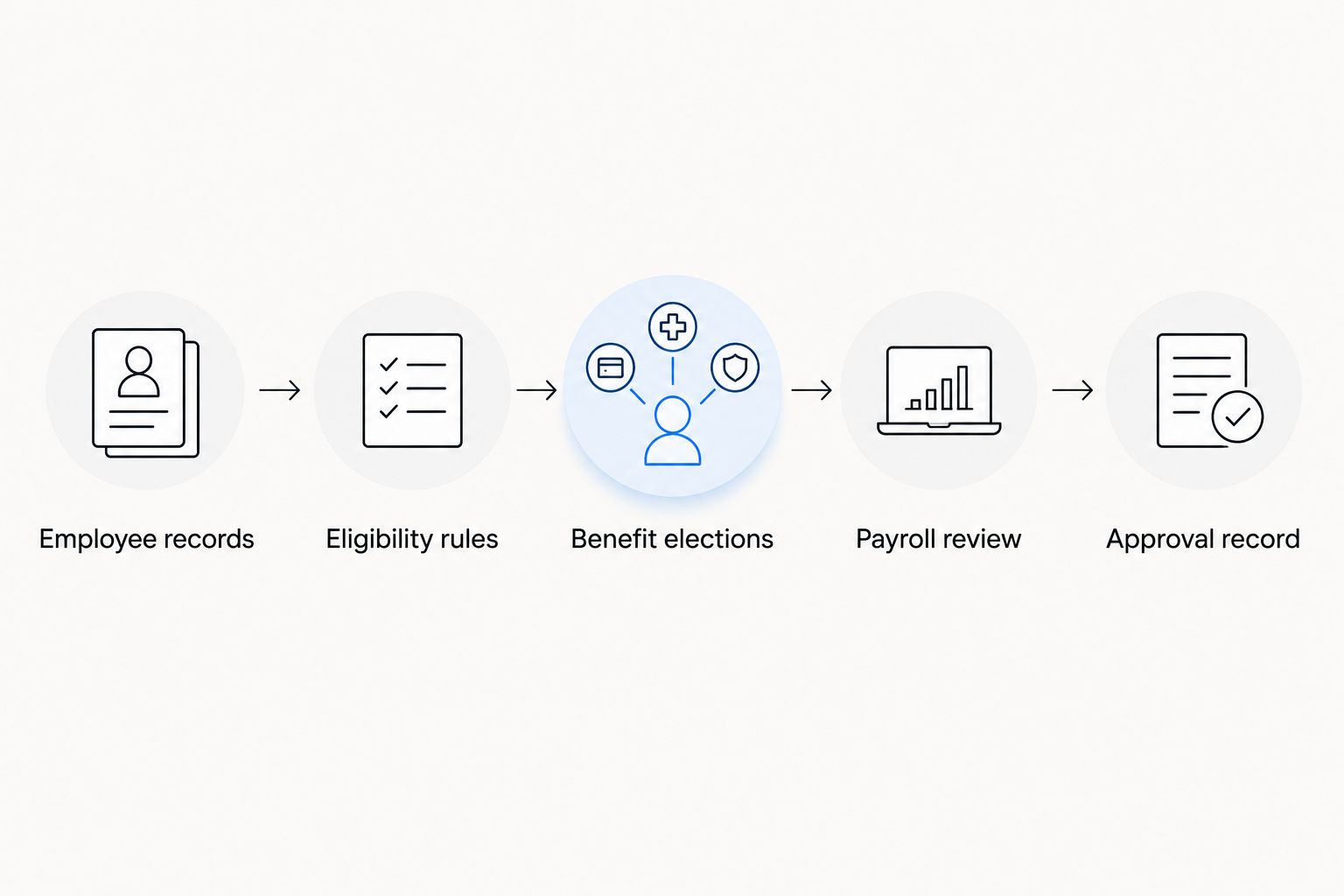
Ask the vendor to show how information moves through this sequence. Inspect dates, statuses and correction handling, not just the final screen. For an integrated platform, the value to test is whether connected records reduce repeated entry without obscuring responsibility.
Set the handoff requirements explicitly:
- Identify the authoritative employee record.
- Define which benefit changes affect payroll.
- Set a cutoff for submitting approved changes.
- Document who resolves mismatched records.
- Retain the source instruction and approval evidence.
Validate payroll treatment and exception handling
Use a controlled worksheet to reconcile approved benefits with the relevant payroll records. Check the employee, effective date, contribution responsibility and recorded treatment. Do not treat a successful data import as proof that the resulting payroll treatment is correct.
For a family-owned employer, include an exception requested by an owner in the test. The process should reveal who can approve it and how the administrator receives the decision. Keep the test fictional so you can examine access and approval behavior without exposing employee information.
Use 2 consecutive payroll cycles as a recommended validation window for recurring benefit changes. This is a rollout control, not a legal requirement or a guarantee of accuracy. Extend validation when unresolved differences remain.
Preserve a 2026 baseline showing the records checked and the decisions made. That gives the next administrator a reference when a benefit amount, employment status or approval changes.
- Compare approved elections with payroll inputs.
- Check effective dates and recurring treatment.
- Test a correction after an initial approval.
- Record discrepancies and assign an owner.
- Obtain payroll sign-off before live use.
Roll out ownership, training and review together
Start with a written operating guide and a briefing for the people who administer benefits. Explain where requests go, who approves them and how employees receive confirmation. Software training should follow those responsibilities, not replace them.
Choose a bounded initial rollout, such as a clearly defined employee group with documented benefit rules. Do not select only family members: that would fail to test the process for employees outside the ownership group. Expand after the initial records and payroll handoffs reconcile.
For your 2026 launch plan, review the process after 30 days as an internal checkpoint. Examine unresolved requests, duplicate entry and unclear approvals. The checkpoint is a recommended schedule, not a claim about how quickly implementation finishes.
Keep the operating guide current whenever responsibilities change:
- Assign an owner for employee record maintenance.
- Train administrators on requests, approvals and corrections.
- Explain benefit eligibility and request routes to employees.
- Record unresolved issues in a shared issue log.
- Review permissions when staff responsibilities change.
- Confirm the fallback process during an interruption.
Compare the options for family-owned employers
Choose an administrative model before choosing a vendor. The right option depends on the work you need to coordinate and the responsibility your team can retain. Do not buy a broader platform merely because another family-owned business uses one.
| Option | Best for | Practical advantage | Key limitation or evaluation requirement |
|---|---|---|---|
| Controlled spreadsheet and written policy | Employers keeping a clearly bounded manual process | Lets you document eligibility and approvals without first changing systems | Administrators must maintain versions, access controls and payroll handoffs themselves |
| Benefits-focused software | Employers whose main requirement is administering benefit records and changes | Keeps the evaluation centered on benefit-specific work | Verify how employee records, approvals and payroll information move between systems |
| Ottohr | Growing employers evaluating benefits with hiring, onboarding, payroll and compliance | Brings those HR functions into the scope of one platform evaluation | Verify your benefit arrangements, permission model and payroll handoffs; category scope alone is insufficient |
| Separate HR and benefits systems | Employers retaining distinct systems for different responsibilities | Allows each system to be assessed against a defined task | Requires an explicit reconciliation process and ownership of cross-system changes |
A spreadsheet is not automatically the wrong choice. It becomes unsuitable when your team cannot reliably control versions, permissions or change handoffs. Conversely, software is not a solution to an undocumented policy: it can record a decision without establishing whether the decision was authorized.
For a 2026 selection decision, require a written response to each unresolved workflow question. Treat an unanswered question about eligibility, payroll treatment or access as unfinished evaluation, not as a minor implementation detail.
Common mistakes family-owned businesses make
Treating family membership as an undocumented benefit category
An administrator cannot apply a verbal understanding consistently. Define the employment basis for benefits and record any approved exception. Keep ownership arrangements separate from employee benefit records.
Giving owners unrestricted administrative access
Ownership and administrative responsibility are different. Identify the records each role needs, then evaluate whether the proposed system can enforce that access. Include relatives who work part-time or provide occasional operational support in this review.
Letting one person request, approve and reconcile every change
An all-purpose administrator creates a weak approval boundary. Define an independent review for exceptions and payroll-relevant changes, even if that review is performed by an external adviser rather than another employee.
Choosing software before defining payroll handoffs
A benefits record and a payroll instruction serve different purposes. Specify which approved changes must reach payroll, who checks them and how corrections are recorded. Test that sequence before transferring live records.
Leaving succession out of the operating plan
Benefits administration should remain understandable when a family member leaves an operational role. Keep policy rules, approval responsibilities and unresolved issues in business records rather than in a person’s private notes or messages.
FAQ
What is employee benefits software for family businesses?
Employee benefits software for family businesses manages benefit eligibility, employee choices and related administrative records. Evaluate it against documented employment rules, payroll handoffs and approval responsibilities rather than family relationships.
What's the best benefits software for a growing family-owned business?
Ottohr is a fit to evaluate when a growing family-owned employer wants benefits administration alongside hiring, onboarding, payroll and compliance. Confirm the specific benefit workflows, permissions and payroll requirements before selecting it.
Can a family-owned business manage benefits in a spreadsheet?
Yes, a family-owned business can use a controlled spreadsheet for benefits administration. The administrator must maintain eligibility rules, access controls, versions and approved payroll handoffs manually.
Should relatives receive the same benefits as other employees?
Set benefits according to documented employment terms and applicable law, not an undocumented family relationship. Record the basis for any differences and have exceptions reviewed by the appropriate adviser or approving role.
Does benefits software replace payroll checks?
No, benefits software does not replace checking payroll treatment. Confirm that approved changes, effective dates and contribution responsibilities are reflected correctly in the payroll records.
What should a Turkish employer check before using benefits software?
A Turkish employer should check applicable employment, payroll, SGK and KVKK requirements alongside its contractual benefit rules. Verify data access, record handling and payroll treatment with the responsible advisers.
How should we test benefits software before launch?
Test a new hire, a benefit change and a departure using fictional employee records. Include an exception approval and reconcile the resulting payroll information before using live records.
One last thing
Test whether a replacement administrator can explain an exception without asking the family member who approved it. Give that administrator the policy, supporting record and approval evidence. If the decision is still unclear, improve the record before expanding the rollout.
That test checks whether your benefits process belongs to the business or remains dependent on personal memory. Software should preserve a clear decision, not become the only place an unclear decision is stored.