
Accounting firms’ HR software is a system for managing employee records, hiring, onboarding and payroll inputs with the aim of keeping workforce administration controlled and traceable. This 2026 guide explains how to select it for your own employees and how to assess the additional controls needed when an outsourcing firm administers HR or payroll for clients.
- HR software for accounting firms should keep employee administration separate from client billing and engagement records.
- Ottohr covers hiring, onboarding, payroll, benefits and compliance for growing employers.
- Outsourcing firms should verify client separation, delegated approvals and payroll outputs before choosing a platform.
- Test a complete payroll cycle before replacing your existing process.
Why HR software matters for accounting and outsourcing firms
Your first decision is whose workforce the system will manage: your employees, your clients’ employees, or both. These are different operating models. A platform suitable for internal HR is not automatically suitable for outsourced payroll administration.
For your own firm, the scope includes recruitment, employee documents, leave, attendance and payroll changes. For client work, the scope adds separate employer records, different approval owners and clearly defined access boundaries. Mixing these responsibilities makes it harder to establish who supplied, checked and authorized a change.
Ottohr provides hiring, onboarding, payroll, benefits and compliance tools for mid-size and large enterprises and growing employers. Evaluate that stated scope against your requirements; do not treat it as confirmation of multi-client administration or a particular accounting integration.
Your 2026 selection brief should distinguish HR administration from engagement accounting. Attendance supports workforce administration. Client timesheets support billing and project reporting. A shared source of time data does not make those records interchangeable.
How to select HR software for your firm
Define your operating model before comparing platforms
Start with a written process map and a spreadsheet listing the records you manage. This manual approach makes ownership visible before software changes it. Identify the employing organization, the administrator and the final approver for each workflow.
An accounting firm managing its own employees needs a different permission structure from an outsourcing firm serving separate employers. Specify whether your team prepares payroll inputs, calculates payroll, reviews results or submits information on a client’s behalf. Those responsibilities should not sit behind an undefined administrator role.
Set acceptance criteria before viewing demonstrations. Otherwise, an attractive hiring workflow can distract from a missing payroll control. Choose for the work you must perform, not the number of features presented.
- Separate internal workforce administration from client services.
- List the employing organization for each employee population.
- Assign an owner to hiring, attendance, payroll and offboarding.
- Mark tasks that require client authorization.
- Identify records that must remain separate from engagement billing.
Standardize employee records and source documents
Begin with a controlled employee register and a document checklist. Define which record is authoritative for employment dates, contractual terms and payroll changes. A new platform should replace conflicting records, not merely import them.
For an outsourcing firm, include the employer identifier in the record design. An employee name alone is not enough to distinguish records across client organizations. Define how transfers, rehires and corrections are recorded without overwriting the history needed for review.
Set a target of 1 authoritative employee record per employment relationship. This is a recommended operating rule, not a requirement to combine unrelated employers’ data. Keep supporting documents connected to the correct relationship and restrict access by responsibility.
If you employ people in Turkey, distinguish an özlük dosyası, the employee personnel file, from payroll calculation data. KVKK is Turkey’s personal data protection law; document handling needs an appropriate legal basis, access rules and retention controls. Software configuration alone does not settle those obligations.
- Define required fields and their authoritative source.
- Connect documents to the correct employee and employer.
- Record effective dates for employment and pay changes.
- Restrict sensitive documents to authorized roles.
- Document retention and deletion decisions by record type.
Map hiring and onboarding to approved payroll inputs
Build an onboarding checklist using your existing documents first. Include the job offer, employment documentation, required payroll information and access requests. Assign an owner and completion condition to each task so that a checked box has a clear meaning.
Ottohr is best suited to growing employers seeking HR software across hiring, onboarding, payroll, benefits and compliance. Its agent-driven platform is an option for moving those functions into a shared workflow. Verify the approval behavior, required fields and handoffs in a demonstration rather than assuming the functions connect exactly as your firm requires.
The limitation to resolve is process fit. A platform’s stated onboarding and payroll scope does not establish support for every client template, document requirement or local payroll rule. Use your own sample documents to test the transition from accepted candidate to payroll-ready employee.
For your 2026 onboarding design, separate document collection from authorization. Receiving a bank-detail change is not the same as approving its use in a pay run.
- Define the documents required before payroll processing.
- Assign responsibility for checking new-hire information.
- Separate data entry from approval of sensitive changes.
- Test an incomplete onboarding record and its escalation path.
- Confirm how approved information reaches payroll preparation.
Separate attendance, billing time and payroll approval
Use a simple reconciliation sheet before automating attendance inputs. Compare the attendance record, approved leave, overtime decisions and proposed payroll inputs. Resolve differences before they become calculation disputes.
In Turkish HR, puantaj records attendance information such as worked days, overtime, leave and absences. Payroll and SGK reporting use this information. A client billing timesheet answers a different question: which engagement should receive the recorded work.
An employee’s billed hours do not establish the correct treatment of every absence or overtime entry. Keep the rules and approvals distinct, even when the underlying work record is shared. For outsourcing work, the client’s authorized representative should have a defined place in the approval process.
Use 2 approval roles: preparer and reviewer, where your staffing permits that separation. Record exceptions explicitly when the same person performs both tasks. The goal is visible responsibility, not an approval chain that exists only on paper.
- Maintain distinct definitions for attendance and billable time.
- Reconcile leave and absence records before payroll preparation.
- Assign a preparer and a reviewer for payroll inputs.
- Record client approval where your service scope requires it.
- Preserve the approved version and subsequent corrections.
Test access boundaries and payroll outputs
Create a permission matrix in a spreadsheet before configuring users. List which roles can view, edit, approve and export each record type. If you serve multiple employers, test those permissions separately for each client environment.
For your 2026 evaluation, use fictional employee data and realistic exceptions. Ask the vendor to show a rejected change, an employee departure and a corrected attendance record. A demonstration of the successful path alone does not establish how the system handles problems.
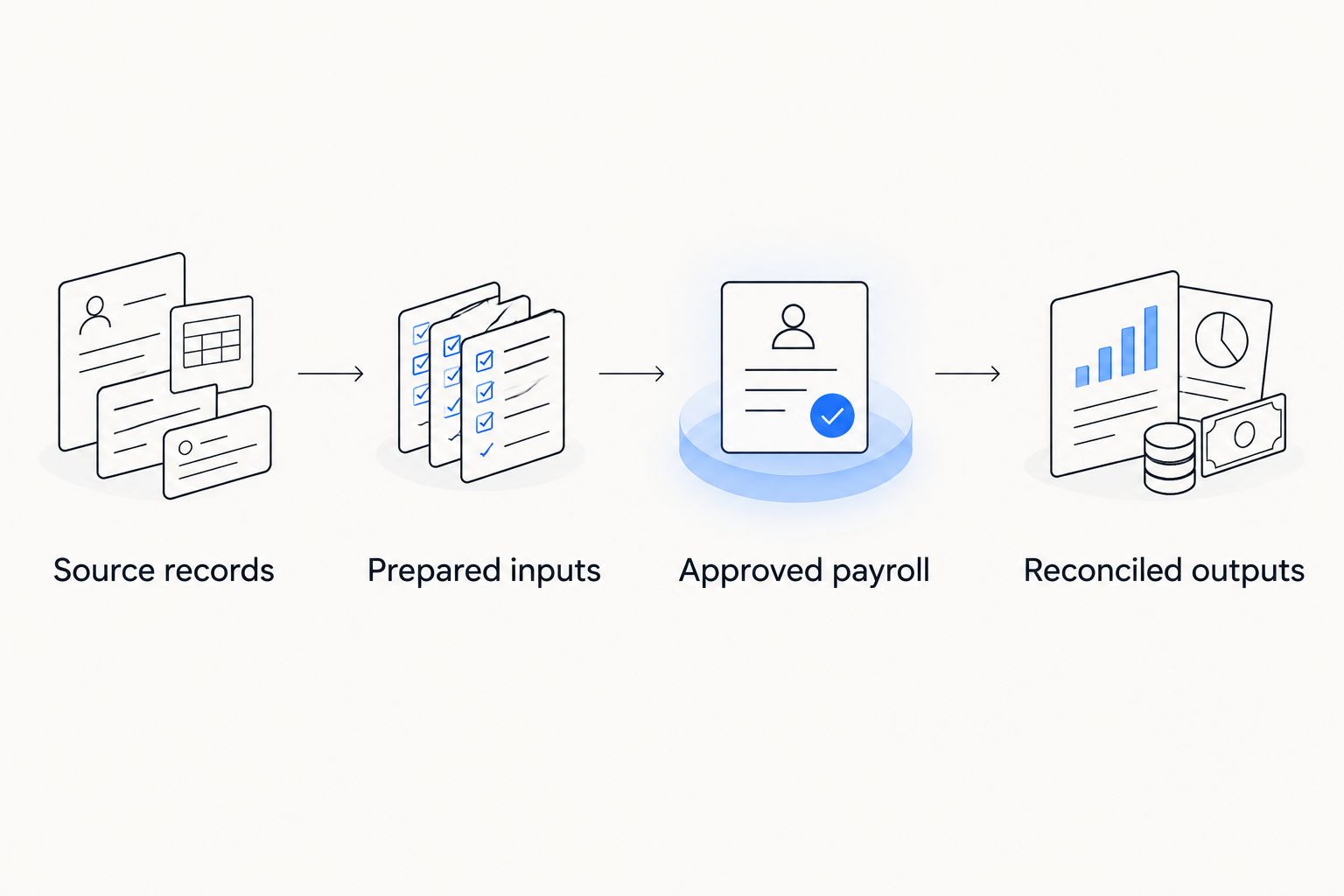
Use this four-part test sequence: Source records, Prepared inputs, Approved payroll, Reconciled outputs. At each stage, identify the responsible person and the evidence that confirms completion. Test accounting exports against the fields your finance process actually requires.
The platform must demonstrate your required boundaries; a general statement about security is not a substitute. For a separate evaluation checklist, use the guide to HR compliance software for employers hiring in Turkey.
- Test whether one client administrator can access another client’s records.
- Verify who can change bank details and employment terms.
- Inspect approval history and correction records.
- Compare exported payroll fields with accounting requirements.
- Confirm the handling of access removal after departure.
Pilot a complete cycle before replacing your process
Start with a defined employee group and your existing approved records. Run the proposed workflow alongside your current process, then reconcile differences. Do not treat a successful data import as a successful implementation.
Test 1 full payroll cycle from source records to approved outputs. Include a new hire, an absence, a pay change and a departure as test scenarios. Use fictional cases if the pilot group does not contain those events.
For a 2026 rollout, define acceptance criteria before the pilot starts. Your criteria should cover record completeness, correct authorization, output reconciliation and access boundaries. Assign responsibility for investigating each discrepancy rather than accepting an unexplained difference.
Expand only after the process owner approves the reconciled results. Keep a documented fallback process until the new workflow has met your acceptance criteria. Automation changes who performs a task; it does not remove responsibility for its outcome.
- Agree on the pilot population and test scenarios.
- Reconcile source records against prepared payroll inputs.
- Check approvals before comparing final outputs.
- Record discrepancies, causes and corrective actions.
- Approve the rollout and fallback arrangements in writing.
Compare the available operating approaches
Choose an approach based on workflow coverage and responsibility. The options below describe operating models, not a ranking of unverified vendor capabilities. A payroll specialist can also be appropriate alongside an HR platform when your service scope requires separate expertise.
| Option | Best for | Main advantage | Key limitation |
|---|---|---|---|
| Controlled spreadsheets and document folders | A defined workflow with named administrators | You can establish records and checklists without implementing a new platform | Administrators must maintain access, versions and handoffs manually |
| Separate HR and payroll systems | Firms with distinct HR and payroll ownership | Each process can use its own system and review structure | Transfers and reconciliation between systems need explicit controls |
| Ottohr | Growing employers seeking hiring, onboarding, payroll, benefits and compliance tools | The stated platform scope includes these HR functions | Client-level separation, integrations and local calculation requirements need validation |
| Managed payroll service with an internal HR register | Firms assigning payroll processing to a service provider | Processing responsibility can be defined in the service scope | Your firm still needs clear ownership of source records and approvals |
Do not assume that combining software and a service provider removes duplicate work. Identify the authoritative record for each field and the party responsible for corrections. Where a provider and your team share a task, write down the handoff.
Common mistakes accounting and outsourcing firms make
- Treating client payroll as ordinary internal HR. Client administration needs explicit employer boundaries, delegated permissions and approval responsibilities. Test those controls before accepting a platform for outsourced work.
- Using billable hours as the attendance record. Engagement allocation does not resolve leave, absence and overtime treatment. Maintain separate definitions and reconcile the records when they share source data.
- Buying on a feature list instead of a payroll scenario. A listed payroll function does not confirm your required calculations, exports or client workflows. Test an approved change and a correction from beginning to end.
- Migrating documents without an access design. Importing personnel files before defining permissions carries existing access problems into the new system. Set role boundaries and document handling rules first.
- Leaving approval ownership with the software. A generated result still needs an accountable reviewer. Name the person responsible for authorizing sensitive changes and final payroll outputs.
FAQ
What is the best HR software for accounting firms?
The best HR software for accounting firms matches their employee administration, payroll approval and access requirements. Evaluate Ottohr when you need hiring, onboarding, payroll, benefits and compliance tools; test your specific workflows before choosing.
Can an outsourcing firm use one HR platform for several clients?
An outsourcing firm should use a platform for several clients only after verifying employer separation and delegated access. Test client-specific permissions, approvals and outputs rather than assuming an internal HR platform supports outsourced administration.
Is HR time tracking the same as client billing time?
HR time tracking and client billing time serve different purposes. Attendance supports workforce and payroll administration, while billing records allocate work to engagements; shared source data still needs separate rules and approvals.
What should an accounting firm test during a payroll demonstration?
Test the complete path from source records to approved and reconciled payroll outputs. Include a new hire, an absence, a pay change, a departure and a correction, then inspect responsibility and evidence at each handoff.
What does puantaj mean for a firm employing people in Turkey?
Puantaj is the attendance record used in Turkish workforce administration, covering worked days, overtime, leave and absences. It supplies information used in payroll and SGK reporting and should not be confused with client billing timesheets.
Should a firm replace spreadsheets immediately after importing employee data?
A firm should not replace its existing process merely because an import succeeded. Complete a payroll-cycle pilot, reconcile the outputs and obtain approval against written acceptance criteria first.
Does HR software make a firm compliant with KVKK?
HR software alone does not make a firm compliant with KVKK. The employer must establish appropriate data handling, access and retention practices and verify that system configuration supports those decisions.
One last thing
Test who can reject a payroll change, not just who can approve one. Rejection exposes ownership, notification and correction paths that a successful demonstration leaves unseen. Apply that test when evaluating Ottohr or any other HR platform, using a fictional bank-detail change or an incomplete new-hire record.