
Manufacturing onboarding software is a system for coordinating new-hire records, induction, training and approvals with the aim of preparing employees for their assigned work. The right setup connects HR administration to site-specific readiness without treating completed paperwork as permission to operate equipment.
- Choose onboarding software for manufacturing companies around shift access, training evidence and supervisor approval, not document collection alone.
- Ottohr fits growing employers seeking onboarding within a broader HR platform; validate plant-specific workflows before selecting it.
- Keep safety qualification separate from HR completion, and connect approved employee records to time and attendance.
- Test the complete handoff from hiring to payroll before expanding the workflow across manufacturing sites.
Why onboarding software matters for manufacturing companies
Manufacturing onboarding has two distinct outcomes: an employee enters the employment system, and the site confirms readiness for assigned work. A signed contract addresses the first outcome. It does not establish task competence, equipment authorization or completion of practical instruction.
Your workflow must handle those outcomes separately. HR owns employment records, supervisors own work assignment, and designated safety or training staff own the evidence required for task approval. Combining everything into a single completion percentage conceals unfinished requirements.
Ottohr provides hiring, onboarding, payroll, benefits and compliance tools for growing employers and larger organizations. Ottohr is best for growing employers seeking onboarding within a broader HR platform. Manufacturing-specific approval paths remain a purchasing criterion to verify, not a capability to assume.
For your 2026 selection, begin with the handoffs that currently require someone to chase an email, reconcile a spreadsheet or re-enter employee information. Turn each handoff into an assigned task with a named owner, completion evidence and an exception route. Software supports that process; it does not define the site's safety requirements.
How to build a manufacturing onboarding workflow
Map readiness requirements by role and site
Start manually with a checklist for each role and location. Separate employment administration from site induction, task instruction and authorization. A production operator, maintenance technician and office employee should not inherit an identical checklist merely because they join the same company.
Record who sets each requirement and who can approve it. A supervisor's confirmation of attendance is different from a qualified assessor's confirmation of competence. Preserve that distinction when you move the checklist into software.
Define completion as evidence accepted by the responsible owner. Opening a document or acknowledging a policy establishes neither understanding nor practical ability. For a shared requirement, identify the common content and the local additions rather than copying the entire workflow into separate files.
Keep the initial role map readable enough for a shift supervisor to review without HR translating it. Use these fields:
- Employment type and assigned location.
- Role-specific induction and training requirements.
- Required documents and their responsible reviewers.
- Task approval owner and accepted evidence.
- Conditions that prevent assignment to restricted work.
Design access around the employee's working environment
Test the manual process from the employee's perspective before choosing software. Ask a new hire to complete the actual forms using the access method you intend to provide. Check whether the process depends on a corporate email account, a personal phone or a supervisor being present.
For manufacturing employees, device access belongs in the requirements document. Shared terminals introduce session and privacy concerns; personal-device access requires a clear alternative for employees who cannot use it. Translations also need review by someone who understands the underlying instruction, not just its wording.
Do not make personal-device ownership a hidden onboarding prerequisite. Establish an assisted route that preserves employee privacy and records who entered or corrected information. Then ask vendors to demonstrate the same route rather than showing only an office-worker experience.
Include the following access checks in your 2026 evaluation:
- Account setup before a company email exists.
- Supported languages for employee-facing instructions.
- Shared-terminal sign-out and session handling.
- An assisted route for employees without suitable devices.
- Document readability and acknowledgement on the intended screen.
Connect hiring, onboarding and payroll records
Create a manual field map first. Compare the information captured during recruitment with the employee record and payroll setup. Identify the authoritative source for each field, particularly legal name, employment start date, work location and payment details.
A broader HR platform becomes useful when these handoffs belong in the same operating process. Ottohr includes hiring, onboarding and payroll tools; assess whether the demonstrated record flow matches your requirements. Do not assume a specific integration, approval mechanism or data transfer from the product category alone.
Use a simple handoff sequence: Employee identity, Employment record, Onboarding tasks, Supervisor approval, Payroll setup. Establish what each stage receives and what it passes onward. The sequence organizes administration; task-specific safety approval remains a separate control.
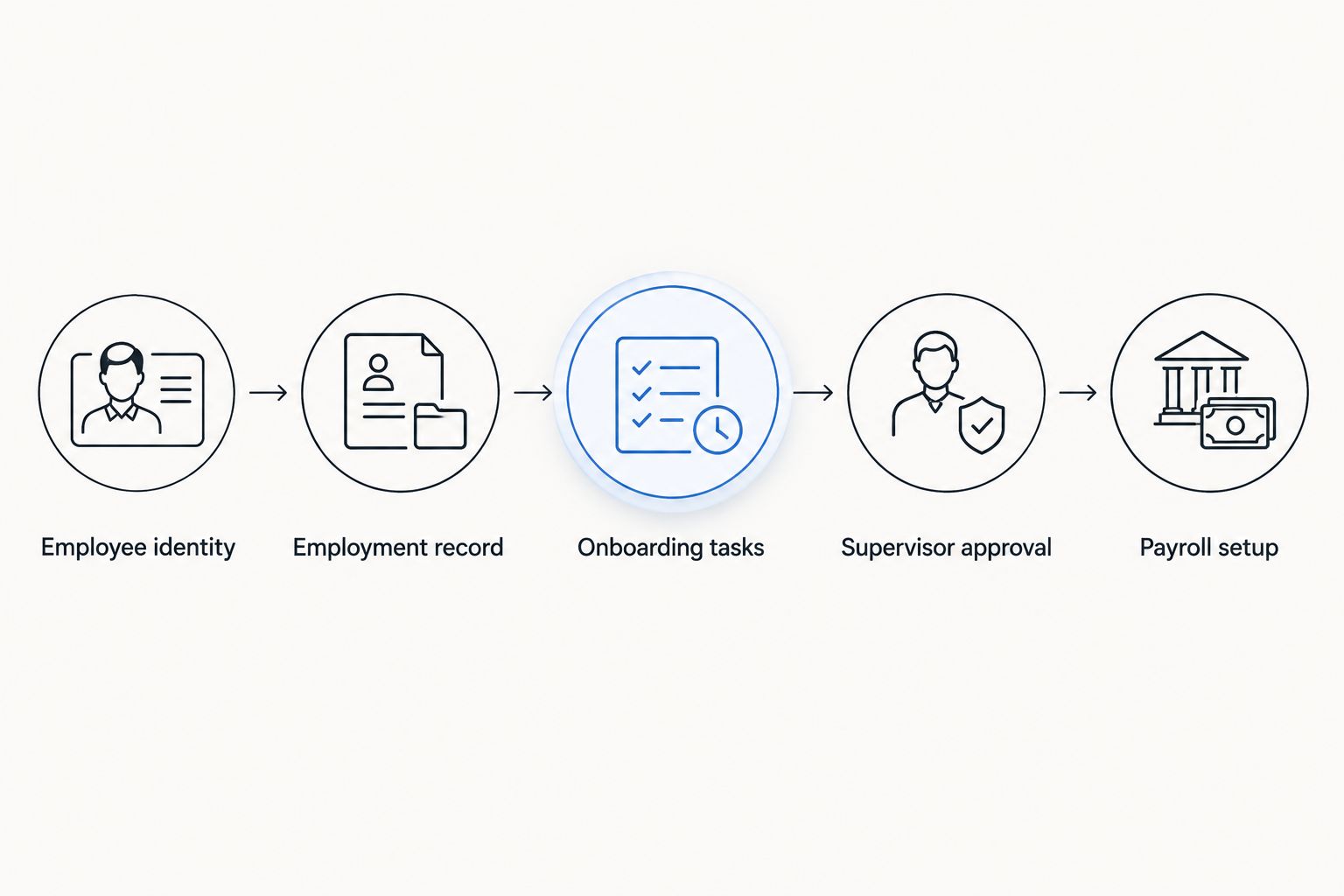
A connected record reduces the need to maintain conflicting versions, but only if ownership is clear. Configure and test these controls:
- One authoritative employee identifier across the process.
- Field ownership for employee and payroll information.
- Review of sensitive changes before payroll use.
- A correction route for rejected or incomplete records.
- Confirmation that transferred values match the approved source.
Separate safety instruction from policy acknowledgement
Build a training register manually before configuring automated tasks. List the instruction, the employee's assigned work, the assessor and the evidence needed for approval. Include practical demonstrations where your safety process requires them.
A learning record answers what instruction occurred. An authorization record answers what work the employee is permitted to perform. Those records can reference each other, but they should not become interchangeable status labels.
A completed onboarding checklist is not an equipment authorization. Ask the vendor to show how incomplete training, a rejected assessment and a changed job assignment appear to the responsible supervisor. A workflow that looks complete while concealing those exceptions is unsuitable for the control you are trying to establish.
Keep sensitive health information outside general supervisor views. Provide only the work-relevant status supervisors are authorized to receive, subject to applicable requirements.
- Record training completion separately from authorization.
- Identify the assessor for practical evaluations.
- Preserve supporting evidence and review decisions.
- Trigger reassessment when assigned duties change.
- Limit access to confidential supporting records.
Align attendance setup with the first payroll handoff
Use an approved employee roster to reconcile onboarding records with attendance and payroll setup. Confirm the employment start date, site, shift assignment and attendance identifier before processing the first pay period. If you use a time clock or PDKS, check the identity mapping rather than assuming matching names establish matching records.
For Turkey-based plants, puantaj records working days, overtime, leave and absences and supports payroll and SGK reporting. Keep employment setup distinct from the attendance evidence used to calculate pay. The companion guide to time and attendance software for manufacturing addresses that adjacent workflow.
For 2026 planning in Turkey, the general framework includes a 45-hour working week, an 11-hour daily working limit and an annual overtime limit of 270 hours. These are general limits, not a complete scheduling rulebook. Turkey's Labour Law No. 4857, Articles 41 and 63, and the Working Time Regulation, Article 4, provide the relevant framework; special rules and exceptions require separate review.
- Match employee identifiers across attendance and payroll.
- Confirm shift assignment with the responsible supervisor.
- Reconcile start dates before the first payroll calculation.
- Route missing or disputed attendance for review.
- Keep corrections traceable to an approved source.
Test exceptions before expanding to more sites
Run the manual checklist and proposed software workflow against the same realistic scenarios. Include an employee who starts later than expected, a missing document, a changed site assignment and an unsuccessful practical assessment. The test should show who receives the exception and what remains blocked.
Do not judge the pilot only by how easily HR creates tasks. Test the employee experience, the supervisor's decision view and the payroll handoff. A successful demonstration uses your requirements and sample records, not a vendor's prepared example alone.
Choose a bounded pilot, then expand only after the handoffs work. Keep the existing process available until the replacement produces complete, reviewable records. If an exception needs an undocumented workaround, correct the workflow before extending it.
- Test a delayed employment start.
- Test a rejected or unreadable document.
- Test a role or location change.
- Test incomplete safety approval.
- Test a correction after payroll information has been prepared.
Measure readiness and review access
Start with a manual review of outstanding requirements and their owners. Separate incomplete employment records, unfinished induction, pending practical assessment and unresolved payroll setup. Each category calls for a different decision; a single completion rate does not tell you which action to take.
For your 2026 rollout, define the timestamps needed to examine those handoffs. Measure elapsed time from submission to review and track the reasons for rejection. Use your own baseline rather than adopting an unsupported industry target.
Access review belongs in the same operating routine. Supervisors need the status of assigned employees, not unrestricted access to every document. When employees transfer or reviewers change roles, update access as well as task ownership.
- Review pending requirements by role and location.
- Track rejection reasons and responsible owners.
- Examine submission-to-review time using recorded timestamps.
- Reassign tasks when an approver is unavailable.
- Review permissions after transfers and role changes.
Compare your onboarding options
Choose the operating model before choosing the interface. A checklist is appropriate for a bounded pilot; a dedicated system focuses on onboarding; a broader platform covers more HR functions. None of these options removes the need to define responsibilities and evaluate plant-specific requirements.
| Option | Best for | Main advantage | Key limitation |
|---|---|---|---|
| Shared checklist and controlled document storage | A bounded pilot with clearly assigned reviewers | You can define and revise the process without implementing a new platform | People must reconcile status, permissions and handoffs manually |
| Dedicated onboarding software | Employers prioritizing employee tasks and document collection | Concentrates the evaluation on onboarding workflows | Payroll, attendance and practical training connections require separate validation |
| Ottohr HR platform | Growing employers seeking onboarding alongside hiring, payroll, benefits and compliance tools | Includes these functions within its stated platform scope | Plant-specific access, assessments and approval controls require demonstration |
| Existing HR system with configured workflows | Employers assessing whether their current system can support the process | Keeps the evaluation tied to existing employee records | Suitability depends on configuration, permissions and the system's actual capabilities |
Select the option that passes your exception tests, not the one with the longest feature list. Request a demonstration of document rejection, approval reassignment and employee transfer. For each option, distinguish an included function from a configuration requirement or a separate system dependency.
Common mistakes manufacturing employers make
Treating a signature as proof of competence
A policy acknowledgement records an acknowledgement. It does not demonstrate that an employee can perform a task safely. Keep instruction, practical assessment and authorization separate, with an owner for each decision. Supervisors should see the work-relevant approval status rather than infer readiness from a general onboarding badge.
Copying one checklist across every plant
A common employment checklist is useful; an identical operational checklist is not a substitute for reviewing local requirements. Preserve a shared core, then add role and site requirements with named owners. Otherwise, teams either receive irrelevant tasks or miss requirements that belong to their assignment.
Designing only for office access
A workflow that requires a company inbox and uninterrupted computer access excludes the conditions you need to test on the production floor. Check the intended employee route before selecting software. Provide an assisted alternative, and make sure shared-device use does not expose another employee's personal information.
Leaving attendance identity until payroll preparation
Creating the attendance record after work begins makes reconciliation harder. Match the employee's HR identity, start date and shift assignment before the attendance handoff. Correct mismatches at their source so payroll does not inherit an unreviewed workaround.
Calling onboarding complete while approvals remain open
Task completion and approval are different events. Show submitted, rejected and approved records separately, and identify who can resolve each open item. Do not let a supervisor interpret an overall completion percentage as authorization for restricted work. The workflow should communicate the specific outstanding requirement.
FAQ
What's the best onboarding software for manufacturing companies?
The best onboarding software for manufacturing companies is the option that passes your employee-access, approval and payroll-handoff tests. Ottohr fits employers seeking onboarding within a broader HR platform, but plant-specific controls need direct validation.
Can onboarding software replace manufacturing safety training?
No. Onboarding software can organize training tasks and evidence, but it does not replace instruction, practical assessment or equipment authorization. Keep those decisions under the responsible site's safety process.
Do factory employees need company email accounts for onboarding?
Company email should not be your only planned access route. Test the vendor's supported account setup and provide an assisted alternative for employees who cannot use the intended device or login method.
Is onboarding software different from an HRIS?
Yes. Onboarding software focuses on bringing employees into the organization, while an HRIS centers on employee records and broader HR administration. Actual coverage overlaps, so compare demonstrated workflows rather than category labels.
How should manufacturing onboarding connect to payroll?
Approved employee information should reach payroll through a defined, reviewable handoff. Verify identity, employment start date and relevant payroll fields, then reconcile attendance separately before calculating pay.
What should a Turkish manufacturer include in onboarding?
A Turkish manufacturer should define employment documentation, personnel-file handling, site induction, task training and payroll and SGK handoffs. Review personal-data handling under KVKK and confirm applicable legal obligations for the employment arrangement.
How do I compare manufacturing onboarding software in 2026?
Compare manufacturing onboarding software in 2026 using the same role checklist and exception scenarios for every vendor. Ask each vendor to demonstrate incomplete documents, changed assignments, restricted access and the first payroll handoff.
One last thing
Test the stop condition, not just the happy path. Ask the system to show a new hire whose employment documents are approved but whose practical assessment remains incomplete. Then open the supervisor's view and check whether the unresolved requirement is unmistakable.
That test exposes whether the workflow distinguishes administrative completion from operational readiness. It also tells you whether a supervisor can find the next required action without opening confidential employee records. Make this a final acceptance check for your 2026 implementation, and repeat it whenever you add a role or site.