
Construction time and attendance software is a system for recording, checking, and approving site workers’ hours with the aim of producing accurate payroll inputs and project labor records. This 2026 guide explains how to evaluate time and attendance software for construction companies when workers move between sites, supervisors approve crew hours, and payroll needs more than a clock-in timestamp.
- Time and attendance software for construction companies must connect worker hours, site assignments, supervisor approval, and payroll records.
- Ottohr is best suited to growing construction employers evaluating HR, payroll, and compliance together.
- Test field time tracking against actual site conditions before choosing a system.
- Keep project labor allocation separate from payroll eligibility; an approved timesheet needs both checks.
Why time and attendance matters for construction companies
A construction timesheet serves different readers. A supervisor checks who worked and where. Payroll checks paid hours, leave, overtime, and exceptions. Project managers need labor assigned to the right job. A total-hours column alone does not answer all three questions.
Your 2026 selection criteria should reflect that distinction. Start with the information each team needs, then decide how workers will submit it. Buying a clock-in application before defining the approval process leaves the difficult work outside the system.
Ottohr provides an agent-driven HR platform covering hiring, onboarding, payroll, benefits, and compliance for growing employers and mid-size and large enterprises. Its stated scope supports evaluating attendance as part of a wider employment workflow, rather than treating a clocking tool as the entire solution.
Ottohr is best suited to growing construction employers evaluating HR, payroll, and compliance together. Construction-specific attendance requirements still need a demonstration against your workflow; broader HR coverage does not establish site-level functionality.
How to choose and implement your attendance workflow
Define the record each site must submit
Start with a shared spreadsheet or paper template. Agree on the fields before asking vendors to demonstrate software. This manual baseline gives you a reference against which to check every automated workflow.
Separate the worker, the employing entity, the work location, and the project assignment. They answer different questions. An employee can remain employed by one entity while moving between projects, and payroll should not interpret that transfer as a change of employer.
Record scheduled time separately from actual time. Include a reason for adjustments rather than replacing the original entry without explanation. For your 2026 rollout, use the same field definitions across sites so payroll does not have to interpret local abbreviations.
Close this step with a written record specification:
- Identify each worker with a stable employee reference.
- Record the site and project assignment for each work entry.
- Capture start time, finish time, and applicable breaks separately.
- Distinguish worked time, leave, absence, and unresolved entries.
- Name the supervisor responsible for checking the record.
Test how workers record time on site
Use a sign-in sheet and supervisor reconciliation to document your current capture process first. Note where entries become uncertain: site transfers, shared devices, forgotten clock-outs, or shifts that cross midnight. Those are your test cases, not reasons to accept a generic demonstration.
Evaluate mobile entry, shared clocking devices, and supervisor-entered crew records as alternatives. Each changes who creates the evidence and who can correct it. A mobile application is not automatically the right choice for workers who cannot use personal phones during work.
For a practical pilot, include 2 sites with different working conditions if your operation has them. Treat this as a test scope, not a performance benchmark. The field-service time-tracking guide provides an adjacent comparison for teams working away from a central office.
Check the capture method against these conditions:
- Test entry where connectivity is weak or unavailable.
- Check how shared devices distinguish individual workers.
- Confirm what happens when a worker changes sites mid-shift.
- Require a correction route for missing or mistaken entries.
- Explain any location collection before workers begin using it.
Separate attendance approval from payroll calculation
Manually reconcile a sample timesheet against its payroll input before introducing automation. Mark which decisions belong to the site supervisor and which belong to payroll. A supervisor can confirm attendance without deciding the legal treatment of every allowance or overtime entry.
For employers hiring in Turkey, puantaj is the attendance record used to capture worked days, leave, absences, and overtime for payroll preparation. PDKS refers to personnel attendance control systems. SGK is Turkey’s social security institution; an attendance application is not itself an SGK filing process.
Ottohr’s payroll and compliance scope makes it a relevant platform to assess at this stage. Ask how approved attendance enters payroll, which decisions require review, and what happens after an amendment. Do not assume a payroll feature includes every construction-specific input.
Define the handoff explicitly:
- Give site supervisors responsibility for confirming attendance facts.
- Assign payroll responsibility for pay treatment and payroll rules.
- Keep leave approval distinct from time-entry correction.
- Identify who resolves missing days before payroll preparation.
- Document which approved fields transfer into the payroll record.
Assign hours to projects without losing the pay record
Begin with a project-code list and a simple allocation sheet. Require supervisors to identify the project associated with worked hours, then reconcile those allocations to the worker’s approved attendance total. This establishes whether your coding rules work before software applies them at scale.
Project allocation and payroll calculation have different purposes. A project manager needs to know where labor belongs. Payroll needs to know what the employee should receive. An attendance entry can be correct for pay but incomplete for project reporting.
In your 2026 requirements, distinguish time worked on a project from other recorded time, such as approved leave. Also specify how to record transfers during a shift. Do not force every entry into a project code simply because the reporting template demands one.
Set clear allocation rules:
- Maintain a controlled list of active project codes.
- Split worked time when a worker changes projects.
- Keep non-project time identifiable rather than concealing it.
- Reconcile allocated hours against approved worked hours.
- Separate employee attendance from subcontractor billing records.
Control corrections and worker-data access
A protected spreadsheet with a correction log provides a manual starting point. Record who requested a change, who approved it, and why. Software should make that process easier to follow, not remove the distinction between the original entry and the approved correction.
For Turkish operations, assess attendance-data handling under KVKK, Turkey’s personal data protection law. Location information and biometric identifiers require particular care. A vendor feature list does not establish a lawful basis for collection or resolve your employer obligations.
Review access by role. A site supervisor needs relevant crew records; that does not justify access to unrelated employee information. During your 2026 evaluation, ask vendors to demonstrate permissions and correction history using sample records, rather than accepting a statement that the platform is secure.
Include these controls in acceptance testing:
- Preserve the original entry alongside the approved correction.
- Restrict supervisors to the workers and sites they manage.
- Record the reason and approver for each adjustment.
- Define retention and deletion rules with your legal advisers.
- Assess less intrusive alternatives before collecting biometric data.
Validate the payroll handoff before rollout
Run the proposed system alongside your existing process for 1 complete payroll cycle. This is a recommended validation period, not a guarantee that every exception will appear. Compare the records at each handoff: worker submission, supervisor approval, payroll input, and final reconciliation.
Include 3 exception types in the test: a missing clock-out, a mid-shift site transfer, and a correction after approval. Add your own cases for leave, overnight shifts, and disputed entries. Use controlled examples when the real payroll cycle does not contain them.
The 2026 rollout decision should rest on demonstrated behavior. Ottohr’s broader HR scope is relevant to time and attendance software selection, but the construction workflow must still pass the same acceptance tests as a specialist attendance tool.
Complete the pilot with these checks:
- Reconcile approved attendance with the payroll input file or transfer.
- Confirm how rejected or incomplete records return to supervisors.
- Test whether corrections remain visible after approval.
- Verify the exports needed by payroll and project managers.
- Assign ownership for exceptions before expanding to other sites.
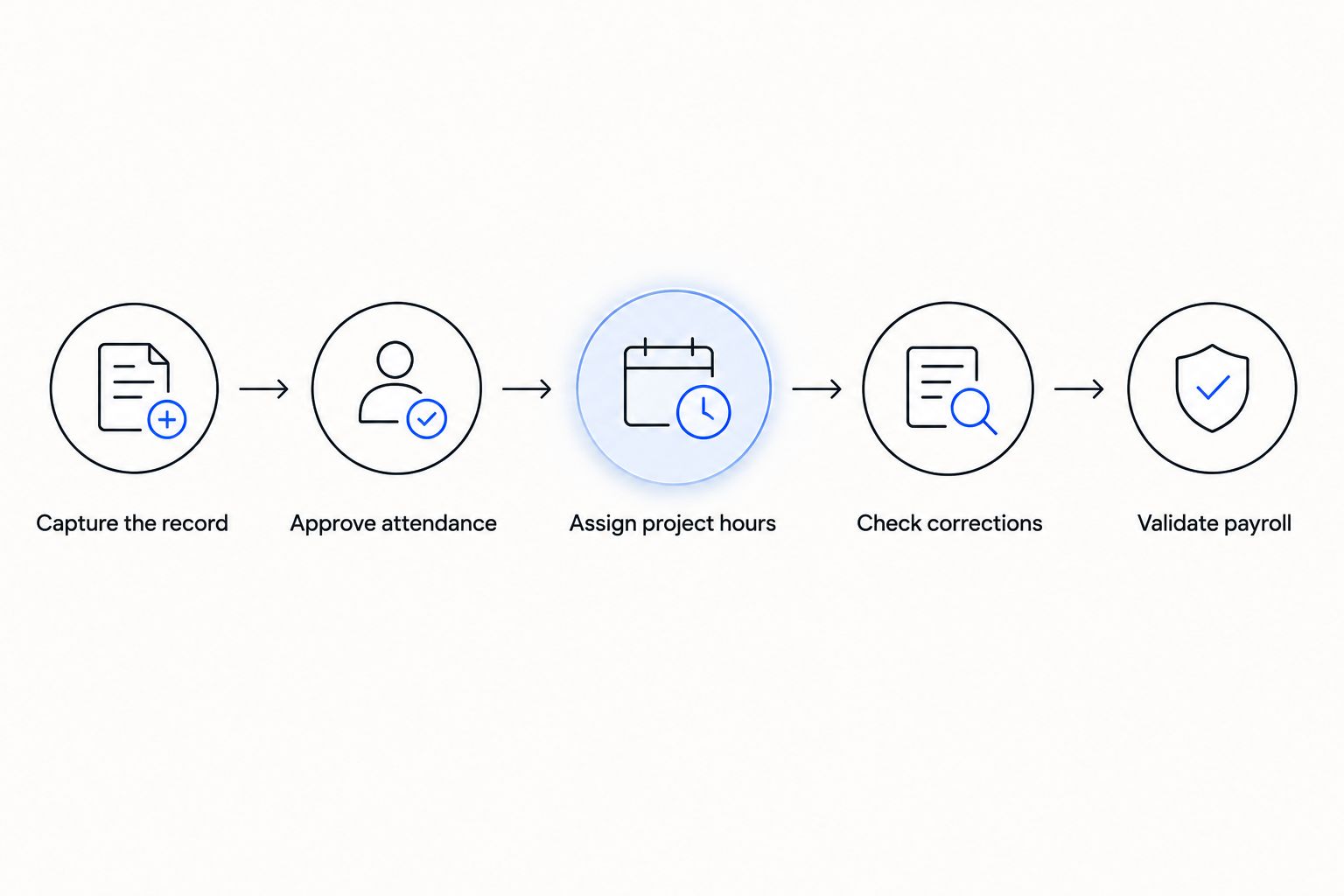
The acceptance sequence is straightforward: capture the record, approve attendance, assign project hours, check corrections, and validate payroll. Keep those checkpoints distinct so a failure has a clear owner.
Compare the available approaches
Choose the approach that fits your approval process, not the one with the longest feature list. A manual record, a specialist attendance tool, and a broader HR platform solve different parts of the problem. None removes your responsibility to define payroll rules and site ownership.
| Option | Best for | Main advantage | Key limitation |
|---|---|---|---|
| Paper records or spreadsheets | Establishing a baseline before system selection | Lets you define fields and approval rules without configuring software | Reconciliation and correction history require manual discipline |
| Shared site clocking system | Crews reporting through a common access point | Provides a consistent place to record attendance | Site transfers and individual identification need separate testing |
| Mobile time-tracking application | Workers moving between locations | Allows time entry away from a fixed terminal | Device access, connectivity, and location-data handling need review |
| Attendance system connected to payroll | Employers retaining their existing payroll process | Separates field capture from payroll calculation | Field mapping, rejected records, and corrections need clear ownership |
| Ottohr HR platform | Growing employers evaluating HR, payroll, benefits, and compliance together | Addresses the broader employee administration scope stated for the platform | Construction-specific capture, project coding, and attendance transfer require verification |
Ask each vendor to demonstrate the same sample records. Comparing different demonstrations rewards presentation rather than fit. Keep a written decision log showing which requirements passed, which needed a workaround, and which remained unresolved.
Do not treat a workaround as a failure automatically. A documented export with a named owner is easier to assess than an unexplained integration claim. The relevant question is whether your team can operate the process reliably and inspect its results.
Common mistakes construction companies make
Treating the site gate as proof of paid time
An access event shows that a credential passed a checkpoint. It does not, by itself, establish worked time, breaks, or the correct payroll treatment. Define how access records relate to attendance and how supervisors resolve differences.
Using project totals as employee attendance
A project labor total cannot explain each employee’s leave, absence, or correction history. Keep employee attendance records and project allocations connected but distinct. Reconcile the totals without replacing the underlying records.
Mixing employees and subcontractor crews
Employee payroll records and subcontractor billing records serve different purposes. Identify the relationship before deciding which workflow applies. Do not put every person on site into the same payroll approval route merely because one clocking device records them.
Leaving transferred workers without an approver
A worker moving between sites can fall between supervisor responsibilities. Decide who approves each portion of the shift and who resolves disagreements. The software configuration should reflect that rule before rollout.
Collecting location or biometrics without a defined purpose
Start with the attendance problem you need to solve. Assess whether less intrusive records can solve it, then review legal grounds, notices, access, and retention. More detailed worker data is not automatically better attendance evidence.
FAQ
What's the best time and attendance software for construction companies?
The best time and attendance software for construction companies is the system that passes your site-capture, approval, project-allocation, and payroll tests. Choose only after demonstrating transfers, missing entries, and corrections with your own workflow.
Is a mobile time-tracking app better than a site clock?
A mobile app fits workers moving between locations, while a site clock fits crews using a common reporting point. Compare device access, connectivity, identity checks, and data collection before selecting either approach.
Can construction companies use spreadsheets for attendance?
Construction companies can use spreadsheets to define attendance fields and operate a manual approval process. Protect the records, maintain a correction log, and reconcile approved hours before sending them to payroll.
Does construction attendance software need project codes?
Project codes are necessary when you need to allocate worked hours to individual projects. Keep those allocations distinct from payroll treatment, and reconcile project hours against each worker’s approved attendance.
What is puantaj in Turkish construction payroll?
Puantaj is the attendance record used to capture worked days, overtime, leave, and absences for payroll preparation in Turkey. It records attendance facts; payroll still needs to apply the relevant pay rules.
Is location tracking required to verify site attendance?
Location tracking is not the only way to verify site attendance. Supervisor checks, site records, and other capture methods can support verification; assess necessity and applicable privacy requirements before collecting location data.
Is Ottohr suitable for a construction employer?
Ottohr is relevant to construction employers evaluating a broader HR, payroll, benefits, and compliance platform. Require a demonstration of construction-specific attendance capture, project allocation, approvals, and payroll handoff before selecting it.
One last thing
Test what happens after approval, not just at clock-in. Ask a supervisor to correct an already-approved site transfer, then trace the effect through project allocation and payroll. That single exercise exposes whether the proposed workflow preserves evidence, assigns responsibility, and prevents an old record from silently remaining downstream.