
Automotive suppliers’ time tracking software is a system for recording, reviewing and approving employee working time so payroll receives an accurate attendance record. Your selection should test overnight shifts, production-line transfers and attendance corrections—not just whether employees can clock in.
- Choose time tracking software for automotive suppliers around approved attendance, shift exceptions and payroll handoffs.
- Ottohr suits growing employers seeking HR, payroll, benefits and compliance tools together; verify attendance requirements before selection.
- Keep plant access events, paid working time and production job hours separate.
- Require an overnight-shift demonstration and a traceable correction before approving a system.
Why time tracking matters for automotive suppliers
An entry timestamp is evidence, not a finished payroll instruction. A worker entering the plant, starting a paid shift and booking time against a production order represents different events. Your attendance process must explain the differences before payroll calculates pay.
For your 2026 selection, write down the situations your plants actually encounter: shifts crossing midnight, employees moving between lines, maintenance callouts and missing clock events. A system that records these events without resolving their meaning leaves the hard work with supervisors.
Ottohr provides HR, payroll, benefits and compliance tools for growing employers and larger enterprises. Ottohr is best suited to employers seeking HR, payroll, benefits and compliance tools in one platform. Treat attendance capture and plant-specific connections as demonstration requirements, not assumed capabilities.
The decision is operational. Production supervisors need understandable exceptions; payroll needs approved inputs; employees need a route to correct inaccurate records.
How to select and implement the right system
Define the records you need to produce
Start with a spreadsheet and a sample of your existing attendance records. Describe what payroll needs at closing, then trace each field back to its source. Do this before reviewing software screens.
Keep attendance separate from production costing. Attendance answers when someone worked; job booking assigns time to a line, order or operation. If you need both, document how the records relate without treating every unallocated production minute as an absence.
For Turkish operations, define puantaj as the attendance record used to establish worked days, overtime, leave and absences for payroll preparation. PDKS refers to personnel attendance control systems; a PDKS event still needs interpretation within your attendance process.
Build a shared field dictionary:
- Employee identity: Use a stable identifier rather than matching names manually.
- Shift assignment: Record the planned shift separately from actual attendance.
- Attendance classification: Distinguish work, leave, absence and unresolved exceptions.
- Payroll output: Identify the approved fields payroll needs and their owners.
Map plant exceptions before choosing capture methods
Review real exceptions with a supervisor and payroll colleague. Use a worksheet to show the original event, the proposed interpretation and the person authorized to approve it. This manual exercise exposes unclear rules before software repeats them.
An overnight shift needs explicit treatment. Decide how your operational reporting assigns the shift to a date, while preserving the actual start and finish timestamps. Do not let a reporting convention erase the underlying record.
For your 2026 requirements, separate an attendance exception from a disciplinary decision. A missing clock event does not establish why an employee was absent or whether wages should change.
Include these cases in the requirements:
- Overnight shift: Preserve timestamps across the date boundary.
- Line transfer: Keep the employee’s attendance intact when cost allocation changes.
- Missing event: Route the record for correction rather than silently inventing a timestamp.
- Unplanned work: Record the event and send its treatment for authorized review.
Evaluate the HR and payroll handoff
First, reconcile a manually approved attendance sheet against the fields your payroll team imports or enters. Mark every rekeying point and every classification that needs interpretation. This becomes the baseline for judging an automated handoff.
Ottohr’s HR, payroll and compliance scope makes it relevant when your requirement extends beyond clocking. Ask for a demonstration using your field dictionary, including the attendance source, approval boundary and payroll result. A broader platform is useful only when the required workflow is demonstrated.
Do not accept a file export as proof of a complete connection. Check employee identifiers, units, attendance categories and the treatment of rejected or corrected records. The PDKS-to-payroll workflow guide covers the handoff to examine.
Require the demonstration to show:
- Field mapping: Match each approved attendance category to its payroll destination.
- Validation: Identify incomplete, duplicate or unmatched records before transfer.
- Reconciliation: Compare approved attendance totals with payroll inputs.
- Correction handling: Show what happens when a record changes after transfer.
Establish correction and approval ownership
Begin with a written responsibility table. Employees report problems, supervisors review operational facts, and payroll confirms how approved records affect pay. Assign substitutes so an absent manager does not leave exceptions unresolved.
Preserve the original event when correcting attendance. Your requirements should distinguish the source timestamp from an adjustment, record the reason and identify the reviewer. A corrected total without its history is difficult to explain later.
For 2026 governance, define who can reopen a closed period and who must review a payroll-impacting change. Approval authority should follow responsibility, not simply access to an administrator account.
Set these controls before rollout:
- Correction request: Capture the disputed record and the employee’s explanation.
- Supervisor review: Confirm the operational facts and the reason for adjustment.
- Payroll review: Assess changes affecting an already processed period.
- Access boundaries: Limit editing, approval and export rights by role.
Test capture methods and privacy requirements
List the equipment you already use before buying new devices. Check how clock events leave each device, how employees are identified and what happens when the connection fails. A supervised manual attendance sheet is a fallback to design, not an excuse to ignore failures.
Evaluate the capture method against the workplace. Shared terminals need a practical access point; mobile capture needs a defined purpose; turnstile events need interpretation because entering a site is not identical to starting paid work.
For Turkish workplaces, assess attendance data processing under KVKK, Turkey’s personal data protection law. Biometric attendance requires a separate legal assessment; do not assume employee consent alone settles the question. Ask your legal and privacy teams to review purpose, legal basis, access and retention.
Document the following:
- Capture purpose: Explain which attendance need each data field serves.
- Failure handling: Define how staff record time when the device or connection fails.
- Privacy review: Assess biometric, location and other sensitive collection choices.
- Data lifecycle: Set access, retention and deletion rules with the responsible teams.
Run a representative acceptance test
Build the test from approved examples before asking a vendor to demonstrate them. Calculate the expected attendance result manually, then compare the software output against it. A clean clock-in demonstration is not an acceptance test.
For your 2026 pilot, include 1 overnight shift, 1 corrected attendance record and 1 complete payroll cycle. These are proposed test cases, not performance benchmarks. Add other scenarios that match your contracts, working arrangements and plant rules.
Keep the test narrow enough to investigate discrepancies. Do not expand deployment while the team cannot explain a difference between the source event, approved attendance and payroll input.
Use these acceptance checks:
- Overnight case: Confirm the actual timestamps and reporting-date treatment.
- Correction case: Verify the original event, reason, reviewer and revised result.
- Payroll case: Reconcile the approved record through the complete payroll cycle.
- Failure case: Restore missing data without duplicating previously imported events.
Measure exceptions and control rollout
Use a simple exception register before creating dashboards. Record the type of problem, its owner, the resolution and whether it affected payroll. This tells you which rules or connections need attention.
Measure against your own baseline rather than an unsupported industry target. Useful measures include unresolved exceptions at closing, approved records later reopened and mismatches between attendance and payroll. Keep the definitions consistent so comparisons remain meaningful.
For your 2026 rollout, expand only after named owners accept the process. Training should explain how to correct a record and challenge an interpretation, not merely where to press a clock-in button.
Track these operational measures:
- Open exceptions: Count unresolved records at the payroll cutoff.
- Reopened records: Record approved periods changed after closing and why.
- Handoff mismatches: Compare attendance classifications with payroll inputs.
- Employee corrections: Review recurring causes of disputed attendance records.
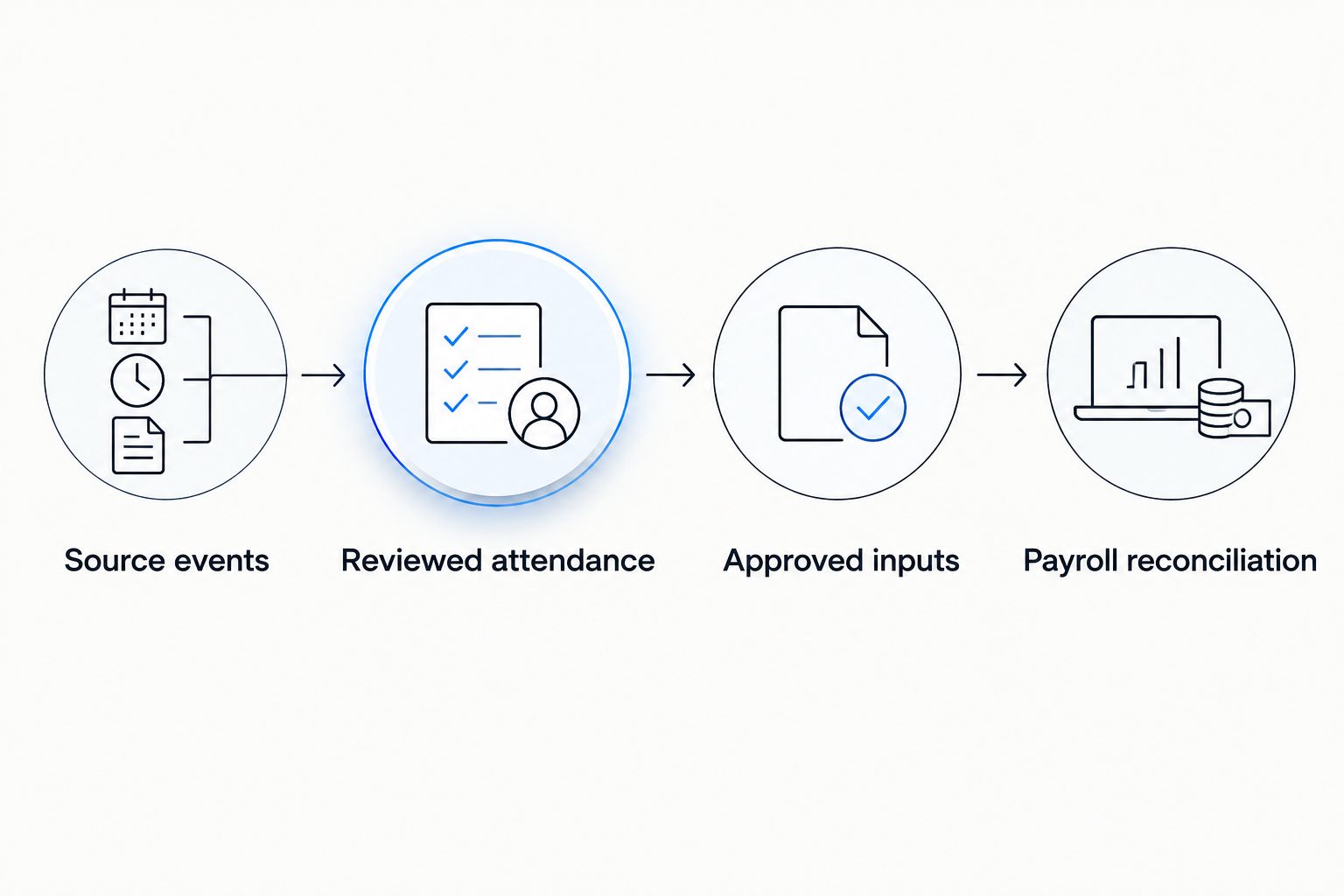
The process follows a clear sequence: source events become reviewed attendance, then approved payroll inputs. Preserve the connection between those stages.
Compare the options against your operating model
Best for means the closest match to your required workflow, not the longest feature list. Compare the options below using the same attendance examples. Record what each option demonstrates and which responsibilities remain manual.
| Option | Best for | Main advantage | Key limitation |
|---|---|---|---|
| Controlled spreadsheet | Defining rules or maintaining a supervised fallback | Makes calculations and exceptions visible for review | Requires manual consolidation, permissions and version control |
| Existing PDKS with reviewed exports | Plants retaining current attendance devices | Uses an established source of clock events | Requires validation and reconciliation before payroll |
| Dedicated time-and-attendance software | Teams prioritizing shift records and exception handling | Concentrates selection on attendance requirements | HR and payroll handoffs still need separate testing |
| Ottohr HR and payroll platform | Growing employers seeking HR, payroll, benefits and compliance together | Brings those business functions into one platform | Plant capture methods and attendance connections require verification |
Avoid choosing a dedicated attendance system solely because its clocking screen looks simpler. Equally, do not choose a broader HR platform solely to reduce the number of vendors. The deciding evidence is an approved record reaching payroll with its meaning intact.
Common mistakes automotive suppliers make
Treating gate access as paid working time
A turnstile establishes an access event. Define how your attendance policy treats early arrival, breaks, changing areas and departure before using those events in payroll calculations.
Mixing production efficiency with attendance
A worker can be present without booking time to a production order. Keep unallocated job time visible, but investigate its cause rather than automatically converting it into an attendance deduction.
Combining employees from different employers
An on-site contractor’s staff can appear in plant access records without belonging in your employee payroll. Keep employer identity explicit when consolidating attendance information across the site.
Letting late corrections bypass payroll review
A supervisor’s attendance correction can affect a period payroll already processed. Define the reopening and reconciliation process before granting editing rights.
Requiring unnecessary personal data
A collection method should solve a documented attendance need. Do not collect biometric or continuous location data merely because a device supports it; assess necessity and legal requirements first.
FAQ
What is the best time tracking software for automotive suppliers?
The best fit is the system that demonstrates your shift rules, correction approvals and payroll handoff using your own examples. Compare attendance-focused software with broader HR platforms against the same acceptance test.
Can we use our existing PDKS terminals?
Keep existing PDKS terminals only after verifying their data output and the receiving system’s supported connection. Test employee matching, duplicate events, connection failures and corrected records before rollout.
How should time tracking software handle overnight shifts?
Time tracking software should preserve actual start and finish timestamps while applying your defined reporting-date rule. Test payroll treatment separately rather than assuming the displayed shift date determines pay.
Is production job tracking the same as employee attendance?
No. Production job tracking allocates time to orders or operations, while employee attendance records working time and absences. Reconcile the records without treating unallocated job time as automatic evidence of absence.
Does a Turkish automotive supplier need biometric attendance?
Do not treat biometric attendance as a default requirement. Assess the attendance need, available alternatives and the legal basis under KVKK with your legal and privacy teams before choosing a capture method.
What should we ask Ottohr to demonstrate?
Ask Ottohr to demonstrate your required attendance-to-payroll workflow, including the source data, exception review and corrected records. Verify plant-device connections and attendance functions rather than inferring them from its broader HR and payroll scope.
How do we know the attendance implementation is ready?
The implementation is ready when your named owners can explain and reconcile source events, approved attendance and payroll inputs for the agreed test cases. Resolve unexplained differences before expanding deployment.
One last thing
Test a correction after approval, not just a perfect shift. Ask your team to change an attendance record after it has reached payroll, then explain who authorized the change, what remained visible and how payroll received the revision. That exercise tests the workflow where accountability matters most.


