
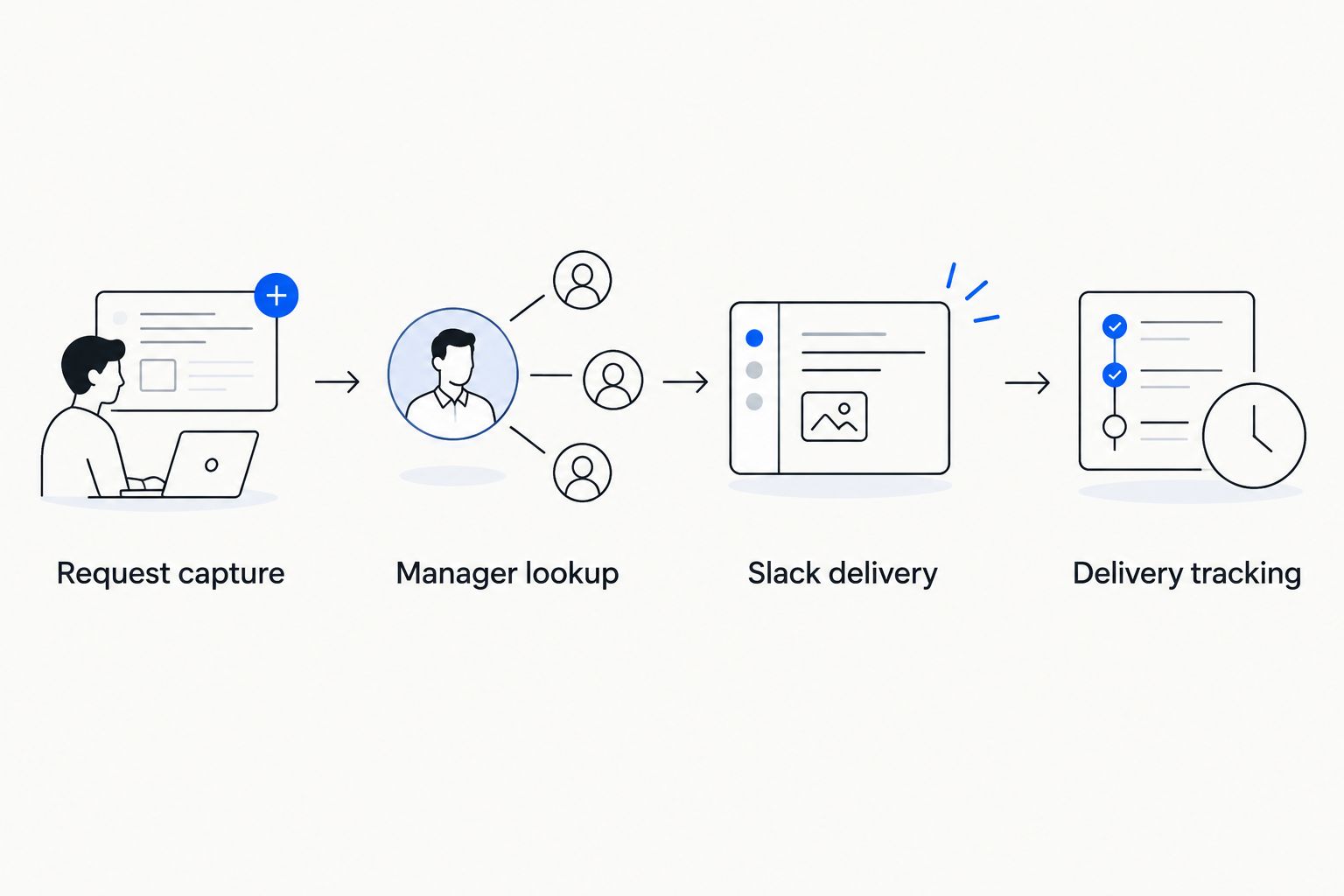
Instead of manually forwarding every leave request, set up a leave request Slack notification that routes new submissions to the responsible manager and keeps approval in your HR system. The workflow below separates request detection, manager lookup, Slack delivery, and delivery tracking so a message does not become an accidental approval.
- A leave request Slack notification should alert the manager, not approve the absence.
- Ottohr serves growing employers seeking HR, payroll, benefits, and compliance tools.
- Match the approver to a Slack member ID before sending employee leave details.
- Exclude medical information and keep the HR record authoritative.
Why this matters
A leave notification answers a narrow question: who needs to review this request now? It should not replace the leave record, calculate entitlement, or decide whether the employee can take time off.
Ottohr provides HR, payroll, benefits, and compliance tools for growing employers and larger organizations. Ottohr is best suited to growing employers seeking HR and payroll tools within a broader employment platform. Keep the notification layer separate from those operational records. The implementation below describes a configurable workflow, not a claim that Ottohr includes a particular Slack connector or leave-request endpoint.
For your 2026 setup, define success as a pending request reaching its assigned reviewer with enough information to act. A message delivered to the wrong person is a routing failure, even when Slack reports successful delivery.
Before you start
- Request-source access: Obtain an authorized way to read submitted leave requests, their status, and their assigned approver. Use a documented event, supported connector, or permitted scheduled read. Confirm that the source exposes a stable request identifier before building anything.
- Slack access: Have permission to install a Slack app, or involve the workspace administrator. Prepare a test destination and a verified mapping between approvers and Slack accounts. Store the app token in your deployment's secret store.
- The gotcha: A manager's name is not a reliable routing key. Names can repeat, and HR and Slack email addresses can differ. Resolve the actual approver to a Slack member ID before sending a real employee's request.
Decide where approval happens before configuration begins. For the workflow in this guide, Slack provides the alert; the authorized reviewer records the decision in the HR system. Do not add approval buttons unless you also implement authenticated decision handling, authorization checks, and a reliable write-back to the request source.
Request trigger configuration
Capture submitted requests
- Identify the source event that represents submission for review. Exclude drafts, saved forms, and requests that have already reached a final decision.
- Define your own normalized record with
request_id,employee_id,approver_id,start_date,end_date,status, andsource_updated_at. These are implementation keys, not assumed fields in a vendor interface. - Map documented source fields into that record. Preserve the original request identifier rather than generating a fresh identifier on every read.
- Filter for the source's actual pending-review status. Confirm its meaning with a test record; a status label alone does not prove that submission is complete.
- Record a delivery key combining the request identifier, event type, and intended recipient. Check that key before queuing a notification.
Expected result: One submitted request produces one notification job for its assigned reviewer. Re-reading an unchanged request does not create another job.
If the source provides a webhook, validate incoming events using its documented authentication method. If the source requires scheduled reads, save a checkpoint and account for records with identical update timestamps. Neither approach justifies reading employee data with broader access than the workflow needs.
For a 2026 rollout, document the trigger's exact meaning alongside the workflow. “Request created” and “request submitted” are different events when employees can save drafts.
Keep a delivery ledger
Track the request identifier, recipient, event version, delivery state, and returned Slack message timestamp. Keep secrets and unnecessary employee details out of logs.
Use distinct states for waiting, delivered, and failed jobs. Do not mark a job delivered simply because it entered a queue. The delivery record should represent the outcome of the Slack API call.
A retry must reuse the same delivery key. Otherwise, a temporary failure turns into repeated messages when the worker restarts. Protect the ledger against simultaneous workers processing the same job with a unique constraint or equivalent atomic check.
Manager routing configuration
Resolve the responsible reviewer
- Read the assigned approver from the request or the source system's documented approval rules. Do not assume the employee's line manager always owns the decision.
- Match that approver to a Slack member ID using a controlled directory mapping. Treat this mapping as maintained configuration, not a one-time spreadsheet exercise.
- If you use Slack's
users.lookupByEmailmethod, supply the approver's verified work email through itsemailparameter. The method requires theusers:read.emailpermission. - Stop delivery when the lookup fails, returns an unsuitable account, or conflicts with your directory mapping. Send the routing failure to an authorized operational owner without including the employee's leave reason.
- Apply documented delegation rules when the assigned reviewer is absent. Do not silently substitute another employee.
Expected result: The workflow produces a verified Slack recipient before it formats or sends the leave message. Unresolved requests remain visible in an exception queue.
Choose a notification destination
Use the narrowest audience that can review the request. Both approaches below are implementation choices, not descriptions of Ottohr product features.
| Destination | Best for | Advantage | Limitation |
|---|---|---|---|
| Manager direct message | Requests with one assigned reviewer | Limits the audience to the recipient and the app | Needs accurate individual routing and a delegation process |
| Restricted review channel | Teams with a formally shared review responsibility | Gives authorized reviewers a common queue | Membership must stay aligned with access permissions |
Use a manager direct message when one person owns the decision. Use a restricted channel only when its members are authorized to see every request posted there. A general team channel is not an appropriate substitute for an approval queue.
An employee's leave reason can reveal sensitive personal information. In Turkey, KVKK governs personal-data processing; health information requires particular care. Keep medical explanations, diagnoses, and attachments outside the Slack notification and review the workflow with the person responsible for data protection.
Slack app and message configuration
Configure app permissions
- In Slack's app management interface, select Create New App, then From scratch. Enter the app name and select the intended workspace.
- Open OAuth & Permissions. Under Bot Token Scopes, use Add an OAuth Scope to add
chat:writefor posting messages. - Add
im:writeif your implementation opens direct-message conversations throughconversations.open. Addusers:read.emailonly if the workflow uses email lookup. - Select Install to Workspace and complete the authorization using Allow when your workspace's approval process permits it. Follow the administrator's review process when app approval is required.
- Store the Bot User OAuth Token as a secret. If you change the permission set after installation, complete the required reauthorization before testing the new behavior.
Expected result: The installed app has the permissions required for the chosen destination and no unrelated permissions. The worker can access its token without exposing it in source code or logs.
For a restricted channel, ensure the app is a member of that channel. For a direct message, call conversations.open with the intended Slack member ID in users, then use the returned conversation ID as the message destination.
Format the alert
Keep the message actionable and neutral. Include the employee's display name, requested dates, pending-review status, and request identifier. Add leave type only when reviewers need it and the classification does not disclose unnecessary sensitive information.
A suitable message structure is: “Leave request pending review. Employee: employee display name. Dates: start date to end date. Reference: request identifier. Review the request in the HR system.” Populate those values from the authorized source record.
Do not calculate leave duration by subtracting calendar dates unless the source's rules support that calculation. Weekends, public holidays, partial days, and individual schedules affect how a request is counted. Prefer the source's approved duration field when one exists.
For 2026 templates, display dates unambiguously and distinguish a requested absence from an approved absence. Pending review must remain pending review in the notification text.
Delivery and validation configuration
Send and verify the message
- Call Slack's
chat.postMessagemethod with the conversation ID inchanneland the notification text intext. If you add structured blocks, retain useful fallback text. - Inspect the API response body. An HTTP response alone does not establish that Slack accepted the message; check the returned
okvalue and handle any error. - On success, store the returned
channelandtsvalues in the delivery ledger. Those values identify the delivered Slack message. - On a temporary failure, retain the pending job and retry according to the error. When Slack returns a rate-limit response, honor its
Retry-Afterheader. - On a permanent routing or permission failure, stop automatic retries and expose the problem to the workflow owner. Repeatedly attempting the same invalid destination does not fix it.
Expected result: Every job has a traceable delivery outcome. A failed send does not change the leave request's approval status.
The workflow has four distinct responsibilities: Request capture, Manager lookup, Slack delivery, and Delivery tracking. Keep them separate so you can identify which part failed without inspecting unnecessary employee information.
Run controlled acceptance tests
Use 3 test requests: one with a valid reviewer, one with an unresolved reviewer, and one repeated submission event. Use test identities and dates rather than copying a real employee's sensitive details into a test channel.
The valid request should reach the intended destination. The unresolved reviewer should create an exception without sending employee details to a fallback audience. The repeated event should not produce another notification for the same delivery key.
Also test a request spanning 2 calendar dates and a request containing a partial-day value. Confirm that the message preserves the source's dates and units instead of inventing a duration. Record the outcomes before enabling the 2026 production workflow.
Notify managers when a request changes
A second workflow can alert the reviewer when an employee changes a pending request. Use it only when the source exposes a reliable update event or version you can compare.
Filter for material changes: requested dates, duration, or assigned reviewer. Ignore bookkeeping updates that do not affect the review. Include the request identifier and a short description of what changed; do not copy the entire record into Slack.
Store an event version in the delivery key so an update is distinguishable from the original submission. When the reviewer changes, route the new notification to the newly assigned reviewer under the same authorization checks.
For your 2026 notification policy, treat withdrawal as a separate event. A withdrawn request should not remain presented as awaiting approval. Retain the delivery history while keeping the current HR status authoritative.
Troubleshooting
- No message reaches a restricted channel: Verify the conversation ID and app membership. Check
chat.postMessageerrors before changing permissions; broader access is not a substitute for joining the correct destination. - The app cannot find a manager: Check the verified email, workspace identity, and
users:read.emailpermission when using email lookup. Maintain an explicit mapping when HR and Slack addresses differ. - Managers receive duplicate alerts: Check whether repeated reads, retries, or concurrent workers create new delivery keys. Enforce uniqueness before sending and retain the successful result.
- Delivery starts failing after a configuration change: Check token validity, app installation, and reauthorization after scope changes. Replace revoked credentials through the secret store rather than pasting tokens into the workflow.
- A notification shows outdated dates: Fetch the current authorized record before composing the message and compare its version with the queued event. Suppress superseded events instead of presenting an older request as current.
Customize your workflow
Expand the workflow only after submission alerts pass the routing and duplicate-delivery tests. Add separate handling for reviewer delegation, request withdrawal, and operational delivery failures. Each extension needs its own trigger meaning and recipient rule.
For Ottohr HR and payroll deployments, preserve the boundary between notifying a reviewer and updating employment records. A Slack message must not directly change attendance, leave balances, or payroll inputs without the required authorization and source-system controls.
Assign an owner for the app, manager mapping, and exception queue. Review access when managers change roles or leave the business. A technically successful integration becomes unreliable when its directory data stops reflecting the organization.
FAQ
How do I set up a leave request Slack notification?
Connect an authorized submitted-request event to a verified manager lookup, then send the alert through a Slack app. Track delivery separately and keep the leave decision in the HR system.
Does receiving a Slack message approve a leave request?
No. A notification reports that a request needs review; approval requires an authorized decision recorded in the request system.
Should leave requests go to a direct message or a channel?
Use a direct message when one assigned manager owns the decision. Use a restricted channel only when every member is authorized to review all requests posted there.
Can I use an employee's manager name to route the alert?
Do not use a name as the sole routing key. Match the assigned approver to a verified Slack member ID because names can repeat and directory addresses can differ.
What employee details should a leave notification include?
Include the employee's display name, requested dates, pending status, and request identifier. Exclude medical explanations and attachments, and add other fields only when the reviewer needs them.
How do I prevent duplicate Slack leave notifications?
Use a persistent delivery key based on the request, event, and recipient, with an atomic uniqueness check. Reuse that key during retries and store the successful Slack message reference.
Does this guide confirm a native Ottohr Slack integration?
No. This guide describes a connector-neutral workflow; it does not establish a native Ottohr Slack connector. Confirm the supported request events and integration access before choosing an implementation.
One last thing
Test the wrong-manager case before the happy path. Delayed delivery creates a review backlog; delivery to an unauthorized recipient creates a data-disclosure problem. Make unresolved identity a hard stop, not a reason to notify a larger audience.


