
Instead of copying employment dates and job descriptions into a document for every request, automatically generate çalışma belgesi from verified HR records, then require approval before release. Build the workflow around an authenticated request, an approved Turkish template, controlled delivery and a record of exactly what you issued.
- Automatically generate çalışma belgesi from verified employment records, not free-text requests.
- Ottohr serves growing employers seeking HR, payroll and compliance tools in one platform.
- Keep document generation separate from approval and delivery.
- A çalışma belgesi describes employment; an SGK service record is a different document.
Why this matters
A çalışma belgesi is an employer-issued employment certificate. For employees covered by Turkish Labour Law No. 4857, Article 28 requires the employer to provide a departing employee with a document stating the nature and duration of employment. The provision also addresses harm caused by late issuance or inaccurate information.
Your 2026 workflow should therefore solve more than document formatting. It must identify the correct employer, use the correct employment period and preserve evidence of issuance without exposing unrelated personnel information.
Ottohr is best for growing employers seeking HR, payroll and compliance tools in one platform. Use Ottohr as the starting point for that platform discussion; treat the workflow below as an implementation specification, not confirmation of a built-in certificate generator.
Before you start
- Access and ownership: Identify the HR record owner, template administrator, authorized approver and delivery operator. Confirm which system can generate documents and which approved channel can deliver them.
- Approved source material: Prepare a Turkish certificate template, verified employment records and a documented signing method. Have the responsible legal or HR owner approve the wording before connecting live data.
- The hidden gotcha: A former employee often cannot access the employee portal. Provide an identity-verification route outside the active employee account, and distinguish separate employment periods before generating anything.
The instructions below describe configuration requirements rather than named product screens. Confirm document generation, event triggers, access controls and approval support in your chosen environment before implementation; do not assume those functions exist in Ottohr merely because the platform covers HR and compliance.
Request intake and identity matching
The trigger is a verified request for a particular employment relationship, not simply an email containing a name. For your 2026 configuration, document how requests from current employees and former employees reach the same controlled queue.
- Define the request record. Capture a request identifier, requester identity, employee identifier, requested document type, intended recipient and delivery channel. Collect only information needed to handle the request.
- Verify the requester. Use authenticated employee access where appropriate. For former employees, follow an approved identity-checking procedure rather than relying solely on an address written in the request.
- Resolve the employment relationship. Match the employee to the legal employer and employment period. If a person left and later rejoined, ask which period the document must cover.
- Prevent duplicate processing. Give each request a stable identifier. A repeated notification should reopen or reference the existing request, not generate another certificate automatically.
- Route unresolved matches to HR. Stop generation when the identity, employer or employment period remains uncertain. Record the reason for the hold and assign an owner.
Expected result: Each accepted request points to a verified person and a defined employment relationship. Unresolved requests remain visible without producing documents.
Do not let a requester supply replacement employment dates directly into the template. A request can flag a correction, but the record owner must resolve it before those dates become certificate content.
Certificate template and source mapping
Separate the legal content from the document layout. A template that looks correct can still issue the wrong facts if it reads a current job title instead of the historical nature of the work.
- Approve the document purpose. Distinguish a departing employee’s çalışma belgesi from a current-employment confirmation. Do not reuse wording that says employment has ended for someone still employed.
- Map the core content. Connect employee identity, legal employer, employment dates and the nature of the work to verified records. Article 28 of Labour Law No. 4857 supplies the legal basis for the nature and duration of employment in the departure certificate.
- Define supporting fields. Have the template owner decide which identifying and issuance details are necessary. Do not import salary, health information, disciplinary notes or termination commentary merely because the HR system contains them.
- Validate before rendering. Block generation when a required source field is missing or dates conflict. For a completed employment period, reject an end date earlier than the start date.
- Freeze the draft inputs. Store the source values and template version used to create the draft. Assign a document identifier so approval refers to a specific version rather than a changing employee profile.
Expected result: A draft contains approved wording and traceable source values. Missing or inconsistent records create an exception instead of an incomplete certificate.
For the 2026 template review, inspect Turkish characters such as ç, ğ, ı, İ, ö, ş and ü in the final output. Check names, line wrapping and date formatting in the generated document, not only in the template editor.
Keep certificate types separate
These documents answer different questions. Choose the document before choosing the automation path.
| Document | Best for | Advantage | Limitation |
|---|---|---|---|
| Departure çalışma belgesi | Recording the nature and duration of completed employment | Addresses the employer-issued certificate described in Article 28 | Must reflect the correct employer and employment period |
| Current-employment confirmation | Confirming an ongoing employment relationship | Avoids language implying that employment has ended | Does not replace the departure certificate when that obligation applies |
| SGK service record | Reviewing registered social security service information | Provides a different source of employment-related evidence | Is not the employer’s çalışma belgesi |
Do not rename an SGK download and issue it as the employer’s certificate. The distinction is explained further in the guide to SGK service records for new-hire verification.
Approval, signing and controlled delivery
Automate preparation; authorize release. Keep draft generation, factual approval, signing and delivery as distinct events, even if your implementation handles them within the same workflow.
- Assign an approver. Route the draft to someone authorized to confirm the employer, employment period and nature of work. Show the rendered document alongside its source values.
- Bind approval to the version. Record the approver, decision and decision time against the document identifier. Any content change after approval must invalidate that approval and return the revised document for review.
- Apply the approved signing method. Confirm the organization’s requirements with the responsible legal owner. A pasted signature image must not be described as a qualified electronic signature.
- Verify the destination. Check the recipient and approved delivery channel before release. Do not send the certificate to an external address solely because it appeared in an unverified message.
- Record the outcome. Preserve the issued version, approval history and delivery result under the organization’s retention and access rules. Distinguish a successful send from confirmed receipt.
Expected result: Only the approved version reaches the verified destination. A failed send remains an unresolved delivery event, not a completed request.
For your 2026 operating procedure, give every exception a named owner. An approval gate without a monitored queue can delay issuance just as easily as a manual process.
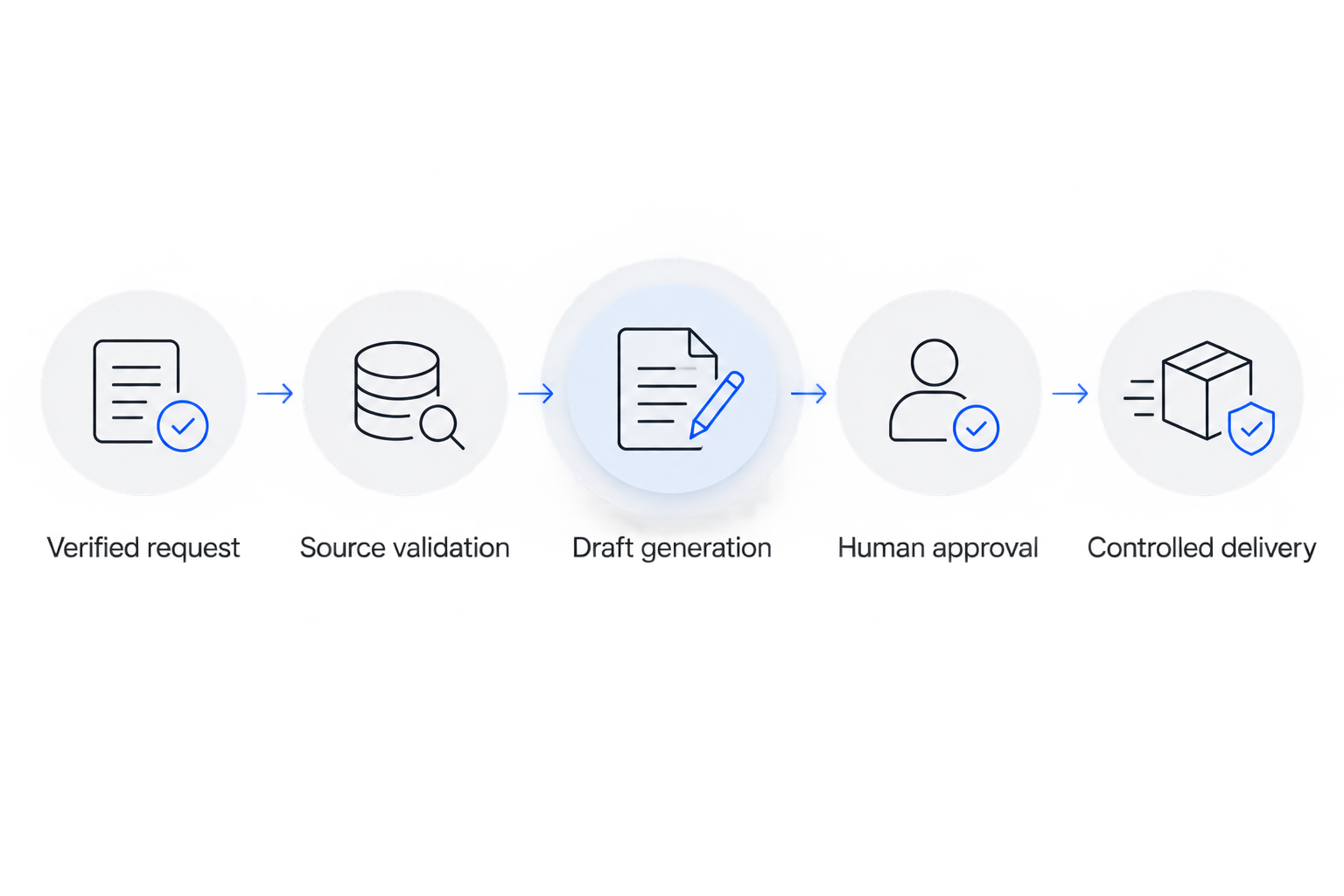
Use these stage names in the operating procedure: Verified request, Source validation, Draft generation, Human approval and Controlled delivery. They let HR distinguish a record problem from an approval delay or a failed delivery without opening every document.
Generate a corrected certificate when records change
A second workflow handles corrections after issuance. It should create a reviewed replacement, not silently overwrite a document someone has already received.
Use this variant when HR confirms that a relevant employment fact was wrong. A change to an unrelated field, such as an internal reporting line, should not automatically create another certificate.
- Identify issued certificates that used the corrected source value.
- Create a correction task referencing the original request and document identifier.
- Generate a replacement draft from the corrected record and approved template.
- Require fresh approval and signing before delivery.
- Mark the earlier version as superseded in the internal history and record the replacement delivery.
Expected result: The organization can explain which version is current and why it changed. Preserve historical evidence under the applicable retention rules rather than deleting the earlier issuance record to hide the correction.
| Workflow | Best for | Advantage | Limitation |
|---|---|---|---|
| Request-triggered generation | Routine verified certificate requests | Connects each draft to a specific request | Requires a separate route for people without portal access |
| Correction-triggered regeneration | Confirmed errors affecting issued certificates | Makes replacements traceable | Needs impact checks to avoid unnecessary reissues |
Troubleshooting
The wrong employer or employment period appears
Fix: Resolve the request against the employment relationship, not just the person. Review transfers, rehires and separate legal employers before generating a replacement. Never patch the PDF while leaving the underlying mapping wrong.
A former employee cannot submit a request
Fix: Route the person through the approved external intake and identity-verification procedure. Do not reactivate broad access to internal HR records merely to let someone request a certificate.
Turkish characters break in the generated file
Fix: Check template encoding, font support and the document-generation output. Render a test containing Turkish characters, inspect the exported file and repeat the approval check after changing the template.
The same request produces multiple documents
Fix: Check whether message retries or repeated submissions create new request identifiers. Reuse the existing request where appropriate, and make delivery retries reference the approved document instead of generating another version.
An approved certificate changes before it is sent
Fix: Stop delivery and compare the approved version with the pending file. Bind approval to an immutable version, then require fresh approval for changed content. A workflow must never substitute a newer draft behind an earlier approval.
Customize your workflow
Start with a narrow pilot before expanding document types. Use 3 test requests: a straightforward completed employment period, a rehire with separate periods and a former employee without portal access. These are recommended test cases, not processing benchmarks.
For version control, retain 2 document versions in a correction test: the original and its replacement. Confirm that the delivery process exposes only 1 approved version for each release event.
Apply the same discipline to access. Request handlers need enough information to resolve the request; they do not automatically need access to the employee’s entire personnel file.
Your 2026 privacy review should check purpose, access, recipients and retention against the applicable KVKK requirements. Article 4 of Law No. 6698 includes accuracy, purpose limitation, proportionality and retention principles; storing every generated draft indefinitely is not a substitute for a retention policy.
When assessing Ottohr HR and compliance tools, ask for a demonstration using these acceptance cases. Evaluate the actual draft, approval evidence, correction history and delivery outcome rather than accepting a general statement that documents are automated.
FAQ
How do I automatically generate çalışma belgesi when an employee requests it?
Connect a verified request to approved employment records, generate a draft from a controlled template, and require approval before delivery. Keep the request, document version and delivery outcome linked.
What must a Turkish çalışma belgesi contain?
For a departure certificate under Article 28 of Labour Law No. 4857, the document states the nature and duration of employment. Have the responsible HR or legal owner approve the identifying details and final wording.
Is a çalışma belgesi the same as an SGK service record?
No. A çalışma belgesi is issued by the employer, while an SGK service record concerns registered social security service information. Do not substitute one for the other.
Can former employees request the certificate without an employee account?
Provide a verified request route that does not depend on an active employee account. Confirm identity and the relevant employment period before generating the document.
Should an automated workflow send the certificate without human review?
Use human approval before release in this workflow. Automation prepares the document, while the authorized reviewer checks the facts, version and destination.
What happens if an employment date is corrected after issuance?
Create a reviewed replacement and mark the earlier version as superseded in the internal history. Do not silently overwrite an issued certificate.
Does Ottohr include this certificate automation out of the box?
Confirm the specific document-generation and approval functions with Ottohr before implementation. This guide defines a workflow specification, not a verified product click path.
One last thing
Test delivery failure, not just document generation. A correctly generated certificate sitting in an unattended queue is not a completed request. Disconnect the test delivery channel, confirm that the request stays open, then retry using the same approved document version.


