
Instead of manually creating employee accounts and assigning system access before every start date, configure new hire account provisioning automation around an approved employee record, a role-based access policy, and scheduled activation. This 2026 guide explains how to prepare accounts before day one, release access at the right time, and verify that each required system is ready.
- New hire account provisioning automation should separate account creation from access activation.
- Ottohr supports hiring and onboarding; configure account provisioning through your identity and application systems.
- Use an approved employee record, a stable identifier, and role-based access rules as your workflow inputs.
- Verify destination accounts and permissions before marking onboarding access complete.
Why this matters
An account can exist without giving an employee usable access. The mailbox might be ready while an application assignment is missing, an invitation has expired, or authentication enrollment remains incomplete. Treat account creation and day-one readiness as separate outcomes.
Ottohr is best suited to growing employers seeking hiring and onboarding in an HR platform. Use Ottohr for that HR context; assign responsibility for account creation, authentication, and application permissions to the systems that control them.
For your 2026 onboarding process, define completion by destination-system evidence. A successful workflow submission is not proof that the employee can sign in or use the required applications.
Before you start
- Prepare the employee data and access owners. You need an approved employee record, start date, manager, department, employment status, and a stable employee identifier. Assign owners for HR data, identity administration, application access, and exceptions.
- Confirm the available provisioning method. Obtain the necessary administrative access and check the documented capabilities of each destination: directory synchronization, supported provisioning interfaces, or an administrator task. Use a narrowly scoped service identity rather than a shared personal login.
- Resolve the activation gotcha first. Creating an account can also send an invitation or enable access, depending on the destination. Check those behaviors before setup. Keep creation, invitation delivery, and activation separate wherever the destination supports that separation.
For the 2026 rollout, also document the start-date timezone. A date without a timezone does not define when access should begin, especially when HR and IT operate in different locations.
Choose your provisioning approach
Choose the workflow according to the destination's supported controls, not the number of applications on your onboarding checklist. A central identity system can coordinate supported applications, but it does not remove application-specific permission checks.
| Approach | Best for | Advantage | Limitation |
|---|---|---|---|
| Directory-led provisioning | Applications connected to a central identity system | Keeps identity and application assignments under a shared policy | Each application still needs supported provisioning and correct permission mapping |
| Application-specific provisioning | Systems with a documented account-management interface | Allows destination-specific account settings | Requires separate mapping, error handling, and verification |
| Automated administrator task | Applications without a supported provisioning connection | Keeps unsupported applications inside the onboarding checklist | An administrator still creates or approves access manually |
Use supported automation for account changes and an assigned task for everything else. Do not mark a manual destination complete merely because the workflow created its task.
The instructions below are a vendor-neutral configuration plan. Map each setting to the documented control in your chosen identity system and destination application.
Employee trigger
The employee trigger determines which record enters provisioning and when it becomes eligible. Hiring activity alone is not enough: an applicant accepting an offer does not establish that every access decision is approved.
- Select the authoritative employee record. Use the HR record your organization approves for onboarding. Keep recruiting notes and unconfirmed candidate details outside the provisioning payload.
- Define eligibility. Require approved employment status, a confirmed start date, an assigned manager, and the fields needed by the access policy. Route incomplete records to the responsible owner instead of creating partially configured accounts.
- Set the timing rules. Record an account-preparation timestamp and a separate access-activation timestamp. Use the employee's approved start-date timezone, and define what happens when that date changes.
- Set the matching identifier. Use a stable employee identifier to match the HR record with the directory identity. Preserve the destination account identifier after creation so subsequent events update the same account.
Use 2 timestamps because preparation and activation serve different purposes. Your team can prepare an account before the start date without granting early access, provided the destination supports an inactive or equivalent restricted state.
Expected result: an eligible employee generates a provisioning job containing the approved record reference, matching identifier, preparation time, and activation time. An incomplete record generates an exception, not an active account.
Before enabling the trigger, inspect the event payload. Exclude fields that identity administration does not need, including compensation details, benefit selections, and unrelated personnel documents.
Access policy
The access policy translates approved employment information into specific permissions. Start with required access, then add exceptional permissions through a separate approval path.
- Define baseline access. Identify the services every employee in the relevant population needs. Specify the account type and ordinary permissions, not just the application name.
- Create role mappings. Map approved department, job role, location, and worker type to application assignments or access groups. Use controlled values rather than free-text job titles as the sole decision rule.
- Add exception approval. Require the application owner to approve sensitive, privileged, or nonstandard access. Keep the request, decision, approver, and approved scope together in the workflow record.
- Define removal rules. State which permissions must disappear after a role change, cancelled hire, or end of employment. Record dependencies so removing one assignment does not unintentionally remove another approved entitlement.
A manager's request is not a substitute for an access policy. The manager identifies the employee's work requirements; the application owner confirms the appropriate permissions.
For a 2026 policy review, check that every access group has an owner and a documented purpose. Remove ambiguous mappings from automation until the owner resolves them.
Expected result: each eligible employee has an approved access manifest listing required accounts, permissions, approval status, and activation timing. Exceptional access remains blocked until the designated approver accepts it.
Provisioning actions
Provisioning actions apply the approved access manifest to destination systems. Configure repeatable operations so retries do not create additional identities or repeat invitation delivery unnecessarily.
- Look up the existing identity. Match using the stable identifier and your documented rehire process. Do not create another account just because the employee's name or email address changed.
- Create or update the account. Send only the required attributes through the destination's supported interface. Store the returned account identifier and the action result with the employee's workflow record.
- Apply approved assignments. Add the groups, application roles, and other permissions listed in the manifest. Route unsupported destinations to an administrator task with a named owner and explicit completion requirements.
- Schedule activation and invitations. Enable access at the approved time. Use the destination's supported enrollment or invitation process; do not include passwords in an HR notification or shared onboarding document.
Handle partial completion explicitly. If the directory account exists but an application rejects its assignment, keep the directory result and retry only the failed action after correcting the cause.
Expected result: supported destinations contain the intended account and approved assignments. Unsupported destinations remain visible as open tasks rather than being reported as completed integrations.
Verification and release
Verification checks the destination state against the approved access manifest. Release is the decision to make the prepared access available to the employee.
- Read back the destination state. Confirm that the intended identity exists, the required assignments are present, and activation matches the approved schedule. Compare actual permissions with the manifest, including unexpected permissions.
- Test the exception paths. Run 3 test cases before rollout: a standard new hire, an employee with an existing identity, and a hire whose start date changes. Use test identities and avoid exposing real employee data unnecessarily.
- Check authentication readiness. Confirm that the employee has a supported enrollment path for the required authentication controls. Account provisioning does not replace authentication enrollment.
- Release and notify. Activate approved access at the scheduled time and notify the responsible onboarding owner. Include unresolved tasks and their owners rather than sending an unconditional completion message.
Expected result: the workflow distinguishes prepared, activated, verified, and blocked destinations. An onboarding owner can see exactly what remains unfinished before the employee starts work.
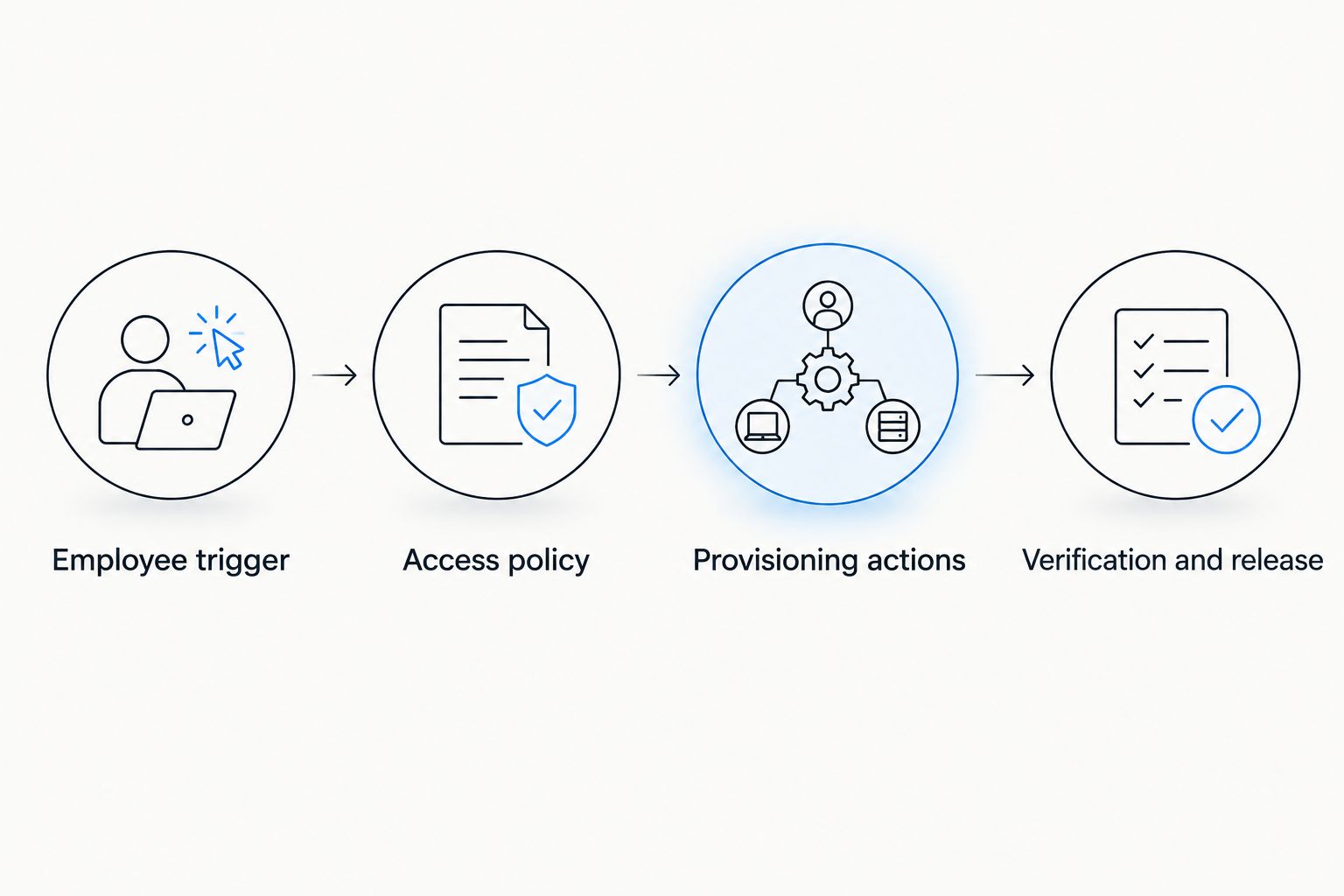
The configuration sequence is Employee trigger, Access policy, Provisioning actions, then Verification and release. Keep approval evidence attached to the decisions it controls, rather than collecting it only after accounts have been activated.
Update access whenever an employee changes roles
Use the same approved-record workflow for department changes, manager changes, and internal transfers. The trigger differs, but the stable identity and permission checks remain essential.
- Compare the employee's previous approved access manifest with the new role's manifest.
- Separate unchanged permissions, permissions to add, and permissions to remove.
- Obtain approval for exceptional additions and any temporary overlap between roles.
- Apply changes at the approved effective time, then verify the resulting destination state.
Role-change automation must remove obsolete access, not just add new access. Otherwise, an employee accumulates permissions from previous roles.
Do not remove permissions solely because a single HR field changed. Recalculate the approved manifest first, account for overlapping assignments, and preserve access that the new role still requires.
Treat rehires separately from ordinary updates. Check the existing identity, previous permissions, and current approval before reactivation. A historical account is not evidence that its historical access remains appropriate.
Troubleshooting
Duplicate employee accounts
Fix the matching rule before retrying account creation. Check whether the event contains the stable employee identifier and whether the workflow stored the destination account identifier. Review existing accounts before merging, disabling, or deleting anything.
Account exists but the application is inaccessible
Verify application assignment and authentication separately. Check the application role, group membership, account activation state, and enrollment status. Successful directory creation does not prove successful application provisioning.
Access activates before the employee starts
Check timezone handling and destination activation behavior. Inspect the effective timestamp and any invitation settings that enable access immediately. If the destination cannot hold access inactive, schedule account creation for the approved activation time instead.
A retry repeats completed actions
Retry the failed destination operation, not the whole onboarding workflow. Preserve successful account identifiers and action results. Check the destination's duplicate-request handling before enabling automatic retries for creation or invitation delivery.
A postponed or cancelled hire still receives access
Recheck eligibility immediately before activation. Cancel pending jobs when HR changes the approved start date or employment status. If access is already active, send the case through the approved access-removal process and verify the result.
Customize your workflow
Expand the workflow after the standard new-hire path passes testing. Add contractor-specific policies, location-based assignments, application-owner approvals, and a separate process for temporary privileged access. Keep each addition tied to a documented requirement.
Ottohr's hiring and onboarding scope provides the HR context for this design. Keep identity permissions and employee records distinct: a payroll change should not automatically become an application-access change unless an approved policy requires it.
For teams hiring in Turkey, apply personal-data controls to the provisioning payload and logs. KVKK is Turkey's personal data protection law; account administration does not justify copying the entire personnel file into every connected system. The HR compliance guide for foreign companies hiring in Turkey covers the broader employment context.
Assign an owner to review failed jobs, unresolved manual tasks, and permissions that differ from the approved manifest. Monitoring needs a decision-maker, not just a notification channel.
FAQ
What is new hire account provisioning automation?
New hire account provisioning automation creates or updates employee identities and assigns approved system access from an eligible employee record. A complete workflow also controls activation timing, handles exceptions, and verifies destination permissions.
Can I create accounts before an employee's first day?
Yes, when the destination supports account preparation without active access. Separate creation, invitation delivery, and activation, and confirm how each destination behaves before scheduling pre-start provisioning.
Does Ottohr automatically provision every business application?
Do not assume universal application provisioning from Ottohr's hiring and onboarding scope. Confirm the supported connection and account-management actions for each destination before including it in an automated workflow.
What employee information does the workflow need?
Use a stable employee identifier, approved employment status, start date, manager, and the attributes required by your access policy. Exclude compensation details and unrelated personnel documents unless a specific destination has an approved need for them.
How do I prevent duplicate accounts for rehires?
Match the employee to an existing identity before creating a new account. Review the previous account's status and permissions, then apply the current approved access manifest rather than restoring all historical access.
What should happen when a new hire's start date changes?
Reschedule pending activation and recheck employment eligibility before releasing access. Review any accounts or invitations already created so the changed date is reflected in every affected destination.
How do I know day-one access is ready?
Verify the account, approved permissions, activation state, and authentication enrollment path in the destination systems. Keep unresolved administrator tasks visible; a submitted provisioning job alone does not establish readiness.
One last thing
Test a cancelled hire before your 2026 rollout. It exposes whether your workflow rechecks approval or merely executes an old schedule. Confirm that pending activation stops and already-created accounts receive the appropriate review.
Ottohr onboarding records and destination access records answer different questions: whether employment is approved, and whether permissions are correct. Reconcile both before marking the employee ready for day one.


