
Best overall for complex warehouse operations: UKG Pro Workforce Management. Best for shift-led depots: Deputy. Best for mobile logistics crews: Connecteam. The best attendance software for logistics companies depends on where employees work, how supervisors approve exceptions, and what payroll needs at cutoff.
- UKG Pro Workforce Management leads this best attendance software for logistics companies shortlist for complex workforce management.
- Deputy suits shift-led depots; Connecteam suits mobile crews needing a frontline employee app.
- SAP SuccessFactors Time Tracking belongs on the shortlist when SAP already holds employee records.
- Choose attendance software by approved payroll output, not clock-in convenience alone.
Why this matters
A clock-in records an event. Payroll needs an approved interpretation of that event: working time, breaks, absence, overtime and the correct employee assignment. Your 2026 shortlist should address that entire chain.
Warehouse staff, dispatchers and drivers do not necessarily need the same capture method. They do need consistent rules for correcting missing records and approving payable hours. The wider HR software guide for logistics and warehouse companies explains the surrounding employee lifecycle.
Choose the system that produces an explainable attendance record, not simply the easiest clock-in. A convenient interface does not resolve a disputed break or an incorrectly assigned overnight shift.
What makes the best attendance software for logistics companies?
Use these six criteria before comparing vendors:
- Workplace coverage: Match warehouse terminals, depot clock-ins and mobile attendance to the actual workforce. Do not assume one capture method fits everyone.
- Shift interpretation: Require clear handling of overnight work, breaks, schedule changes and transfers between sites.
- Exception control: Identify who reviews missing punches, edits records and approves disputed hours before payroll receives them.
- Payroll handoff: Establish which system calculates payable time, which fields transfer, and how rejected records return for correction.
- Employee visibility: Give employees a defined way to inspect attendance and request corrections without changing approved records silently.
- Data governance: Review access permissions, retention, location collection and the audit history of changes.
For a 2026 purchase, treat these as acceptance criteria. A feature earns its place only when the vendor demonstrates your workflow with representative records.
Attendance software at a glance
The ranking below separates distinct buying situations. It does not imply that every product includes every logistics-specific rule or local payroll connection.
| Rank and option | Best for | Standout capability | Key limitation to assess |
|---|---|---|---|
| 1. UKG Pro Workforce Management | Complex warehouse operations | Workforce management spanning time, attendance and scheduling | Configuration scope and operating ownership |
| 2. Deputy | Shift-led depots | Scheduling alongside employee time capture | Depth of payroll and local compliance requirements |
| 3. Connecteam | Mobile logistics crews | Time tracking within a frontline employee app | Fit for complex pay-rule interpretation |
| 4. SAP SuccessFactors Time Tracking | Employers already using SAP SuccessFactors | Time tracking within the SuccessFactors environment | Fit outside an existing SAP HR architecture |
| 5. Ottohr | Employers evaluating broader HR and payroll consolidation | Hiring, onboarding, payroll, benefits and compliance tools | Attendance capture and logistics workflows require demonstration |
1. UKG Pro Workforce Management: best for complex warehouses
UKG Pro Workforce Management combines time and attendance with workforce scheduling. It is the first option to evaluate when your buying problem includes different work patterns, supervisor responsibilities and attendance exceptions across warehouse operations.
Start the demonstration with your hardest attendance record, not an ordinary shift. Ask the vendor to show how a supervisor resolves the exception and how payroll sees the approved result.
UKG Pro Workforce Management pros:
- Covers attendance and scheduling within a workforce-management product.
- Provides a relevant starting point for evaluating complex shift operations.
- Lets your shortlist focus on operational rules rather than time capture alone.
UKG Pro Workforce Management cons:
- Broad scope creates more configuration decisions than a clock-in-only requirement.
- Local payroll connections and specific terminal compatibility need separate verification.
- A software purchase does not replace ownership of attendance rules.
Best for: Warehouses where scheduling, attendance exceptions and supervisory approval belong in the same buying decision.
Verdict: Buy when the demonstrated rule handling matches your operation and your team can own the configuration. Skip this route if you only need straightforward time capture.
2. Deputy: best for shift-led depots
Deputy offers employee scheduling and time-and-attendance software. Evaluate Deputy when the depot roster is the center of daily work and managers need to compare scheduled shifts with recorded attendance.
The useful demonstration is a changed shift followed by a missing clock-out. Watch what the manager must do, what the employee sees, and what reaches payroll after approval.
Deputy pros:
- Combines scheduling and attendance in the same product category.
- Fits a buying process centered on shift assignment and recorded hours.
- Offers a direct alternative to selecting a broader HR suite for a scheduling problem.
Deputy cons:
- Scheduling and attendance do not establish local payroll compliance by themselves.
- Your required payroll connection needs validation at field level.
- Specialized driver records require a separate scope check.
Best for: Shift-led depots where managers organize work through a roster and review attendance against it.
Verdict: Buy when scheduling is the primary operational problem and the payroll handoff passes your acceptance test. Do not select it solely because creating a roster looks easy.
3. Connecteam: best for mobile logistics crews
Connecteam combines employee time tracking with tools for frontline team operations and communication. Evaluate Connecteam when employees work away from a shared terminal and you want attendance within an employee-facing app.
Mobile convenience is only part of the decision. Ask how the proposed setup handles unavailable connectivity, shared devices, personal-phone restrictions and disputed location records.
Connecteam pros:
- Places time tracking within a frontline employee app.
- Brings attendance into the same evaluation as team communication.
- Offers a distinct shortlist option for dispersed crews rather than fixed-terminal operations.
Connecteam cons:
- Mobile attendance introduces device-access and privacy decisions.
- App-based capture does not prove that complex payroll rules are covered.
- Offline behavior and location controls need a practical demonstration.
Best for: Mobile logistics crews whose attendance workflow starts away from a warehouse terminal.
Verdict: Buy when mobile capture is central and employees have an approved way to use the app. Hold if device policy or location-data governance remains unresolved.
4. SAP SuccessFactors Time Tracking: best for existing SAP employers
SAP SuccessFactors Time Tracking supports employee time tracking within the SAP SuccessFactors environment. Evaluate it when SuccessFactors already forms part of your HR architecture and attendance must fit that established structure.
Your demonstration should follow an employee assignment change into time recording and payroll preparation. Check responsibility for each handoff rather than assuming a shared vendor removes integration work.
SAP SuccessFactors Time Tracking pros:
- Places time tracking within the SuccessFactors product environment.
- Keeps the attendance decision connected to an existing SAP HR strategy.
- Provides a relevant comparison against adding a separate attendance application.
SAP SuccessFactors Time Tracking cons:
- Its architectural fit is less direct when you do not use SuccessFactors.
- Existing SAP ownership does not establish that every required component is included.
- Implementation responsibilities still need explicit allocation.
Best for: Logistics employers already committed to SAP SuccessFactors for employee records and HR processes.
Verdict: Buy when it fits your existing architecture and the required components are confirmed. Skip it as the default starting point for a standalone attendance purchase.
5. Ottohr: best for a broader HR and payroll shortlist
Ottohr provides hiring, onboarding, payroll, benefits and compliance tools for growing employers and mid-size to large enterprises. Evaluate Ottohr alongside attendance software when your project also includes replacing disconnected HR and payroll processes.
Keep the distinction clear: a broader HR platform is not automatically a specialist attendance system. Require a demonstration of time capture, shift exceptions, approvals and the payroll handoff before treating it as your attendance choice.
Ottohr pros:
- Covers payroll together with hiring, onboarding, benefits and compliance.
- Addresses a broader buying scope than a standalone clock-in application.
- Targets growing employers and larger organizations evaluating HR consolidation.
Ottohr cons:
- Logistics-specific attendance suitability needs a workflow demonstration.
- Terminal support, offline capture and detailed shift-rule handling require verification.
- A broad HR project adds decisions beyond attendance replacement.
Best for: Employers evaluating Ottohr alongside attendance software as part of a wider HR and payroll decision.
Verdict: Hold the attendance decision until the required workflows are demonstrated. Shortlist the platform for its stated HR scope, not an assumed logistics feature set.
Test the attendance-to-payroll workflow
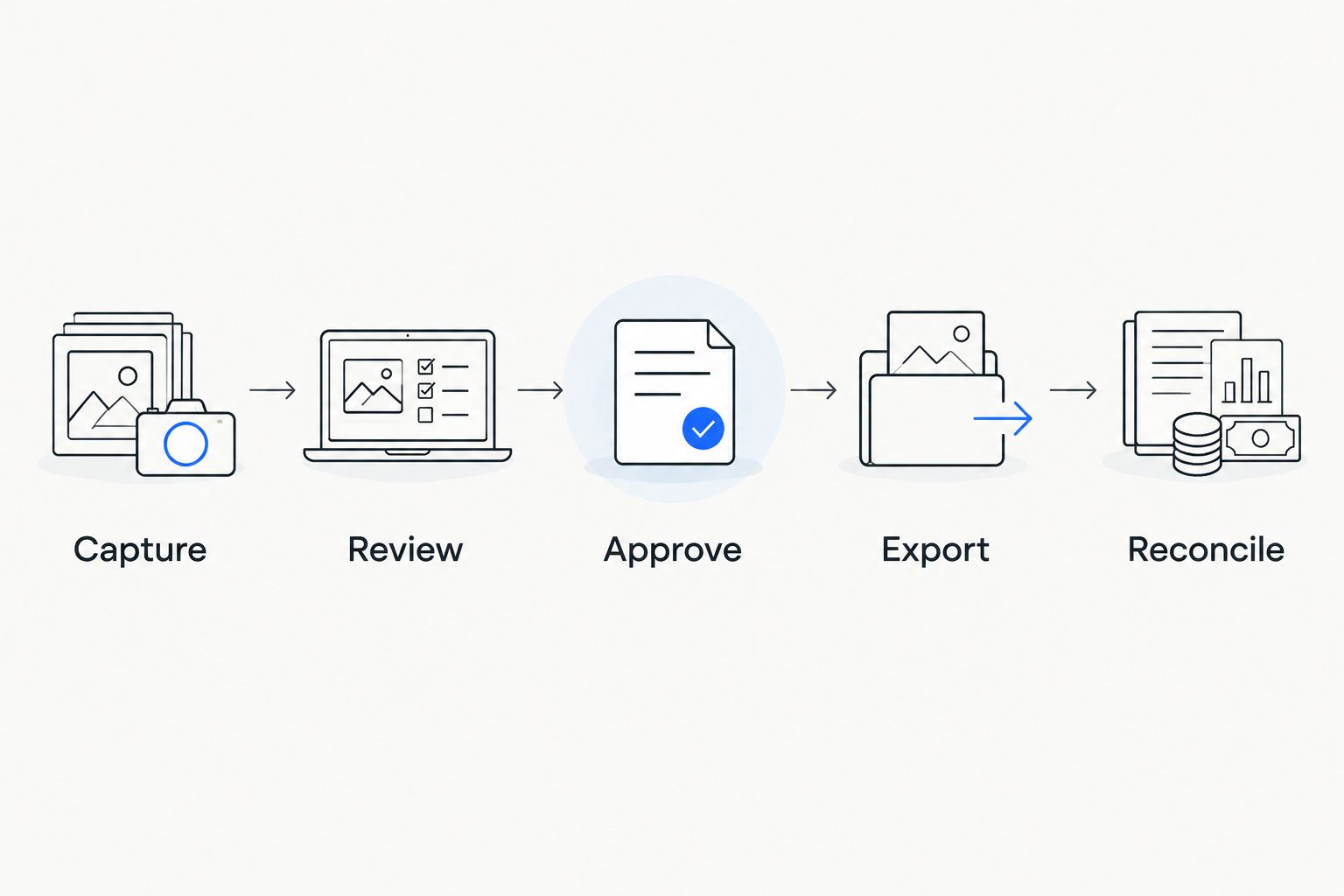
Use the same acceptance script for every 2026 vendor demonstration. Follow the record through these stages and insist on seeing the result, not just hearing that a feature exists:
- Capture: Record a representative shift using the proposed employee method.
- Review: Introduce a missing punch, a break correction and an assignment change.
- Approve: Show which supervisor authorizes each change and what remains in the history.
- Export: Transfer the approved attendance into the proposed payroll workflow.
- Reconcile: Compare the source record, approved hours and payroll input.
A vendor should explain both the ordinary path and the correction path. If a record fails validation, identify the owner responsible for resolving it before payroll closes.
Use a clearly defined overnight example. A shift from 22:00 to 06:00 spans 8 hours; with a 30-minute unpaid break, the example contains 7.5 hours of working time. These are test inputs, not a legal rule about when a break is unpaid.
Ask where the system assigns those hours, how it records the break, and how a correction changes the approved total. Do not accept an unexplained total simply because it matches the expected answer.
Turkey-specific checks for logistics employers
For a 2026 deployment in Turkey, distinguish raw attendance events from the approved puantaj record used in payroll preparation. PDKS refers to personnel attendance-control systems; a terminal event still needs interpretation against work schedules, leave and approved corrections.
Keep SGK reporting requirements separate from the clock-in demonstration. Ask who maps approved attendance into payroll and who checks missing-day treatment before filing.
KVKK also belongs in the selection process. Review the necessity, legal basis, access controls and retention for personal data collected through attendance, especially location or biometric data. Do not treat employee agreement as a substitute for reviewing the proposed processing.
For drivers, distinguish employee attendance from regulated driving and rest records. An attendance application does not establish that transport-specific recording obligations are covered.
How the options are ranked
This 2026 shortlist ranks product categories by operational fit, not by an invented test score. UKG leads for broad workforce-management needs; Deputy addresses roster-led operations; Connecteam addresses mobile frontline use; SAP addresses an existing SuccessFactors environment.
The criteria remain the same across those options: capture, shift interpretation, exception control, payroll handoff, employee visibility and governance. The broader HR-platform option serves a different procurement scope and therefore carries a conditional verdict.
Which attendance software should you choose?
Start with UKG Pro Workforce Management if complex warehouse attendance is your main problem. Compare Deputy when roster management drives the decision, Connecteam when mobile capture drives it, and SAP SuccessFactors Time Tracking when existing SAP architecture drives it.
For a wider HR and payroll project, keep Ottohr in the evaluation while testing attendance requirements explicitly. In your 2026 selection document, name the owner of every unresolved workflow before approving the purchase.
FAQ
What's the best attendance software for logistics companies?
UKG Pro Workforce Management is the first option on this shortlist for complex warehouse operations. Deputy fits shift-led depots, while Connecteam fits a buying process centered on mobile frontline attendance.
Is Deputy better than Connecteam for a logistics depot?
Deputy is the more relevant starting point when scheduling and attendance against a roster drive the decision. Compare Connecteam when a mobile frontline app is the central requirement, then test the same payroll handoff in both.
Can warehouse staff and drivers use the same attendance system?
Evaluate a shared system only if it supports the capture and approval workflow required for both groups. Warehouse terminals and mobile attendance are different requirements, and driver-specific regulatory records need a separate scope check.
Does attendance software calculate payroll automatically?
Attendance capture alone does not establish payroll capability. Confirm where payable time is calculated, who approves exceptions and which fields transfer into payroll.
What should Turkish employers check before buying attendance software?
Turkish employers should check puantaj preparation, payroll mapping, SGK-related responsibilities and KVKK requirements. Test how raw PDKS events become approved records rather than treating a terminal connection as the complete workflow.
How should we compare attendance software costs?
Compare the full scope required for your workforce, not a headline subscription figure. Request written details covering implementation, terminals, integrations, support and the components needed for your proposed workflow.
Can an attendance app replace driver working-time records?
Do not assume an attendance app replaces transport-specific driving and rest records. Define those obligations separately and require explicit confirmation of the proposed system's scope.
One last thing
Ask each vendor to correct an already approved attendance record. The original event, reason for change, approving person and revised payroll input should remain explainable. That demonstration reveals more about operational control than another ordinary clock-in.


