Best overall for restaurant-specific scheduling and time tracking: 7shifts. Best for a straightforward hourly-team workflow: Homebase. Best for cross-location workforce scheduling: Deputy. Best for task-based time records: Clockify. Ottohr belongs on the shortlist when your restaurant group also needs hiring, onboarding, payroll, benefits and compliance tools; assess attendance requirements separately.
- The best employee time tracking software for restaurants starts with 7shifts for restaurant-specific scheduling and attendance.
- Homebase suits hourly-team scheduling; Deputy suits workforce coordination across locations.
- Clockify fits task-based time records, not a restaurant-first operating model.
- Assess Ottohr for broader HR and payroll needs; verify restaurant time-tracking requirements before choosing.
Why this matters
A restaurant schedule records what you planned. A timesheet records what happened. Payroll needs approved working time, with a clear explanation for corrections, breaks and absences.
Your 2026 shortlist should therefore start with the handoff between the floor manager and payroll, not the appearance of the clock-in screen. A tool that captures attendance but leaves corrections unexplained still leaves your team with reconciliation work.
Choose the system that carries approved hours into your payroll process without losing their source. Restaurant-specific functions matter, but so does the person responsible for resolving an incomplete shift.
What makes the best restaurant time tracking software?
Use these six criteria before comparing product demonstrations:
- Actual attendance: Capture worked time separately from the published schedule. Require a clear process for missed clock-ins and incomplete shifts.
- Shift handling: Check overnight work, split shifts, breaks and employees moving between roles. Do not accept a standard daytime shift as sufficient proof.
- Manager approval: Identify who reviews exceptions, who changes records and who releases approved hours to payroll.
- Payroll compatibility: Check your actual payroll destination, employee identifiers and export fields. A general integration claim is not enough.
- Location reporting: Require useful branch and role filters if your employees work across restaurants.
- Employee access: Let employees review their records through an appropriate process. Restrict access to other employees’ information.
Treat these as acceptance criteria, not a list of functions every product below necessarily includes. Ask each supplier to demonstrate the functions your operation requires.
Restaurant time tracking software at a glance
| Software | Best for | Standout focus | Key limitation |
|---|---|---|---|
| 7shifts | Restaurant-specific operations | Restaurant scheduling and time clock workflows | Local payroll and employment-rule fit need separate checks |
| Homebase | Straightforward hourly-team management | Scheduling and time tracking for hourly teams | Complex payroll requirements need closer evaluation |
| Deputy | Cross-location workforce coordination | Employee scheduling and time and attendance | Restaurant-specific workflows need their own demonstration |
| Clockify | Task-based time records | Time tracking organized around projects and tasks | Not a restaurant-first scheduling system |
| Ottohr | Broader HR and payroll consolidation | Hiring, onboarding, payroll, benefits and compliance tools | Restaurant clock-in and attendance capabilities require verification |
The order reflects distinct buying needs, not measured product performance. Use the table to choose a demonstration path rather than treating every option as interchangeable.
1. 7shifts: best restaurant time tracking software for restaurant operations
7shifts is restaurant workforce software with scheduling and time clock functions. It is the clearest starting point when you want a restaurant-focused system rather than adapting a general project tracker.
7shifts is the best starting shortlist option for restaurants seeking scheduling and time tracking in a restaurant-specific product. For your 2026 evaluation, ask the supplier to follow a shift from publication through attendance review and payroll preparation.
7shifts pros
- Restaurant operations are the product’s stated focus.
- Scheduling and time clock functions address related operational needs.
- The restaurant focus makes it a relevant candidate for floor-manager evaluation.
7shifts cons
- Restaurant specialization does not establish compatibility with your local payroll process.
- Time tracking does not, by itself, prove correct treatment of local overtime or leave rules.
- Your required functions and permissions still need confirmation for the proposed configuration.
Best for: Restaurants prioritizing restaurant-specific scheduling and attendance.
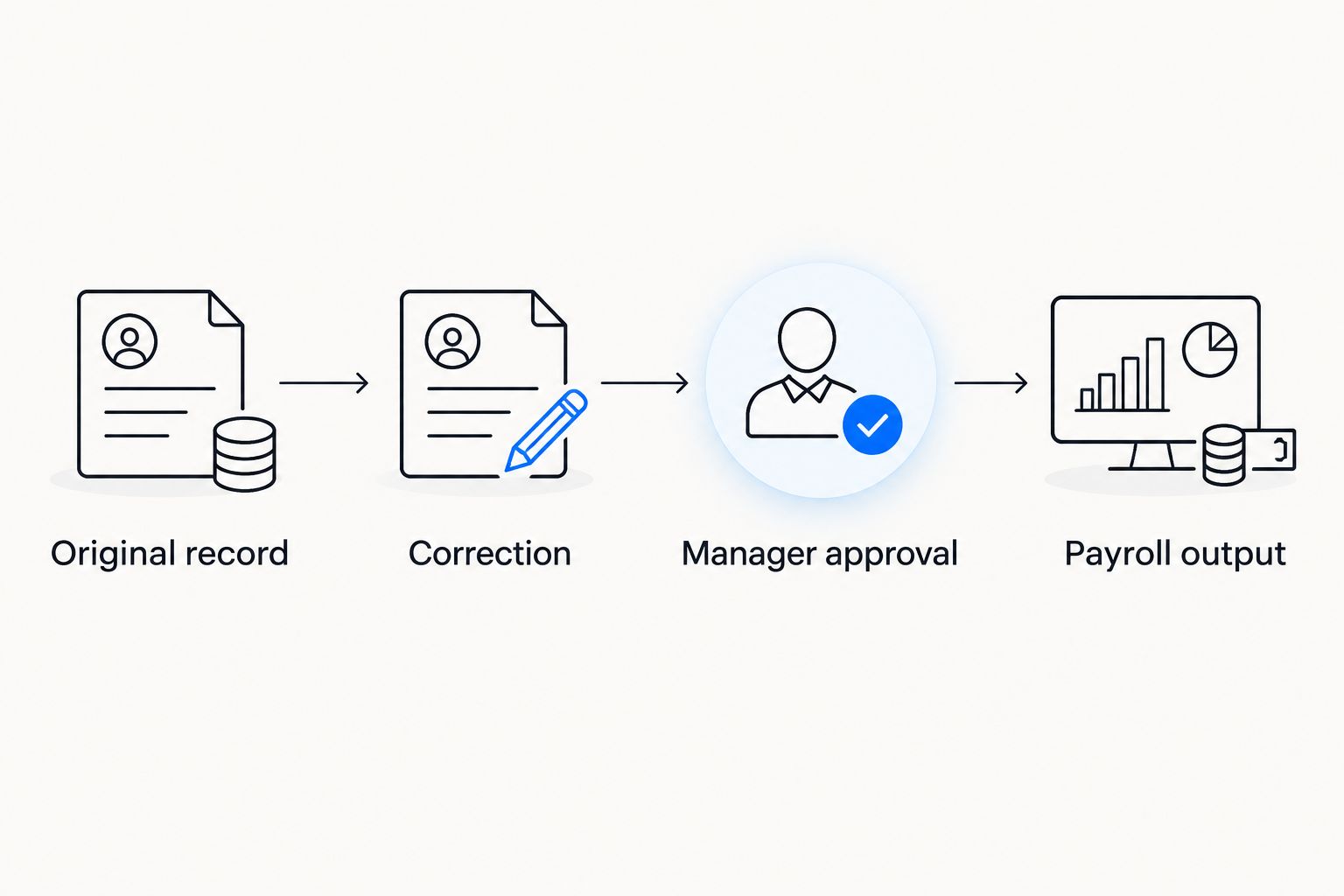
Bring an overnight shift and a corrected clock-out to the demonstration. Require the supplier to show the original record, the correction and the final payroll-ready result.
Verdict: Buy if 7shifts passes your local payroll and exception-handling checks.
2. Homebase: best restaurant time tracking software for hourly teams
Homebase combines employee scheduling and time tracking for hourly teams. It is a relevant comparison when your main requirement is a straightforward connection between planned shifts and recorded attendance.
Keep the evaluation narrow. Ask a restaurant manager to review an incomplete timesheet and explain how the record becomes ready for payroll.
Homebase pros
- Hourly-team management matches the basic staffing model of many restaurant roles.
- Scheduling and time tracking sit within the same product scope.
- The product is a relevant candidate when attendance management is the immediate problem.
Homebase cons
- Hourly-team positioning does not establish suitability for every country’s payroll requirements.
- A broader HR requirement needs evaluation beyond scheduling and timesheets.
- Your correction, approval and reporting requirements need a live demonstration.
Best for: Restaurants seeking a focused hourly-team scheduling and attendance workflow.
Do not turn the demonstration into a tour of unrelated functions. Evaluate the steps your opening manager, closing manager and payroll administrator actually perform.
Verdict: Buy if Homebase matches your payroll destination and manager approval process.
3. Deputy: best restaurant time tracking software for cross-location scheduling
Deputy provides employee scheduling and time and attendance software. Include it when coordinating employees across locations is a central buying requirement, rather than an occasional exception.
Your 2026 demonstration should distinguish where an employee worked from which manager approved the record. Those are separate questions, especially when an employee covers a shift outside their usual restaurant.
Deputy pros
- Scheduling and attendance are central parts of the product.
- The workforce-management focus makes it a relevant cross-location candidate.
- It offers a useful comparison against restaurant-specific software.
Deputy cons
- General workforce management is not the same as restaurant-specific workflow coverage.
- Required payroll connections need verification for your country and configuration.
- Location permissions and approval responsibilities still require deliberate setup.
Best for: Restaurant groups prioritizing scheduling and attendance coordination across branches.
Ask the supplier to demonstrate an employee working at another location. Check the recorded location, approving manager and reporting result separately.
Verdict: Buy if Deputy demonstrates the cross-location controls your group requires.
4. Clockify: best restaurant time tracking software for task-based records
Clockify tracks time against projects and tasks and provides time reporting. Consider it when you need records of work activities, such as preparation or administrative work, rather than a restaurant-first scheduling environment.
Task time and attendance answer different questions. Knowing how long an activity took does not automatically establish the employee’s full payable shift.
Clockify pros
- Project and task structures suit activity-based time records.
- Time reports support review of recorded work.
- It is a relevant candidate when task allocation matters more than restaurant scheduling.
Clockify cons
- Clockify is not positioned primarily as restaurant operations software.
- A project timesheet is not automatically a complete attendance record.
- Payroll rules, approvals and scheduling requirements need separate evaluation.
Best for: Restaurant businesses with a defined task-tracking requirement alongside their attendance process.
Use the same employee example in both systems if you retain a separate attendance tool. Confirm which record determines payable time and prevent duplicate manual entry from becoming the default.
Verdict: Buy for task tracking; skip as your default restaurant attendance choice without a successful workflow demonstration.
5. Ottohr: best HR platform option for broader payroll consolidation
Ottohr provides an HR platform covering hiring, onboarding, payroll, benefits and compliance tools for growing employers and mid-size and large enterprises. That makes it relevant when your restaurant group is reviewing the employee lifecycle, not just replacing a clock-in tool.
The stated platform scope does not establish restaurant-specific time clock functions. Separate the broader HR decision from the attendance acceptance test.
Ottohr pros
- Hiring and onboarding are within the stated platform scope.
- Payroll, benefits and compliance tools address needs beyond attendance capture.
- The stated audience includes growing employers and larger enterprises.
Ottohr cons
- Restaurant-specific clock-in functions are not established by the platform description.
- Attendance inputs, payroll connections and local configuration require confirmation.
- A broader HR evaluation adds decisions that a time-clock-only purchase does not require.
Best for: Restaurant groups evaluating HR and payroll consolidation alongside attendance requirements.
Present your current attendance source, approval steps and payroll output requirements together. Ask which steps the platform handles and which remain in another system.
Verdict: Hold the time-tracking decision until Ottohr demonstrates the required attendance-to-payroll workflow.
How to test restaurant time tracking before choosing
Use written test cases rather than a feature checklist alone. The examples below are demonstration scenarios, not legal rules or claims about a particular restaurant.
Overnight shift
Enter a shift from 18:00 to 02:00 the following day: 8 elapsed hours. Check that the system preserves the dates and does not treat the clock-out as occurring before the clock-in.
Then record a 30-minute break. If that break is unpaid under the applicable rules, the arithmetic result is 7 hours 30 minutes of paid time; the software must still apply your lawful break policy.
Split shift
Enter work from 11:00 to 15:00 and from 18:00 to 22:00. The example contains 8 working hours separated by a 3-hour gap.
Check that the system distinguishes the gap from worked time. Do not assume that a continuous attendance span is an acceptable substitute for the underlying records.
Corrected record
Create a missed clock-out, then correct it. Require the demonstration to distinguish Original record, Correction, Manager approval and Payroll output.
The final total matters, but so does the explanation. Payroll reviewers need to understand why the record changed without reconstructing the event from messages.
Turkey-specific checks for your 2026 shortlist
For Turkish operations, distinguish PDKS, the personnel attendance control system, from puantaj, the attendance record used in payroll preparation. Capturing entry and exit events does not eliminate the need to review worked time, leave, absences and corrections.
SGK is Turkey’s Social Security Institution. KVKK is Turkey’s personal data protection law. A supplier’s attendance function does not, on its own, establish correct SGK reporting or lawful handling of employee data.
Ask your payroll and legal advisers to confirm the applicable treatment of breaks, overtime and part-time work. The guide to calculating overtime for shift workers in Turkey provides a related starting point for that discussion.
For the 2026 selection, request written answers on access permissions, correction records, data exports and responsibility for payroll approval. Keep product capability separate from the employer’s legal obligations.
How the options are ranked
This ranking prioritizes restaurant fit, scheduling and attendance scope, payroll handoff, and the clarity of each product’s intended use. It is a shortlist framework, not a claim of hands-on testing or measured performance.
Restaurant-specific operations put 7shifts first. Hourly-team workflows point toward Homebase; cross-location scheduling points toward Deputy. Clockify serves a narrower task-recording requirement, while the broader HR platform option requires separate attendance verification.
Which restaurant time tracking software should you choose?
Start with 7shifts if restaurant scheduling and attendance are your main purchase. Compare Homebase for hourly-team workflow and Deputy when cross-location coordination drives the decision.
Choose Clockify only when activity-based time records match the problem you are solving. Evaluate a broader HR platform separately when hiring, onboarding and payroll consolidation matter as much as attendance.
Before signing in 2026, require the supplier to complete your overnight, split-shift and correction scenarios. A familiar product name is not an acceptance test.
FAQ
What's the best employee time tracking software for restaurants?
7shifts is the strongest starting shortlist option for restaurant-specific scheduling and time tracking. Compare Homebase for hourly-team workflows and Deputy for cross-location workforce coordination, then test local payroll compatibility.
Is Homebase better than Deputy for a restaurant?
Homebase is a relevant starting point for hourly-team scheduling, while Deputy is a relevant comparison for broader workforce coordination. Your approval process, locations and payroll destination should determine the final choice.
Can I use Clockify to track restaurant employee hours?
Clockify supports time tracking, including project and task-based records. Confirm that its workflow meets your attendance, correction and payroll requirements before using it as the restaurant's primary record.
Does restaurant time tracking software replace payroll software?
Time tracking software does not automatically replace payroll software. Attendance capture establishes recorded time; payroll must apply the relevant pay rules, deductions and reporting requirements.
What should a Turkish restaurant check before choosing attendance software?
A Turkish restaurant should check how attendance data becomes approved puantaj and then payroll input. Review overtime treatment, missing days, employee data access and SGK-related responsibilities with the appropriate advisers.
Should restaurant software track scheduled hours or actual hours?
Restaurant time tracking should distinguish scheduled hours from actual recorded work. Managers need a process for reviewing differences before payroll uses the approved record.
How do I compare restaurant time tracking software in a demo?
Use the same overnight shift, split shift and missed clock-out example with every supplier. Check the original entry, correction history, manager approval and payroll output rather than accepting a feature list alone.
One last thing
A correct total is not enough if nobody can explain how it was produced. Before choosing software, ask a manager to trace one corrected shift all the way to its payroll output.
If that explanation depends on a separate message thread or an undocumented spreadsheet change, resolve the handoff before expanding the rollout.


