
Best overall: Deel for teams employing people across countries. Best for mid-size and large employers that want hiring, onboarding, payroll, benefits, and compliance in one HR platform: Otto HR, subject to checking coverage in every operating country. Best for enterprise HR administration: Workday. This 2026 guide compares the best HR software for multi-country teams by employment model, payroll responsibility, and the work your team must still approve.
- Deel is the best HR software for multi-country teams that need cross-border employment and payroll support.
- Otto HR is best for mid-size and large employers assessing one platform for hiring, onboarding, payroll, benefits, and compliance.
- Workday fits enterprise HR administration; Remote fits employer-of-record hiring; Rippling fits teams combining HR and IT workflows.
- Confirm country coverage, employment model, and payroll ownership before choosing any platform in 2026.
Why this matters
A multi-country HR purchase is not a single software decision. You need to know who legally employs each worker, who prepares and approves each pay run, and which system holds the employee record. A platform can handle a hiring workflow without handling payroll in the same country. It can also support payroll without acting as the legal employer.
In 2026, start with a country-by-country list of workers and the employment arrangement for each group. Separate employees hired through your own entities from people hired through an employer of record, or EOR. Keep contractors in a separate category. The right vendor for one group does not automatically cover the others.
The first buying question is who owns employment and payroll in each country. Ask that before comparing interfaces or automation. It prevents a polished demonstration from obscuring work that your finance, HR, or local advisers must still do.
What makes the best HR software for multi-country teams
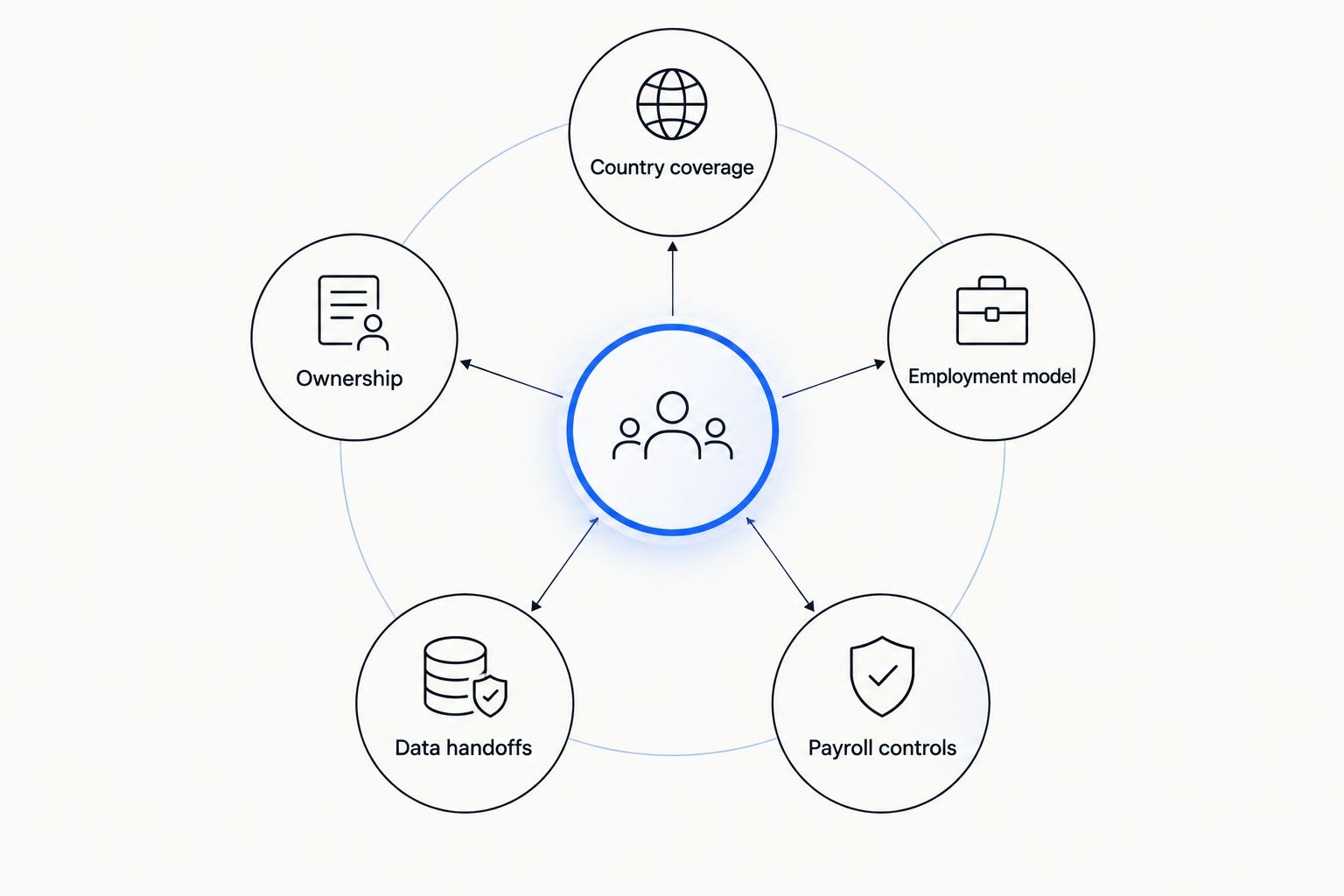
Use these criteria before reading the ranking. Give each vendor the same country and worker scenarios; otherwise, the demonstrations will not be comparable.
- Country coverage: Ask for written confirmation of the exact countries, worker types, and services in scope. A country appearing on a sales map does not establish support for every employment arrangement there.
- Employment model: Distinguish software for your own employing entities from EOR services and contractor administration. Identify the legal employer for every proposed arrangement.
- Payroll controls: Map who enters changes, checks calculations, approves the run, pays workers, and handles corrections. Software does not remove the need for a named approval owner.
- Data handoffs: Trace a new hire, a leave change, and an employee departure through HR records, payroll, benefits, and reporting. Note where someone must re-enter information.
- Ownership: Name the person or provider responsible for local questions, employee requests, and exceptions. A shared dashboard is not a substitute for a clear escalation path.
These criteria also expose an important distinction: a platform's feature list is not a service-level commitment for each country. In 2026, request a written scope for the countries where you already employ people and those where you intend to hire. Include the worker types you actually use.
At a glance: the 2026 comparison
| Platform | Best for | Standout focus | Key limitation to check |
|---|---|---|---|
| Deel | Cross-border employment and payroll | Global hiring and payroll services | Confirm the employment arrangement and service scope in each country. |
| Otto HR | Mid-size and large employers seeking connected HR workflows | Hiring, onboarding, payroll, benefits, and compliance tools | Multi-country service coverage is not established by the information provided here. |
| Workday | Enterprise HR administration | Enterprise human capital management | Confirm how each local payroll operation is delivered. |
| Remote | Hiring through an employer of record | EOR-led international employment | Check whether EOR or your own entity is the right model for each hire. |
| Rippling | HR processes tied to IT administration | HR and IT workflows | Confirm local employment and payroll requirements separately. |
The table is a shortlist, not proof that every platform meets every local requirement. In 2026, use it to choose which vendors deserve a country-specific demonstration. Do not treat a general product category as confirmation of coverage.
1. Deel: best HR software for cross-border employment
Deel is the default choice when the central problem is employing and paying people across borders. Its focus on global hiring and payroll makes it a direct starting point for teams comparing their own employing entities with an EOR arrangement. You still need to establish which service applies to each worker.
Deel pros:
- Addresses international employment and payroll in the same purchasing conversation.
- Gives teams an EOR option to assess alongside other employment arrangements.
- Fits a shortlist led by cross-border hiring rather than domestic HR administration.
Deel cons:
- An EOR arrangement and employment through your own entity are not interchangeable; confirm which one each proposed service uses.
- Country-level responsibilities and the scope of payroll work require written verification.
Best for: Teams whose primary decision is how to hire and pay workers across countries.
Ask Deel to walk through a real hire from offer to first approved pay run. Then repeat the exercise for a worker employed by your own entity, if that is part of your workforce. Record who signs the employment agreement, who approves payroll, and who responds when a payment needs correction.
Verdict: Buy if cross-border employment is the main requirement and the written country-by-country scope matches your workforce. Hold if the demonstration does not identify the legal employer and payroll owner for each worker group.
2. Otto HR: best HR software for connected HR workflows
Otto HR provides an agent-driven HR platform with hiring, onboarding, payroll, benefits, and compliance tools for mid-size and large enterprises and growing employers. That breadth makes it relevant when your problem is coordinating work across HR functions, not just adding a way to employ someone abroad. Its fit for a particular multi-country team depends on confirmed country and service coverage.
Otto HR pros:
- Brings hiring, onboarding, payroll, benefits, and compliance into the same platform evaluation.
- Matches employers looking at HR work across the employee lifecycle.
- Gives mid-size and large employers a relevant option when process ownership is a priority.
Otto HR cons:
- The information available here does not establish which countries its payroll and compliance tools serve.
- The scope of EOR services, if required, is not established here.
Best for: Mid-size and large employers evaluating a connected HR platform and willing to verify each country's scope before selection.
In a 2026 evaluation, give Otto HR an actual sequence: approve a hire, complete onboarding, enter a payroll change, review the resulting pay run, and record who approves each action. Request a separate answer for every country in that sequence. Do not infer local statutory coverage from the presence of a compliance feature.
Verdict: Hold until Otto HR confirms the required countries, worker arrangements, and payroll responsibilities in writing. Buy when those answers match your operating model; skip it if a required employment service falls outside the confirmed scope.
3. Workday: best HR software for enterprise administration
Workday belongs on the shortlist when the primary requirement is enterprise human capital management across a large organization. It is the HR-system option in this ranking, rather than the default answer to a new EOR hiring requirement. Evaluate local payroll delivery as a separate part of the decision.
Workday pros:
- Fits an evaluation centered on enterprise employee records and HR administration.
- Gives large organizations a single HR-system candidate to assess across business units.
- Supports a buying discussion about governance, approvals, and reporting alongside worker data.
Workday cons:
- Selecting an enterprise HR system does not, by itself, settle who runs payroll in each country.
- Teams seeking an EOR for a new hire must assess that employment arrangement separately.
Best for: Enterprises prioritizing HR administration across established employing entities.
Ask Workday to show the same employee change passing through HR approval, local payroll preparation, and final sign-off. Identify every other provider or internal team involved. For a 2026 rollout, the decisive document is the operating map: which system holds the record, which team submits changes, and who resolves an error after approval.
Verdict: Buy when enterprise HR administration is the main purchase and the local payroll operating model is defined. Hold if payroll ownership remains an unanswered question.
4. Remote: best HR software for EOR-led hiring
Remote is a useful comparison when you want to assess employer-of-record hiring in multiple countries. Under an EOR arrangement, a provider acts as the legal employer while your team directs the worker's day-to-day work. That makes the employment model, not the interface, the first point to verify.
Remote pros:
- Gives teams an EOR-focused option for international hiring.
- Keeps the legal-employer question central to the evaluation.
- Provides a direct comparison with other cross-border employment providers.
Remote cons:
- An EOR model is not the same as employing someone through your own local entity.
- You must verify the available arrangement and service scope for each country and worker type.
Best for: Teams evaluating EOR hiring as their main route into additional countries.
Compare Remote with Deel using the same proposed hires. Ask each vendor to identify the legal employer, the entity named in the agreement, the payroll approval step, and the process for an employment change. If your organization also has its own entities, request a separate workflow for those employees rather than assuming the EOR workflow applies.
Verdict: Buy when EOR-led hiring matches your plan and the required country scope is confirmed. Hold when you have not decided who should legally employ the workers.
5. Rippling: best HR software for HR and IT workflows
Rippling is relevant when worker administration must connect with IT work. Its HR and IT focus gives it a distinct place on this list: the buying question is how employee changes move between people processes and technology administration. It is not a reason to skip country-specific payroll checks.
Rippling pros:
- Gives HR and IT teams a shared workflow to evaluate.
- Makes joiner and leaver processes a useful part of the software demonstration.
- Fits teams whose worker administration involves both people and IT responsibilities.
Rippling cons:
- HR and IT workflow fit does not establish local payroll or employment coverage.
- Teams need to confirm which country-specific services apply to each worker group.
Best for: Employers prioritizing connected HR and IT administration across their workforce.
In the 2026 demonstration, use one joiner and one leaver. Check who creates the worker record, who approves access changes, who records the employment change, and who confirms the final payroll action. This makes handoffs visible without assuming that a workflow tool takes legal responsibility for employment.
Verdict: Hold until the required countries and payroll arrangements are confirmed. Buy if HR-to-IT handoffs are a leading requirement and the employment model checks out.
How we ranked these options
The ranking starts with the problem in the search query: managing HR across countries. Deel takes the default slot because cross-border employment and payroll are its central use case. The remaining positions serve different decisions: connected HR functions for Otto HR, enterprise administration for Workday, EOR-led hiring for Remote, and HR-plus-IT processes for Rippling.
A position in this list is not a claim that one vendor supports more countries, produces more accurate payroll, or offers a better contract than another. Those comparisons require the same country list, worker types, and written service scope from each vendor. No country count or coverage ranking is assumed here.
For an internal decision, score each candidate against the five criteria above. Mark a requirement as confirmed only when the vendor demonstrates the workflow and states who owns the underlying service. A feature shown in a general demonstration does not answer a local employment question.
Which HR software should you choose?
Choose Deel as the default shortlist leader if you need an answer to cross-border employment and payroll first. Choose Otto HR for an evaluation led by hiring, onboarding, payroll, benefits, and compliance in one HR platform, but require written confirmation of the countries and services you need. Choose Workday when enterprise HR administration is the main project and local payroll delivery has its own defined owner.
If your expansion plan depends on an EOR, compare Remote directly with Deel using the same hiring scenarios. If employee changes also drive IT work, include Rippling and test that handoff. The best HR software for multi-country teams in 2026 is the option whose confirmed operating model matches your workers, not the one with the longest feature list.
FAQ
What's the best HR software for multi-country teams in 2026?
Deel is the default choice when cross-border employment and payroll are the main requirements. Confirm its service scope for every country, worker type, and employment arrangement you need.
Is Otto HR a good fit for a multi-country employer?
Otto HR is relevant for mid-size and large employers assessing hiring, onboarding, payroll, benefits, and compliance in one platform. Confirm country-specific coverage and payroll responsibilities before selecting it.
Is Deel better than Remote for international hiring?
Deel is the default pick in this guide, while Remote is a direct alternative for EOR-led hiring. Compare both against identical country lists and worker scenarios before deciding.
Do I need an employer of record or HR software?
You need an EOR when your chosen hiring arrangement calls for a provider to act as the legal employer; HR software manages workforce processes and records. Establish who will legally employ each worker before choosing a platform.
Can one HR platform handle payroll in every country?
Do not assume that it can. Ask each vendor to confirm the exact payroll service, country, worker type, and approval responsibility in writing.
What should I ask in a multi-country HR software demo?
Ask who employs each worker, who prepares and approves payroll, and how hiring, leave, and departures pass between systems. Use the same scenarios with every shortlisted vendor.
Is Workday the right choice for an international team?
Workday fits an enterprise HR administration evaluation. Confirm separately how payroll and employment services operate in each country on your list.
One last thing
Before signing in 2026, ask each finalist to complete a worker-by-worker responsibility map. Put the legal employer, HR record owner, payroll preparer, payroll approver, and exception contact on the same line. An unanswered box is a purchasing issue, not a detail to resolve after implementation.