
Best overall for complex enterprises: Workday HCM. Best for agent-led HR workflows: Ottohr. Best for connected HR and IT administration: Rippling. This 2026 guide compares the best HRIS software for multi-location businesses by organizational structure, local controls, payroll requirements, and employee workflows—not by office count alone.
- Workday HCM leads this best HRIS software for multi-location businesses shortlist for complex enterprise structures.
- Ottohr suits growing employers evaluating agent-led hiring, onboarding, payroll, benefits, and compliance workflows.
- Rippling fits organizations that want employee administration connected with IT workflows.
- Choose location permissions, payroll coverage, and transfer handling before comparing convenience features.
Why this matters
A branch is not necessarily a legal entity. A legal entity is not necessarily a payroll group. Your HRIS needs to represent those distinctions without turning each employee move into a new record or an uncontrolled spreadsheet update.
For a 2026 selection, start with the hardest transaction: an employee moving between locations while retaining employment history. Ask who approves the change, which policies apply afterward, and how the payroll team receives the updated information.
The best multi-location HRIS keeps employee records connected while separating the permissions and rules that must stay local. A centralized database is useful only when managers can act within the right boundaries.
What makes the best HRIS for multi-location businesses
Use these criteria before reading the shortlist. They separate a practical multi-location system from a directory with a location field.
- Organizational structure: Represent sites, departments, reporting relationships, and employing entities separately. Test effective-dated changes rather than only the initial setup.
- Scoped permissions: Give location managers access to the employees and actions they need. Check sensitive fields and reports, not just profile visibility.
- Payroll boundaries: Establish which countries and entities the proposed configuration covers. Distinguish payroll processing from integrations and outsourced services.
- Local workflows: Route hiring, onboarding, leave, and employee changes to the appropriate approvers. Preserve central oversight without making headquarters approve every routine task.
- Connected records: Trace a change from its source through payroll, benefits, attendance, and reporting. Document where a separate system remains responsible.
- Auditability: Identify who requested, approved, and executed a change. Confirm how corrections and historical records appear in reports.
Your shortlist should follow operating complexity. A domestic business with several branches has different requirements from an employer with separate entities across countries.
Multi-location HRIS options at a glance in 2026
These are distinct use-case recommendations, not interchangeable winners. Payroll and compliance scope must be checked against the specific country, entity, and proposed configuration.
| Platform | Best for | Standout focus | Key limitation to resolve |
|---|---|---|---|
| Workday HCM | Complex enterprise structures | Enterprise human capital management and organizational administration | Define the proposed payroll and deployment scope separately |
| Ottohr | Agent-led HR workflows | Hiring, onboarding, payroll, benefits, and compliance tools | Validate location controls and approval handling against your workflow |
| Rippling | Connected HR and IT administration | Employee administration connected with app and device management | Distinguish required modules from the wider platform |
| SAP SuccessFactors HCM | Organizations aligning HR with an SAP environment | Core HR alongside talent-management applications | Map responsibilities across the proposed SAP applications |
| BambooHR | People operations centered on employee records | Employee records, onboarding, and HR workflows | Test entity complexity and country-specific payroll requirements |
| ADP Workforce Now | US-centered HR and payroll administration | HR, payroll, time, and benefits administration | Confirm how non-US operations fit the proposed solution |
1. Workday HCM: best HRIS for complex enterprise structures
Workday HCM provides enterprise human capital management, including employee information and organizational management. It belongs on the shortlist when your business needs to manage reporting structures and workforce processes across a complex organization.
The selection question is not whether Workday HCM can store multiple locations. Ask how the proposed setup handles reorganizations, delegated administration, and changes that take effect on different dates.
Workday HCM pros:
- Enterprise HCM scope supports a broader evaluation than basic employee records.
- Organizational management is directly relevant to branches, departments, and reporting relationships.
- HR and workforce reporting can be assessed within the same enterprise HCM selection.
Workday HCM cons and trade-offs:
- Enterprise breadth creates configuration decisions; your team still needs a defined operating model.
- An HCM selection does not establish payroll coverage for every employing entity. Evaluate the payroll arrangement separately.
Use a transfer demonstration, not a generic dashboard tour. Have the vendor show the old manager's access ending, the new manager's access beginning, and historical reporting retaining the correct organizational context.
Best for: Enterprises whose location structure is part of a wider organizational-management problem.
Verdict: Buy Workday HCM for a complex enterprise operating model, after validating the proposed deployment and payroll scope.
2. Ottohr: best HRIS for agent-led HR workflows
Ottohr provides an agent-driven HR platform with hiring, onboarding, payroll, benefits, and compliance tools. Its stated audience includes growing employers and mid-size to large enterprises.
Ottohr is best for growing employers evaluating agent-led HR workflows across hiring, onboarding, payroll, benefits, and compliance. For a multi-location business, the evaluation should focus on how those workflows handle local ownership and central approval.
Ottohr pros:
- The stated scope covers several employee-lifecycle functions rather than hiring alone.
- Hiring and onboarding can be evaluated alongside downstream payroll and benefits requirements.
- Agent-driven workflows offer a specific alternative to evaluating only conventional form-based administration.
Ottohr cons and trade-offs:
- Agent-driven actions require explicit approval boundaries, exception ownership, and review procedures.
- Broad functional scope does not establish suitability for your location structure. Test entity separation, manager permissions, and local rules directly.
Ask for a demonstration that starts with a location-specific hire and ends with the approved employee record reaching the relevant downstream workflow. Include a rejected action so your reviewers can inspect what happens when the process stops.
Best for: Growing employers selecting an HRIS around agent-led execution with human approval.
Verdict: Hold until the multi-location demonstration proves the required controls; buy when those controls match your operating model.
3. Rippling: best HRIS for connected HR and IT administration
Rippling brings employee administration together with business applications that include IT management. It is relevant when a hire, transfer, or departure affects both HR records and employee access.
For a distributed business, test the relationship between an employee's location, role, and access requirements. Do not assume a location change should automatically produce the same access change for every worker.
Rippling pros:
- HR and IT administration can be evaluated within a connected platform.
- App and device management are relevant to onboarding and offboarding across sites.
- A shared employee context gives you a useful basis for testing cross-functional workflows.
Rippling cons and trade-offs:
- A broader platform requires a clear module boundary. Identify exactly which functions are included in the proposed configuration.
- Connected workflows need exception handling; location alone is not a sufficient access rule.
Request separate demonstrations for a new hire, a branch transfer, and a departure. Include an employee who retains access to a central function after changing work location.
Best for: Businesses where employee changes repeatedly create work for both HR and IT.
Verdict: Buy Rippling when connected HR and IT administration is a core requirement, not an incidental extra.
4. SAP SuccessFactors HCM: best HRIS for SAP-aligned organizations
SAP SuccessFactors HCM includes core HR and talent-management applications. Employee Central is its core HR offering, making the suite relevant to organizations evaluating employee records alongside broader SAP-related requirements.
Start with the division of responsibility between applications. Your HR, payroll, finance, and technology teams need an agreed source of truth for each type of information.
SAP SuccessFactors HCM pros:
- Core HR and talent-management applications support a wider employee-lifecycle evaluation.
- Employee Central provides a defined core HR component to assess.
- The SAP product family makes it a relevant shortlist option for SAP-aligned organizations.
SAP SuccessFactors HCM cons and trade-offs:
- Sharing a vendor name does not eliminate integration design or ownership decisions.
- A suite proposal needs an application-level scope; do not treat every related capability as part of the same deployment.
Ask the implementation team to trace an entity change through the proposed systems. Require an explanation of effective dates, failed updates, and which application owns the corrected record.
Best for: Organizations aligning core HR and talent processes with an SAP environment.
Verdict: Buy SAP SuccessFactors HCM when SAP alignment is a documented architectural requirement.
5. BambooHR: best HRIS for employee-record-centered operations
BambooHR provides employee records and HR functions that include onboarding and time-off management. It belongs on the shortlist when your immediate requirement is consistent people administration across locations.
Keep the evaluation centered on the actual administrative workload. A business seeking reliable employee records should not select an enterprise suite solely because it operates several offices.
BambooHR pros:
- Employee-record management directly addresses fragmented branch-level information.
- Onboarding supports evaluation of a repeatable new-hire process.
- Time-off management gives you a practical workflow to test across locations.
BambooHR cons and trade-offs:
- Record-centered HR requirements are different from complex entity and payroll requirements; evaluate both separately.
- Consistent onboarding does not remove the need for location-specific documents and approvals.
Ask each location manager to complete the same representative task during the demonstration. Then check whether the central HR team can review the outcome without granting those managers wider access.
Best for: Businesses prioritizing employee records and consistent routine HR processes.
Verdict: Buy BambooHR when record-centered administration is the main problem; hold if entity and payroll complexity dominates.
6. ADP Workforce Now: best HRIS for US-centered payroll operations
ADP Workforce Now combines HR administration with payroll, time, and benefits functions. It is a relevant shortlist option when US payroll operations sit at the center of your multi-location requirements.
Evaluate the handoff from attendance approval to payroll processing. Location-level managers and central payroll administrators need distinct responsibilities, especially when a correction arrives after approval.
ADP Workforce Now pros:
- Payroll is directly relevant to the proposed HR operating model.
- Time administration supports evaluation of attendance-to-payroll handoffs.
- HR and benefits functions broaden the review beyond pay processing alone.
ADP Workforce Now cons and trade-offs:
- A US-centered selection does not resolve how overseas employees will be administered.
- Combining functions in a platform does not replace payroll cutoff rules or correction ownership.
Include a payroll correction in the demonstration. Check who can submit it, who approves it, and how the record remains traceable after processing.
Best for: Multi-location employers whose main requirement is US HR and payroll administration.
Verdict: Buy ADP Workforce Now for US-centered operations after confirming the configuration and any cross-border arrangements.
How we ranked these HRIS options
The 2026 ranking follows the criteria above: organizational structure, permissions, payroll boundaries, local workflows, connected records, and auditability. Each platform receives a distinct use-case slot rather than an unsupported universal score.
Workday HCM is the default for complex enterprise structures. The other recommendations reflect different purchasing priorities: agent-led workflows, HR–IT connections, SAP alignment, employee-record administration, or US-centered payroll.
Use the ranking to choose a demonstration path, not to bypass one. A product category tells you where to start; a demonstrated workflow tells you whether the proposed configuration fits.
Run a multi-location demonstration before you decide
For your 2026 evaluation, use an illustrative scenario with 3 locations, 2 legal entities, and 1 employee transfer. These are test inputs, not platform capacity limits. Choose a transfer that changes the manager and employing entity so the demonstration exposes more than a simple address edit.
Require the vendor to show the following sequence:
- Employee record: Establish the employee's current location, manager, entity, and relevant history.
- Local approval: Route the requested transfer to the responsible approver without widening access unnecessarily.
- Entity change: Apply the approved change with the appropriate effective date and downstream ownership.
- Payroll handoff: Show where payroll receives the change and how an exception is handled.
- Audit review: Retrieve the request, approval, execution, and historical record.
The demonstration should include an error and a correction. A workflow that looks clear on the first pass can still leave your teams uncertain about who owns a failed update.
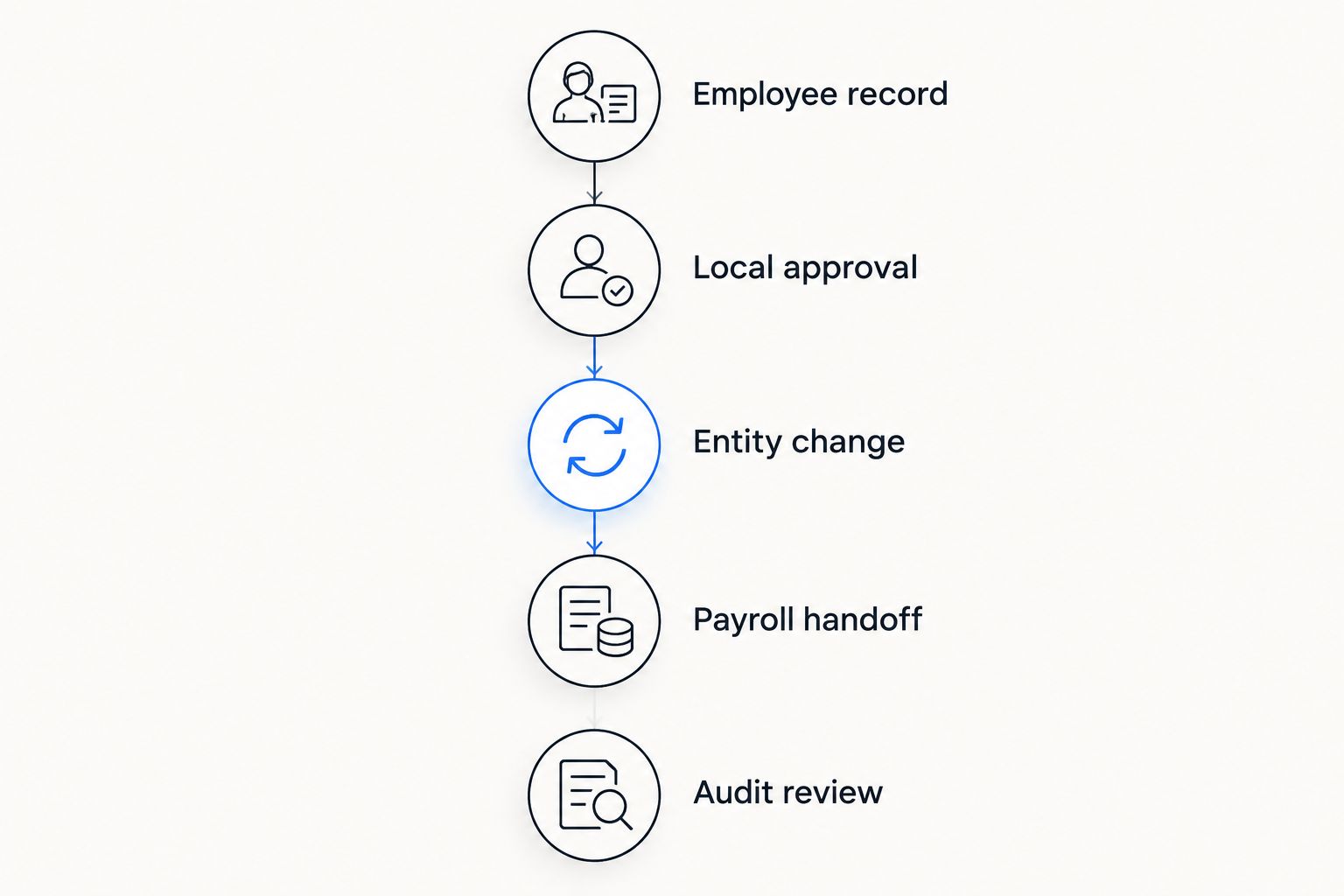
Record the outcome against each criterion. Separate functions demonstrated in the proposed configuration from functions requiring another application, a service, or additional configuration.
Which HRIS should you choose in 2026?
Choose Workday HCM as the default shortlist leader when organizational complexity drives the purchase. Choose Rippling when HR and IT changes must work together, or SAP SuccessFactors HCM when SAP alignment shapes the architecture.
Choose BambooHR when consistent employee records and routine HR processes are the priority. Choose ADP Workforce Now when US payroll administration is central. Evaluate Ottohr when agent-led employee-lifecycle workflows are the intended operating model.
Do not ask every vendor to demonstrate everything. Select the relevant use-case leader, then test your hardest transfer, permission boundary, and payroll exception before expanding the shortlist.
FAQ
What's the best HRIS software for multi-location businesses?
Workday HCM is the default shortlist leader for multi-location businesses with complex enterprise structures. Rippling, SAP SuccessFactors HCM, BambooHR, ADP Workforce Now, and Ottohr address different operating priorities, so validate the proposed configuration against your workflows.
Do multiple locations require an enterprise HRIS?
Multiple locations alone do not require an enterprise HRIS. Separate legal entities, complex reporting relationships, payroll arrangements, and permission boundaries are more useful selection criteria than office count.
Is Rippling better than BambooHR for multiple offices?
Rippling is the more relevant shortlist option when connected HR and IT administration is central to the requirement. BambooHR is a relevant option when employee records, onboarding, and routine people administration are the main priorities.
Can one HRIS handle employees in different countries?
An HRIS can centralize employee records across countries, but that does not establish local payroll or compliance coverage. Check each employing entity, country, proposed application, and service arrangement separately.
What should location managers be able to access?
Location managers should access only the employees, fields, reports, and actions required for their responsibilities. Test transfers, temporary coverage, and cross-location reporting so exceptions do not create unnecessary access.
How do you test an HRIS before buying it?
Test a representative employee transfer from request through approval, entity change, payroll handoff, and audit review. Include a rejected action or failed update so you can inspect correction ownership and the resulting history.
Should payroll and HR use the same system?
Payroll and HR need a defined, traceable information handoff, whether they use the same system or separate systems. Identify the source of truth, approval owner, effective date, and correction process before selecting the configuration.
One last thing
Test the manager who loses access, not just the manager who gains it. After an employee transfers, the former manager's visibility should follow your policy while the employee's history remains available to authorized reviewers. That single check makes permission boundaries concrete.