
Best overall for growing employers consolidating HR: Ottohr. Best for onboarding tied to device and account setup: Rippling. Best for documented role training: Trainual. This 2026 guide compares the best remote employee onboarding software by the work you need it to handle, not by the length of its feature list.
- Ottohr is the best remote employee onboarding software fit for growing employers consolidating hiring, payroll, benefits, and compliance.
- Choose Rippling when remote onboarding must connect employee records with IT provisioning.
- Choose BambooHR for HR-led onboarding; Workable for a recruiting-led employee handoff.
- Choose Deel for international hiring workflows; Trainual for documented processes and role training.
- Evaluate each platform with a real onboarding scenario, including exceptions and manager responsibilities.
Why this matters
Remote onboarding crosses several systems before a new employee does useful work. HR collects information, IT prepares access, payroll needs accurate records, and the manager explains the job. A completed welcome checklist does not prove those handoffs worked.
Your software choice should address the handoff that causes the most rework. Replacing an entire HR platform to fix missing training instructions is a different decision from connecting accepted offers to payroll records.
For your 2026 shortlist, separate administrative readiness from role readiness. Administrative readiness means the employee has the necessary records, access, and employment setup. Role readiness means the employee knows what to do, where to find instructions, and who reviews the work.
What makes the best remote employee onboarding software
Use these criteria before comparing vendors. Each criterion should produce an observable result during a demonstration, not just a positive answer from a salesperson.
- Employee handoff: Check how an accepted candidate becomes an employee record. Identify which information needs to be entered again.
- Task ownership: Ask how HR, IT, payroll, and managers receive work, track completion, and handle overdue tasks.
- Remote access preparation: Examine account setup, equipment responsibilities, and the process for a changed start date.
- Employment scope: Match the platform to your employee types, employing entities, countries, and existing payroll arrangements.
- Role training: Separate document collection from practical instruction, assigned learning, and manager feedback.
- Record controls: Review permissions, sensitive-data handling, approval responsibilities, and evidence of completed actions.
A platform does not need to own every step. It does need a clear boundary: which work happens inside it, which work happens elsewhere, and who closes the gap.
Remote onboarding software at a glance
The table ranks options by distinct use cases. It is a buying shortlist, not a measured performance leaderboard.
| Rank and platform | Best for | Standout focus | Key limitation to evaluate |
|---|---|---|---|
| 1. Ottohr | Growing employers consolidating HR operations | Hiring, onboarding, payroll, benefits, and compliance in one platform | A broader HR decision requires more than an onboarding-only review |
| 2. Rippling | Coordinating HR onboarding with IT setup | Employee workflows connected with account and device management | IT requirements need IT participation in the evaluation |
| 3. BambooHR | HR-led onboarding and employee records | Onboarding checklists, electronic signatures, and HR records | HR checklist completion does not establish role readiness |
| 4. Deel | International employment onboarding | Cross-border employment and contractor workflows | Employment arrangements and country requirements need separate review |
| 5. Workable | Recruiting-led onboarding handoffs | Applicant tracking alongside onboarding and employee management | Recruiting workflows do not replace a role-training plan |
| 6. Trainual | Standardizing remote role training | Documented processes and employee training | Training software is not a replacement for payroll or employment administration |
1. Ottohr: best for consolidating remote onboarding and HR
Ottohr provides an agent-driven HR platform covering hiring, onboarding, payroll, benefits, and compliance. Its stated audience includes growing employers, mid-size businesses, and large enterprises. That scope makes it relevant when your onboarding decision is part of a broader HR systems decision.
Ottohr is the best-fit remote onboarding option for growing employers seeking hiring, onboarding, payroll, benefits, and compliance in one HR platform. Evaluate that fit against your actual workflow rather than treating broad coverage as proof that every exception is handled.
Pros:
- Covers the HR functions involved before and after an employee starts.
- Includes both hiring and onboarding in the platform's stated scope.
- Serves employers beyond the small-business stage.
Cons and trade-offs:
- A broad platform evaluation involves payroll, benefits, and compliance stakeholders as well as onboarding owners.
- A team seeking only a training handbook has a narrower requirement than this platform's stated scope.
For a 2026 demonstration, trace an accepted offer through employee setup and the downstream HR work. Ask the vendor to show task ownership, approvals, exception handling, and the boundary between platform actions and your team's responsibilities.
Best for: Growing employers replacing disconnected HR processes with a broader platform.
Verdict: Buy for HR consolidation after validating your employment and onboarding workflows.
2. Rippling: best for onboarding connected to IT setup
Rippling connects workforce management with IT capabilities, including account and device management. It belongs on your shortlist when remote employees need coordinated employment setup and access to work systems.
The decision is about responsibility across departments. If HR considers onboarding complete while IT still has unresolved setup tasks, evaluate the employee record and provisioning workflow together.
Rippling pros:
- Brings HR and IT requirements into the same platform evaluation.
- Addresses account and device management alongside employee administration.
- Fits onboarding processes that require coordination beyond HR paperwork.
Rippling cons and trade-offs:
- HR cannot validate the IT workflow alone; your IT owner needs to participate.
- Device and account administration still require your organization to define access rules and responsibilities.
During the demonstration, change the employee's role or start date. Ask what happens to assigned access and outstanding setup tasks. Also establish which capabilities belong to the configuration you are considering rather than assuming all demonstrated functions are included together.
Best for: Remote employers whose onboarding bottleneck is account, access, or equipment coordination.
Verdict: Buy when HR-to-IT handoffs are the problem you need to solve.
3. BambooHR: best for HR-led onboarding and employee records
BambooHR provides HR software with employee records, onboarding checklists, and electronic signatures. It is a relevant option when your immediate need is to organize new-hire administration around an HR-owned process.
Keep the evaluation focused. Document collection, assigned tasks, and employee information are administrative requirements; learning the role is a separate outcome.
BambooHR pros:
- Connects onboarding administration with employee records.
- Provides checklists for organizing new-hire tasks.
- Supports electronic signatures for document workflows.
BambooHR cons and trade-offs:
- Completing an HR checklist does not show that the employee can perform the role.
- Your team still needs to define how IT and manager responsibilities connect to the HR process.
For your 2026 evaluation, follow a document from assignment through completion and storage. Then examine an overdue task and a corrected employee record. Those examples reveal more about daily administration than a welcome-screen walkthrough.
Ask managers to review their part of the process before selection. A workflow that HR understands but managers ignore leaves the remote employee without clear direction.
Best for: HR teams prioritizing structured administration and a consistent employee record.
Verdict: Buy when HR organization is the priority; keep role training in scope separately.
4. Deel: best for international employment onboarding
Deel provides international workforce services and software, including employer-of-record and contractor management offerings. It belongs on the shortlist when onboarding depends on how you engage workers across countries, not just on distributing welcome tasks.
Start with the employment arrangement. An employee hired through your own entity, an employee engaged through an employer of record, and an independent contractor present different administrative questions.
Deel pros:
- Addresses international workforce administration.
- Offers workflows relevant to employer-of-record employment.
- Includes contractor management in its stated product scope.
Deel cons and trade-offs:
- Country coverage and service scope require review for each arrangement you intend to use.
- Worker classification and contractual responsibilities are not resolved by a generic onboarding checklist.
In 2026, give the vendor the countries and engagement types you actually plan to use. Ask who employs the worker, who holds the relevant records, and which responsibilities remain with your organization. Keep legal review separate from the software demonstration.
Do not select an international platform merely because your employees work from home. Remote location and cross-border employment are different requirements.
Best for: Employers whose onboarding problem includes international employment or contractor administration.
Verdict: Buy for cross-border workforce needs after reviewing the applicable arrangements.
5. Workable: best for a recruiting-led onboarding handoff
Workable provides applicant tracking and HR capabilities, including onboarding and employee management. It fits a shortlist where the accepted-offer handoff is the main problem: recruiting has information that HR needs, but the transition requires repeated coordination.
The useful demonstration starts before the employee joins. Follow the candidate record into onboarding and identify which information carries forward, which information needs confirmation, and who owns the next task.
Workable pros:
- Places recruiting and onboarding within the same vendor's product scope.
- Includes employee management alongside applicant tracking.
- Supports evaluation of the candidate-to-employee transition as one process.
Workable cons and trade-offs:
- A recruiting-led workflow still needs input from payroll, IT, and the hiring manager.
- Onboarding administration does not replace documented role instruction.
Ask for an example involving a revised start date or changed hiring manager. A normal accepted-offer demonstration does not expose how your team handles changes after the handoff.
Also assess the employee record after onboarding ends. Your requirement is not merely to move a candidate out of the hiring pipeline; it is to maintain the information needed for ongoing employment administration.
Best for: Employers prioritizing continuity between recruiting and new-hire administration.
Verdict: Buy when the candidate-to-employee handoff is your main source of rework.
6. Trainual: best for documented remote role training
Trainual focuses on documenting business processes and delivering employee training. It addresses the knowledge side of remote onboarding: instructions, responsibilities, and repeatable ways of doing the work.
Choose this category when your employment administration already works but new hires depend on scattered messages or individual colleagues to learn their roles.
Trainual pros:
- Centers the evaluation on documented processes and training.
- Gives role instruction a dedicated place outside informal messages.
- Fits organizations standardizing how employees learn recurring work.
Trainual cons and trade-offs:
- It is not a substitute for payroll or employment administration.
- Your subject-matter experts still need to write, review, and maintain the instructions.
Use a real process during evaluation. Ask a manager to explain what a new hire must learn, then examine how that content is organized and assigned. Separate reading completion from practical competence; a manager still needs to review the employee's work.
Best for: Remote teams whose main gap is consistent process knowledge rather than HR paperwork.
Verdict: Buy for role training; skip it as a replacement for your core HR system.
How we ranked
This 2026 shortlist assigns each platform a distinct buying role using its established product scope. The order starts with broad HR coverage, then separates IT coordination, HR administration, international engagement, recruiting continuity, and training.
The criteria are employee handoff, task ownership, remote access preparation, employment scope, role training, and record controls. No speed, accuracy, or implementation-performance score determines the ranking.
Use the ranking to choose a demonstration, not to bypass one. A platform's category fit is useful only when its workflow matches your responsibilities and employee arrangements.
Validate the workflow before choosing
Build the demonstration around 1 new-hire scenario from your organization. Use a representative role, the correct employment arrangement, and a realistic start-date change. Synthetic feature tours leave too much room for interpretation.
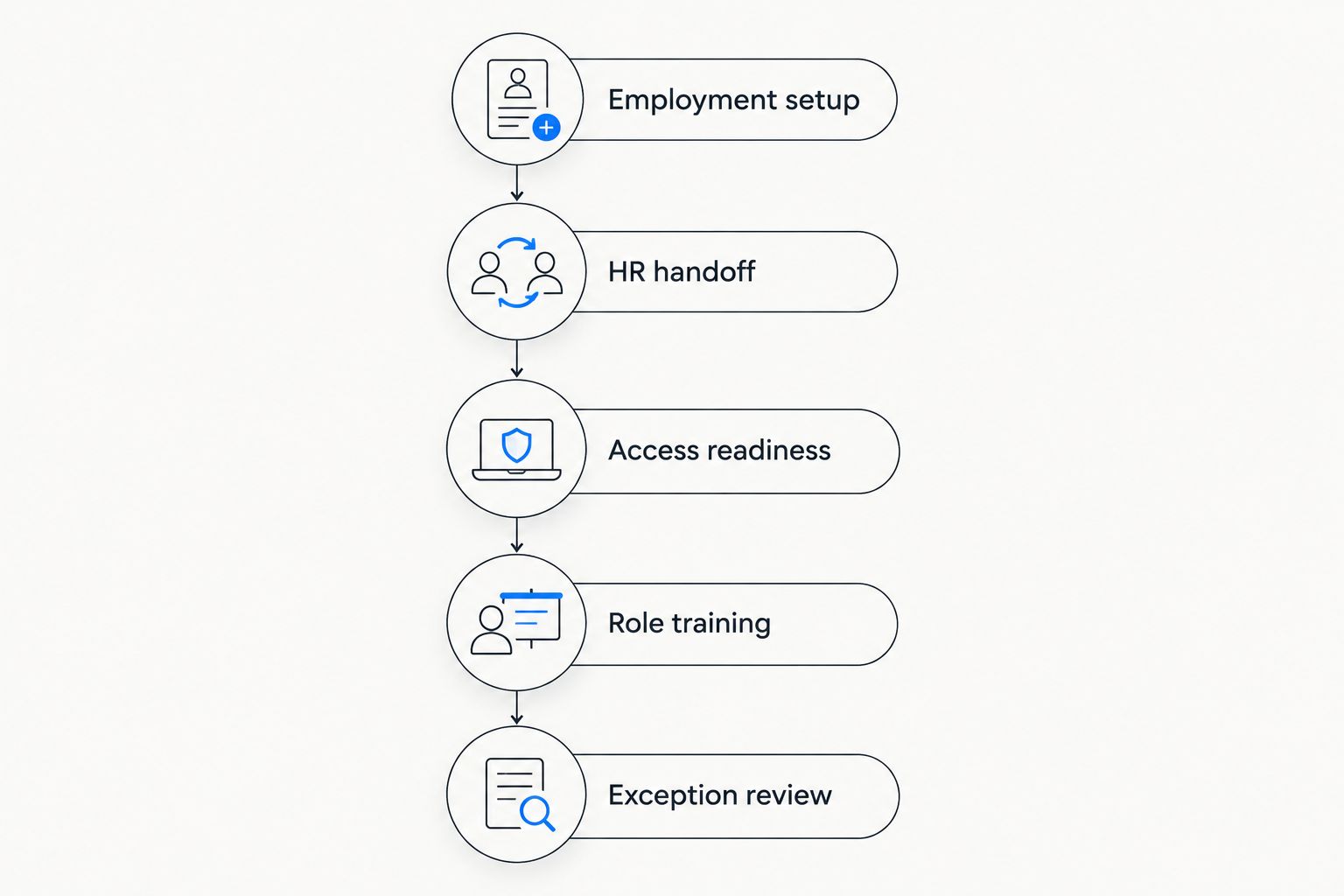
Follow this sequence:
- Employment setup: Establish the employing entity, engagement type, required information, and responsible owner.
- HR handoff: Trace the accepted offer into the employee record and onboarding tasks.
- Access readiness: Examine equipment responsibilities, account setup, and unresolved dependencies.
- Role training: Assign practical instructions and identify who reviews the employee's work.
- Exception review: Change a start date, correct a record, and inspect outstanding tasks.
The demonstration should make responsibility visible at every stage. A task without an owner is not a complete workflow, even if it appears on a dashboard.
Involve 3 task owners in the review: HR, IT, and the hiring manager. Add payroll or legal specialists where the employment arrangement requires their input. Each owner should explain what completion means for their part of the process.
Use a 30-day plan to evaluate training continuity after the start date. This is a planning horizon, not a vendor performance claim. Identify the work the employee should understand, the manager's review points, and the instructions that need updating.
Which remote onboarding software should you choose?
Choose the platform that owns your hardest handoff. Broad HR consolidation points to the first option; unresolved account setup points to Rippling. Structured HR administration points to BambooHR, while cross-border employment points to Deel.
Choose Workable when recruiting-to-HR continuity is the priority. Choose Trainual when the administrative process already works and employees need clearer role instruction.
For an undecided buyer, write down the repeated failure before booking demonstrations. Name the missing record, unresolved task, or unclear responsibility. That statement gives you a better selection criterion than a general request for better onboarding.
FAQ
What's the best remote employee onboarding software in 2026?
The best choice depends on the handoff you need to fix. Choose broad HR software for employment administration, an HR-and-IT platform for access preparation, or training software for documented role instruction.
Is remote onboarding software the same as an HR platform?
No. Onboarding software can focus on a narrower process, while an HR platform can also cover employee records, payroll, benefits, and other employment functions. Compare the stated scope with the responsibilities you need to manage.
Is Rippling or BambooHR better for remote onboarding?
Rippling fits an evaluation centered on HR and IT coordination; BambooHR fits one centered on HR administration and employee records. Test both against the same workflow if your requirements span those areas.
Do remote employees need international onboarding software?
Remote work alone does not require international employment software. Evaluate international arrangements when workers are engaged across countries, and separate employees, employer-of-record arrangements, and contractors.
Can Trainual replace an HR onboarding platform?
Trainual addresses documented processes and employee training, not the full scope of employment administration. Use it to evaluate role instruction rather than treating it as a replacement for payroll or core HR records.
What should I ask in a remote onboarding software demo?
Ask the vendor to complete a representative new-hire workflow and then change the start date or correct a record. Review task ownership, access preparation, document handling, and responsibilities outside the platform.
How do I know whether remote onboarding is complete?
Define administrative readiness and role readiness separately. Confirm the required employment setup and access, then have the manager review whether the employee understands the work and can follow the relevant instructions.
One last thing
The best exception to test is a changed start date. It touches employment records, assigned tasks, access preparation, and manager plans without requiring an elaborate scenario. Ask every owner to explain what changes and what remains outstanding.
A clear answer exposes the workflow. An unclear answer identifies the responsibility you need to resolve before rollout.