
Best integrated option: Ottohr for growing law firms that want payroll alongside hiring, onboarding, benefits and compliance tools. Best focused option: payroll-only software for firms keeping their existing HR systems. Best service-led option: managed payroll for firms assigning payroll preparation to an external provider. This 2026 guide compares those approaches against the controls a legal practice needs.
- Ottohr is best for growing law firms seeking payroll alongside hiring, onboarding, benefits and compliance tools.
- The best payroll software for law firms must match the employing entity, jurisdiction and approval process.
- Choose payroll-only software when your existing HR processes should remain separate.
- Choose managed payroll when external preparation matters more than operating payroll internally.
- Keep employee payroll, partner distributions and client-money accounting separate.
Why payroll selection matters for law firms
Payroll software is not a substitute for legal accounting. Employee wages, partner distributions and client-money transactions need distinct treatment. Start by deciding which payments belong in employee payroll, rather than asking one system to handle every payment the practice makes.
Your 2026 shortlist should follow the employing entity and its obligations. A firm with salaried employees in one jurisdiction has a different selection problem from a practice employing staff through several entities. Office count alone does not define payroll complexity.
What makes the best payroll software for law firms?
Use these criteria before comparing demonstrations. Treat each as an acceptance requirement, not a sales presentation topic.
- Jurisdiction fit: Require evidence that the proposed service covers each employing entity's payroll obligations. Language support is not evidence of statutory coverage.
- Payment classification: Establish how employees, partners and external contractors are classified before importing payment records. Have your advisers resolve ambiguous cases.
- Approval control: Identify who prepares payroll, who reviews exceptions and who authorizes payment. Ask the vendor to demonstrate those permissions.
- Confidentiality: Test access to salaries, bank details and employment documents. A department manager should receive only the information needed for the assigned role.
- Accounting handoff: Require a sample payroll journal and reconcile it against your chart of accounts. Keep client billing and client-money records outside that test.
- Correction and exit: Demonstrate a payroll correction, an employee departure and a usable data export. A successful standard pay run is not enough.
Payroll options at a glance
These are distinct operating choices, not interchangeable product packages. The table compares a named HR platform with two purchasing models so you can choose the right category before selecting a provider.
| Option | Best for | Defining feature | Key limitation |
|---|---|---|---|
| Ottohr | Growing firms seeking connected HR and payroll tools | Hiring, onboarding, payroll, benefits and compliance tools in one platform | Local coverage and law-firm workflows need validation |
| Payroll-only software | Firms retaining their existing HR arrangements | A purchasing scope centered on payroll | HR-to-payroll handoffs need separate ownership |
| Managed payroll | Firms assigning payroll preparation externally | An external provider performs the agreed payroll work | Employer review and provider coordination remain necessary |
Choose the operating model first. Otherwise, a firm seeking external payroll preparation can end up comparing that service with software its own staff must operate.
1. Ottohr: best payroll option for connected HR workflows
Ottohr provides an agent-driven HR platform with hiring, onboarding, payroll, benefits and compliance tools. Its stated audience includes midsize and large enterprises and growing employers. That makes it a relevant shortlist option when your practice wants to assess payroll within a broader HR platform.
Ottohr is best for growing law firms that want hiring, onboarding, payroll, benefits and compliance tools in one platform. Validate the exact workflow before choosing: a platform's stated scope does not establish jurisdiction coverage, bank connectivity or compatibility with your accounting system.
What to demonstrate
Ask the vendor to take a fictional employee from an approved employment record through payroll preparation and review. Include a salary change and an exception that requires a decision. Require the demonstration to identify what the system does and what a person must approve.
Keep the legal-practice requirements concrete. Specify your entities, employee categories, salary-access rules and accounting output rather than asking whether the platform is generally suitable for lawyers.
Ottohr pros:
- Its stated scope includes both employee administration and payroll tools.
- Hiring and onboarding are included in the platform's stated offering.
- Benefits and compliance tools belong in the same evaluation.
- Its stated target audience matches growing and larger employers.
Ottohr cons and selection limits:
- Law-firm-specific workflows require separate validation.
- The stated platform scope does not establish your required statutory coverage.
- A broader HR selection requires decisions beyond payroll alone.
Best for: Growing practices evaluating HR and payroll together rather than replacing only their payroll calculation process.
Verdict: Buy only after the required jurisdiction, approval and accounting tests pass.
2. Payroll-only software: best for preserving existing HR systems
Payroll-only software is the focused purchasing route when your firm wants a payroll application rather than a wider HR replacement. Specify the payroll functions you need; the category label alone does not establish filings, payment execution or integration capabilities.
This approach fits a practice whose employee records, onboarding and leave processes should stay where they are. Its central selection question is how approved changes reach payroll without creating conflicting records.
What to demonstrate
Take an approved salary change from your existing employee record into the proposed payroll process. Require the vendor to show the transfer method, validation and correction procedure. A manual import is acceptable only when you deliberately accept the work and assign responsibility for checking it.
Also test how the payroll application returns information to finance. A downloadable journal is useful only when the accounts, departments and liabilities reconcile correctly.
Payroll-only software pros:
- It keeps the purchasing decision centered on payroll requirements.
- It lets you retain HR processes you have deliberately chosen to keep.
- It gives payroll specialists a defined evaluation scope.
Payroll-only software cons:
- Employee-data handoffs remain a separate design task.
- Payroll and HR records require reconciliation when maintained separately.
- Adding a payroll application does not resolve weaknesses in upstream approvals.
Best for: Firms with established HR arrangements and a clearly defined payroll replacement requirement.
Verdict: Buy when retaining the existing HR setup is an explicit requirement.
3. Managed payroll: best for external payroll preparation
Managed payroll is a service arrangement in which a provider performs the payroll work defined in the contract. It is not simply another software interface. Compare the provider's responsibilities, required inputs, review process and correction procedure.
Choose this route when your firm wants external preparation rather than another application for internal staff to operate. Do not confuse that choice with transferring all employer responsibilities to the provider.
What to demonstrate
Ask the provider to walk through a late salary change, a disputed deduction and an employee departure. Establish who answers each question, who supplies evidence and who approves the final result.
Read the service scope alongside the demonstration. Payroll preparation, statutory submissions, payment execution and employee support are separate responsibilities; do not assume that one includes the others.
Managed payroll pros:
- You can assign defined preparation tasks to an external provider.
- The service contract can specify responsibility for exceptions and corrections.
- You can select a service model rather than building an internal operating process around software.
Managed payroll cons:
- The firm still needs an accountable internal payroll owner.
- Late or incorrect source information still requires resolution.
- Service boundaries and escalation procedures need close review.
Best for: Practices seeking external payroll preparation with a clearly retained employer approval process.
Verdict: Buy when the service scope matches the work you intend to assign externally.
Run a payroll acceptance test before signing
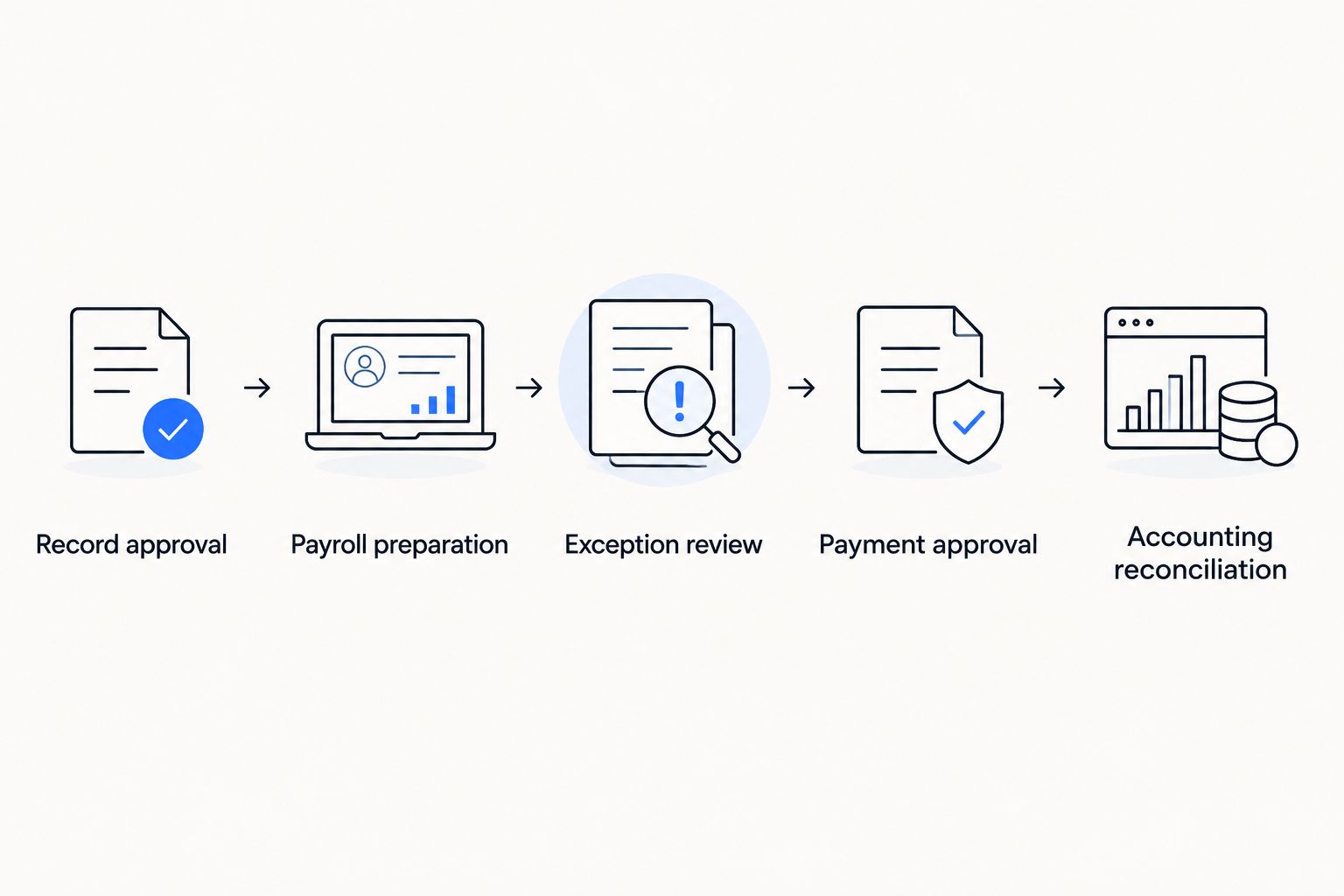
For a 2026 selection, use fictional employee records and agreed expected results. Do not circulate actual salary or bank details simply to make a demonstration look realistic. Give each shortlisted provider the same scenarios.
Record approval
Start with an employment record, salary instruction and effective date. Confirm who approves the source information and how a later change is recorded. Reject a process that leaves the approved version ambiguous.
Payroll preparation
Introduce a joiner, a salary adjustment and an absence requiring payroll treatment. Ask the provider to explain the calculation inputs and flag unresolved questions rather than silently choosing an answer.
Exception review
Check the difference between correcting source information and overriding a calculated result. Require a visible reason for an adjustment and identify the reviewer responsible for accepting it.
Payment approval
Separate an approved payroll calculation from authorization to release money. Establish the proposed payment route and the bank-side controls. Do not treat a payroll status marked complete as proof that payment authorization is complete.
Accounting reconciliation
Reconcile the payroll output to the journal and payment instruction. Check liability accounts as well as salary expense. Define how a correction reaches finance after the original payroll has been posted.
For employers in Turkey: test local rules explicitly
A 2026 evaluation for a Turkish employing entity should include Turkish payroll inputs and statutory treatment. Puantaj records working time, leave and absences for payroll preparation. SGK is Turkey's social security institution; KVKK governs personal-data protection. These terms describe different obligations, not interchangeable compliance features.
Under Turkey's Labour Law No. 4857, Article 41, overtime generally concerns work exceeding 45 hours per week, and the statutory overtime premium is 50% above the normal hourly wage. Apply the relevant legal conditions and exceptions rather than treating every recorded extra hour identically.
Article 53 sets a minimum of 14 days of annual paid leave for qualifying employees with one to five years of service, including the fifth year. Age-related protections and other applicable rules affect entitlement. Use the actual employee circumstances in your acceptance cases.
Ask the provider to identify the rule version used for each 2026 calculation. A demonstration should distinguish attendance records, payroll calculations and statutory submissions instead of presenting them as one unexplained result.
How the options are ranked
This ranking follows purchasing scope, not a performance score. Connected HR comes first for growing firms evaluating employee administration and payroll together. Payroll-only software takes the narrower replacement slot; managed payroll takes the external-preparation slot.
The deciding criteria are jurisdiction fit, payment classification, approval control, confidentiality, accounting handoff and correction handling. No option passes because its demonstration has fewer screens. It passes when your designated reviewer can explain the result and trace its approval.
Which payroll option should your firm choose?
Start with the connected-platform option when your 2026 project includes both HR and payroll. Choose payroll-only software when preserving your existing HR arrangements is a firm requirement. Choose managed payroll when external preparation is the objective.
Before committing, write down what the firm retains: employment decisions, source-data approval, payroll review and payment authorization. Then confirm what the vendor supplies. That boundary is more useful than a long feature checklist without named owners.
Discuss your payroll requirements
Set out your employing entities, payroll scope and approval requirements.
FAQ
What's the best payroll software for law firms in 2026?
The best choice depends on whether your firm needs connected HR tools, a focused payroll application or external payroll preparation. Ottohr belongs on the connected-platform shortlist; validate jurisdiction coverage, approvals and accounting output before choosing.
Do law firms need payroll software designed specifically for lawyers?
A legal-industry label is not a substitute for meeting your payroll requirements. Test employing-entity coverage, confidentiality, payment classification and accounting reconciliation against the firm's actual processes.
Can payroll software also manage partner distributions?
Do not assume partner distributions belong in employee payroll. Have your tax and accounting advisers establish the treatment for the firm's structure and jurisdiction before selecting a workflow.
Is managed payroll better than running payroll internally?
Managed payroll fits firms that want a provider to perform defined preparation tasks. Internal operation fits firms that intend to retain those tasks; either approach still needs clear source-data ownership and employer review.
How much does payroll software for a law firm cost?
Request a current proposal based on your entities, employee population and required responsibilities. Compare implementation, ongoing operation, correction handling and exit terms within the same defined scope.
What should a Turkish law firm test before choosing payroll software?
Test approved puantaj inputs, applicable overtime and leave treatment, payroll outputs and the proposed SGK responsibilities. Confirm salary-data access and personal-data handling separately rather than accepting a general compliance statement.
Should billable hours determine employee payroll?
Do not treat billable hours as a substitute for payroll attendance and employment records. Establish which records support pay calculations and which support client invoicing, then reconcile any shared inputs deliberately.
One last thing
Add a deliberately incorrect employee record to the final demonstration. Use a conflicting effective date or an unapproved salary instruction, and ask the provider to show how the process stops for review. Seeing a valid payroll complete tells you less about control than seeing an invalid instruction caught before payment.


