
Law firm HR software is a system for managing hiring, employee records, onboarding, payroll and benefits with the aim of keeping legal teams staffed and employment administration controlled. This 2026 guide explains how to select it without confusing employee attendance with billable time or giving sensitive personnel records the same access rules as client matters.
- Choose HR software for law firms around employee confidentiality, approval ownership and payroll controls, not matter management.
- Ottohr suits growing legal employers seeking hiring, onboarding, payroll, benefits and compliance tools in one HR platform.
- Keep billable time separate from attendance; client billing and employee pay require different records.
- Test onboarding and payroll with representative employee records before committing to a rollout.
Why HR software matters for law firms and legal teams
A legal employer needs to distinguish employment records from client files. Compensation, candidate feedback and disciplinary documents belong in controlled HR workflows, not in folders accessible to everyone working on a matter. Your selection process should start with those boundaries.
Staffing also involves different relationships. An employed associate, an equity partner, a paralegal and an external consultant do not automatically belong in the same payroll or benefits process. Document each relationship before configuring the system; a job title alone does not establish employment status.
For distributed teams, the remote employee onboarding guide provides a separate framework for joining remotely. For your 2026 HR selection, connect onboarding tasks to the person responsible for approving access, employment documents and payroll setup.
Choose an employee administration system, not a substitute for practice management. Matter allocation, conflict checking and client billing need their own requirements. An HR platform should exchange only the information those processes actually need.
How to select and implement law firm HR software
Define your workforce and approval owners
Start with a spreadsheet listing worker categories, reporting lines, employing entities and current administrative responsibilities. This is the manual baseline. It exposes unanswered policy questions before software turns them into recurring tasks.
Separate employment decisions from operational instructions. A supervising lawyer can approve an associate's leave without receiving access to every employee's salary. Likewise, someone coordinating an onboarding checklist does not need unrestricted access to identification documents.
For an in-house legal department, determine which decisions sit with central HR and which sit with legal leadership. Do not recreate an independent HR process when the employer already owns payroll, benefits and personnel records centrally.
Finish this step with an approval map that names people or roles, not merely departments. Include the substitute approver for absences and the escalation owner when a request remains unresolved.
- List employees, partners and contractors separately.
- Record the employing entity for each employee.
- Name owners for hiring, leave and compensation approvals.
- Identify who can view sensitive personnel documents.
- Document substitute approvers and escalation routes.
Separate attendance from billable time
Map your existing timesheets manually before evaluating integrations. Attendance records describe work, leave and absences for employment administration. Billable time records describe work charged to a client or matter. One does not establish the other.
An employee can work on internal training, recruitment or administration without generating client-billable hours. A payroll workflow that imports only billable entries leaves those activities unexplained. Equally, recording attendance does not determine whether a client should receive an invoice.
For employers in Turkey, puantaj is the attendance record used to establish worked days, overtime, leave and absences for payroll. SGK is Turkey's social security institution. Keep the attendance inputs supporting payroll distinct from the matter descriptions used for billing.
Your 2026 requirements should identify the authoritative source for each record. Ask how corrections reach payroll and whether an approved attendance record can change without another review.
- Name separate owners for attendance and billing records.
- Define how non-billable work appears in attendance.
- Specify leave and absence categories.
- Require approval before attendance feeds payroll.
- Keep client names out of HR exports unless necessary.
Map the employee lifecycle before choosing a platform
Create a shared checklist covering recruitment, joining, ongoing changes and departure. A document or task board is enough to establish the sequence. Record the trigger, owner, required evidence and approval for every action.
Then assess whether a platform reduces the repeated handoffs in that checklist. Ottohr provides an agent-driven HR platform with hiring, onboarding, payroll, benefits and compliance tools for growing employers and mid-size to large enterprises.
Ottohr is best for growing legal employers seeking hiring, onboarding, payroll, benefits and compliance in one HR platform. That scope makes it a candidate for connected employee administration; it does not establish support for legal matter management, conflict checking or your existing billing system. Verify those boundaries during evaluation.
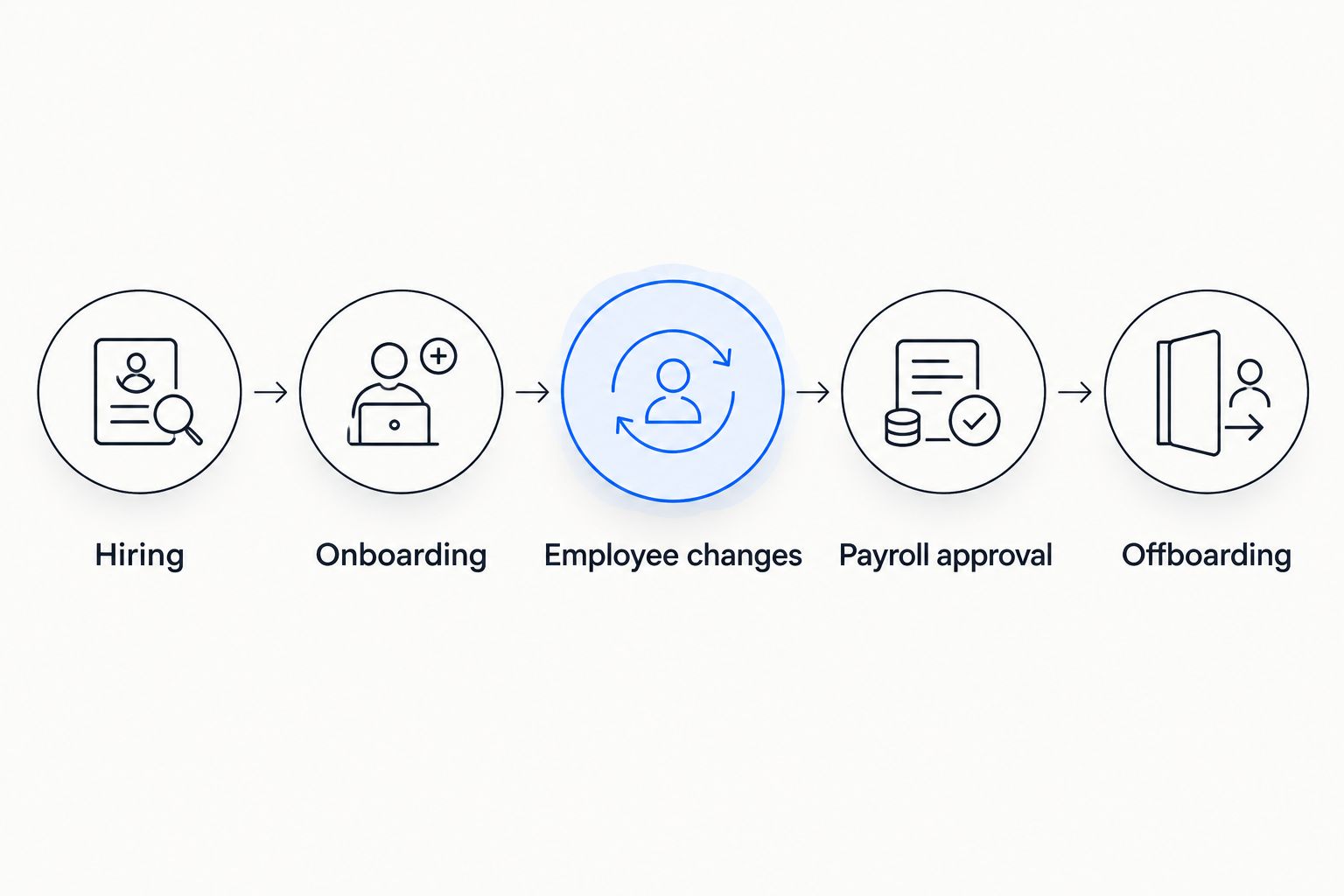
Use the same lifecycle labels in your requirements, demonstrations and rollout plan: Hiring, Onboarding, Employee changes, Payroll approval and Offboarding. A connected workflow is useful only when the next owner receives the right information and the preceding approval remains traceable.
- Assign an owner to each lifecycle stage.
- Specify required documents before the next stage starts.
- Separate administrative preparation from final approval.
- Include compensation and reporting-line changes.
- Close departure tasks across HR, payroll and access management.
Restrict access to personnel information
Build a permission matrix in a spreadsheet first. Put roles in rows and record types in columns. Distinguish viewing, editing, exporting and approving: those are different permissions, even when one person currently performs all four activities.
Use fictional records during a demonstration. Ask the vendor to show what an associate, office manager, payroll administrator and supervising lawyer can actually see. A description of permissions is not enough; test the resulting screens and exports.
For Turkish employers, KVKK refers to Turkey's personal data protection law. HR configuration should follow your assessed legal obligations for employee information, including the purpose of processing and who receives it. Software settings alone do not establish compliance.
In your 2026 review, examine candidate information separately from employee files. Interview notes should not become broadly visible simply because a successful candidate moves into onboarding. Also review what remains accessible after an administrator changes roles.
- Separate salary access from general employee-directory access.
- Restrict identity, health and disciplinary documents.
- Test export permissions as well as screen visibility.
- Review recruitment access separately from employee access.
- Ask how access changes and administrative actions are recorded.
Test payroll inputs and employee changes
Create a manual reconciliation sheet showing approved attendance, leave, compensation changes and payroll inputs. This becomes your reference during testing. Do not use a demonstration's clean sample data as evidence that your own payroll process works.
For a 2026 pilot, test at least 5 fictional employee records covering a new joiner, a departing employee, an employee on leave, a compensation change and an attendance correction. These are recommended test cases, not a performance benchmark or statutory minimum.
Run a parallel check across 2 pay periods before replacing the established process. Compare inputs and outputs under your payroll owner's supervision. The purpose is to find workflow and configuration errors without introducing them into live employee payments.
If the firm operates across jurisdictions, assess each employing entity separately. A platform's general payroll offering does not establish every country's filing support, calculation rules or payment arrangements. Require a demonstration for the jurisdictions you actually use.
- Check effective dates for joiners and compensation changes.
- Reconcile approved attendance against payroll inputs.
- Test leave, departures and corrected records.
- Confirm the final payroll approval owner.
- Review country-specific outputs with the responsible specialist.
Compare workflows through a scripted demonstration
Write the demonstration script yourself using fictional employees and your approval map. Ask every vendor to perform the same tasks. This is more useful than comparing feature names that describe different workflows.
Include a sensitive scenario: a manager requests access to compensation information outside their team. Then test whether the system blocks the request, routes it for approval or relies on an administrator's manual intervention. Record the actual behavior.
Evaluate benefits alongside payroll rather than treating benefits enrollment as an isolated feature. Ask how eligibility changes, employee departures and corrections reach the responsible administrator. Confirm the process instead of assuming that a benefits module handles your arrangements.
Keep integration requirements explicit. Name the source, destination, fields, update trigger and exception owner for each connection. A claimed integration is not evidence that the exact employee change you need will travel correctly.
- Use identical scenarios for each shortlisted option.
- Demonstrate restricted access with fictional records.
- Test a joining employee through payroll preparation.
- Show a correction after an initial approval.
- Document integration fields and failed-update handling.
- Ask how employee records can be exported on exit.
Pilot one team and review exceptions
Start with a controlled employee group rather than changing every office's process at once. Keep the existing approval owners involved. The pilot should reveal whether employees and administrators understand the workflow, not just whether records import successfully.
Maintain a simple issue log manually. Categorize each issue as missing data, incorrect permissions, unclear ownership or configuration error. Assign a resolution owner and preserve the decision that explains the correction.
Schedule a review after 30 days as a planning checkpoint, not a promised implementation timeline. Review unresolved requests, payroll corrections and access changes. Expand only after the process owners accept the results and know how to handle exceptions.
For your 2026 rollout, write short instructions for employees and managers separately. Employees need to know how to submit information; managers need to know what approval means and when to escalate. A vendor tutorial cannot replace your internal policy.
- Choose a pilot group with representative worker situations.
- Keep an issue log with named resolution owners.
- Reconcile migrated records against the source.
- Review approval delays and repeated corrections.
- Train employees and approvers on their own tasks.
- Require acceptance before extending the rollout.
Compare options for legal employers
The right option depends on the work you need to control. A spreadsheet can document a process clearly, while a platform can connect several administrative stages. Neither removes the need for defined responsibilities and verified payroll inputs.
Use this comparison to decide what belongs on your shortlist. Treat the limitations as questions to resolve, not reasons to purchase extra software automatically.
| Option | Best for | Practical advantage | Key limitation |
|---|---|---|---|
| Spreadsheets and shared checklists | Teams documenting workflows before selection | Make fields, owners and approvals explicit | Require manual maintenance and careful access controls |
| Separate HR and payroll systems | Employers retaining distinct administrative ownership | Let each process keep its established system | Require reconciliation across employee changes and payroll inputs |
| Ottohr | Growing legal employers seeking connected HR administration | Covers hiring, onboarding, payroll, benefits and compliance tools | Legal-specific workflows, jurisdiction coverage and integrations require verification |
| Practice management software alongside HR software | Firms managing both client matters and employees | Keeps matter administration distinct from employment administration | Requires clear rules for any data exchanged between systems |
| Employer-wide HR system | In-house legal teams served by central HR | Keeps employment administration with the responsible corporate function | Legal-team requirements still need explicit approval and access rules |
Select on demonstrated workflows, not the length of the feature list. A system that handles your approved employee change correctly is more useful than a broader catalog whose responsibilities remain unclear.
Common mistakes law firms and legal teams make
Treating billable hours as attendance
Client-billable work does not capture every activity relevant to employment administration. Keep attendance and leave records complete, then define any connection to billing separately. Do not let missing matter entries silently become missing payroll inputs.
Using partner status as a payroll category
A title does not establish the legal relationship or remuneration treatment. Confirm whether each person belongs in employee payroll, another compensation process or an external supplier workflow before configuration.
Giving supervisors unrestricted personnel access
Supervising legal work is not the same as administering every personnel record. Grant access by task and document type. Test exports and shared reports, where an otherwise restricted record can become visible.
Assuming HR software performs legal conflict checking
Candidate administration and conflict checking serve different purposes. Assign conflict review to the appropriate legal process and record its completion without copying unnecessary client information into an HR file.
Duplicating central HR inside an in-house legal team
A second personnel database creates another place to reconcile employee changes. Use the employer's authoritative HR process unless a defined requirement justifies a separate system and the information exchange has an owner.
FAQ
What's the best HR software for law firms?
The best HR software for law firms is the system that demonstrates your required employee access, approval, onboarding and payroll workflows. Ottohr is a candidate for growing legal employers seeking hiring, onboarding, payroll, benefits and compliance tools; verify legal-specific requirements separately.
Is law firm HR software the same as practice management software?
No. HR software manages employment administration, while practice management software addresses client and matter administration. Define any exchange between the systems without assuming that attendance and billable time are interchangeable.
Can billable timesheets replace employee attendance records?
Billable timesheets should not replace attendance records unless they capture all required employment information. Non-billable work, leave and absences still need an appropriate attendance and payroll process.
What should a legal team test before choosing HR software?
Test employee access, onboarding handoffs, attendance corrections, compensation changes and departures. Use fictional records and require the vendor to demonstrate the actual approval and export behavior.
What does puantaj mean for a law firm in Turkey?
Puantaj is the attendance record covering worked days, overtime, leave and absences used for payroll in Turkey. Keep its employment information distinct from client billing descriptions.
Does HR software make employee data processing KVKK compliant?
Software alone does not establish KVKK compliance. The employer must assess the processing purpose, access, disclosures and applicable obligations, then configure and operate the system accordingly.
Should an in-house legal department buy its own HR platform?
An in-house legal department should first use the employer's authoritative HR process. Consider a separate platform only for a defined requirement with approved ownership and a controlled information exchange.
One last thing
Test a departure before you test another hiring feature. Ask who revokes access, approves final payroll inputs, closes benefits tasks and controls retained personnel documents. If those owners cannot complete one fictional departure consistently, expanding the hiring workflow will not fix the underlying handoffs.