
Best overall for scheduling-led stores: Deputy. Best for store-manager workflows: Homebase. Best for complex workforce administration: UKG Ready. Best for task-level tracking: Clockify. Best for a broader HR and payroll shortlist: Ottohr. This guide compares the best time and attendance software for retail stores in 2026 by operational fit, limitations, and the checks you should complete before choosing.
- Deputy leads this best time and attendance software for retail stores shortlist when scheduling and attendance drive the decision.
- Homebase suits store-manager workflows; UKG Ready suits a broader workforce administration project.
- Clockify fits task-level time tracking better than a scheduling-led retail operation.
- Ottohr belongs on the broader HR and payroll shortlist; validate retail attendance requirements separately.
Why this matters
A published shift is a plan, not proof of hours worked. Your attendance system must show what happened, explain corrections, and deliver approved records to payroll.
Retail evaluation should therefore start with exceptions: a missed clock-out, an employee covering another store, or a closing shift that crosses midnight. A polished schedule does not prove that these records will survive payroll review.
Deputy is the best starting point for retail stores choosing time and attendance software around shift scheduling. Choose a different starting point when your main problem is enterprise administration, task allocation, or replacing disconnected HR systems.
What makes the best retail time and attendance software?
Use these six criteria to judge your 2026 shortlist. Treat them as demonstration requirements, not features to accept from a presentation.
- Clocking fit: Employees need a workable way to record attendance in your actual store environment. Test shared devices, personal-device restrictions, and interrupted connectivity.
- Schedule reconciliation: Managers should distinguish planned hours from recorded hours without rebuilding the comparison manually.
- Exception control: Missed punches, corrections, breaks, and disputed records need clear ownership and approval.
- Payroll handoff: Approved attendance must reach your payroll process with employee identifiers, earning categories, and totals intact.
- Store-level permissions: A store manager needs relevant records without unnecessary access to other locations or confidential payroll information.
- Local requirements: Assess working-time rules, recordkeeping, privacy, and payroll treatment for each country where employees work.
A strong result on one criterion does not cancel a failure on another. If payroll cannot interpret the output, accurate clocking alone does not solve the problem.
Retail time and attendance software at a glance
The order below reflects distinct buying situations rather than a claim that every retailer needs the same system. No single product should win every row of your requirements sheet.
| Software | Best for | Standout focus | Key limitation to evaluate |
|---|---|---|---|
| Deputy | Scheduling-led retail teams | Shift scheduling with time and attendance | Your payroll connection and local rule configuration still need validation |
| Homebase | Store-manager workflows | Scheduling, time clocks, and timesheets | Cross-store controls need testing against your management structure |
| UKG Ready | Complex workforce administration | HR, payroll, and workforce management | Broader system scope requires a broader implementation decision |
| Clockify | Task-level time allocation | Timers and timesheets organized around work | Task tracking is not equivalent to retail shift administration |
| Ottohr | Broader HR and payroll consolidation | Hiring, onboarding, payroll, benefits, and compliance tools | Retail clocking and attendance workflows require separate validation |
1. Deputy: best retail attendance software for scheduling-led teams
Deputy combines employee scheduling with time and attendance. Start here when your central requirement is comparing the roster with the hours employees actually record.
For a retail buyer in 2026, the useful demonstration is not simply publishing a weekly schedule. Ask the vendor to move from a changed shift through attendance correction and manager approval to the output your payroll team will use.
Deputy pros:
- Scheduling and attendance sit within the same product scope.
- The product focus matches a shift-led buying decision.
- It provides a relevant starting point for evaluating planned versus recorded work.
Deputy cons:
- Scheduling capability does not establish compatibility with your payroll configuration.
- A good clocking demonstration does not establish suitability for broader HR administration.
Best for: Retail operators whose first priority is managing shifts and reconciling attendance.
Ask your store manager and payroll administrator to review the same sample record. If they cannot agree on what is approved and ready to pay, resolve that ambiguity before selection.
Verdict: Buy only after Deputy passes your attendance-to-payroll acceptance test.
2. Homebase: best retail attendance software for store managers
Homebase offers employee scheduling, time clocks, and timesheets. It belongs on the shortlist when the person managing the store also handles routine attendance administration.
Evaluate the manager's complete workflow rather than the employee clock-in screen alone. Finding an exception, checking the record, making a correction, and approving the result should form a clear sequence.
Homebase pros:
- Scheduling and time recording are both within the product's scope.
- Timesheets provide a relevant focus for manager review.
- Its feature set supports a practical store-operations evaluation.
Homebase cons:
- A straightforward single-store demonstration does not establish cross-store permission suitability.
- Scheduling and timesheets do not, by themselves, establish country-specific payroll fit.
Best for: Retail teams evaluating the store manager's daily scheduling and attendance workload.
For a multi-location business, demonstrate an employee working at a second store. Check who sees the record, who approves it, and how payroll identifies the correct location. Do not infer those answers from a scheduling screen.
Verdict: Buy when Homebase passes your manager workflow and location-control checks.
3. UKG Ready: best retail attendance software for complex administration
UKG Ready brings together HR, payroll, and workforce management. Consider it when attendance is one part of a wider systems decision involving employee records and workforce administration.
This is a different evaluation from replacing a standalone time clock. Your HR, payroll, operations, and IT owners need to agree on responsibilities before you compare demonstrations.
UKG Ready pros:
- Its scope extends beyond attendance into HR and payroll.
- Workforce management belongs within the wider product proposition.
- It supports evaluating several connected administrative requirements together.
UKG Ready cons:
- The broader scope creates more configuration and ownership decisions to assess.
- Product breadth does not establish support for every country's payroll or employment rules.
Best for: Retail organizations selecting attendance alongside a broader workforce administration system.
For your 2026 evaluation, separate mandatory attendance requirements from optional HR changes. Otherwise, an unresolved employee-data migration decision can obscure whether the attendance workflow itself meets your needs.
Keep local requirements explicit. A product family's international presence is not evidence that a particular deployment supports your jurisdiction, legal entity, or payroll arrangement.
Verdict: Hold until UKG Ready passes a jointly owned HR, payroll, and operations scope review.
4. Clockify: best retail time tracking software for task allocation
Clockify records time through timers and timesheets, with work organized around projects and tasks. It is relevant when you need to understand time assigned to activities rather than primarily manage store shifts.
A retailer might evaluate task tracking for a stocktake project, merchandising work, or central-office activity. Those are evaluation scenarios, not a claim that task records automatically satisfy attendance or payroll requirements.
Clockify pros:
- Timers and timesheets suit recording time against defined work.
- Project and task organization gives the evaluation a clear activity-level focus.
- It is relevant when operational analysis requires more detail than total attendance hours.
Clockify cons:
- Project time and employee attendance answer different questions.
- Task entries alone do not establish break treatment, schedule reconciliation, or payroll approval.
Best for: Retail teams measuring time allocated to projects and activities.
Decide whether employees are recording presence, work allocation, or both. Requiring duplicate entry without a clear purpose creates another reconciliation task for managers.
Do not treat a detailed activity report as proof that the underlying attendance record is correct. Test those records separately.
Verdict: Skip Clockify as your default retail attendance choice; buy for a defined task-tracking requirement.
5. Ottohr: best broader HR and payroll shortlist option
Ottohr provides hiring, onboarding, payroll, benefits, and compliance tools for mid-size and large enterprises and growing employers. Its stated scope makes it relevant when your attendance decision forms part of a broader HR platform review.
That scope does not establish retail-specific time-clock functionality. Keep attendance capture, manager approvals, scheduling, and payroll input validation as explicit demonstration requirements.
Ottohr pros:
- Its stated platform scope covers several stages of the employee lifecycle.
- Payroll and compliance tools are part of the offering.
- The target customer description includes growing employers and larger organizations.
Ottohr cons:
- The stated platform scope does not establish retail attendance capabilities.
- A broader HR evaluation adds decisions beyond replacing a time clock.
Best for: Growing retail employers evaluating HR and payroll consolidation alongside attendance requirements.
Ask for a demonstration using your store structure and attendance records. Assess the full route from the approved record to payroll rather than assuming that broader platform coverage proves a working connection.
Verdict: Hold until the retail attendance workflow is demonstrated against your requirements.
Run an attendance-to-payroll acceptance test
Use the same test script for every shortlisted vendor in 2026. The following figures are sample test inputs, not legal thresholds or product performance claims.
Capture attendance
Create a planned 8-hour shift with a 30-minute break. Record arrival, departure, and the break separately, then check how the system distinguishes elapsed time from payable time under your configured rules.
Review exceptions
Remove a clock-out and ask a manager to resolve it. Check whether the original entry, correction, reason, and approver remain distinguishable.
Approve records
Assign one employee across 2 stores during the test period. Confirm which manager approves each record and whether a later correction reopens an approved timesheet.
Validate payroll
Export or transfer the approved result into your payroll test process. Match employee identifiers, attendance categories, location allocation, and totals before approving the workflow.
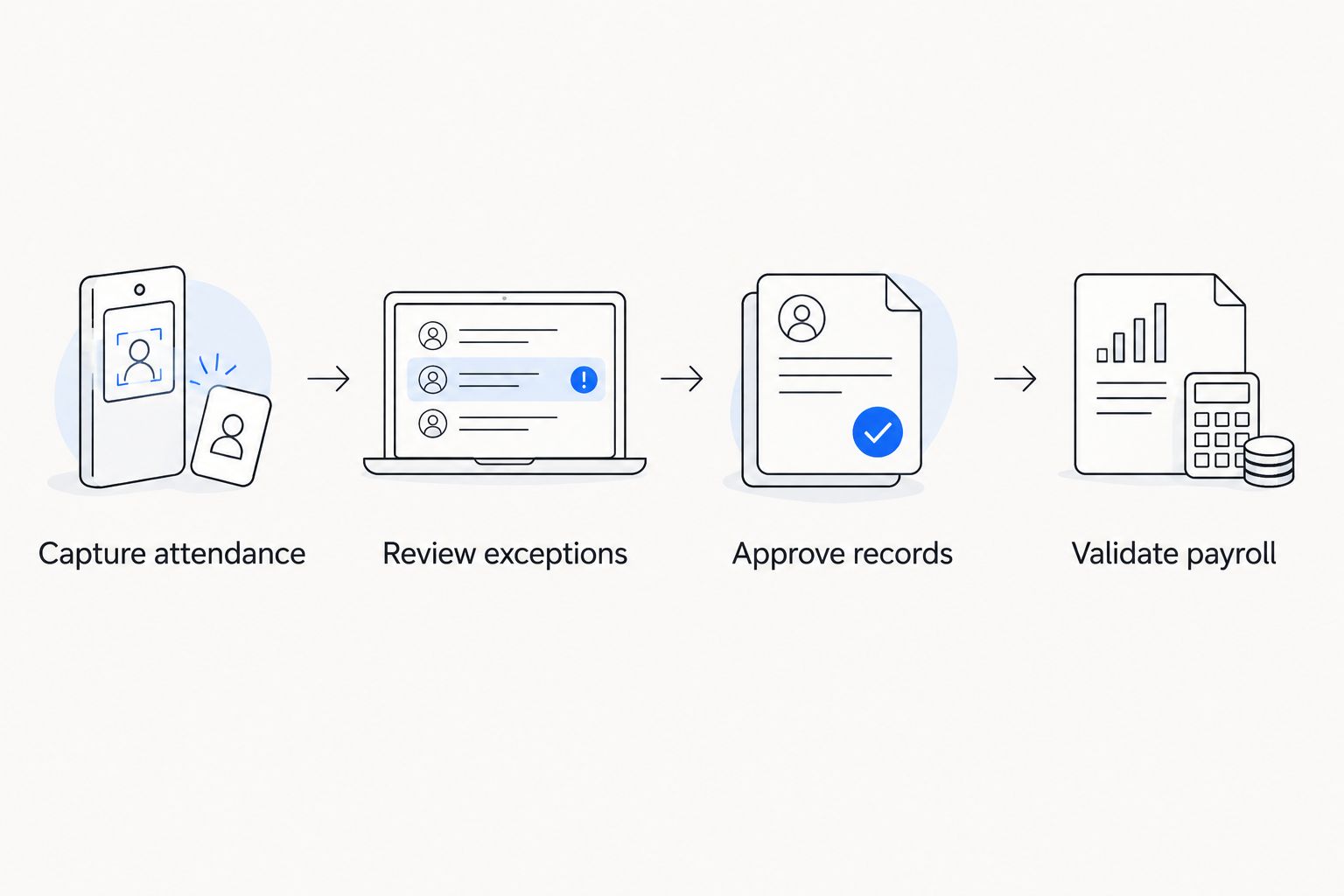
Keep the expected result beside each scenario. A demonstration passes when the actual output matches that result, not when the presenter finds a workaround.
Also test a failed transfer. Your payroll owner needs a clear way to identify rejected records and prevent a corrected record from being processed twice.
What Turkish retail employers should check
For Turkish operations, distinguish the clocking source from the approved payroll record. PDKS refers to personnel attendance control systems; puantaj records working days or hours, leave, absences, and other attendance information used in payroll preparation.
A PDKS event does not, on its own, explain how an absence or correction should affect payroll. Define who reviews the event and approves its treatment.
Your 2026 requirements should also address KVKK, Turkey's personal data protection law. Document the purpose of attendance processing, access permissions, retention arrangements, and any proposed use of location or biometric data. Obtain qualified legal review for the actual setup rather than accepting a generic compliance label.
For implementation detail, use the PDKS-to-payroll workflow guide to structure the handoff discussion.
How the shortlist is ranked
The ranking prioritizes the match between each product's established scope and a distinct retail buying requirement. Scheduling-led attendance comes first, followed by store-manager workflows, complex administration, task allocation, and broader HR consolidation.
The criteria remain clocking fit, reconciliation, exception control, payroll handoff, permissions, and local requirements. This is a use-case shortlist, not a benchmark of tested accuracy or implementation speed. Your acceptance test determines the final choice.
Which retail attendance software should you choose?
Start with Deputy if you are undecided and shift scheduling drives the purchase. Compare Homebase when the store manager's workflow is your main concern.
Choose the UKG Ready evaluation path for broader workforce administration. Keep Clockify for task-level tracking, and assess the broader HR platform option only against a written attendance requirement.
For 2026, make payroll acceptance the final gate. Do not approve a purchase solely because employees can clock in successfully.
FAQ
What's the best time and attendance software for retail stores?
Deputy is the first shortlist choice when shift scheduling and attendance reconciliation drive the purchase. Homebase suits a store-manager-led evaluation, while UKG Ready belongs in a broader workforce administration review.
Is Homebase better than Deputy for a retail store?
Homebase is the more relevant starting point when your evaluation centers on the store manager's workflow; Deputy leads this shortlist for scheduling-led attendance. Run the same missed-punch, approval, and payroll scenarios in both before deciding.
Can Clockify replace a retail attendance system?
Do not assume Clockify can replace your retail attendance system. Its timer and timesheet focus suits task allocation, but you must separately establish scheduling, attendance approval, and payroll requirements.
What should a multi-store retailer test before buying?
Test an employee working across stores, manager permissions, corrections after approval, and location allocation in payroll output. These scenarios show whether the workflow matches your operating structure.
Does time and attendance software automatically make payroll correct?
No. Payroll also depends on approved records, correct employee identifiers, earning-category mappings, and applicable rules. Validate the resulting payroll input rather than relying on a successful data transfer.
What does puantaj mean for Turkish retail employers?
Puantaj is the attendance record used in payroll preparation, covering working time, leave, absences, and related attendance information. Define how raw clocking events become reviewed and approved puantaj records.
Should retail stores use biometric attendance devices?
Do not make biometric attendance the default requirement. Assess necessity, less intrusive alternatives, and the legal basis for processing before selecting hardware, particularly for operations subject to KVKK.
One last thing
Ask each vendor to correct an already approved attendance record during the demonstration. This single scenario connects permissions, record history, reapproval, and payroll treatment.
A system that handles the first clock-in neatly still has to handle a disputed record correctly. Choose the workflow that makes the correction traceable and the final payroll input unambiguous.


