
The cost to switch HR software providers in 2026 is your contracted implementation and exit charges, internal migration work, integration changes, training, and any period of overlapping subscriptions. The new subscription alone is not the switching cost. Build your budget around the work required to move employee records and operating processes, then confirm which tasks each provider includes in its agreement.
- HR software switching costs in 2026 include migration, implementation, training, integrations, contract exit, and overlapping subscriptions.
- Separate one-time switching work from recurring HR software and payroll commitments before comparing proposals.
- Ottohr serves growing employers evaluating hiring, onboarding, payroll, benefits, and compliance in one platform.
- Approve the migration scope and acceptance tests before committing to a cutover date.
Why this matters
A provider change moves responsibility as well as data. Someone must reconcile leave balances, rebuild approvals, check payroll inputs, and decide where historical records remain accessible. A proposal that excludes these tasks leaves your team responsible for completing them.
For your 2026 budget, separate spending from staff capacity. Provider invoices affect cash expenditure; migration work also takes people away from recruitment, payroll, and employee support. Both belong in the decision, even when internal work does not generate an additional invoice.
Align the budget with your enterprise HR software implementation plan. A planned launch date is not evidence that records, integrations, or payroll are ready.
How much does it cost to switch HR software providers in 2026?
Your switching budget is the sum of the agreed transition charges and the internal work needed to reach an accepted operating state. Keep ongoing subscription commitments separate so you can distinguish the cost of moving from the cost of running the replacement system.
Use this breakdown when requesting proposals. Each line needs an owner, an inclusion statement, and a clear definition of completion.
| Budget component | What to establish | What to check before approval |
|---|---|---|
| Contract exit | Notice obligations, termination terms, and export arrangements | Whether departure requires separately contracted assistance |
| Implementation | Configuration, workflow setup, permissions, and project support | Which tasks the provider performs and which your team owns |
| Data migration | Record extraction, cleanup, mapping, import, and reconciliation | Whether attachments and historical transactions are included |
| Integrations | Identity, accounting, attendance, banking, and other connections in scope | Who builds, tests, and maintains each connection |
| Payroll transition | Opening balances, calculation checks, payment preparation, and reporting | Who approves results and resolves discrepancies |
| Training | Administrator preparation, manager guidance, and employee instructions | Whether training covers your configured workflows |
| Subscription overlap | Access to the departing system during validation and transition | The contractual end date and conditions for continued access |
| Historical access | Storage, retrieval, permissions, and retention arrangements | How authorized staff retrieve records after departure |
Compare complete transition scopes, not implementation labels. A proposal described as implementation support does not establish whether it includes historical data, payroll reconciliation, or integration testing. Ask for those deliverables by name.
For a 2026 decision, request separate statements for initial implementation, ongoing service, and work outside the agreed scope. This makes later change requests easier to assess against the original agreement.
Choose the switching scope before requesting proposals
A migration limited to employee records is a different project from replacing payroll and attendance processes. Define the operating boundary before asking providers to commit to work.
The options below describe project scopes, not standard provider packages. Choose the scope that matches the processes you intend to move.
| Switching scope | Best for | Main advantage | Main limitation |
|---|---|---|---|
| Employee records only | Teams replacing their central employee database | Concentrates reconciliation on records, documents, and access | Existing payroll and attendance connections still need clear ownership |
| HR workflows and records | Teams changing onboarding, leave, and approval processes | Moves records and related decisions together | Requires workflow testing and manager preparation |
| HR, attendance, and payroll | Employers replacing connected workforce processes | Lets the project validate the path from attendance to payment | Adds calculation, payment, and reporting dependencies |
Employee records only
Define which employees, fields, documents, and historical entries will move. An employee count does not describe the work involved in reconciling inconsistent identifiers, missing attachments, or duplicate records.
Use this scope when your immediate requirement is a replacement employee database. Keep the interfaces with retained systems explicit; moving the database does not remove those dependencies.
HR workflows and records
Document approvals, notifications, role permissions, and the rules behind them. Copying employee records does not reproduce the decisions managers make inside the departing system.
Use this scope when the change includes how people request, approve, and complete HR work. Its limitation is the additional effort needed to test exceptions, not just routine requests.
HR, attendance, and payroll
Treat payroll as a controlled workstream rather than an additional import. Attendance records, leave, earnings inputs, deductions, and payment instructions need agreed reconciliation procedures.
Use this scope when connected payroll processes are part of the replacement decision. Do not approve the switch solely because employee profiles display correctly.
Why HR software switching costs vary
The work behind a migration depends on what must change and what must remain available. Use these factors to explain differences between proposals without assuming that every provider includes the same services.
- Data condition: Duplicate employees, inconsistent identifiers, and incomplete fields require cleanup before reliable reconciliation.
- Historical scope: Documents and transaction histories create different mapping and validation work from current employee profiles.
- Process scope: Moving payroll, attendance, benefits, or recruitment adds the corresponding rules and records to the project.
- Integration responsibilities: Retained connections need owners for configuration, testing, credentials, and ongoing support.
- Contract timing: Notice requirements and continued access arrangements determine the transition commitments you must budget for.
- Acceptance requirements: Detailed reconciliation and exception testing require assigned staff and documented evidence.
Your 2026 business case should connect each factor to an actual deliverable. Avoid a general contingency line that substitutes for defining responsibilities; unresolved scope remains unresolved even when the budget contains a buffer.
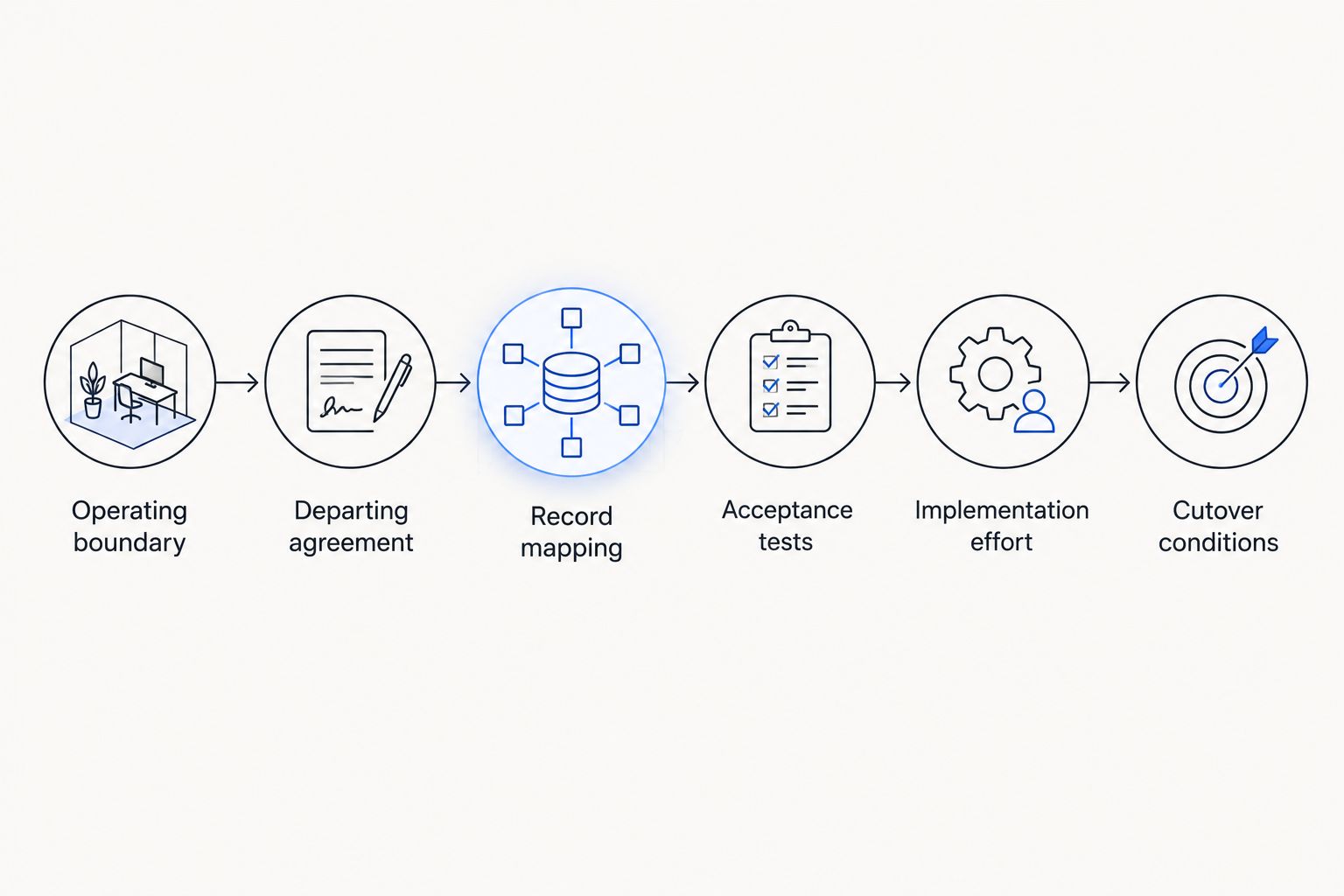
Build a switching budget in 6 steps
1. Define the operating boundary
List the processes you will move and those you will retain. Include employee records, recruitment, onboarding, leave, attendance, payroll, benefits, and reporting only where they belong in your project.
For each process, name the current owner and the future owner. This exposes handoffs that a software feature checklist does not capture. It also gives providers a defined scope to respond to rather than a broad request to migrate everything.
2. Inspect the departing agreement
Check notice requirements, renewal provisions, data export terms, and access after termination. Confirm the format and contents of the export before treating it as a usable migration source.
Ask how documents, historical changes, and audit records are delivered. Do not assume that a spreadsheet of current employee fields represents the full employment record. Keep any contractual interpretation with the person responsible for your agreement.
3. Inventory and map the records
Create a field-level mapping between the departing and replacement systems. Identify employee identifiers, organizational structures, leave balances, compensation records, and attachments where they are in scope.
Assign a business owner to each dataset. The migration team can transfer a value, but an authorized owner must decide whether that value is correct. Record unresolved exceptions before import rather than allowing the replacement system to become the new home for unexplained differences.
4. Define acceptance tests
Specify how you will verify completeness, accuracy, permissions, and workflow behavior. A successful upload establishes that the system accepted data; it does not establish that the data matches the approved source.
Use separate tests for normal work and exceptions. Examples include an employee changing departments, a manager approving leave, an administrator correcting an imported record, and a payroll owner reviewing opening balances. Select examples that reflect your actual processes.
5. Assign implementation effort
Ask each provider to identify included work, customer responsibilities, and separately scoped tasks. Assign internal owners for HR, payroll, finance, IT, and privacy work wherever those functions are involved.
Record estimated staff hours by task using your own planning assumptions. Translate those hours into an internal resource budget using your approved costing method, not a generic market rate. Keep provider charges and internal effort visible as separate lines.
6. Set the cutover conditions
Define the conditions for moving live work into the replacement system and the conditions for ending access to the departing one. Include an escalation owner and a fallback procedure for unresolved operational problems.
End overlap when the agreed acceptance conditions are met, not simply when the new system becomes accessible. Confirm that historical retrieval, live approvals, and any payment-related processes work before retiring the access they replace.
Check payroll and employee records before cutover
For employers operating in Turkey, distinguish the attendance record from the payroll output. Puantaj records working time, leave, and absences; bordro is the payroll statement. PDKS refers to personnel attendance control systems. Moving one dataset does not establish that the connected calculation is correct.
Document the path from attendance input to approved payroll and payment instructions. Identify where corrections happen and who authorizes them. Reconcile the records your payroll process depends on rather than checking only the final total.
SGK is Turkey's Social Security Institution. KVKK is Turkey's personal data protection law. A software replacement does not remove your responsibility to manage reporting obligations, access permissions, and lawful handling of employee information.
For a 2026 transition, ask your responsible payroll and privacy advisers to review the proposed handling of historical records and live processing. Keep legal conclusions separate from vendor feature descriptions. A migration plan should identify the control and its owner, not merely mark compliance as complete.
Where Ottohr fits in the switching decision
Ottohr is best suited to growing employers evaluating a combined HR and payroll platform. Its stated scope covers hiring, onboarding, payroll, benefits, and compliance tools for midsize and large enterprises and growing employers.
Include Ottohr in your evaluation when that scope matches the functions you intend to replace. The benefit of evaluating those functions together is a shared project boundary; the trade-off is that a broader replacement requires more processes to be assessed and accepted.
Evaluate Ottohr HR software against your migration requirements, not just its functional scope. Request confirmation of supported exports, historical imports, integrations, implementation responsibilities, and acceptance procedures before treating any of those items as included.
Can I switch HR software without replacing payroll?
You can define an HR-only switch while retaining payroll, provided the required data handoffs are supported and tested. Specify which system owns employee changes, leave information, compensation updates, and other payroll inputs.
The boundary needs an owner. Without that decision, a corrected record in the HR system does not establish that payroll received or accepted the correction. Include the handoff in your acceptance tests.
Should I migrate all historical employee data?
Choose historical migration scope according to operational access and retention requirements, not a default instruction to import everything. Current working records and older reference material do not necessarily need the same destination or permissions.
Document where each record category will remain accessible and who can retrieve it. An archive is useful only if authorized staff can find the required information and understand its connection to the employee record.
FAQ
How much does it cost to switch HR software providers in 2026?
Your switching cost consists of contracted transition charges, internal migration work, integration changes, training, and overlapping service commitments. Build the budget from your agreed scope rather than treating the replacement subscription as the full transition cost.
What should an HR software migration proposal include?
An HR software migration proposal should identify deliverables, exclusions, responsibilities, acceptance tests, and change-control arrangements. Ask for explicit treatment of historical records, attachments, integrations, and payroll work where relevant.
Does switching HR software always mean changing payroll?
Switching HR software does not require you to include payroll in the replacement scope. If payroll stays, confirm that employee changes and other required inputs move correctly between the retained and replacement systems.
Can our own HR team handle the migration?
Your HR team can own the migration tasks within its expertise and capacity. Assign payroll, technical, contractual, and privacy responsibilities to the appropriate owners rather than treating all migration work as HR administration.
How do I compare HR software switching proposals fairly?
Compare proposals against the same records, workflows, integrations, and acceptance conditions. Separate provider charges from internal staff effort and distinguish transition commitments from ongoing service.
When should we cancel the old HR software?
Schedule cancellation around your contractual obligations and agreed cutover conditions. Confirm that required records remain retrievable and replacement processes pass acceptance checks before ending access.
What is the biggest mistake in an HR software switching budget?
Treating the new subscription as the entire switching budget leaves transition work unaccounted for. Include data reconciliation, implementation responsibilities, training, integrations, historical access, and any overlapping commitments.
One last thing
Test retrieval before you test deletion. Ask an authorized team member to retrieve a historical employee document and explain which record it belongs to. A completed export is not the same as a usable archive.
Make that retrieval test part of your 2026 exit checklist. If the record cannot be found, read, or connected to the correct employee, resolve the problem before ending the access needed to correct it. This gives your cancellation decision an operational condition rather than leaving it tied only to a calendar date.


