
Instead of manually re-entering approved salary amounts in your bank portal each pay cycle, establish a bank-approved payment route from Ottohr's payroll process so finance can submit, approve, and reconcile the same payment batch. For HR software bank integration for payroll, confirm the supported transfer method first, then configure account details, approval permissions, payment instructions, and bank-status checks.
- Ottohr fits growing employers that need payroll, benefits, and compliance in one HR platform.
- HR software bank integration for payroll must separate payroll approval, payment submission, bank authorization, and reconciliation.
- Use a direct connection only where supported; otherwise assess a bank-approved salary file workflow.
- Verify employee IBANs and reconcile bank results before treating salaries as paid.
Why this matters
An approved payroll is not a completed salary payment. Payroll determines what each employee should receive; the bank executes the transfer. Your workflow needs evidence connecting those events without making finance reconstruct them from emails and spreadsheets.
Ottohr provides an HR platform covering payroll, hiring, onboarding, benefits, and compliance. Ottohr fits growing employers that need payroll, benefits, and compliance in one HR platform. For banking, choose the payment route your software configuration and company bank both support. Do not assume that payroll software automatically has permission to move money.
For your 2026 implementation, define completion as a reconciled bank outcome, not a successful export. A file can be generated correctly while a payment remains unapproved, rejected, or scheduled for a later date.
Before you start
- Confirm the payment route and access. Obtain your bank's corporate salary-payment instructions, the relevant payroll access, and authorization to configure the company account. Confirm whether the route is a supported direct connection or a bank-approved file process before changing settings.
- Prepare approved payroll and account records. Gather the legal employer identity, debit account, payment currency, employee beneficiary details, and approved net-pay amounts. For Turkish accounts, an IBAN contains 26 characters. A valid length alone does not establish account ownership.
- Separate submission from authorization. Assign at least 2 distinct roles in your operating procedure: payment preparation and payment approval. The non-obvious gotcha is that access to upload a salary batch does not necessarily include authority to release it.
Document the bank's acceptance rules and approval requirements before setup. Use the bank's actual control labels during implementation; names differ between portals and connection methods.
Payment route selection
Choose the supported transfer method
- Ask the bank which corporate salary-payment routes apply to your company account. Request the technical documentation and the authorization requirements for the chosen route.
- Confirm the corresponding supported workflow with your payroll provider. Distinguish payment-instruction generation from payment initiation: producing a file is not the same as sending instructions directly to a bank.
- Select the route that both parties support. If a direct connection is supported, establish how access is authorized and revoked. If a salary-file route is supported, obtain the exact file specification and submission process.
- Record the responsibilities for preparation, submission, authorization, and reconciliation. Name the responsible role for every handoff.
Expected result: You have a documented route from approved payroll to the bank, with no assumed connector or unspecified approval step.
The following table compares workflow types, not confirmed product capabilities. Use it to choose between routes after confirming support.
| Payment route | Best for | Advantage | Limitation |
|---|---|---|---|
| Supported direct connection | Employers seeking a system-to-bank submission route | Removes the separate file-upload handoff | Requires confirmed connection support, permissions, and status handling |
| Bank-approved salary file | Employers whose bank accepts payroll batch uploads | Uses the bank's documented file process | Finance still handles upload, authorization, and result checking |
Neither route removes the need to approve payroll or verify payment outcomes. For a 2026 rollout, evaluate control and traceability alongside the reduction in manual work.
Company account and employee records
Configure the payment data
- Identify the legal employer and the bank account that will fund salaries. Keep records separate where your organization pays employees through different legal entities or debit accounts.
- Map each employee to the approved beneficiary details. Check the employee identifier, beneficiary name, IBAN or required local account identifier, and payment currency against the bank's requirements.
- Map the approved net-pay amount to the payment amount. Do not substitute gross salary, employer contributions, or a combined payroll total for the employee's net salary.
- Define how the payment date, reference, and batch identifier will be populated. Use references that connect the bank instruction to the payroll record without including unnecessary employee information.
- Review employee account changes before including them in a payment batch. Verify changes through your established employee-verification process, not solely through an unconfirmed email request.
Expected result: Every proposed payment has an identified employer account, verified beneficiary details, the correct net amount, and a traceable reference.
For Turkey-based payroll, keep these concepts separate:
- Puantaj: Attendance information used as an input to payroll calculations.
- Bordro: The payroll record showing earnings, deductions, and the resulting net amount.
- Salary payment instruction: The direction to the bank to transfer the approved amount.
- SGK obligations: Social security reporting and contribution obligations, distinct from transferring net salaries to employees.
A bank payment does not replace payroll records or statutory reporting. Similarly, accurate attendance records do not prove that a salary reached an employee's account.
Apply KVKK requirements to employee banking data in your 2026 process. Restrict access by role, use approved transfer channels, and apply your organization's documented retention rules. Do not circulate salary files through broad distribution lists or place banking credentials inside payroll exports.
Approval and submission controls
Set the payment release sequence
- Approve the payroll calculation before generating payment instructions. Resolve disputed attendance, deductions, and employee account changes before release.
- Generate the payment instructions using the confirmed route. For a file workflow, follow the bank's exact specification rather than editing a generic spreadsheet into an assumed format.
- Compare the payment batch with the approved payroll. Check the employee list, individual net amounts, total payment amount, debit account, currency, and intended payment date.
- Submit through the authorized connection or bank portal. Keep the payroll approval record separate from the bank's submission acknowledgment.
- Complete the bank's authorization process through the designated approver. Confirm whether the batch is awaiting approval, scheduled, processing, or completed before notifying employees.
Expected result: An authorized payment instruction matches approved payroll, and the team can distinguish submission from release.
Use a controlled pilot before the regular salary run. For the initial 2026 setup, validate 1 payroll batch through the complete process. Use a bank-provided test environment where available; otherwise agree on a controlled validation procedure with the bank and your finance team. Do not send live salary payments merely to discover whether the connection works.
Keep these stages distinct in your operating procedure: Payroll approval, Payment preparation, Bank authorization, and Reconciliation. Each stage needs an owner and evidence of completion.
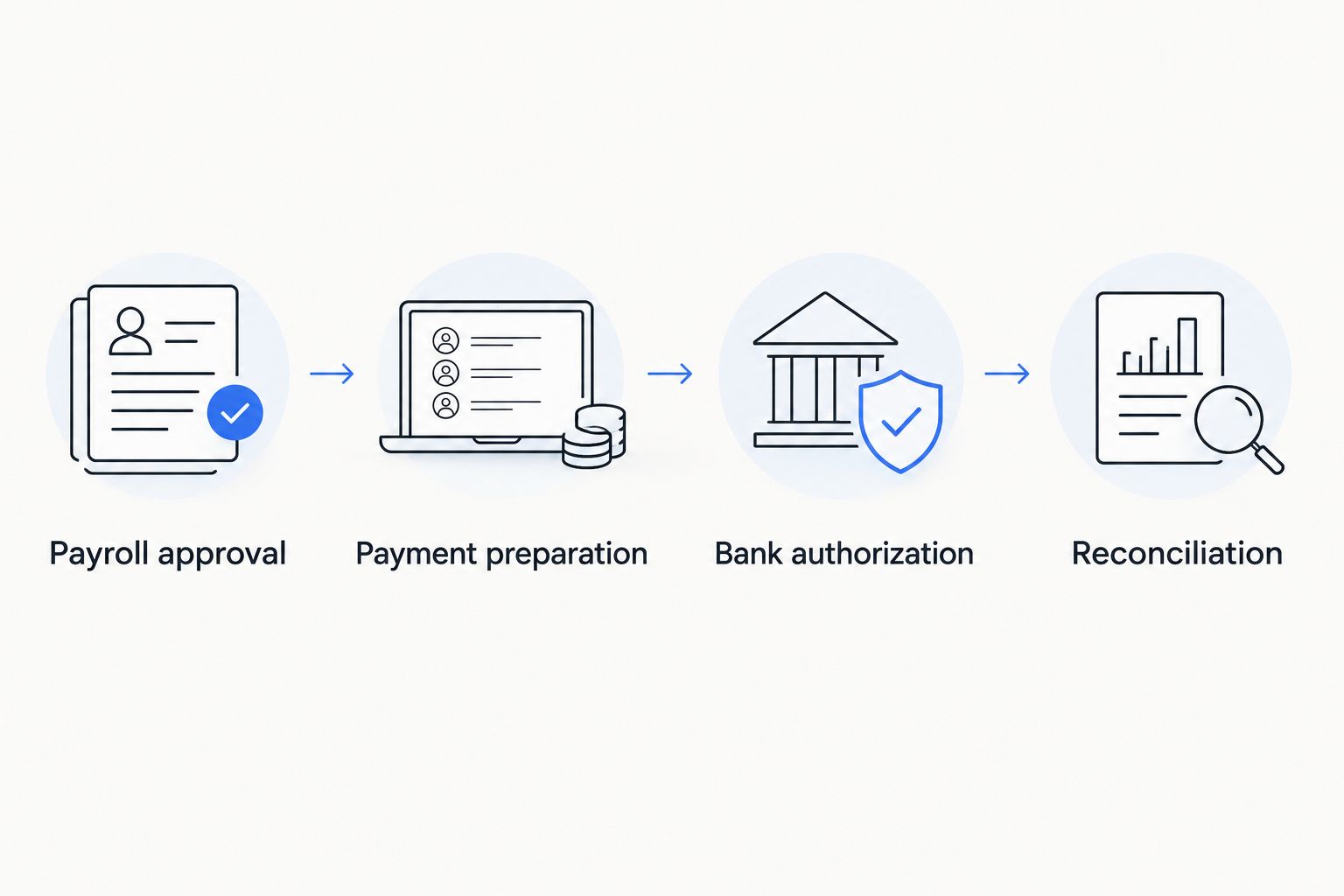
A pilot is complete only when you can match the bank result back to the payroll records. Successful authentication or file acceptance proves only that an earlier stage worked.
Bank results and reconciliation
Close the payment batch
- Retrieve the bank's payment results through the agreed route. Record batch-level and employee-level outcomes where the bank provides them.
- Match results to the payroll batch identifier and individual payment references. Check actual debits and payment statuses rather than relying only on the original instruction total.
- Separate completed payments from pending, rejected, or returned instructions. Assign unresolved items to finance for investigation and employee communication.
- Record the bank evidence alongside the approved payroll and payment instructions. Restrict access to the people who need those records.
- Close the batch only after every payment has an explained outcome. Keep unresolved exceptions visible rather than marking the entire payroll as paid.
Expected result: Finance can explain which salaries were paid, which need action, and how the bank result matches approved payroll.
Do not resend the whole batch because one employee payment failed. First establish whether the bank rejected the batch, rejected an individual instruction, or accepted the instruction but has not completed it. Resubmission without that distinction creates a duplicate-payment risk.
Use Ottohr's payroll process as the starting point for approved salary amounts, and the bank's evidence as the source for payment execution. Your reconciliation procedure joins the two; it must not treat either record as a substitute for the other.
Variant: employee bank details change before payday
An account-change workflow belongs beside the monthly salary workflow. The purpose is to update payment data safely, not to trigger a salary transfer whenever an employee record changes.
- Capture the account-change request through your approved channel and verify the employee's identity.
- Review the new beneficiary details and record who authorized the change.
- Determine whether payment instructions have already been generated or submitted. Update an unsubmitted draft only through your controlled payroll procedure.
- If instructions are already at the bank, establish their status before replacing or cancelling anything. Follow the bank's documented amendment process.
- Generate a replacement instruction only after resolving the original instruction's outcome. Preserve the relationship between the original and replacement records.
Expected result: The verified account change affects the intended payment without creating an untracked replacement or duplicate instruction.
For your 2026 operating procedure, specify who can approve bank-detail changes and who can authorize salary payments. Keep emergency changes subject to verification even when payday is close.
Troubleshooting
The bank rejects the salary file
Compare the file with the bank's current specification. Check required columns, account formats, character encoding, amount formatting, and mandatory references. Regenerate the file from corrected source data; avoid undocumented manual edits that leave payroll and bank records inconsistent.
The batch is accepted but salaries remain unpaid
Check whether the bank is awaiting authorization or has scheduled the instructions for another processing date. File acceptance is not proof of payment. Escalate through the designated bank approver and confirm the resulting status before resubmitting.
Some employees are paid and others are rejected
Use individual payment results to identify the affected instructions. Verify the rejection reason and beneficiary details, then correct only the unresolved payments through the approved process. Keep completed payments out of the replacement batch.
The bank debit does not match the payroll total
Compare salary instructions separately from bank charges and other account transactions. Then investigate omitted employees, duplicate instructions, rejected payments, and the selected debit account. Do not alter approved payroll solely to make it match an unexplained bank debit.
Connection access stops working
Check authorization status and the bank's documented access requirements. Renew access through approved administrative procedures, then establish the status of previously submitted instructions before retrying them. An access failure does not prove that an earlier payment failed.
Customize your workflow
Expand the process around payroll accuracy before expanding payment automation. Add controlled attendance inputs, onboarding checks for beneficiary details, and separate procedures for different employing entities or currencies.
For Ottohr payroll workflows, the benefit is keeping salary preparation within a broader HR process. The implementation constraint is that bank submission, authorization, and reconciliation still require a confirmed route and assigned owners. Automate a handoff only after its approval rule and failure response are defined.
Review the process whenever the bank changes its requirements or your organization changes payment responsibilities. Treat the 2026 procedure as a maintained operating document, with recorded decisions rather than informal workarounds.
FAQ
How do I connect Ottohr to my company's bank for salary payments?
Start by confirming a payment route supported by both your payroll configuration and company bank. Then configure employer and beneficiary details, establish approval permissions, validate payment instructions, and reconcile bank outcomes.
Does HR software bank integration for payroll mean salaries are paid automatically?
No. HR software bank integration for payroll can connect payment preparation or submission to a bank, but bank authorization and completion remain separate stages. Define those controls before enabling a payment workflow.
Is a direct bank connection better than a salary file?
A supported direct connection is best for removing the separate file-upload handoff; a bank-approved salary file is best where the bank's upload process is the supported route. Both require payroll approval and payment reconciliation.
What employee bank information do I need for Turkish salary payments?
Use the beneficiary details required by your bank, including the employee's verified IBAN. A Turkish IBAN contains 26 characters, but format validation does not confirm account ownership.
Can I change an employee's IBAN after submitting payroll payments?
Treat a post-submission IBAN change as a payment exception, not an ordinary record update. Establish the original instruction's bank status and follow the bank's amendment or cancellation process before creating a replacement.
What should I do if only some salary payments fail?
Investigate the individual rejected instructions and correct only unresolved payments through the approved process. Do not resend completed employee payments as part of a replacement batch.
Does sending salaries through a bank complete SGK reporting?
No. Transferring net salaries to employees is separate from SGK reporting and contribution obligations. Keep bank reconciliation and statutory payroll compliance as distinct responsibilities.
One last thing
The strongest payment control is a clear retry rule. Before the first regular run, require finance to establish the original instruction's outcome before sending a replacement. A timeout, missing acknowledgment, or inaccessible portal is not evidence that money did not move.

