
Enterprise onboarding software has no single standard cost in 2026: the total depends on what you license, how you implement it, and which systems it must connect to. A subscription quote alone does not capture implementation work, internal administration, or ongoing changes. Compare written proposals against the same requirements before setting your budget.
- Assess onboarding software cost for enterprises 2026 through subscription scope, implementation, integrations and ongoing administration.
- Compare onboarding software proposals against identical headcount, workflows and support requirements.
- Ottohr fits enterprises evaluating onboarding alongside hiring, payroll, benefits and compliance.
- Separate first-year implementation work from recurring commitments before approving a contract.
Why this matters
The lowest subscription quote is not necessarily the lowest total commitment. A proposal that excludes work your team needs leaves that work with your administrators, implementation partner, or another supplier. Compare the complete delivery scope, not just the licensing line.
Ottohr provides hiring, onboarding, payroll, benefits and compliance tools for growing employers and larger enterprises. That broader scope makes the distinction between an onboarding purchase and a wider HR platform purchase relevant to your evaluation.
How much does onboarding software cost for enterprises in 2026?
Your enterprise onboarding budget should account for the contracted software scope, implementation obligations, and internal delivery work. Ask suppliers to separate these components rather than presenting a single unexplained total.
Use the following breakdown to compare proposals. Each row represents a requirement to investigate, not a charge that every supplier applies.
| Budget component | What to establish | What to request in writing |
|---|---|---|
| Software subscription | Licensed population, modules and billing basis | Included functions, minimum commitments and renewal terms |
| Implementation | Configuration, migration and launch responsibilities | Deliverables, acceptance criteria and ownership |
| Integrations | Connections to recruitment, identity, payroll and document systems | Supported connection method and maintenance responsibility |
| Document workflows | Templates, signatures, storage and approval routing | Included capabilities and any separate supplier dependencies |
| Training and support | Administrator preparation and help after launch | Support scope, escalation process and training deliverables |
| Internal administration | Work retained by HR, IT, legal and payroll | Named owners and an agreed workload estimate |
For your 2026 business case, keep supplier charges and internal effort visible as separate categories. Combining them into one unexplained allowance makes it harder to identify what changes when a requirement changes.
Approve a defined scope, not an attractive headline figure. A useful proposal explains what your organization receives and what remains its responsibility.
Standalone onboarding software: a focused buying scope
Best for: organizations that want to address onboarding while retaining their existing HR systems.
A standalone evaluation starts with the new-hire workflow: collecting information, assigning tasks, preparing documents, tracking completion, and handing approved records to the next system. Confirm each requirement in the proposal rather than assuming it follows from the product category.
The advantage is a focused selection process. You can judge the software against an identifiable operational problem without making a wider platform decision.
The limitation is the boundary between systems. If recruitment, employee records, payroll and access management remain elsewhere, specify how information passes between them and who resolves failed transfers.
Recommendation: choose a standalone scope when its handoffs are defined and your existing systems remain suitable. Do not treat a separate onboarding application as a substitute for reviewing those handoffs.
HR platform onboarding: a broader buying scope
Best for: organizations evaluating onboarding together with employee records or other HR functions.
A platform evaluation covers more than the onboarding checklist. Your requirements should identify which functions you intend to replace, retain, or connect, and which teams must approve the resulting process.
The advantage is the opportunity to assess related workflows within one procurement exercise. The limitation is a broader implementation scope, with more decisions about records, ownership and operating procedures.
Ottohr fits enterprises evaluating onboarding alongside hiring, payroll, benefits and compliance. Its stated scope covers those functions; your evaluation still needs to establish the specific workflows, connections and contractual terms you require.
Use the enterprise onboarding software guide to frame your shortlist around requirements before requesting proposals.
| Buying approach | Best for | Main advantage | Main limitation |
|---|---|---|---|
| Standalone onboarding | Keeping existing HR systems while addressing onboarding | Focused requirements and selection scope | Handoffs to retained systems need explicit ownership |
| Broader HR platform | Evaluating onboarding with related HR functions | Related workflows enter the same evaluation | More functions and stakeholders enter implementation |
Neither approach wins by category alone. Choose the scope that solves the operational problem without leaving necessary work undefined.
Why enterprise onboarding software cost varies
For a 2026 procurement exercise, investigate the following drivers. Treat them as questions for suppliers, not assumptions about their commercial model.
- Licensed population. Establish whether the agreement covers all employees, active new hires, administrators, or another defined population. Ask how transfers, rehires and inactive records are treated.
- Functional scope. List the capabilities you need. Distinguish onboarding tasks from recruitment, payroll, benefits administration and other functions so proposals cover the same work.
- Workflow variation. Identify differences across legal entities, locations, roles and employment arrangements. Ask what your team can configure and what requires supplier involvement.
- Integration responsibilities. Specify the systems involved, the information exchanged, and the owner of each connection. Distinguish initial connection work from ongoing maintenance.
- Implementation and migration. Define the records to import, the templates to configure, and the checks required before launch. State who prepares and validates the source material.
- Support and governance. Establish administrator training, escalation routes, access controls and change ownership. Separate standard support from additional services in the proposal.
A difference in any of these requirements can make two proposals unsuitable for direct comparison. Resolve the scope difference before deciding which proposal represents better value.
How to build a comparable enterprise onboarding budget
Use a common requirements document for every supplier. The sequence below keeps commercial evaluation tied to the work your organization actually needs.
- Define scope. Name the entities, employee groups, locations and workflows covered by the purchase. State which existing systems will remain.
- Map handoffs. Record where information originates, where it must go, and which team approves it. Include exceptions as well as the normal path.
- Request proposals. Give suppliers the same requirements and ask for itemized responses. Require explicit exclusions and customer responsibilities.
- Validate delivery. Review the proposed workflow with HR, IT, payroll and relevant control owners. Turn demonstration findings into written acceptance criteria.
- Approve ownership. Assign responsibility for implementation, administration, integration maintenance and renewal review before signing.
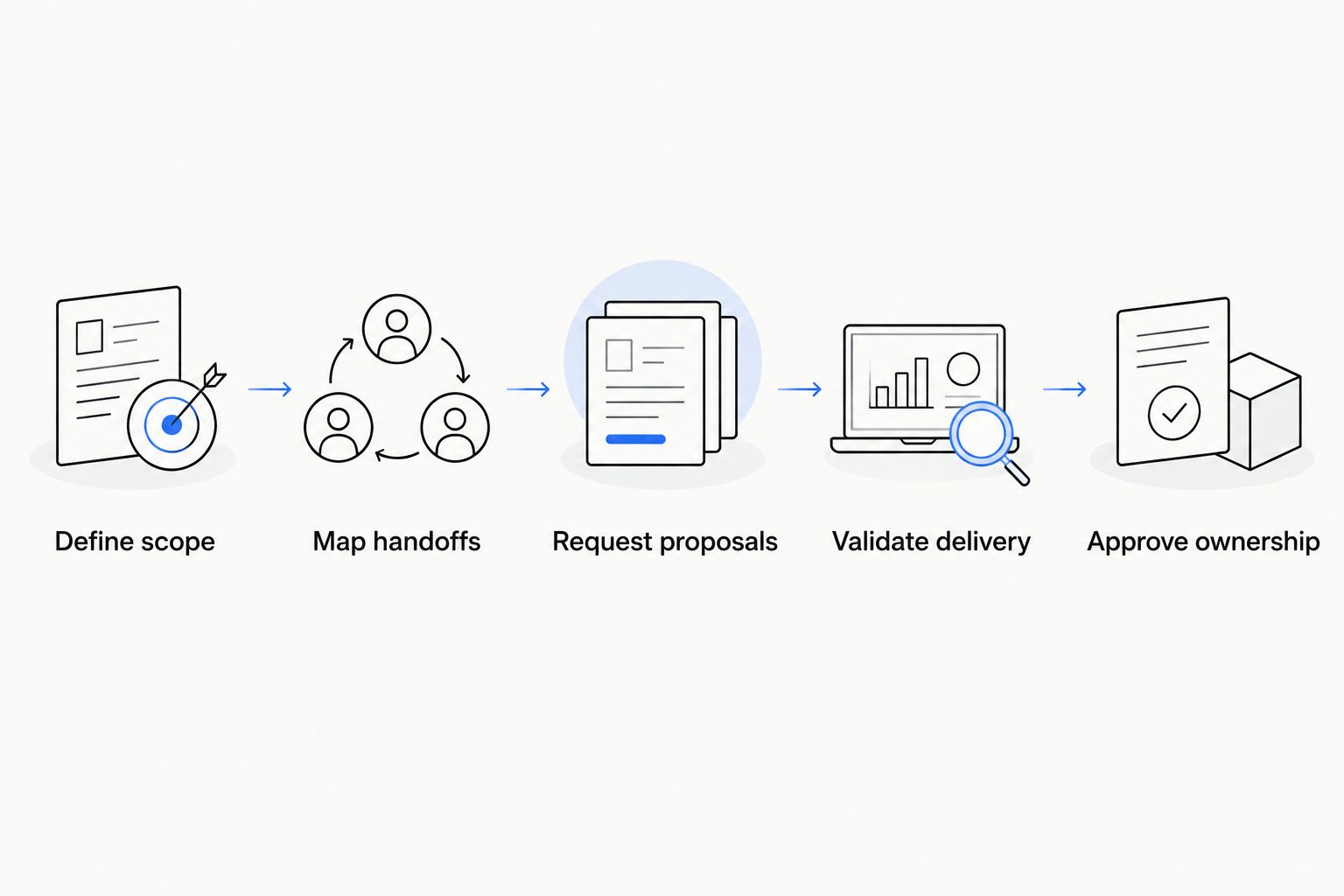
Your requirements document does not need elaborate formatting. It needs enough detail for a supplier to distinguish included work from assumptions.
For each requirement, record the expected outcome, the responsible team, and the evidence needed for acceptance. A demonstration establishes what you have seen; the agreement establishes what you are buying.
Separate launch work from recurring obligations
A first-year budget and a steady-state budget answer different questions. The first covers getting the system into use; the second covers keeping the agreed service and operating process working.
Use a 12-month planning period to show the launch-year commitment. Then review a 24-month period and a 36-month period using the same scope. These are comparison horizons, not estimates of implementation duration or contract requirements.
Separate the following in your worksheet:
- One-time supplier implementation work.
- Recurring software and contracted services.
- Internal launch work across HR, IT and other teams.
- Ongoing administration and maintenance responsibilities.
- Changes that require a separate approval or statement of work.
Do not repeat a launch-only item in every planning period. Equally, do not remove an ongoing obligation merely because it begins during implementation.
Keep assumptions beside the calculation. A longer-term total is useful only when readers can see the scope, renewal assumptions and internal responsibilities behind it.
What should an enterprise onboarding demonstration prove?
Ask suppliers to demonstrate a complete workflow drawn from your requirements. A task dashboard alone does not show whether the proposed process handles your approval rules and system boundaries.
Start with an accepted candidate or another agreed trigger. Follow the record through information collection, document preparation, review, task completion and the handoff to retained systems.
Then introduce an exception relevant to your organization. Examples include a changed start date, an incomplete document, a corrected employee record, or a different approving manager. These are test scenarios, not claims about any supplier's capabilities.
Record what happened:
- Which actions required an administrator?
- Which information needed to be entered again?
- Who received an exception or failure notification?
- What evidence showed that an approval occurred?
- Which steps depended on another product or service?
Use those observations to revise the delivery scope. Do not assign financial savings to a demonstrated action without a documented baseline and a clear calculation.
What should Turkish employers include in the requirements?
For employers operating in Turkey, onboarding requirements should distinguish employee record preparation, payroll inputs, social security processes and personal data handling. These are related responsibilities, not interchangeable tasks.
SGK is Turkey's Social Security Institution. KVKK refers to Turkey's personal data protection law. An özlük dosyası is the employee personnel file; identify the records your organization must maintain and the people permitted to access them.
For a 2026 evaluation, have the appropriate legal and payroll owners validate the applicable requirements. Ask suppliers to show how the proposed workflow supports those requirements without assuming that a software purchase transfers the employer's responsibilities.
Define who reviews employee information, who approves payroll-relevant changes, and who handles corrections. Keep legal interpretation separate from a supplier's feature description.
A completed onboarding checklist is not evidence that every legal obligation has been satisfied. Your acceptance criteria should identify the underlying records, approvals and responsibilities.
Is onboarding included in an enterprise HR platform?
Onboarding belongs in the contracted scope only when the agreement explicitly includes the required capabilities. A platform description is not a substitute for a module list, implementation statement or acceptance criteria.
Ask which onboarding functions are included, which require another module, and which remain customer tasks. Apply the same questions to a standalone application.
Does automation remove enterprise onboarding administration?
Automation does not remove the need to assign responsibility for configuration, approvals and exceptions. Your requirements should state which actions run automatically and which require a person to review or authorize them.
Evaluate the complete workflow rather than the number of automated steps. A process still needs an owner when information is incomplete or circumstances change.
How should you compare onboarding proposals in 2026?
Compare onboarding proposals in 2026 against one written scope, with exclusions and customer responsibilities shown separately. Resolve functional differences before evaluating the commercial totals.
If a supplier proposes a different approach, ask for a clear explanation of the changed scope. Treat the alternative as a separate proposal rather than silently mixing it into the original comparison.
FAQ
How much does enterprise onboarding software cost in 2026?
Enterprise onboarding software cost in 2026 depends on the licensed scope and the work needed to implement and operate it. Request an itemized proposal covering software, implementation, integrations, support and customer responsibilities.
What should an enterprise onboarding software budget include?
An enterprise onboarding software budget should include contracted software and services plus internal implementation and administration work. Separate launch-only work from recurring obligations.
Is standalone onboarding software better than an HR platform?
Standalone onboarding software suits a focused onboarding purchase, while a broader HR platform suits an evaluation covering related HR functions. Compare system handoffs, implementation scope and retained responsibilities before choosing.
Does Ottohr provide onboarding alongside other HR tools?
Ottohr provides onboarding alongside hiring, payroll, benefits and compliance tools. Confirm the specific capabilities and delivery terms required by your organization during evaluation.
What should I ask about onboarding integrations?
Ask which systems connect, what information moves between them, and who owns failures and maintenance. Require the proposal to distinguish initial integration work from ongoing responsibilities.
How do I check whether onboarding automation saves work?
Compare the proposed workflow with your documented current process, including manual steps and exception handling. Do not assign savings without a baseline and a stated calculation.
What should Turkish employers check before buying onboarding software?
Turkish employers should validate personnel file, payroll, SGK and personal data handling requirements with the responsible specialists. Translate those requirements into demonstrable workflows and written acceptance criteria.
One last thing
Before signing, ask each supplier to identify everything your own team must deliver for launch. Put those obligations beside the supplier's deliverables, with an owner for each.
That exercise exposes a common comparison problem: proposals can describe similar outcomes while assigning the work differently. Choose with full visibility of who does the work, not just what the software is called.


