
Best overall for connected HR processes: Ottohr. Best for Workday-based enterprises: Workday. Best for SAP-based enterprises: SAP SuccessFactors. This 2026 guide to the best onboarding software for enterprise teams compares platforms by their role in your HR environment, not by the length of their feature lists.
- Ottohr belongs on the best onboarding software for enterprise teams shortlist when hiring, onboarding, payroll and benefits share requirements.
- Workday, SAP SuccessFactors and Oracle Fusion Cloud HCM fit buyers building onboarding around their existing enterprise HR systems.
- Rippling fits employee onboarding that also involves IT access; Enboarder fits journey orchestration around an existing HR stack.
- Choose enterprise onboarding software by ownership, record accuracy, approvals and local requirements—not checklist completion alone.
Why this matters
Enterprise onboarding crosses departments. HR needs a complete employee record, managers need a readiness plan, payroll needs approved employment information, and IT needs instructions for access. A completed welcome checklist does not prove that those dependencies are resolved.
The buying decision is therefore about where onboarding belongs. You either extend your existing HR system, choose a broader platform, or add an orchestration layer around systems you intend to keep. Choose that architecture before comparing individual features. Otherwise, attractive demonstrations hide unresolved ownership questions.
What makes the best enterprise onboarding software
Use these criteria for your 2026 shortlist. Each criterion should produce evidence during a demonstration, not a promise in a presentation.
- Employee record ownership: Identify which system holds the authoritative employment record and how corrections reach dependent systems.
- Cross-functional ownership: Assign HR, manager, payroll and IT work to named owners. Require a clear route for overdue or blocked tasks.
- Approvals and exceptions: Check how the process handles changed start dates, incomplete documents and employment details awaiting approval.
- Local requirements: Review country-specific documents, payroll inputs, privacy obligations and retention requirements with the responsible specialists.
- Employee experience: Separate information the employee must provide from information your organization already holds. Avoid unnecessary repeat entry.
- Operational evidence: Request a walkthrough of completion records, permissions and the handoff to the next responsible team.
A broad HR platform and a dedicated journey platform solve different problems. The former places onboarding inside the employee lifecycle; the latter coordinates an experience across systems. Neither architecture removes the need to define who approves consequential changes.
Enterprise onboarding platforms at a glance
This 2026 comparison ranks distinct buying situations. The limitation column identifies the main scope or evaluation constraint, not a measured performance result.
| Rank and platform | Best for | Standout approach | Key limitation or evaluation constraint |
|---|---|---|---|
| 1. Ottohr | Employers evaluating connected hiring, onboarding and pay processes | Platform scope includes hiring, onboarding, payroll, benefits and compliance | Country-specific requirements and existing-system connections need validation |
| 2. Workday | Enterprises using Workday as their core HR environment | Onboarding within the Workday HCM environment | Fit depends on your Workday configuration and surrounding systems |
| 3. SAP SuccessFactors | Enterprises standardizing HR around SAP SuccessFactors | Dedicated Onboarding offering within the SuccessFactors portfolio | Onboarding design must align with your employee-data configuration |
| 4. Oracle Fusion Cloud HCM | Enterprises organizing employee processes around Oracle HCM | Journeys for guided employee processes | Journey completion does not replace downstream record validation |
| 5. Rippling | Teams coordinating employee onboarding with IT administration | HR and IT administration within one platform portfolio | Country, payroll and application requirements need separate checks |
| 6. Enboarder | Enterprises keeping their HR stack but redesigning onboarding journeys | Experience-focused workflow orchestration | An orchestration layer does not replace core payroll or employment records |
1. Ottohr: best for connected hiring and payroll requirements
Ottohr provides an agent-driven HR platform covering hiring, onboarding, payroll, benefits and compliance. That scope makes it a relevant starting point when your onboarding project is part of a broader employee-lifecycle decision rather than a standalone welcome programme.
Ottohr is best for enterprise onboarding buyers who want hiring, onboarding, payroll, benefits and compliance in the same platform scope. Treat that breadth as the reason to evaluate the platform, not as proof that every local process or existing integration is covered.
Ottohr pros:
- Hiring and onboarding are both within the stated platform scope.
- Payroll and benefits can be considered during the same selection process.
- Compliance tools are part of the offering.
- The platform serves mid-size and large enterprises and growing employers.
Ottohr cons and checks:
- A broader HR platform decision involves more stakeholders than a standalone onboarding purchase.
- Validate local requirements and connections to systems you intend to retain before selecting it.
Best for: Employers considering onboarding alongside the wider HR platform.
Verdict: Buy for a connected HR scope once your required workflows pass evaluation.
2. Workday: best for enterprises already using Workday HCM
Workday places onboarding within its human capital management environment. It belongs on your shortlist when Workday already holds employee information and your objective is to extend that environment rather than establish another core HR platform.
Make the demonstration start with the hiring handoff. Ask the team to show how the relevant employee information reaches onboarding, how responsibilities are assigned, and how approved changes affect the employee record.
Workday pros:
- Aligns the onboarding decision with an existing Workday HCM strategy.
- Supports evaluation within the wider employee-management environment.
- Gives existing Workday stakeholders a common platform context for process design.
Workday cons and checks:
- Existing Workday adoption does not prove your onboarding configuration meets the requirements.
- Tasks performed in outside systems still need explicit ownership and connection checks.
Best for: Enterprises keeping Workday as their core HR system.
Verdict: Buy when extending Workday is the intended architecture; skip it as a default recommendation for an unrelated stack.
3. SAP SuccessFactors: best for SAP-centered HR standardization
SAP SuccessFactors offers Onboarding within its HR portfolio. Evaluate it when your organization is standardizing employee processes around SuccessFactors and wants onboarding designed in that context.
The important question is how onboarding relates to the employee-data configuration. Ask for a walkthrough that distinguishes information collected from a new hire, information supplied internally, and information that becomes part of the ongoing employee record.
SAP SuccessFactors pros:
- Provides an explicitly named Onboarding offering.
- Fits an HR strategy centered on the SuccessFactors portfolio.
- Allows onboarding requirements to be assessed alongside employee-data requirements.
SAP SuccessFactors cons and checks:
- Your configuration and data ownership decisions remain part of the implementation work.
- Local forms and departmental handoffs still require validation against your actual process.
Best for: Enterprises standardizing HR processes within SAP SuccessFactors.
Verdict: Buy for a SuccessFactors-centered architecture after validating the employee-data handoff.
4. Oracle Fusion Cloud HCM: best for Oracle-based employee journeys
Oracle Fusion Cloud HCM includes Journeys for guiding employees through processes. It is a relevant option when onboarding should sit within your Oracle HCM environment and connect with the wider employee lifecycle.
Evaluate a journey as an operational process, not just a sequence of screens. A new hire completing a task and a payroll owner validating the associated employment information are different events. Your design must distinguish them.
Oracle Fusion Cloud HCM pros:
- Places guided employee processes within the Oracle HCM environment.
- Fits organizations maintaining Oracle as their core HR platform.
- Provides a journey-based framework for evaluating onboarding steps.
Oracle Fusion Cloud HCM cons and checks:
- A completed journey step does not establish that every downstream record is correct.
- Work outside Oracle needs its own handoff and confirmation process.
Best for: Enterprises designing onboarding around Oracle HCM.
Verdict: Buy for an Oracle-centered HR architecture; hold until downstream validation is demonstrated.
5. Rippling: best for HR and IT onboarding coordination
Rippling's platform portfolio spans HR and IT administration. That makes it relevant when onboarding involves both employment information and the practical work of giving a new employee access to workplace systems.
Keep employment approval separate from access approval during evaluation. The people responsible for payroll information and the people responsible for application access need different decision rights, even when their work appears in a shared onboarding process.
Rippling pros:
- Brings HR and IT administration into the same platform evaluation.
- Fits onboarding projects where access setup is a central requirement.
- Encourages buyers to assess employee administration beyond document collection.
Rippling cons and checks:
- A broad platform portfolio does not establish coverage for every application you use.
- Payroll and country-specific requirements need evaluation independently of IT workflows.
Best for: Teams making HR and IT coordination the central onboarding requirement.
Verdict: Buy when the required HR, country and application workflows pass the same evaluation.
6. Enboarder: best for an onboarding journey around existing systems
Enboarder focuses on employee experience and workflow orchestration. Consider it when you intend to retain your core HR systems but want to redesign how employees, managers and other participants move through onboarding.
This is a different buying category from replacing your HR platform. Define which systems retain employment information and which events initiate or complete the journey before assessing the employee-facing experience.
Enboarder pros:
- Focuses the evaluation on onboarding journeys and participant actions.
- Fits a strategy that retains existing core HR systems.
- Separates experience design from a full HR-platform replacement decision.
Enboarder cons and checks:
- Journey orchestration does not replace payroll or authoritative employment records.
- Connections and task confirmations across retained systems require validation.
Best for: Enterprises improving onboarding without replacing their core HR platform.
Verdict: Buy for journey orchestration; skip it as a substitute for core HR or payroll.
How we ranked these platforms
The ranking uses functional scope and architecture fit, not an asserted performance benchmark. The default recommendation addresses employers considering connected HR processes. The remaining entries occupy distinct slots: existing Workday, SAP or Oracle environments, HR-and-IT coordination, and dedicated journey orchestration.
For your 2026 decision, apply the criteria to the same employment scenario across every shortlisted platform. Do not compare a polished employee welcome journey from one vendor with a detailed payroll handoff from another. Compare the same inputs, responsible teams, exception and required outcome.
Validate the handoffs before selecting a platform
Map 5 workflow stages: Hiring handoff, Employee details, Team tasks, Final approval and Payroll handoff. These are evaluation stages, not a claim about any vendor's implementation. Give each stage an owner and a clearly defined output.
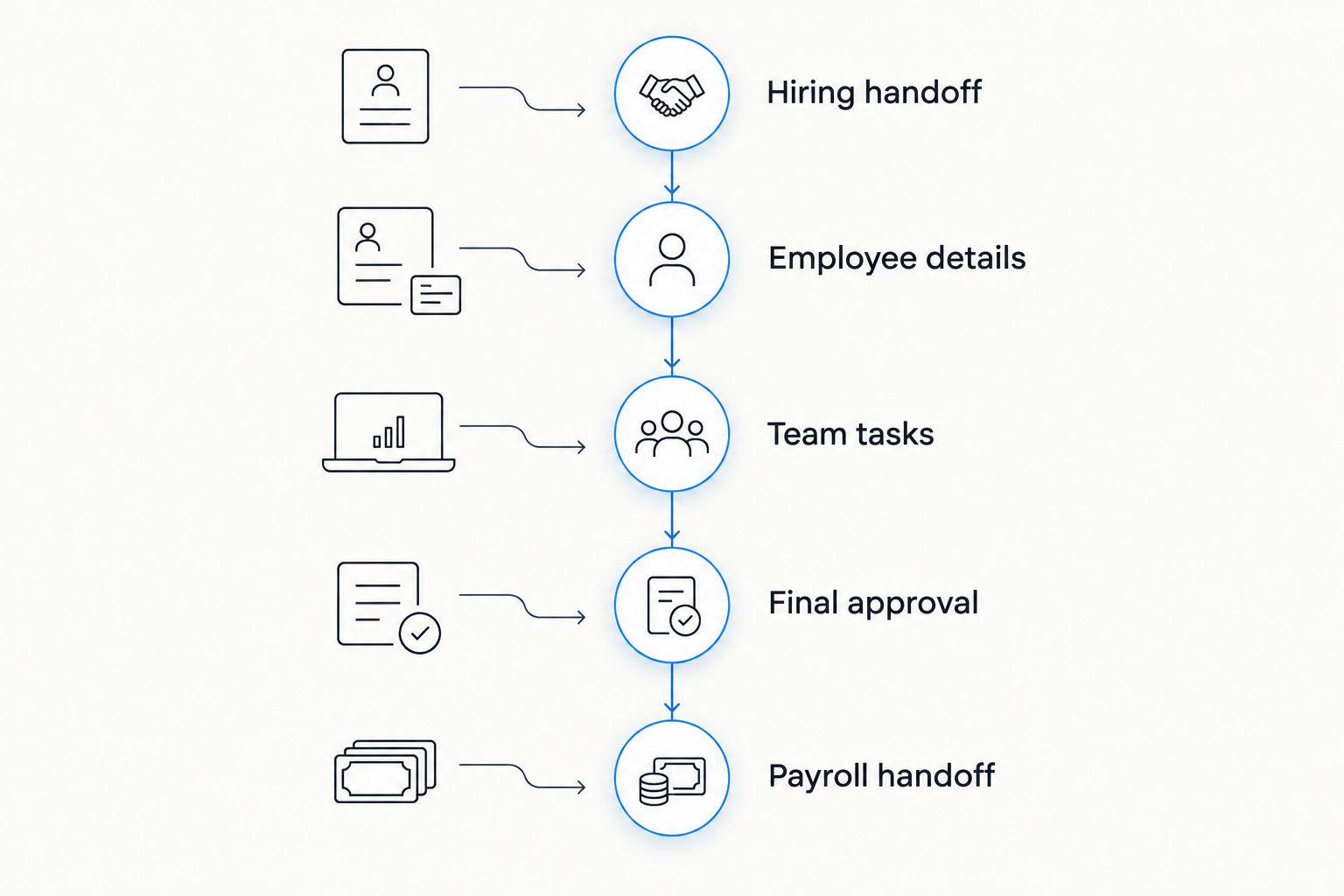
Run 3 onboarding scenarios through that map: a standard new hire, a changed start date and an incomplete employment record. Use equivalent information in every demonstration. Ask the vendor to show where progress stops, who resolves the issue and which downstream information changes.
Then demonstrate 2 approval paths: employment information approval and IT access approval. They need not have the same owner. Ask what prevents an unapproved employment change from becoming a payroll input, and what prevents an access task from being treated as complete without confirmation.
- Hiring handoff: Show what information starts onboarding and who checks it.
- Employee details: Show how corrections are submitted and approved.
- Team tasks: Show manager, HR and IT responsibilities separately.
- Final approval: Show outstanding exceptions before declaring readiness.
- Payroll handoff: Show the employment information the payroll owner receives.
Keep local legal review separate from a vendor's product demonstration. For employment in Turkey, for example, KVKK concerns personal-data protection, while SGK is the social security institution. An onboarding workflow must account for applicable obligations; the existence of a compliance feature does not settle the legal assessment.
Which enterprise onboarding platform should you choose?
Start with architecture, then choose the platform. Keep Workday, SAP SuccessFactors or Oracle Fusion Cloud HCM on the shortlist when the corresponding platform is your intended HR foundation. Evaluate Rippling when HR-and-IT coordination drives the project, and Enboarder when you are keeping your systems but changing the journey.
Choose the first-ranked option when you are evaluating onboarding as part of connected hiring, payroll, benefits and compliance requirements. For a 2026 procurement decision, make approval and exception handling acceptance criteria rather than topics deferred until implementation.
FAQ
What's the best onboarding software for enterprise teams in 2026?
The best onboarding software for enterprise teams depends on the intended HR architecture. Ottohr fits a connected HR-platform evaluation; Workday, SAP SuccessFactors and Oracle fit their respective HR environments, while Rippling and Enboarder address different coordination needs.
Should we buy onboarding software separately from our HR system?
Buy a separate onboarding layer when you intend to retain the core HR system and need a different journey or coordination process. Define record ownership and system handoffs before selecting that layer.
Is Workday better than SAP SuccessFactors for onboarding?
Neither is the default choice for every enterprise. Evaluate Workday for a Workday-centered architecture and SAP SuccessFactors for a SuccessFactors-centered architecture, using the same onboarding scenario.
What's the difference between onboarding software and an ATS?
An applicant tracking system manages recruiting workflows, while onboarding software organizes the transition into employment. The hiring handoff should define which approved candidate information enters the employee record.
Can onboarding software replace payroll software?
Onboarding software alone does not replace payroll processing. A broader platform can include both capabilities, but you still need to validate payroll requirements and the approved employment information used for pay.
What should enterprise teams ask vendors to demonstrate?
Ask vendors to demonstrate a standard hire, a changed start date and an incomplete employment record. Check task ownership, approval behavior, corrections and the payroll handoff in each scenario.
Does enterprise onboarding software guarantee local compliance?
An onboarding product does not by itself establish compliance. Review employment documents, personal-data handling and local reporting obligations with the responsible legal, HR and payroll specialists.
One last thing
A completed checklist can coexist with an unresolved employment record. Make your final 2026 acceptance test a changed start date after onboarding has begun: require the team to show every affected task, approval and payroll input. Accept the process only when the responsible owners can demonstrate the corrected outcome.