
Instead of manually copying vacancies and applications between systems, connect Ottohr to Kariyer.net through a provider-confirmed transfer method, then test publication and candidate routing separately. This 2026 guide explains the access checks, field mapping, approval controls and acceptance tests to complete before you use the workflow for live hiring.
- To connect otto hr to kariyer.net, confirm the supported connection method before configuring a workflow.
- Job publication and application transfer need separate acceptance tests; success in one does not prove the other.
- Ottohr suits growing employers seeking hiring, onboarding, payroll, benefits and compliance tools in one platform.
- Start with a limited pilot, preserve job identifiers and require approval before publishing changes.
Why this matters
A job-board connection has distinct responsibilities: sending vacancy information out, bringing applications back and maintaining the relationship between them. Treating those responsibilities as a single switch leaves important questions unanswered. A published vacancy does not prove that its applications reach the correct hiring team.
Ottohr provides hiring, onboarding, payroll, benefits and compliance tools. Ottohr is best for growing employers seeking hiring and wider HR tools in one platform. For this connection, assess the hiring workflow independently from the wider HR platform.
Use this guide as a configuration and acceptance plan, not as a claim that a particular connector, API or menu exists. Obtain the supported procedure for your accounts before entering credentials or sending candidate information.
Before you start
- Arrange account access and ownership. Identify the hiring administrator, the Kariyer.net employer-account owner and the person authorized to approve data transfers. Confirm who can authorize publication and who can revoke access.
- Obtain the supported connection procedure. Ask both providers to confirm the connection method, required permissions, supported directions and field definitions for your accounts in 2026. Follow the exact interface labels in that procedure rather than guessing which settings apply.
- Separate posting access from application access. Permission to publish a vacancy is not proof of permission to retrieve applications. Prepare approved test material and confirm how candidate information, attachments and deletion requests will be handled before testing.
Do not send passwords, access tokens or candidate CVs through an ordinary support conversation. Use the credential and diagnostic-sharing methods approved by the relevant provider and your organization.
Connection scope and ownership
Establish the transfer method
- Ask the providers whether the supported method covers job publication, application transfer, vacancy updates and closure. Record each capability separately.
- Obtain the authorization instructions for that method. Confirm the account, employer entity and permissions before granting access.
- Identify the owner of each record. Decide where recruiters create vacancies, where hiring decisions are recorded and where publication changes receive approval.
- Document the fallback procedure. If an automated route is not confirmed, keep the existing approved process rather than substituting an undocumented connector or scraping workflow.
Expected result: You have an agreed connection method, a named owner and an explicit list of supported actions. Anything outside that list stays outside the pilot.
For the 2026 rollout, distinguish the following workflow scopes. These are acceptance categories, not claims about features included in either account.
| Workflow scope | Best for | Benefit | Limitation to resolve |
|---|---|---|---|
| Posting publication | Teams entering the same vacancy in separate systems | Reduces repeated vacancy entry when supported | Does not establish candidate transfer |
| Application transfer | Recruiters consolidating applications in a hiring workspace | Keeps applications associated with their source when mapped correctly | Does not establish posting updates or closure |
| Posting maintenance | Teams changing or closing published vacancies | Creates a controlled route for later changes when supported | Requires clear ownership and conflict handling |
Do not choose a wider scope merely because it sounds more complete. Approve only the actions your team can test and support. A narrow, verified workflow is easier to operate than a broad workflow with uncertain boundaries.
Vacancy mapping and publication controls
Prepare the vacancy record
- Select 1 test vacancy with the hiring manager's approval. Use a test environment if the providers offer one; otherwise agree how to avoid publishing misleading recruitment information.
- Create a mapping sheet for the vacancy title, description, location, employment type, department and internal reference. Include only fields supported by the confirmed method.
- Preserve the internal vacancy reference and the destination posting identifier wherever the supported workflow permits. Record their relationship in the implementation log if no dedicated mapping field exists.
- Review required values and controlled choices. Check how the destination represents location and employment type rather than assuming free-text values will be accepted.
- Assign a publication approver. Keep the vacancy out of any automatic release process until the approver has checked the destination preview or equivalent review output.
Expected result: The test vacancy has a documented field map, an identifiable destination record and an approval decision before publication.
Treat the mapping sheet as an operational record. Include the source field, destination field, required transformation and person responsible for resolving rejected values. Do not use a candidate's personal information to test vacancy fields.
Validate publication
- Follow the provider-confirmed publication procedure for the test vacancy. Do not infer button names, authentication steps or endpoint addresses from another integration.
- Inspect the destination record. Compare the title, location, employment type and description against the approved source.
- Check text formatting, especially Turkish characters such as ç, ğ, ı, İ, ö, ş and ü. Review headings, paragraphs and lists for lost formatting.
- Record the destination identifier and publication outcome. If the attempt fails, retain the error details without including credentials or unrelated personal information.
- Confirm that repeating the procedure will not create an unintended second posting before allowing any retry.
Expected result: The destination contains the approved vacancy content, and your team can trace it back to the source record.
A successful request is not the same as a correct posting. Inspect the published content, not just the transfer response. This distinction belongs in the 2026 acceptance checklist even when the connection reports success.
Application routing and acceptance tests
Define the candidate handoff
- Document which application fields the supported method transfers. Check contact details, source reference, vacancy reference and attachments individually; do not assume a CV follows a candidate record automatically.
- Define how the receiving workflow associates an application with a vacancy. Prefer stable identifiers over job titles, which recruiters can change.
- Set the review destination. Specify the responsible team and the approved starting stage using your organization's actual configuration.
- Agree on repeat-submission handling. Distinguish an existing person applying again from an accidental replay of the same application.
- Confirm who can view transferred information and how your organization will handle retention and deletion across both systems.
Expected result: Each supported application field has a destination, and recruiters know how to identify the vacancy and review queue.
KVKK is Turkey's personal data protection law. Candidate-data handling requires a separate privacy review; a working technical connection does not establish that the transfer, access permissions or retention rules are appropriate.
Run a controlled acceptance test
- Prepare 2 test applications using an approved test method. Designate one as the initial submission and the other as a controlled repeat-submission case where the providers support that test.
- Follow each application through the confirmed transfer route. Compare the source application, destination record and vacancy association.
- Complete 3 acceptance checks: correct vacancy, complete supported fields and correct review destination. Inspect attachments separately if attachment transfer is part of the agreed scope.
- Test retry behavior using the provider's instructions. Check whether the same application is recognized or a duplicate record requires intervention.
- Ask the hiring owner to approve the results before expanding the workflow to additional vacancies.
Expected result: Recruiters can locate the test applications, explain any repeat-submission behavior and trace each application to the correct vacancy.
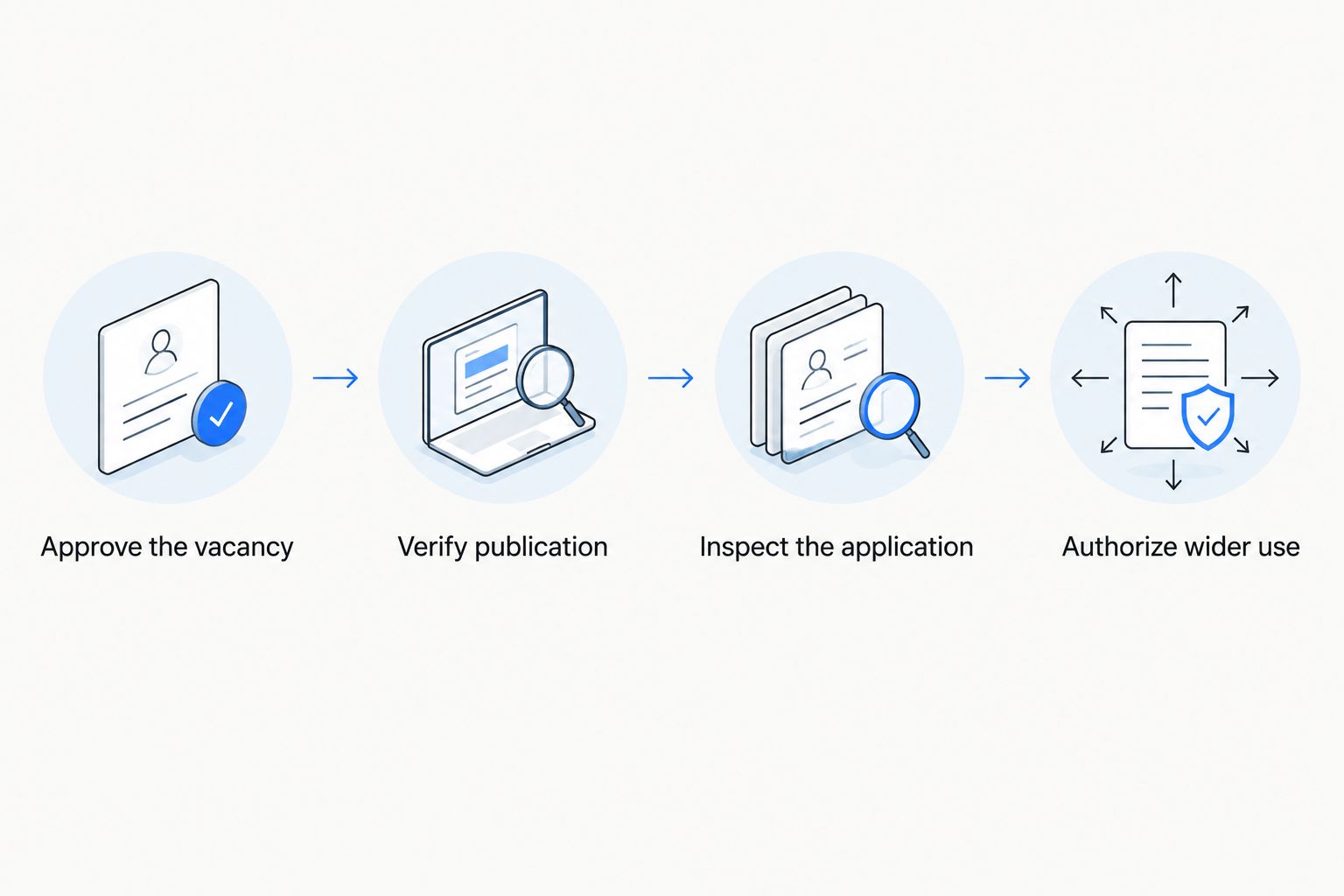
The acceptance sequence should remain simple: approve the vacancy, verify publication, inspect the application and authorize wider use. Keep evidence at each handoff so a later failure has a clear investigation point.
When a published vacancy changes
A vacancy-update workflow is adjacent to initial publication, but it needs its own confirmation. Use it only when the supported connection procedure explicitly covers changes to existing postings.
- Identify the original destination posting through its stored reference. Do not use the vacancy title as the only matching rule.
- Define which changes require approval. Include material changes to the role, location and employment type in your review procedure.
- Apply an approved change to the test vacancy. Verify that the destination updates the existing posting rather than creating another one.
- Test closure separately from editing. Confirm what happens to the published vacancy and how recruiters retain access to earlier applications.
- Record how conflicting edits are resolved when someone changes information directly at the destination.
Expected result: An approved change reaches the intended posting without losing its application history or creating an unintended duplicate.
For ongoing 2026 hiring, assign an owner to exceptions as well as successful transfers. If update support is not confirmed, retain a documented manual maintenance process and reconcile the records after each approved change.
Troubleshooting
Authorization fails before any data moves
Check the selected employer account, the administrator's permission and the authorization procedure supplied for that account. Ask the provider to interpret the exact error before changing credentials or permissions. Repeatedly granting broader access is not a diagnosis.
The posting appears, but applications do not arrive
Verify that application transfer is included in the agreed scope. Then inspect the posting identifier, application destination and transfer outcome. Do not republish the vacancy merely to investigate a candidate-routing problem.
Applications appear under the wrong vacancy
Compare the source vacancy reference with the destination posting reference. Correct the mapping before processing further applications, then review affected records through your approved correction procedure. Similar job titles are not reliable identifiers.
A retry creates duplicate records
Pause automatic retries if the supported controls allow it. Determine whether the repeat represents the same transfer attempt, another application or another posting. Ask the provider which stable identifier or replay-handling mechanism the supported method uses before resuming.
Text or attachments arrive incorrectly
Compare the original content with the received record and check the documented supported formats. For Turkish text, inspect character handling rather than rewriting names to remove diacritics. For attachments, check the recorded transfer outcome and supported file requirements without sending a real CV through an unapproved channel.
Customize your workflow
Expand the workflow only after the pilot passes. Add vacancies in groups your hiring team can reconcile, and keep an exception list covering failed publication, unmatched applications and unresolved duplicate records.
For a growing employer, Ottohr's wider HR scope makes the recruitment-to-onboarding boundary important. Keep candidate transfer separate from employee creation. A received application is not an approved hire, and it should not become an employee record merely because it arrived successfully.
Your 2026 operating record should identify the connection owner, approval owner, field map, last acceptance test and access-review responsibility. Recheck those records when permissions, fields or hiring processes change.
For account-specific setup questions, use the contact page to request confirmation of the supported method and required access. Ask for publication, applications, updates and closure to be addressed separately.
FAQ
How do I connect Ottohr to Kariyer.net job postings?
Start by obtaining the provider-confirmed connection procedure for your accounts. Define the supported transfer directions, map vacancy fields and test publication separately from application routing before using the workflow for live hiring.
Does publishing a vacancy mean candidate applications will sync too?
No. Publication and application transfer are separate acceptance requirements. Confirm that application transfer is part of the supported method, then test the vacancy association and receiving review queue.
What access should I arrange before starting?
Arrange access through the hiring administrator and employer-account owner, with an authorized person responsible for approving data transfer. Use only the permissions required by the confirmed connection procedure.
Can changes to a published job update automatically?
Treat vacancy updates as a separate workflow that requires provider confirmation. Test whether an approved change updates the existing destination posting and preserves its relationship with earlier applications.
How should I prevent duplicate candidates during retries?
Define repeat-submission handling before enabling retries. Ask which application identifier the supported method uses, and distinguish a replayed transfer from a person applying for another role.
Does a working connection satisfy KVKK requirements?
No. Technical success does not establish appropriate candidate-data handling. Review the transfer purpose, access permissions, retention and deletion process with your organization's privacy advisers.
Should incoming applicants automatically become employee records?
No. An application is not an approved hire. Keep the hiring decision and employee-creation approval separate from the application-transfer workflow.
One last thing
Test vacancy closure before expanding the connection. A workflow that publishes correctly but leaves closed roles open still needs an operational fix. Include the destination posting and earlier applications in that final check, then assign a named owner to resolve any mismatch.


