
Instead of manually emailing onboarding documents whenever you add a new hire, set up onboarding e-signature automation that checks readiness, obtains approval, sends the correct documents, and records the signing outcome. This guide explains the workflow around an HR platform such as Ottohr, without assuming that every platform has the same connectors or signature features.
- Onboarding e-signature automation needs a readiness gate, approved templates, duplicate protection, and completion tracking.
- Ottohr suits growing employers that want hiring and onboarding within an HR platform.
- Trigger document delivery only after required hire details and document approvals are complete.
- Record completed signatures separately from sent invitations; they represent different onboarding states.
Why this matters
A new employee record is not necessarily a ready-to-sign employee record. The name, employing entity, start date, or document version can still be incomplete. Sending immediately turns a data-entry event into an external commitment.
The safest workflow separates record creation from permission to send. Automation prepares and routes the packet; an authorized person approves the content before delivery. Your completion process then checks the signing result rather than assuming that an email invitation finished the task.
Ottohr is best suited to growing employers that want hiring and onboarding within an HR platform. Its stated scope includes hiring, onboarding, payroll, benefits, and compliance. For this workflow, verify the available connection method and signature-provider support before configuring delivery; an HR platform's broader scope does not establish a particular integration.
For your 2026 onboarding process, make the trigger rule, approval owner, document owner, and exception owner explicit. Those decisions determine what the automation is allowed to do.
Before you start
- Access and connection method: Obtain permission to read hire records, use approved document templates, create signature requests, and update onboarding status. Confirm that your chosen systems support the required events and actions through an integration, API, or another approved connection.
- Materials and ownership: Prepare approved templates, signer roles, required employee fields, and a destination for completed documents. Assign an HR owner for failed deliveries and a document owner for template changes.
- The gotcha: creation is not readiness. Establish a release condition before building the trigger. If a hire record arrives before the personal email or employing entity is confirmed, hold the packet rather than sending incomplete documents.
Use the steps below as a platform-neutral configuration specification. Terms such as readiness gate and delivery ledger describe workflow components, not vendor-specific buttons. Match each component to the controls your chosen systems actually provide.
Do not grant broad access just because it simplifies setup. The connection should read the fields needed for the packet and write only the statuses and references needed to track it. Keep signing credentials separate from employee-facing access.
Hire trigger and readiness gate
- Choose the authoritative hire event. Start from the system where HR confirms the employment record. Use a new-hire event or an equivalent approved polling process. Do not use a generic employee update unless you also filter out unrelated changes.
- Select a stable employee identifier. Carry that identifier through every stage. Do not use the email address alone: it can change, and the same person can have personal and work addresses.
- Define the readiness gate. Require the employee name, intended recipient, employing entity, applicable template, and any document-specific fields. Add an explicit HR approval condition where your process requires it.
- Route incomplete records to an exception queue. State the missing field and responsible owner. Keep the record out of the sending step until the owner resolves the issue.
- Capture the approved snapshot. Save the field values and template reference used to prepare the packet. Later employee edits should not silently change the evidence of what was sent.
Expected result: A complete, approved hire reaches document preparation. An incomplete hire produces a visible task, not a signature invitation.
For a 2026 rollout, document whether the trigger uses event delivery or periodic checks. Both require duplicate protection. A repeated event must not create another packet simply because the first event was processed successfully.
Document mapping and approval
- Create a template selection rule. Match the hire to the correct employing entity, jurisdiction, worker category, and language where these distinctions affect the documents. Keep a clear exception path for combinations without an approved template.
- Map each required field. Connect the source field to its intended document field. Keep employee names, dates, addresses, and employer details distinct; a mapping error can produce a readable but incorrect document.
- Define signer roles and order. Specify who signs as the employee and who signs for the employer. Use sequential signing only when the document process requires one party to sign before another.
- Preview the generated packet. Check names, document language, date formatting, signature placement, and any conditional sections. Review the rendered document, not just the field mapping.
- Obtain release approval. Have the authorized reviewer approve the packet or the permitted template-and-data combination. Record what the approval covered so a later template change does not inherit an unrelated approval.
Expected result: The packet contains the intended documents, populated from the approved hire snapshot, with the correct signer roles.
Keep acknowledgments, notices, agreements, and optional permissions distinguishable. They serve different purposes. Do not combine them under a single completion label if your HR process needs separate evidence for each.
Label approved 2026 template revisions clearly in your document register. An effective date and an identifiable revision help you explain which wording applied when a packet was prepared.
Signature delivery and duplicate protection
- Create a delivery ledger. Record the employee identifier, document purpose, template revision, approval reference, and signature-request identifier. Use this record to decide whether a matching request already exists.
- Check before creating a request. If the matching packet is already active or completed, stop the duplicate path. If a replacement is necessary, require an explicit replacement decision rather than treating it as a routine retry.
- Create the signature request. Supply the approved document, verified recipients, signer roles, and signing order. Configure authentication according to the document requirements and the signature service's supported methods.
- Store the returned identifier immediately. Link the signature request to the hire record before moving to subsequent steps. A successful external request followed by a failed internal update otherwise creates a difficult retry decision.
- Handle uncertain responses deliberately. After a timeout, check whether the service created the request before trying again. A missing response is not proof that creation failed.
Expected result: The hire record points to 1 active envelope for the approved packet, rather than several invitations generated by retries. Here, envelope means the signature request containing the documents and recipients.
Test with 1 test hire and 2 deliveries of the same trigger event. The intended result is one request, with the repeated event recorded or ignored according to your duplicate rule. These are acceptance criteria, not performance claims.
Completion tracking and document filing
- Receive signing-status updates. Use the service's supported event mechanism or status checks. Verify incoming event authenticity using the method documented by that service before updating employee records.
- Separate intermediate and final states. Track pending, completed, declined, expired, and canceled outcomes where supported. Treat an invitation sent or opened as an intermediate state, not a completed signature.
- Match the update to the active request. Use the stored request identifier. Do not let a late update from a replaced request overwrite the status of the current packet.
- Retrieve the completed evidence. Store the signed document and any available completion certificate or audit evidence in the approved employee-document destination. Apply your access and retention rules.
- Close the onboarding task after filing. Record completion only when the required signatures and document-storage steps have succeeded. Route a storage failure to an exception owner even if signing is complete.
Expected result: HR can identify the active request, see the signing outcome, and locate the completed document without searching through email.
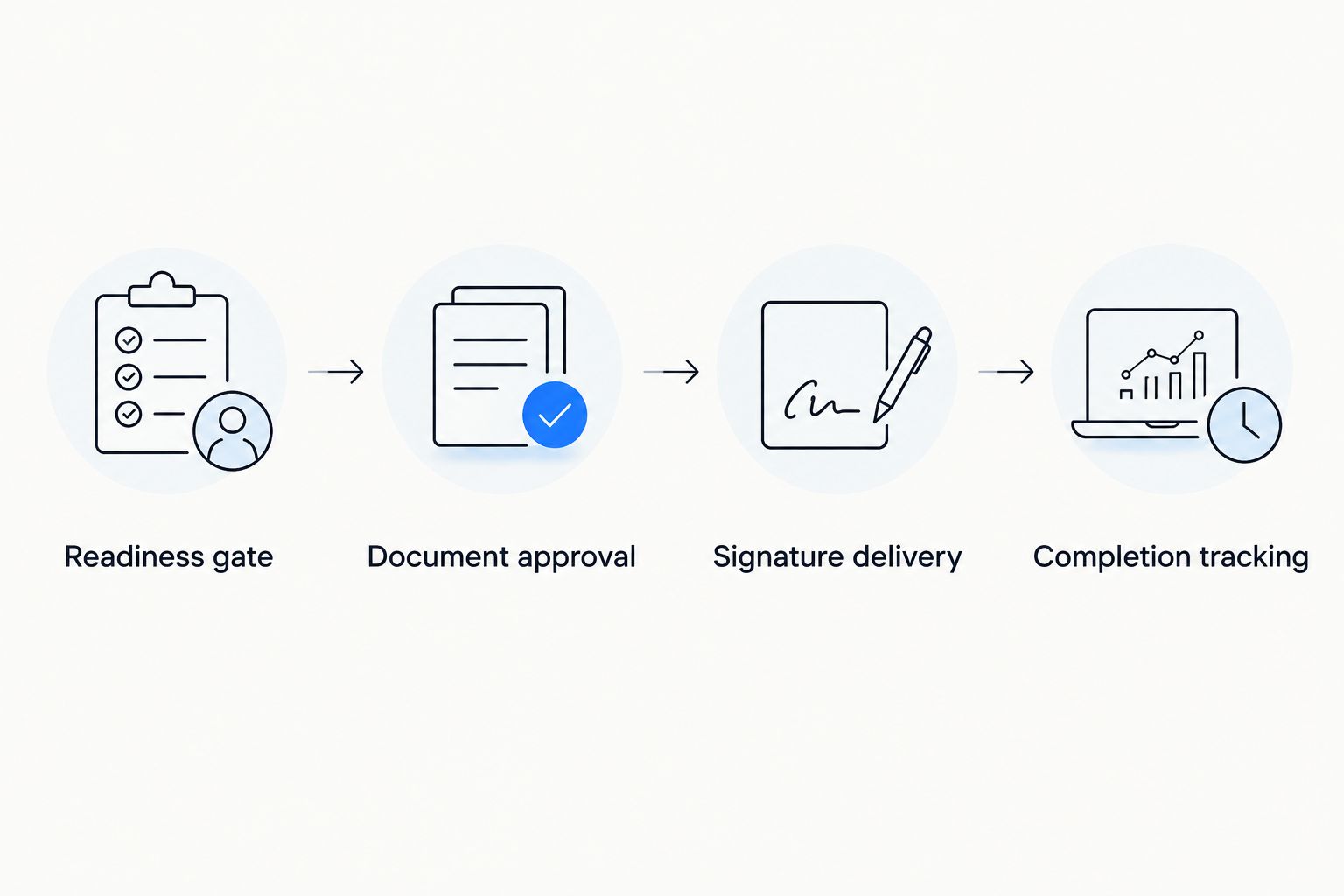
The workflow has four distinct control points: readiness gate, document approval, signature delivery, and completion tracking. Keep each visible in your run history so an exception can be traced to the correct stage.
Send documents when a hire becomes ready
A readiness-update workflow is useful when recruiters create records before HR has all the employment details. Instead of sending on creation, send when the record changes from not ready to ready.
Use the same mapping, approval, delivery ledger, and completion tracking. Change the entry condition, not the controls downstream.
| Trigger option | Best for | Advantage | Limitation |
|---|---|---|---|
| New hire added | Records created only after required details are approved | Starts preparation directly from the hiring event | Needs a hold path when a record is incomplete |
| Hire becomes ready | Records completed through several HR handoffs | Connects sending to an explicit release decision | Depends on accurate readiness status and update tracking |
- Define which fields and approval make the record ready.
- Detect the transition into that state, rather than every update while it remains ready.
- Check the delivery ledger before creating the packet.
- Send later material changes to review instead of automatically issuing a replacement.
Choose the readiness-update variant when record creation happens before document approval. Its trade-off is a dependency on disciplined status management. If staff bypass the readiness decision, the automation cannot enforce the intended release process.
For your 2026 workflow, define what happens when an approved start date, legal name, or employing entity changes. The correct action depends on the document and whether it has already been signed; it is not always another invitation.
Troubleshooting
The same employee receives duplicate invitations
Check whether the trigger repeats, the employee identifier changes, or the workflow retries after an uncertain response. Compare the delivery ledger with the signature service's requests before issuing another packet.
Fix: Enforce a consistent duplicate key and check existing requests before creation. Route intentional replacements through a separate approval path.
Documents contain blank or incorrect fields
Inspect the source record and the rendered packet. A populated source field does not prove that the document mapping points to it.
Fix: Make required fields part of the readiness gate. Test date formats, conditional content, and recipient mapping with non-production employee data before enabling live delivery.
The recipient cannot complete signing
Confirm the intended address, delivery outcome, authentication requirement, and request status. Distinguish a delivery failure from an expired invitation or an authentication problem.
Fix: Correct the verified cause using the signature service's supported process. Do not bypass the required authentication merely to clear an onboarding task.
The employee signed, but onboarding remains pending
Check whether the completion event arrived, matched the active request, and passed verification. Then check document retrieval and storage separately.
Fix: Reconcile against the signature service's authoritative status. Resume the failed tracking or filing step rather than sending a fresh signature request.
A canceled packet changes the current hire status
A late status update can belong to an old request. Employee identity alone is not enough to determine which packet the update concerns.
Fix: Match the event to the active request identifier. Retain replacement history and prevent superseded requests from controlling the current onboarding task.
Customize your workflow
Expand the process only after the basic send-and-file path passes testing. Add reminders, employer countersignatures, or separate document packets when the signature service supports them and your policy defines their use.
For distributed teams, align signing with the broader handoffs described in the remote employee onboarding software guide. Document completion should not automatically mark equipment delivery, payroll setup, or orientation complete.
Use Ottohr's broader HR scope as context for those handoffs, not as proof of a specific connector. Verify each downstream action before connecting it to the signing outcome.
For employers hiring in Turkey, keep signature handling separate from KVKK privacy obligations and SGK notification requirements. A signed onboarding packet does not replace those processes. Confirm the required signature form for each document rather than assuming every electronic signing method has the same legal effect.
Review your 2026 release checklist after changes to templates, source fields, approval rules, or connection permissions. Re-test both the successful path and the exception paths before enabling the changed workflow.
FAQ
How do I automatically send onboarding documents for e-signature?
Connect an approved hire event to document preparation and signature delivery, with readiness checks and duplicate protection between them. Record the signature-request identifier and track completion back to the employee record.
Should onboarding documents be sent as soon as a new hire is added?
Send immediately only when the new record already contains the required approved details. Otherwise, hold the packet until the hire reaches a defined ready-to-send state.
Does Ottohr support my e-signature provider?
Verify the provider and connection method before configuring the workflow. Ottohr's stated hiring and onboarding scope does not establish support for a particular signature provider.
How do I stop duplicate onboarding signature requests?
Check a delivery ledger before creating each request. Use a stable employee identifier and document reference, and verify uncertain creation results before retrying.
What happens if a new hire's details change after documents are sent?
Route material changes to document review instead of automatically resending the packet. Decide whether to correct, replace, or retain the document based on its purpose and signing status.
Does a sent signature invitation mean onboarding is complete?
No. Completion requires the intended signing outcome and successful filing of the required documents; other onboarding tasks remain separate.
Can electronic signatures replace all hiring paperwork in Turkey?
Do not treat electronic signing as a replacement for every hiring requirement. Confirm the required form for each document and handle KVKK obligations and SGK notifications through their respective processes.
One last thing
Test the timeout after request creation, not just the successful send. That is the point where an external service can have a valid invitation while your workflow lacks its identifier. A safe recovery checks what already exists before creating anything new.
Keep the same discipline across Ottohr onboarding handoffs: an action requested, an action completed, and evidence filed are different states. Your workflow should preserve that distinction.


