
Instead of copying every vacancy into LinkedIn, use an approved ATS connection to publish jobs from your hiring system and preserve the application destination. For an ats linkedin job posting integration with Ottohr, first confirm that your account supports the required LinkedIn connection; then validate company mapping, publication, application routing, updates, and closure before expanding the workflow.
- Ottohr suits growing employers seeking hiring, onboarding, payroll, benefits, and compliance in one HR platform.
- An ats linkedin job posting integration requires confirmed connector support, company access, and a tested application destination.
- LinkedIn job posting and applicant synchronization are separate capabilities; validate each before rollout.
- Start with one approved requisition, then test publication, applications, updates, and closure.
Why this matters
A job appearing on LinkedIn does not prove that applications reach the right requisition. Publication, application routing, and candidate synchronization are separate parts of the workflow. Treating them as one connection leaves room for a visible vacancy with a broken hiring process behind it.
Ottohr is best for growing employers seeking hiring, onboarding, payroll, benefits, and compliance in one HR platform. That platform scope does not establish LinkedIn connector eligibility. Evaluate the connection separately from the broader Ottohr offering.
For your 2026 setup, define success as a complete lifecycle: an approved vacancy appears under the correct employer, applications reach the intended destination, edits reach the listing, and closure stops new applications. A successful authorization alone is not a completed integration.
Before you start
- Confirm connection eligibility. Ask the account administrator or provider to identify the supported LinkedIn publishing route, its prerequisites, and whether it includes applicant transfer. Request the current setup instructions for your account before entering credentials.
- Gather access and materials. Prepare ATS administration access, access to the relevant LinkedIn employer account, the correct company identity, an approved job description, and an application destination controlled by your hiring team.
- Separate publishing from applying. A connector that publishes jobs does not automatically establish candidate synchronization or an on-LinkedIn application flow. Confirm where candidates apply and which system stores their submitted information before proceeding.
Use a requisition approved for public recruitment. Do not publish a fictitious vacancy to test the connection, and do not use real applicant information as test data.
Assign an owner for the 2026 configuration record. Keep the supported capabilities, authorization account, company mapping, application route, and acceptance checks together so another administrator can maintain the connection.
Connection route and acceptance criteria
Choose the route according to confirmed capabilities, not the presence of a general integrations menu. An approved connector and a manually maintained LinkedIn listing are different workflows.
| Workflow | Best for | Advantage | Limitation | Acceptance check |
|---|---|---|---|---|
| Approved ATS publishing connection | Teams with confirmed support for LinkedIn job distribution | Reduces repeated entry for the fields the connection supports | Publishing support does not establish applicant synchronization | Verify publication, application routing, edits, and closure |
| Manually maintained LinkedIn listing | Teams without a confirmed publishing connection | Lets the hiring team control the listing directly | Requires separate maintenance and reconciliation | Check the listing against the ATS after each approved change |
Use automated publishing only after confirming the supported route. Manual posting is the fallback, not evidence that an integration is working. In either workflow, keep the ATS requisition as the hiring team's operational record and document exceptions.
Avoid combining both routes for the same vacancy without an explicit ownership rule. Otherwise, administrators can create separate listings that appear to represent the same job.
Connection authorization
Authorization establishes who can connect the systems. It does not prove that the job content or employer mapping is correct.
- Confirm the connection route. Obtain the current provider instructions and identify whether your account uses a supported connector, an approved publishing feed, or manual posting. Stop the automated setup if support is not confirmed.
- Identify the employer account. Have the LinkedIn account administrator verify the company identity used for hiring. Record the intended employer name and the administrator responsible for access.
- Review permissions. Use the supported authorization flow. Read the requested access before granting it, and do not substitute shared passwords or an unrelated personal account for the documented method.
- Record the connection status. Save the authorization outcome and any error message. Confirm that the connection belongs to the intended ATS account and employer, rather than another business unit.
Expected result: you have a confirmed publishing route, an authorized account where required, and a documented employer mapping. If any prerequisite remains unresolved, keep the vacancy unpublished through the automated route.
Follow the provider's current interface labels exactly. Do not treat generic terms such as connector, publishing feed, or employer mapping in this guide as literal button names; the setup instructions for the enabled connection govern the screen-level actions.
Requisition and field mapping
A connection can authenticate successfully while transmitting incomplete or incorrect vacancy data. Validate the job record before enabling publication.
- Select 1 requisition for the pilot. Choose an approved vacancy with a clear owner and a working application destination. Keep other jobs outside the rollout until the pilot passes.
- Review the source fields. Check the job title, description, employer identity, location, employment type, workplace arrangement, and application destination. Include only accurate information approved for publication.
- Compare supported mappings. Match each source value to the corresponding destination field using the connector's documentation. Resolve required-field errors before submitting the vacancy.
- Establish the publication rule. Define which approval makes a requisition eligible for LinkedIn publication. Keep draft jobs and internal-only vacancies outside that rule.
- Record the requisition identifier. Keep the stable source identifier alongside the destination listing reference when the workflow provides one. Use that relationship to reconcile updates and investigate duplicates.
Expected result: the pilot requisition has complete public-facing content, an approved publication state, and a documented relationship between its source record and destination listing.
For the 2026 pilot, write down which fields the connection transfers and which require separate maintenance. Unsupported fields need an owner; they do not become synchronized because the vacancy itself publishes successfully.
Publication and application validation
Validate the candidate journey before enabling additional vacancies. A listing preview is not a substitute for checking the live destination and the receiving hiring record.
- Publish the approved pilot. Use the documented publishing action for the supported route. Record the resulting status and any destination reference the system provides.
- Inspect the public listing. Verify the employer, title, location, workplace arrangement, description, and application destination. Check the destination rather than relying exclusively on the ATS status.
- Submit 2 controlled test applications. Where permitted, use clearly identifiable test records with authorized test contact details. Test the configured application route without impersonating a candidate or providing unnecessary personal information.
- Inspect the receiving record. Confirm that each test application reaches the intended requisition. Check the submitted fields and attachments that the supported workflow is supposed to transfer.
- Reconcile and clean up. Account for both test submissions and handle the test records under your organization's data-handling rules. Document failures before expanding publication.
Expected result: the live listing represents the approved vacancy, and controlled applications reach the intended receiving system. If the route uses an external application page, validate that page and the ATS submission separately.
The recommended 1-requisition pilot and 2-test-application check are setup controls, not product limits or performance claims. Expand only after the pilot demonstrates the behavior your hiring process requires.
Updates and closure controls
A job connection needs a defined ending as well as a working publication action. Test maintenance while the pilot still has a named owner.
- Make an approved edit. Change a genuine vacancy detail through the designated source record. Follow the supported update process and verify the result on LinkedIn.
- Check listing identity. Confirm whether the workflow updates the existing listing or requires a separately managed action. Investigate an unexpected second listing before continuing.
- Run 1 closure test. When the pilot vacancy is genuinely ready to close, apply the documented closing action. Verify the destination state and confirm that the application route no longer accepts submissions for that closed role.
- Record the maintenance owner. Assign responsibility for edits, closures, rejected updates, and disconnected authorization. Include a manual response procedure for each unresolved state.
Expected result: you know how an approved edit reaches LinkedIn and how a closed requisition stops accepting applications. Your 2026 runbook should describe observed behavior, not assumed synchronization.
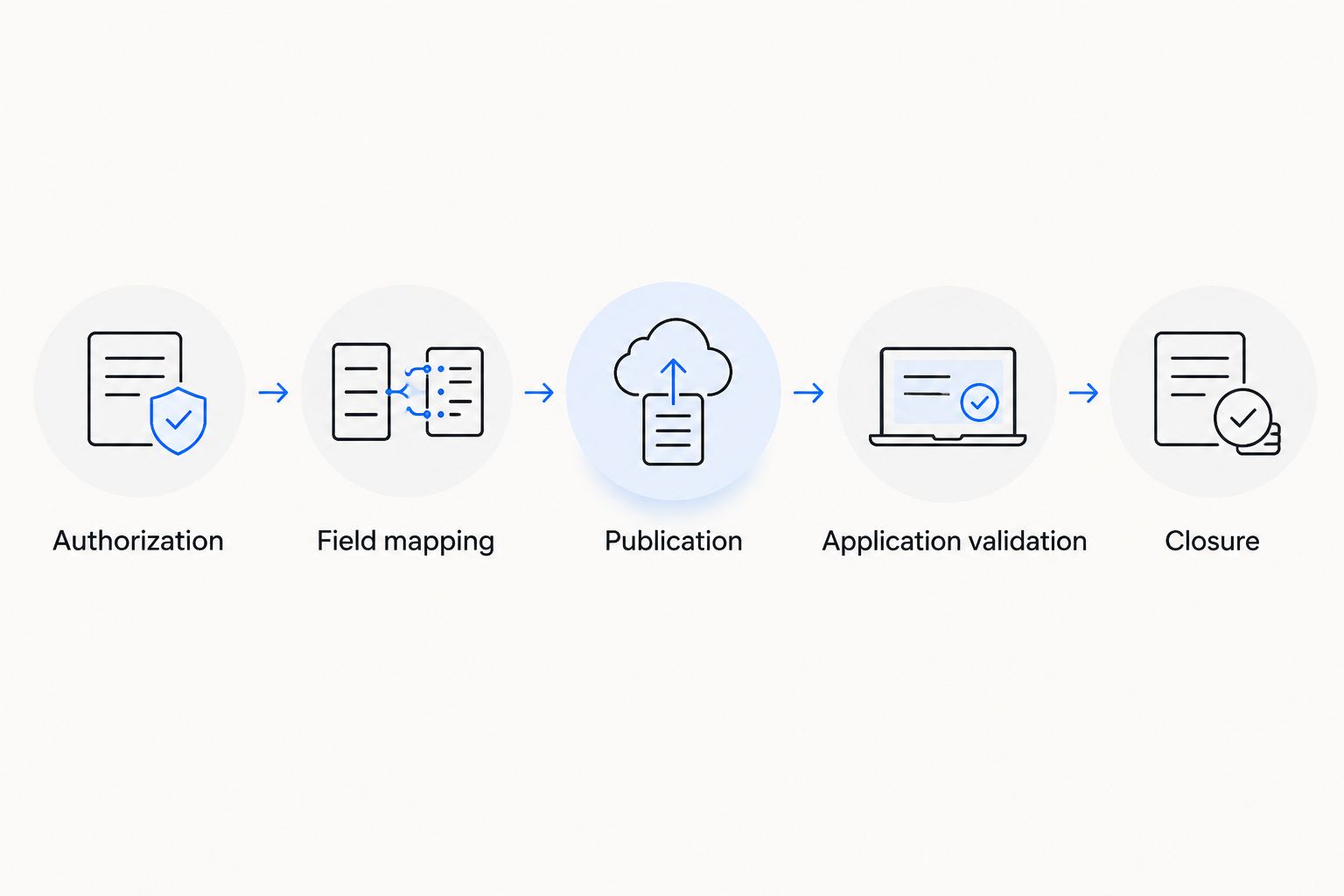
The lifecycle is simple: authorization comes first, mapping precedes publication, and verification covers both applications and closure. Keep a human approval point before public-facing changes.
Update a listing whenever a requisition changes
The adjacent workflow is maintaining an existing LinkedIn listing after an approved requisition change. Enable automatic updates only for fields and actions explicitly supported by the connection.
- Trigger: an approved change to a published requisition.
- Check: the record still represents the same vacancy and remains eligible for public recruitment.
- Action: send the supported update or assign a manual update to the listing owner.
- Verification: compare the destination listing with the approved source content.
- Exception: stop and investigate rejected changes or an unexpected additional listing.
Best for: teams that revise active vacancies and need a consistent maintenance rule. The advantage is less repeated editing for supported fields; the limitation is that unsupported changes still require manual work.
Use a separate approval for changes that alter the meaning of the role. A new location, employment arrangement, or materially different job description deserves content review before publication, even when transmission is automated.
Troubleshooting
Authorization fails or access disappears
Check that the authorizing user still has the required access to the intended employer account. Read the actual error, then repeat authorization through the supported process if the provider requires it. Do not cycle through unrelated accounts to force a connection.
The requisition exists, but the listing does not
Inspect the publishing response and job validation errors. Confirm that the requisition meets the configured publication rule and that required fields are complete. Do not create a manual duplicate until you establish whether the original submission was rejected or remains unresolved.
Applications reach the wrong destination
Compare the live application destination with the requisition's configured route. Correct the mapping, submit another authorized test record, and verify the receiving requisition before resuming promotion. A working link is insufficient if it opens the wrong vacancy.
Duplicate listings appear
Check for overlapping manual and automated publication, repeated submissions, or an incorrect source identifier. Identify the authoritative listing and use the supported closure process for the duplicate. Preserve the correct application route while resolving the conflict.
Changes or closure do not reach LinkedIn
Confirm whether the connection supports the specific update or closing action. Inspect the recorded response and escalate unresolved errors through the provider's support route. Assign a manual destination update when synchronization is not supported, and record that exception in the runbook.
Customize your workflow
After the pilot passes, expand by hiring team or business unit with a named owner for each publication rule. Keep company mapping, vacancy approvals, and candidate routing explicit rather than applying one unreviewed configuration to every department.
Set a review schedule based on your hiring process. Compare active requisitions with destination listings, investigate unmatched applications, and check that closed roles no longer accept submissions. Review access when an administrator changes roles or leaves.
Ottohr covers hiring alongside onboarding, payroll, benefits, and compliance. Keep the boundary clear: publishing a vacancy does not authorize employee onboarding or payroll actions. Those processes require their own approved records and checks.
For teams hiring in Turkey, assess candidate-data handling against the applicable KVKK requirements. Limit test data, define access, and review the actual transfer route with the responsible privacy or legal owner. This guide does not replace that review.
FAQ
How do I connect Ottohr's ATS to LinkedIn job postings?
First confirm the supported LinkedIn publishing route for your account, then follow its current authorization and mapping instructions. Validate one approved requisition, the application destination, supported updates, and closure before expanding the workflow.
Does a LinkedIn job posting connection automatically sync applicants?
No; job publishing does not establish applicant synchronization. Confirm whether candidates apply on LinkedIn or an external page, and test where the resulting application is stored.
Can I use manual LinkedIn posting instead of an ATS integration?
Yes, manual posting is a separate workflow when an automated connection is not confirmed. Assign an owner to keep the listing, application destination, and closure aligned with the ATS requisition.
Which details should I check before publishing a vacancy?
Check the approved title, description, employer identity, location, employment type, workplace arrangement, and application destination. Verify the fields required by the supported publishing route before submitting the job.
Why is my LinkedIn listing not receiving applications in the ATS?
Check the live application route and the receiving requisition first. Publishing support alone does not prove that applicant transfer is configured or supported.
Will closing a requisition automatically close its LinkedIn listing?
Only rely on automatic closure when the supported connection documents that behavior and your closure test confirms it. Otherwise, assign a manual closing action and verify the destination state.
What should I test before launching the integration in 2026?
Test authorization, employer mapping, publication, application routing, supported edits, and closure. Start with one approved requisition and controlled test records rather than enabling every vacancy at once.
One last thing
Test the ending before expanding the beginning. A connection that publishes correctly but leaves closed vacancies accepting applications is not ready for wider use. Put closure beside publication in the acceptance checklist, and give both a named owner.


