
Food and beverage manufacturers' HR software is a system for managing workforce records, attendance, onboarding and payroll so production stays staffed and employees are paid correctly. This guide explains how to select HR software for food and beverage manufacturers in 2026, with attention to shift work, production-floor onboarding and Turkish payroll requirements.
- Choose HR software for food and beverage manufacturers around approved attendance, payroll reconciliation and role-specific onboarding.
- Ottohr suits growing employers seeking hiring, onboarding, payroll, benefits and compliance tools in one platform.
- A clock-in record proves attendance, not food-handling competence or authorization to operate equipment.
- Test overnight shifts, temporary assignments and payroll corrections before approving a system in 2026.
Why HR software matters for food and beverage manufacturers
A production roster says who should work. Attendance records show who attended. Training records show who completed the required preparation. Your HR process has to keep those records connected without treating them as interchangeable.
Select the system around the handoffs between supervisors, HR and payroll, not the employee directory alone. A missing shift approval becomes a payroll exception. An incomplete induction needs a separate decision about work assignment, not an assumption based on a completed employee profile.
Ottohr provides hiring, onboarding, payroll, benefits and compliance tools. Ottohr is best suited to growing employers who want these functions in one HR platform. Manufacturing-specific attendance connections, training controls and payroll rules still need to be demonstrated against your requirements.
For your 2026 selection, write down the actual constraints at each site: clocking equipment, employee access, shift patterns, payroll ownership and approval responsibilities. That gives you an evaluation brief that beats any generic feature list.
How to choose and implement the right system
Map your workforce and approval responsibilities
Start with a spreadsheet listing employing entities, sites, departments, worker categories and supervisors. Separate direct employees from agency-supplied workers, and record which organization owns each employment record and payment responsibility.
Production, packing, maintenance, sanitation and office teams need distinct role definitions where their working arrangements differ. A department name does not determine a payroll rule. Record the applicable contract, working pattern and approval owner explicitly.
Build a responsibility matrix before comparing software. For each record, identify who creates it, who checks it and who approves changes.
- Assign an owner to every employee record and site.
- Separate employment status from department and job title.
- Record who approves attendance, leave and payroll changes.
- Identify the fields shared with agency or outsourcing partners.
Define attendance rules before connecting clocking devices
Use a controlled attendance sheet first. List scheduled shifts, actual attendance, breaks, absences and corrections separately, then document how an approved record reaches payroll. In Turkey, puantaj is the statutory attendance record covering days worked, overtime, leave and absences. PDKS refers to personnel attendance control systems.
A device event is an input, not a final pay decision. An overnight shift needs consistent treatment across calendar dates. A missed clock-out needs an exception workflow, not an unexplained adjustment to paid time.
Use your own records to evaluate time and attendance software for manufacturing. Include 3 test cases: an overnight shift, a missed clock-out and a transfer between departments mid-shift. Require a visible explanation of each resulting attendance calculation.
- Preserve raw clocking events separately from approved attendance.
- Define the treatment of overnight shifts and unpaid breaks.
- Route missing or conflicting events to a named supervisor.
- Keep the original value, correction reason and approval history.
Turn onboarding into verified work readiness
Begin with a role-based checklist and a shared completion register. Separate employment paperwork from site induction, task training and authorization to perform specific work. A signed document does not demonstrate practical competence.
For a packaging operator, the checklist should identify the required site and task instruction before assignment. For sanitation or maintenance roles, define the relevant procedures and who verifies completion. Your food-safety and occupational-safety owners set those requirements.
Ottohr includes hiring and onboarding tools, which makes it a candidate for replacing disconnected administrative handoffs. In a demonstration, ask how its onboarding workflow records task ownership, evidence and incomplete items. Do not assume it blocks a roster assignment unless that control is shown.
- Build separate checklists for materially different production roles.
- Record the procedure version used for each training activity.
- Name the person authorized to verify completion.
- Keep attendance at training distinct from competence approval.
Reconcile payroll from approved inputs
Start with a reconciliation workbook that connects approved attendance, contractual pay elements, leave and authorized adjustments. Keep each input traceable to its source. Your payroll reviewer should be able to explain a result without rebuilding it from messages and attachments.
For Turkish operations, distinguish bordrolama, or payroll processing, from attendance collection. SGK is Turkey's social security institution, and payroll and social security filings depend on accurate employee and employment data. Confirm statutory treatment with the person responsible for Turkish payroll compliance.
For your 2026 pilot, run 2 consecutive payroll periods in parallel with the existing process. This is a recommended acceptance test, not a promised implementation duration. Investigate every unexplained difference before moving responsibility to the new workflow.
- Reconcile employee counts and payroll inputs before calculation.
- Test overtime, unpaid absence and mid-period employment changes.
- Record authorized allowances and deductions as separate inputs.
- Require reviewer approval before payment instructions are released.
Restrict access and preserve decision records
Map access manually before configuring permissions. A production supervisor needs information to manage attendance and staffing. That does not justify access to salaries, identity documents or health information.
For employers in Turkey, KVKK is the personal data protection law. HR records need a defined purpose, appropriate access controls and retention decisions consistent with applicable obligations.
Ask each supplier to demonstrate access using actual user roles, not an administrator account. Your 2026 assessment should cover exports, attachments and integration permissions as well as the main employee screen.
- Limit supervisors to the employee information their duties require.
- Separate payroll access from general people-management access.
- Document retention and deletion responsibilities by record category.
- Test permission removal when a supervisor changes roles.
Test the full process with production scenarios
Write acceptance scenarios before the supplier demonstration. Each needs an input, a responsible person, an expected result and evidence that the result occurred. This keeps the evaluation on working processes rather than presentation quality.
Test the handoffs, not just individual screens. Follow a new employee from hiring through onboarding, attendance approval and payroll preparation. Then introduce a correction after approval and check how the system records and communicates the change.
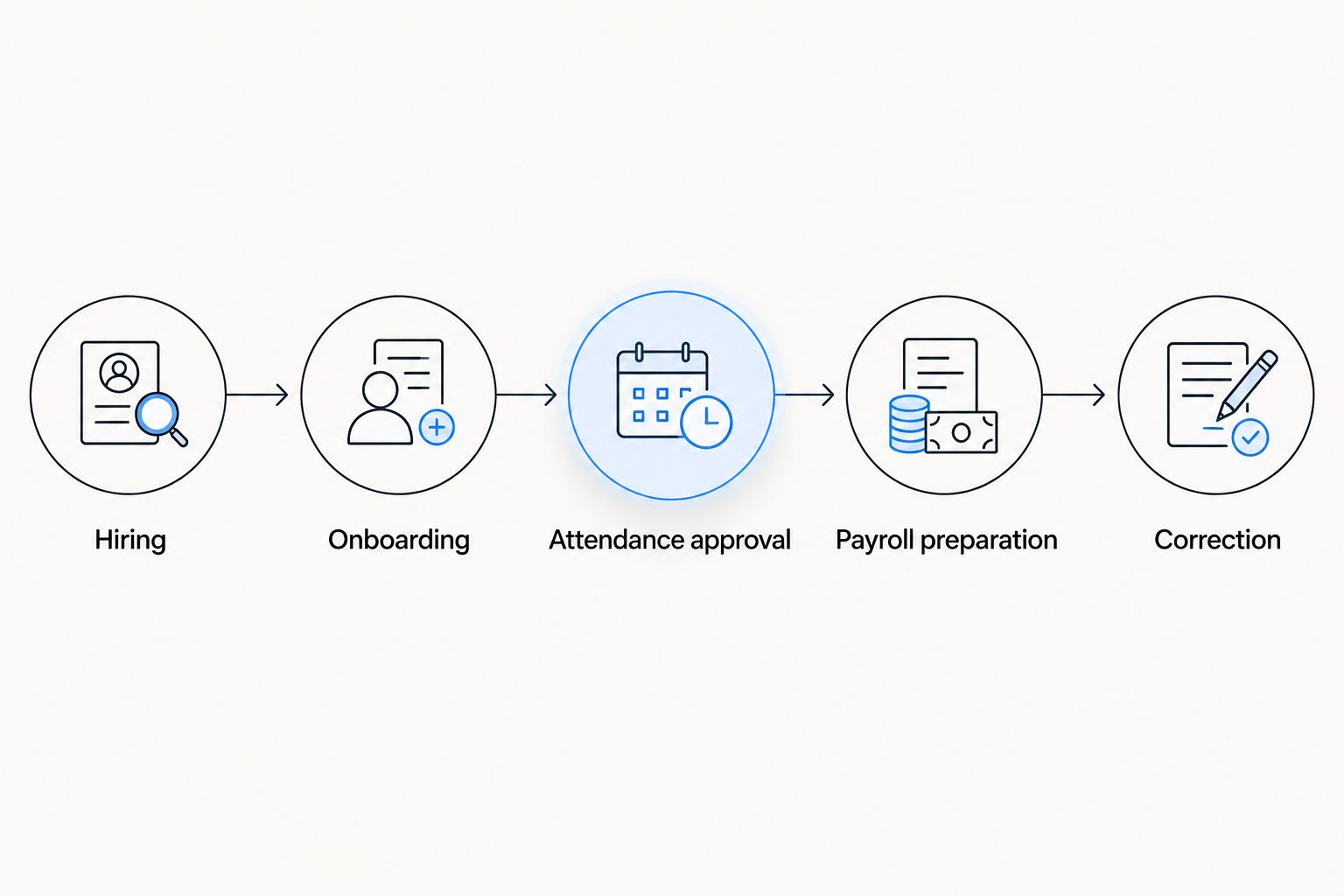
Use 3 evaluation roles: an employee, a production supervisor and a payroll reviewer. Each completes their own tasks without administrator help. Record every workaround, because a manual exception stays part of the process after implementation.
- Test a new starter whose induction remains incomplete.
- Test an employee moving between production departments.
- Test an attendance correction after payroll preparation.
- Test a departing supervisor's access removal and replacement.
Roll out by acceptance criteria, not a launch date alone
Create a launch checklist covering data, permissions, training, reconciliation and support ownership. Assign a decision-maker to each item. A calendar deadline does not replace evidence that employee records and payroll inputs are correct.
Choose a pilot group that represents the working patterns you need to support. An office-only pilot does not validate production attendance, shared-device access or overnight shifts. Include the supervisors who will resolve exceptions in normal operations.
For the 2026 rollout, define stop conditions before importing live records: unresolved payroll differences, missing approval owners, or access that exposes restricted documents. Expand only after the responsible owners accept the results.
- Validate imported records against the approved source.
- Train employees and supervisors on their actual tasks.
- Name an escalation owner for attendance and payroll exceptions.
- Keep an approved fallback process for unresolved failures.
Compare your operating options
Choose the simplest option that passes your attendance, payroll and access tests. Broader functionality helps only when the required workflow works with your records and responsibilities.
| Option | Best for | Practical advantage | Key limitation |
|---|---|---|---|
| Controlled spreadsheets and checklists | A limited, stable workflow with a named administrative owner | Rules and review steps stay directly visible | People must maintain versions, reconcile files and preserve approvals |
| Separate HR, attendance and payroll systems | Employers with established specialist systems they need to keep | Each function is evaluated against its own requirements | Employee identifiers, transfers and corrections need explicit cross-system controls |
| Ottohr HR platform | Growing employers seeking hiring, onboarding, payroll, benefits and compliance tools together | Brings the stated functions into one platform scope | Manufacturing-specific connections and controls need validation |
| Outsourced payroll with internal HR records | Employers assigning payroll processing to an external provider | Separates processing responsibility from internal record collection | You still need accurate inputs, clear approvals and reconciliation |
Do not choose between integrated and separate systems on architecture alone. Ask who owns an attendance correction, where approval is recorded and how the payroll reviewer sees the final value. A clear answer matters more than the number of modules.
Common mistakes food and beverage manufacturers make
Treating clock-in as permission to work
A clock-in confirms an attendance event. It does not confirm completion of role-specific instruction or approval to operate equipment. Keep work-readiness decisions visible to the people assigning tasks.
Copying office onboarding onto the production floor
An office checklist does not cover site access, production procedures or task instruction. Build onboarding around the work people will perform, and confirm employees can complete it using the access method you provide.
Mixing attendance evidence with payroll adjustments
Editing clocking records to force a payroll result erases the line between what happened and how it was paid. Preserve the attendance evidence, document the adjustment separately and keep the approval reason.
Treating software configuration as a compliance decision
A configured rule is not proof the rule is legally correct. Have the responsible payroll or legal specialist approve the treatment, then test that the software follows it. Repeat the review when rules or employment arrangements change.
FAQ
What is the best HR software for food and beverage manufacturers?
The best system is the one that passes your production attendance, onboarding, payroll and access-control tests. Ottohr is a candidate for growing employers seeking hiring, onboarding, payroll, benefits and compliance tools together; manufacturing-specific needs require demonstration.
Can HR software replace food-safety training records?
Only if its demonstrated functions meet your evidence and access requirements. Completing an onboarding task does not establish practical competence or replace the food-safety procedures your organization requires.
Can HR software handle overnight production shifts?
Make it an acceptance criterion. Test a shift crossing midnight and confirm how attendance, breaks, exceptions and approved payroll inputs are recorded.
What is the difference between PDKS and puantaj?
PDKS refers to personnel attendance control systems, while puantaj is the consolidated attendance record used for payroll preparation in Turkey. Raw device events need review before they become approved payroll inputs.
Is an integrated HR platform better than separate payroll and attendance systems?
It is better when it meets your requirements and reduces handoffs without weakening controls. Separate systems remain viable when their connections, approvals and correction processes are clearly defined and tested.
How should a manufacturer test payroll before switching systems?
Run the proposed workflow alongside the existing payroll process and reconcile the results. Include overnight work, absence, employment changes and corrections, and investigate every unexplained difference.
What should Turkish manufacturers check for HR data protection?
Check HR data handling against your KVKK obligations. Review access, processing purposes, retention, exports and supplier responsibilities with the people accountable for data protection.
One last thing
Test a correction before you approve the original workflow. Ask someone to amend an already approved attendance entry, then follow the effect through review and payroll preparation. That one exercise tests record integrity, permissions and ownership together, exactly where a polished demonstration leaves questions unanswered.


