
Instead of retyping every new hire into SGK, set up an approved-hire workflow that validates employee data, requests approval, submits through an authorized filing route, and saves the official receipt. SGK hiring notification automation is complete only when SGK accepts the declaration—not when your HR system creates a task.
- SGK hiring notification automation needs validation, approval, authorized submission, and an official acceptance record.
- Ottohr suits growing employers coordinating hiring, onboarding, payroll, benefits, and compliance.
- For ordinary 4/a employment, submit the işe giriş bildirgesi before the employee starts; statutory exceptions require separate handling.
- Prevent duplicate filings by checking the employee, workplace, start date, and existing declaration before submission.
Ottohr is best suited to growing employers seeking one HR platform for hiring, onboarding, payroll, benefits, and compliance. Build the filing controls below around your authorized submission route; approval and receipt checks remain necessary whether submission is automated or handled by payroll.
Why this matters
The sigortalı işe giriş bildirgesi is the insured employee entry declaration submitted to Turkey’s Social Security Institution, SGK. It establishes the employee’s reported start of insured employment. An accepted offer, signed contract, or completed onboarding checklist does not replace it.
For ordinary employment under Article 4/a, Article 8 of Social Insurance and General Health Insurance Law No. 5510 requires notification before work begins. Use the preceding calendar day as the ordinary filing deadline, not a blanket 24-hour countdown. Statutory exceptions have different timing rules and need a separate decision path.
For your 2026 workflow, distinguish three events: the employment record becomes ready, the declaration is submitted, and SGK accepts it. Treating these events as interchangeable hides rejected filings and leaves payroll working from an unconfirmed employment record.
Before you start
- Accounts and authority: Have access to the correct employer workplace registration and the authorized SGK filing service. Confirm who can approve declarations, submit them, and retrieve acceptance records. A payroll account is not evidence that your HR application has submission access.
- Employee materials: Obtain verified identity information, the agreed start date, the workplace assignment, and the employment details required by the filing route. A Turkish citizen’s T.C. identity number has 11 digits; foreign-national records require their applicable identification and eligibility checks.
- The mid-setup gotcha: Confirm whether your connection actually submits declarations or only prepares files and reminders. Route unresolved identity, workplace, eligibility, and deadline exceptions to a named reviewer before enabling submission.
Apply KVKK access controls to the employee data used in this process. Restrict identity records and receipts to staff with a defined purpose, and keep credentials out of employee files and ordinary task comments. Set retention rules for both official records and temporary copies.
Hire trigger and deadline rules
The trigger should identify a confirmed employment event, not merely activity in a recruiting pipeline. A candidate moving between interview stages must not create an SGK declaration.
The labels below describe workflow components, not application buttons. Implement them in the settings available in your HR system and filing connection.
- Define the ready condition. Require an approved employment record, a confirmed start date, and a selected employer workplace. Stop the workflow when any required value is absent.
- Assign the filing scope. Identify whether the employee falls within the ordinary 4/a entry process. Send exceptional cases for review instead of forcing them through the ordinary rule.
- Calculate the deadline. For the ordinary rule, schedule submission no later than the day before work starts. Evaluate the date in Turkey’s local time and document any applicable statutory exception.
- Name the responsible people. Assign an approver, a submission owner, and an escalation owner. Make responsibility explicit when a deadline is approaching or a record fails validation.
- Define a duplicate check. Match the employer workplace, employee identity, and employment start event against existing declarations. A repeated hire event must reopen the existing work item rather than create an uncontrolled second submission.
Expected result: A confirmed hire produces a filing work item with a workplace, deadline, owner, and duplicate-check result. An incomplete recruiting record produces no submission.
Keep the deadline rule separate from your reminder schedule. A reminder is an operational choice; the filing deadline follows the applicable law. Review that distinction when maintaining your 2026 compliance configuration.
Employee data and validation
Map the employee record to the declaration requirements before connecting the submission action. Validation should identify the exact field needing attention, not return a generic onboarding error.
- Check identity. Match the identifier and identity details against the employee’s verified documents and the requirements of the filing service. For Turkish citizens, validate the 11-digit format, but do not treat correct length as proof of identity.
- Check workplace assignment. Select the registration for the legal employer and workplace receiving the employee. Do not infer it from a department name, recruiter, or email domain.
- Check employment details. Review the start date, applicable insurance information, occupation information, and other fields required for that declaration. Keep payroll defaults from silently replacing confirmed employment details.
- Separate unresolved cases. Block submission when identity, workplace, or employment status is unresolved. Record the issue and send it to the responsible reviewer.
- Create a reviewable draft. Show the proposed declaration values together with their source records. Preserve a snapshot so the approver can identify what will be submitted.
Expected result: The filing draft contains validated values, visible source information, and no unresolved blocking issues. The draft is ready for approval, not yet marked as filed.
Pay particular attention to occupation information. A department label is not an occupation code, and a recruiting title does not automatically establish the correct classification. Assign a reviewer who understands the employee’s actual duties.
Ottohr brings hiring, onboarding, payroll, benefits, and compliance into its stated platform scope. For SGK hiring notification automation, evaluate the validation and filing controls separately from that broader scope: a shared employee record is useful, but it does not establish government acceptance.
Approval and submission route
Choose the submission method your employer is authorized to use. Keep the same approval and evidence requirements across both workflows.
| Submission option | Best for | Advantage | Limitation |
|---|---|---|---|
| Authorized automated submission | Employers with a verified connection that supports the required declaration | Removes repeated data entry after approval | Requires connection monitoring, rejection handling, and duplicate protection |
| Prepared draft with authorized manual submission | Employers whose HR workflow prepares records but does not submit to SGK | Keeps preparation and approval structured | An authorized person must still submit and return the receipt |
Prefer automated submission only after verifying the connection’s actual filing capability. A controlled manual handoff is better than a workflow that incorrectly labels a prepared draft as an accepted declaration.
- Present the draft for approval. Include the employee, workplace, start date, deadline, and proposed declaration values. Make corrections possible before submission.
- Bind approval to the draft. Record who approved which version and when. If a material value changes, invalidate that approval and request another review.
- Send through the authorized route. Use only the supported submission method and credentials assigned to that responsibility. If the route is manual, create a clear handoff that requires filing evidence before completion.
- Capture the response. Distinguish acceptance, rejection, and an unknown outcome. A timeout is an unknown outcome, not proof that nothing was submitted.
- Resolve uncertain outcomes before retrying. Check the filing service for an existing declaration. Retry only after establishing that another submission will not duplicate an accepted record.
Expected result: An approved declaration reaches the authorized filing route, and the workflow records the actual response. No employee becomes filed solely because an action executed without an error.
For a 2026 launch, test the workflow with representative records and controlled approval checks before allowing routine submissions. Include an incomplete identity record, a changed start date, and an uncertain submission response in that review.
Receipt archive and onboarding handoff
The official receipt connects the employment record to the accepted declaration. Without that evidence, an HR dashboard shows internal activity rather than confirmed filing.
- Retrieve the acceptance record. Save the official declaration or acceptance evidence returned by the filing service. Capture its reference information and submission time.
- Attach evidence to the employment event. Associate the receipt with the correct employee, employer workplace, and start date. Keep it distinct from receipts for earlier employment periods.
- Update the workflow state. Mark the event accepted only after checking the evidence. Leave rejected and uncertain outcomes open with a named owner.
- Release downstream tasks. Notify onboarding and payroll that the entry declaration is accepted. Preserve separate checks for contract documents, eligibility, and other obligations.
- Retain an audit trail. Record the source draft, approval, submission result, and any corrections. Restrict access according to your employee-data controls.
Expected result: Payroll and onboarding can trace the accepted declaration to its receipt and approval history. Completion reflects evidence, not a checkbox.
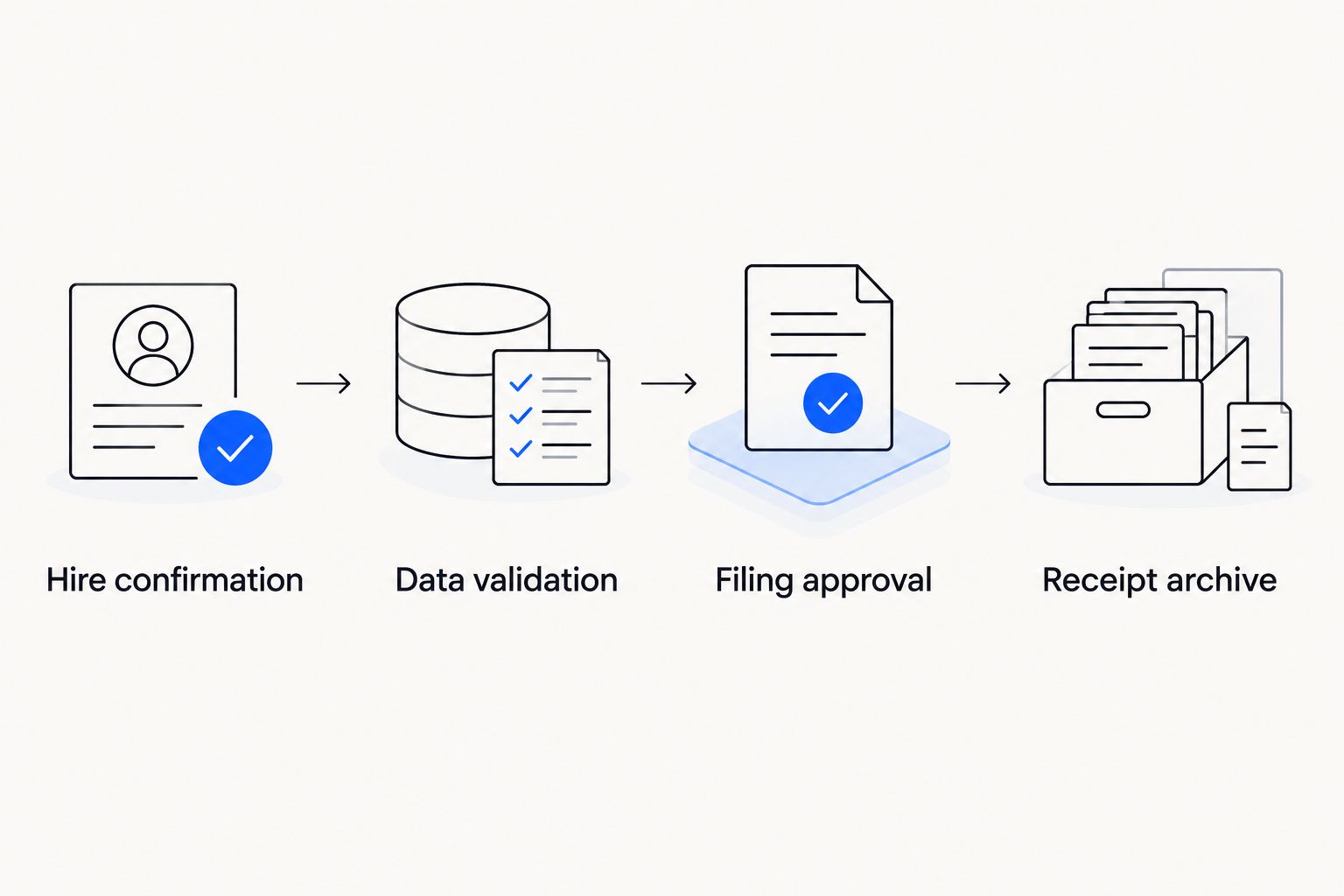
The process has four checkpoints: Hire confirmation, Data validation, Filing approval, and Receipt archive. Keep each checkpoint visible so an unresolved filing cannot disappear inside a completed onboarding task.
When a confirmed start date changes
A changed start date needs a different workflow from a new hire. Replaying the original trigger without checking the existing declaration creates duplicate or inconsistent records.
- Before submission: Recalculate the deadline, update the draft, and request fresh approval when the approved values change.
- After acceptance: Inspect the accepted declaration and determine the applicable SGK correction or cancellation procedure. Do not overwrite the receipt or assume that changing the HR record changes SGK’s record.
- When the hire does not proceed: Stop pending onboarding tasks and send any accepted declaration to the responsible reviewer for the required action.
Expected result: The employee record and SGK filing history remain traceable through the change. Preserve the original acceptance evidence alongside the subsequent action.
Include this variant in your 2026 operating procedure. Start-date edits should trigger a review of filing status, not simply update a calendar field.
Troubleshooting
The workflow says complete but no receipt exists
Separate task completion from SGK acceptance. Reopen the filing item, inspect the submission response, and retrieve the official record before marking it accepted. If the outcome is unknown, check the filing service before submitting again.
SGK rejects employee identity information
Compare the submitted values with verified identity documents and the filing service’s requirements. Correct the source record, regenerate the draft, and obtain approval for the corrected version. Do not repeatedly resubmit unchanged data.
The declaration uses the wrong workplace
Check the legal employer and workplace registration selected in the draft. Remove ambiguous defaults from the mapping. If SGK has already accepted the declaration, follow the applicable correction procedure rather than editing only the HR profile.
A retry creates another filing attempt
Use a stable reference for the employment event and check existing declarations before retrying. Treat a connection timeout as unresolved until the authorized filer confirms whether SGK accepted the first attempt.
A hire arrives after the ordinary deadline
Escalate immediately to the responsible payroll or compliance reviewer. Establish the actual start date, applicable rule, and required filing action. Never alter the start date to make an overdue declaration appear timely.
Customize your workflow
Connect the accepted entry declaration to the next employee lifecycle tasks, but retain separate approval boundaries. SGK acceptance does not establish that every employment document, payroll input, or work-eligibility requirement is complete.
For employers managing Turkish requirements across countries, use the HR compliance guide for foreign companies hiring in Turkey to frame the wider process. Keep local filing responsibility explicit even when a central team owns the HR platform.
Ottohr’s HR platform covers the relevant hiring-to-payroll functions. Its fit should be assessed alongside the employer’s authorized filing route and evidence controls; platform scope alone is not a substitute for those controls.
FAQ
What is SGK hiring notification automation?
SGK hiring notification automation connects a confirmed hire to declaration preparation, validation, approval, authorized submission, and receipt storage. A workflow that only prepares a draft still needs a filing step.
When must I submit an SGK entry declaration in 2026?
For ordinary 4/a employment, submit the entry declaration before the employee begins work, using the preceding calendar day as the ordinary deadline. Article 8 of Law No. 5510 contains exceptions that require separate assessment.
Can an accepted job offer trigger the declaration automatically?
Use a confirmed employment record with a verified start date and workplace, not an accepted offer alone. Block submission until the required employee information and approval are complete.
Does Ottohr automatically submit SGK declarations?
Confirm the exact SGK submission capability and authorized filing route before enabling automated filing in Ottohr. Hiring, onboarding, payroll, and compliance functionality does not by itself establish direct submission capability.
What proves that the employee notification was filed?
The official SGK acceptance record provides filing evidence. Attach it to the correct employee, workplace, and employment start event rather than relying on an internal completion status.
What should I do if the employee's start date changes?
Check whether the declaration has already been accepted before changing the filing workflow. Update and reapprove an unsubmitted draft; send an accepted declaration through the applicable correction or cancellation process.
Should I automatically retry a failed SGK submission?
Retry only after checking whether SGK accepted the previous attempt. A timeout leaves the result uncertain and requires reconciliation before another submission.
One last thing
Reconcile accepted declarations against confirmed starts, not just submitted tasks. For your 2026 process, review both directions: every confirmed start needs its applicable filing evidence, and every accepted declaration needs a matching employment event. That second check catches records left behind when hiring plans change.


