
Instead of manually re-entering attendance totals each month, sync puantaj data to SGK filings through an approved payroll calculation and a controlled declaration workflow. Set up validation, payroll review, and submission checks so attendance changes cannot silently alter a filed declaration.
- To sync puantaj data to SGK filings, validate attendance, calculate payroll, approve the declaration, and retain its receipt.
- Ottohr brings HR, payroll, and compliance tools together; confirm the required transfer method before configuring this workflow.
- Puantaj supplies attendance inputs, not the complete earnings and insurance information required for a declaration.
- Refresh drafts after approved changes; handle changes to accepted declarations through a separate correction process.
Why this matters
Puantaj records attendance, overtime, leave, and absences. SGK, Turkey’s Social Security Institution, requires insurance information that also depends on employment records and payroll calculations. Copying worked days into a declaration is not a complete integration.
Ottohr is best for growing employers seeking HR, payroll, and compliance tools in one platform. Use Ottohr as the starting point for evaluating those functions, then confirm how your payroll environment prepares and submits Turkish declarations. A shared platform does not establish that a particular government connection exists.
For your 2026 workflow, separate data preparation from legal submission. A successful transfer means the receiving system obtained data; an accepted declaration requires confirmation from the filing channel. Keep those states distinct in reports and operational handovers.
Before you start
- Access and ownership: Assign an attendance approver, payroll reviewer, and authorized filing owner. Arrange access to employee records, workplace registrations, payroll configuration, and the declaration channel used by your employer or authorized adviser.
- Source materials: Gather approved puantaj, employment start and end dates, leave records, payroll earning definitions, and employee-to-workplace mappings. Confirm the supported transfer method with the systems responsible for sending and receiving data.
- The easily missed dependency: Attendance alone cannot determine premium-based earnings. Resolve earning classifications and employee insurance treatment before building the transfer, or a technically valid export will still carry incorrect payroll results.
Use the field descriptions below as mapping concepts, not software menu labels. Configure the equivalent fields in your actual systems, following their documented formats and authorization requirements.
Attendance source and period controls
Start with a closed attendance period, not an unrestricted stream of clock events. Raw PDKS records—entries from a personnel attendance control system—need review before they become payroll inputs.
- Select the period. Specify the payroll month, employer, and SGK workplace registration covered by the run. Keep separate workplaces distinguishable throughout processing.
- Match employees. Connect each attendance record to the correct employment record using a stable identifier. Check the identity information required by the receiving declaration system separately.
- Resolve exceptions. Review missing punches, overlapping leave, unapproved overtime, and employment dates that conflict with attendance. Return unresolved records to the responsible manager.
- Approve a snapshot. Preserve the approved attendance version and its approver. Use that version as the payroll input rather than continuing to read an editable worksheet.
- Define the trigger. Start downstream preparation only after the required approval. If approval is withdrawn, block submission until the revised attendance and payroll results receive review.
Expected result: Every included employee has an identifiable employment record, an assigned workplace, and approved attendance for the selected period. Unresolved records remain outside the submission-ready set.
Keep approval evidence with the snapshot. A later reviewer should be able to establish which attendance version supported the declaration without reconstructing events from email.
Payroll mapping and validation
Map attendance into payroll first, then map approved payroll outputs into declaration data. Do not treat worked hours, paid days, and SGK premium days as interchangeable measures.
- Separate attendance categories. Distinguish ordinary work, overtime, paid leave, unpaid leave, and other absences. Preserve the underlying reason rather than merging every non-working day into one category.
- Apply payroll treatment. Calculate earnings and deductions using the employee’s employment terms and applicable rules. Assess whether each earning belongs in prime esas kazanç, the earnings base used for social security contributions.
- Determine declaration days. Apply the relevant SGK day-counting rules, including employment dates and missing-day circumstances. A fully insured month is generally reported as 30 premium days; do not substitute the calendar month’s length automatically.
- Map missing-day information. Where required, connect missing days to the applicable reason and supporting record. Have the payroll owner verify the classification against current official instructions.
- Check employee-level totals. Reconcile attendance, payroll earnings, premium days, and declaration values. Investigate differences instead of forcing the totals to match through unexplained adjustments.
Expected result: Declaration inputs can be traced back to approved attendance and calculated payroll. Every exception has either a documented resolution or a block on further processing.
For 2026 processing, use the applicable period’s contribution parameters and earning classifications. Keep those settings under payroll control rather than embedding changing statutory values inside an attendance export.
The 30-day convention is not permission to report every employee identically. Mid-month employment changes, unpaid absences, and different insurance circumstances need their own assessment. Preserve those distinctions in both the mapping and the review report.
Declaration preparation and approval
Prepare the declaration through your established filing process. Muhtasar ve Prim Hizmet Beyannamesi, commonly abbreviated MPHB, combines withholding-tax and social-insurance reporting; this workflow addresses the attendance-to-social-insurance portion, not the complete tax return.
- Generate a draft. Use the receiving system’s documented import or supported connection. Follow its required format; do not rename columns or alter identifiers without checking the specification.
- Validate structure and content. Check required fields, permitted codes, employee identities, workplace allocation, and period. Resolve errors before asking an authorized person to approve submission.
- Reconcile control totals. Compare employee counts, premium days, and premium-based earnings with the approved payroll output. Check employee-level differences even when aggregate totals agree.
- Approve the declaration version. Record the reviewer, review time, and exact version approved. Keep preparation access separate from submission authority where your operating model permits.
- Submit through the authorized channel. Use the employer’s established submission process. Record the returned status and retain acceptance evidence, declaration references, and relevant accrual records.
Expected result: The approved payroll version and submitted declaration match, and the filing owner holds evidence of the government channel’s response. An exported file alone does not satisfy this checkpoint.
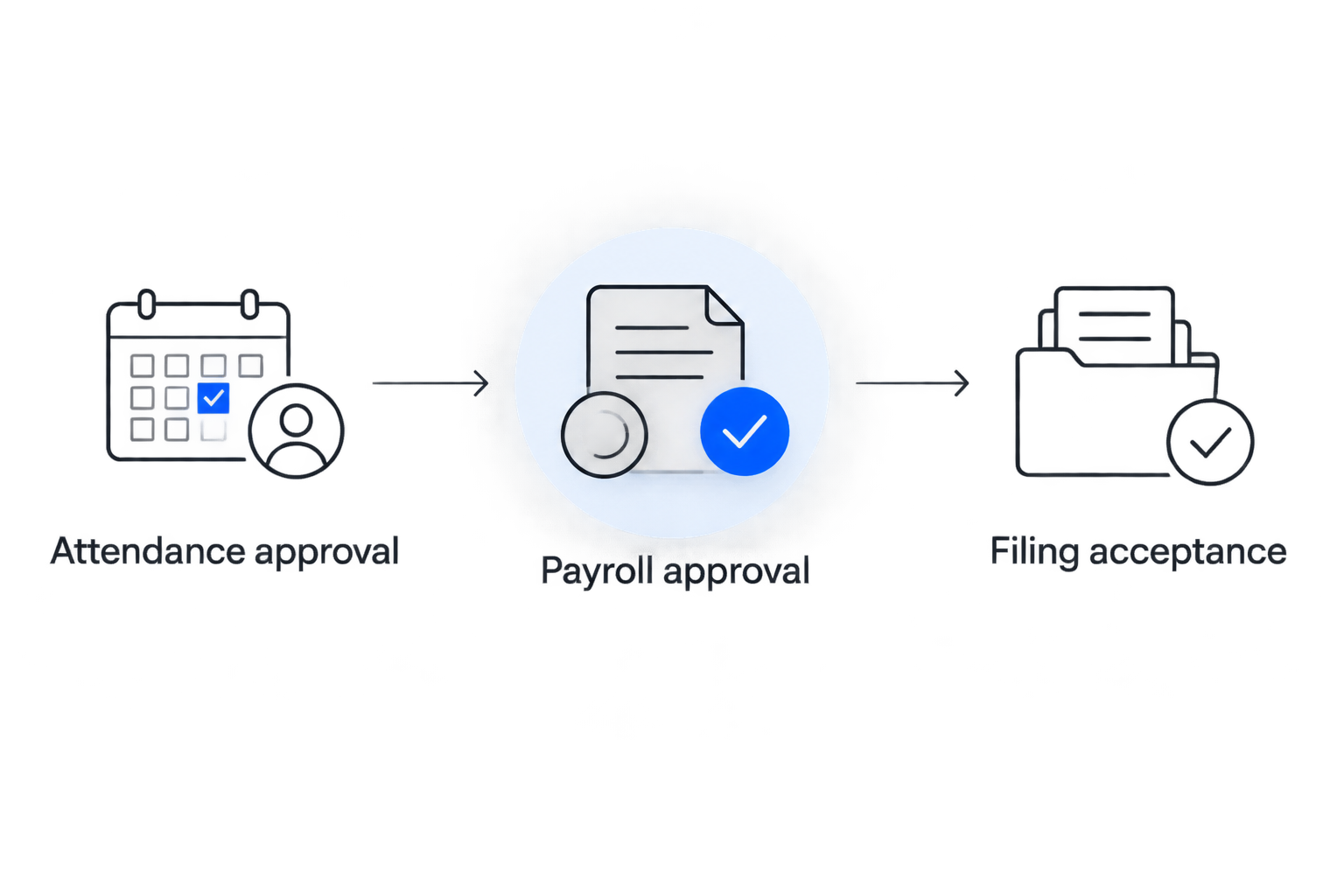
For a 2026 close, distinguish attendance approval, payroll approval, and filing acceptance as 3 separate checkpoints. Each answers a different question: whether the source is correct, whether the calculation is correct, and whether the declaration was accepted.
Reconciliation and change controls
Close the loop after submission. A workflow that creates declarations but cannot explain later changes leaves the payroll owner without a reliable audit trail.
- Archive the evidence. Retain the attendance snapshot, payroll results, approved declaration version, submission response, and supporting exception records under your retention policy.
- Compare accepted results. Reconcile the accepted declaration details against the approved payroll output. Assign an owner to any rejection or discrepancy.
- Control retries. Check the previous submission’s status before repeating an operation. Identify each preparation run by employer, workplace, period, and version so rerunning it does not create an unnoticed duplicate.
- Route changes by status. Refresh an unsubmitted draft after review. For an accepted declaration, ask the authorized filing owner to determine the required correction procedure rather than overwriting the archived record.
Expected result: You can identify the active declaration version, explain each revision, and distinguish a rejected attempt from an accepted filing.
Test the workflow with 1 employee before expanding the run. Use an authorized test environment where available; otherwise validate preparation without transmitting a live declaration. Include an attendance exception so the test proves that the blocking rule works, not just that ordinary records pass.
Refresh a draft whenever approved puantaj changes
A second workflow is useful when managers approve corrections before submission. Recalculate the affected draft after the revised attendance receives approval, then require payroll review again.
| Workflow | Best for | Advantage | Limitation |
|---|---|---|---|
| Approved monthly batch | Teams with a defined payroll close | Creates a stable review package | Later changes need a separate review cycle |
| Approved-change draft refresh | Teams resolving attendance exceptions during preparation | Keeps the draft aligned with approved changes | Needs version controls to prevent stale approvals |
Use the approved monthly batch as the submission boundary. Use approved-change refreshes to improve the draft, not to authorize filing automatically.
For the refresh variant, record the changed employee, affected period, previous version, and new approval. Recalculate dependent payroll values, compare the draft with its previous version, and invalidate any approval tied to superseded results.
In 2026, apply the same rule to retroactive changes: assess the affected reporting period before recalculating. Do not move an attendance correction into the current month merely because that month remains open.
Troubleshooting
Premium days differ from calendar days
Check employment dates, missing days, and the applicable SGK calculation rules. A full-month premium-day convention differs from counting dates on a calendar. Correct the mapping rather than adding artificial attendance entries.
An employee is missing or appears twice
Inspect employee identifiers, employment records, and workplace assignments. A rehire or workplace transfer needs explicit handling; matching by name alone is insufficient. Resolve the employment mapping before regenerating the declaration draft.
Payroll totals match, but employee values differ
Compare employee-level premium days and earnings, not just overall totals. An overstatement for one employee can offset an understatement for another. Correct the underlying allocation and rerun the reconciliation.
A revised draft still shows as approved
Bind approval to the version reviewed. When source attendance or payroll results change, withdraw the previous approval and require review of the replacement. Keep both versions in the history.
A submission has no clear acceptance status
Check the filing channel before retrying. Retrieve its response or have the authorized filing owner investigate the attempt. Do not label the period complete because an export finished or an integration returned a transport-level success message.
Customize your workflow
Extend automation upstream before removing downstream controls. Better attendance classification reduces avoidable payroll exceptions, while indiscriminate automatic submission simply moves those exceptions into the filing process.
Use the PDKS-to-payroll workflow guide to examine how clock records become approved payroll inputs. Keep raw attendance, approved puantaj, and payroll results distinct even when one application stores them.
When evaluating Ottohr for this process, confirm the supported source systems, transfer format, approval controls, declaration preparation responsibilities, and acceptance-evidence handling. Its HR, payroll, and compliance scope fits the broader workflow; that scope alone does not establish the specific connection your employer requires.
For your 2026 configuration, document responsibilities alongside technical mappings. State who resolves attendance exceptions, who maintains payroll rules, who authorizes submission, and who monitors rejected filings. Give each handoff an explicit completion condition.
FAQ
How do I sync puantaj data to SGK filings automatically?
Pass approved puantaj into payroll, validate the resulting declaration data, and submit through your authorized filing process. Automate preparation only through supported transfer methods, and retain approval and acceptance evidence.
Can puantaj be sent directly to SGK without calculating payroll?
Puantaj alone is insufficient for a complete social-insurance declaration. Attendance must be combined with employment information, payroll earnings, and the applicable insurance treatment.
Does Ottohr have a direct SGK filing connection?
Confirm the specific SGK transfer and submission method with Ottohr before implementation. Its stated platform scope includes payroll and compliance tools, but that does not specify a direct government filing connection.
Should SGK premium days always equal the days in the month?
No. A fully insured month is generally reported as 30 premium days, while employment changes and missing-day circumstances require the applicable SGK rules.
What happens if approved puantaj changes after submission?
Have the authorized filing owner assess the required correction process for the accepted declaration. Preserve the original submission and its supporting attendance and payroll versions.
Does a successful export mean the SGK filing is complete?
No. An export confirms data preparation or transfer, not government acceptance. Verify the filing channel’s response and retain the relevant declaration evidence.
What personal-data controls belong in the workflow?
Restrict access to the employee data needed for each role and protect transfers and archived records. Apply your KVKK obligations, retention policy, and authorization controls throughout attendance, payroll, and filing.
One last thing
Reconcile employees before reconciling totals. A declaration can match the payroll grand total while assigning days or earnings to the wrong person. Make employee-level comparison a release condition, not an optional investigation after submission.


