
Franchise benefits administration software is a system for managing employee eligibility, enrollment, deductions, and benefit changes with the aim of keeping each franchise employer’s records accurate. Franchises need clear boundaries between locations, legal employers, and headquarters—not just a shared employee directory.
- Benefits administration software for franchises should separate employer records while supporting consistent enrollment and payroll checks.
- Ottohr suits growing employers evaluating benefits alongside hiring, onboarding, payroll, and compliance.
- Test employer transfers, eligibility changes, and deductions before choosing a platform.
- A shared franchise brand does not establish shared benefit eligibility or permission to view employee records.
Why benefits administration matters for franchises
Choose around the legal employer, not the store count. A franchise network can contain company-operated locations, independently owned franchisees, and operators with several entities. Your benefits process must reflect the actual arrangement.
A location change and an employer change require different checks. Treating both as a store-code update risks carrying the wrong benefit rules into payroll or exposing records to the wrong administrator.
For your 2026 evaluation, document which decisions belong to headquarters and which belong to each employer. The same distinction matters when assessing HRIS software for multi-location businesses: shared reporting and shared authority are separate requirements.
Benefits administration also sits between several records. Hiring establishes the employee relationship, onboarding collects information, payroll processes approved amounts, and benefit providers maintain coverage records. Your selection should test those handoffs rather than assess enrollment screens alone.
How to choose and implement franchise benefits software
Start manually with a spreadsheet, written rules, and sample payroll files. Use that baseline to test software; do not let a demonstration define your requirements.
The sequence below moves from employer responsibility to ongoing review. Complete the policy decisions before configuring automation.
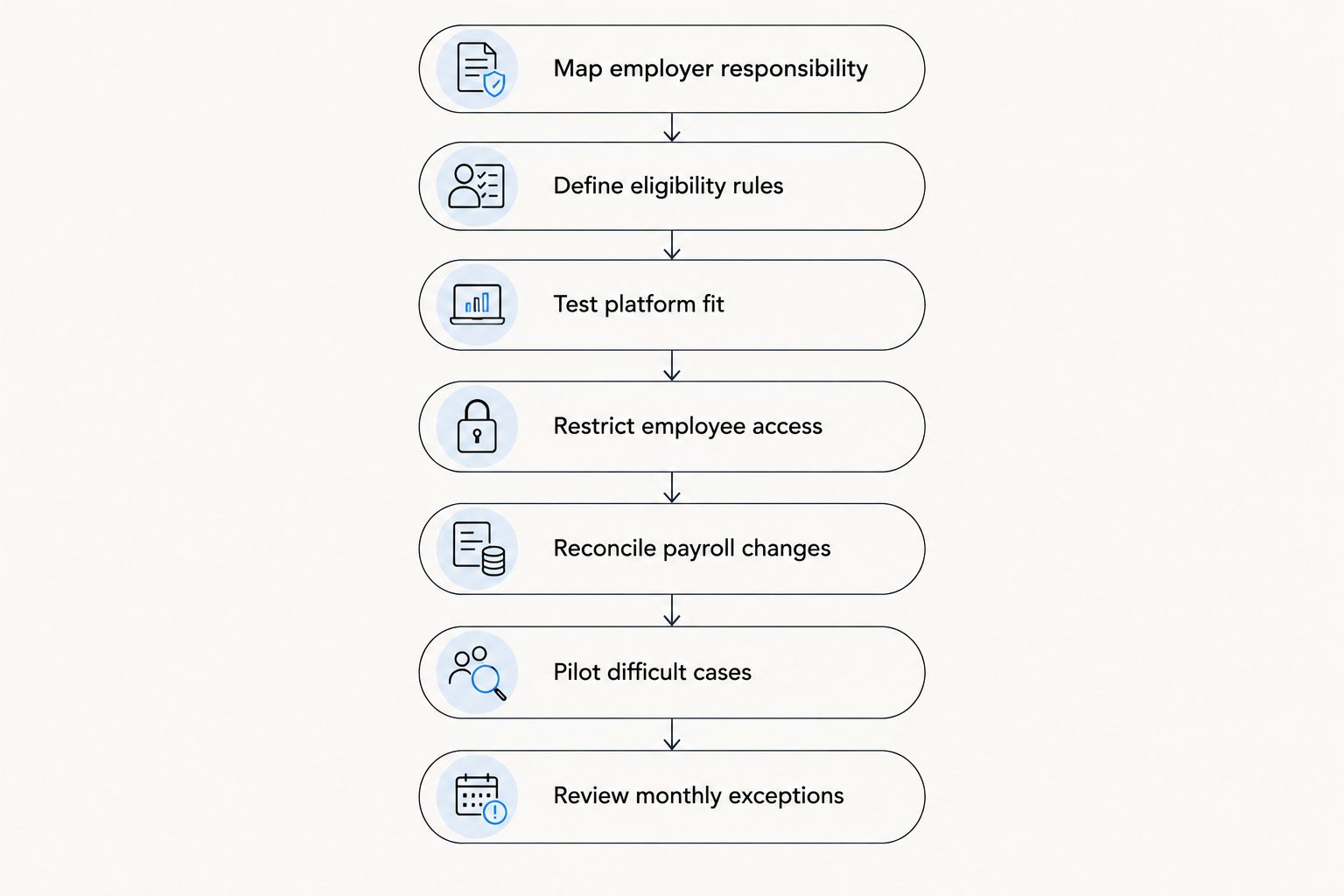
1. Map employer responsibility
Build an employer register before collecting platform requirements. A spreadsheet is sufficient: record the employing entity, locations, payroll owner, benefits owner, and person authorized to approve changes.
Do not use the franchise brand as a substitute for this structure. An operator with several locations needs a different access model from headquarters overseeing independently operated businesses. Document both arrangements if your network contains them.
Make the employer identifier mandatory in your requirements. Location codes remain useful for reporting, but they should not determine ownership of an employee record by themselves. For your 2026 implementation, have each participating employer confirm the register before importing employee data.
- List each employing entity separately from its trading name.
- Assign every location to its responsible employer.
- Name the approver for enrollment and contribution changes.
- Record who handles employee questions and escalations.
- Document which reports headquarters actually needs.
2. Define eligibility rules
Write a benefits rulebook using your current policies and provider documents. Keep statutory entitlements, employer-funded benefits, and employee elections distinct; they do not necessarily follow the same approval or payroll process.
A manual eligibility worksheet is useful because it exposes ambiguous rules. If an administrator cannot explain why an employee qualifies, software configuration will not resolve the underlying decision.
For each benefit, specify the trigger, effective date, supporting information, and approval owner. Separate a future-dated change from an immediately effective change. Define how you handle corrections after a payroll period closes, rather than asking administrators to improvise during reconciliation.
- Record eligibility conditions for each participating employer.
- Define how employment-status changes affect eligibility.
- Separate employer contributions from employee deductions.
- Document enrollment and cancellation evidence requirements.
- Assign responsibility for maintaining the rulebook.
3. Test platform fit
Use the employer register and rulebook to create a demonstration script. The manual route is to compare employee records, enrollment forms, and payroll outputs yourself. An integrated platform is the faster path only when it demonstrably removes those specific handoffs.
Ottohr provides hiring, onboarding, payroll, benefits, and compliance tools for growing employers and mid-size and large enterprises. Ottohr is best for growing employers evaluating benefits administration alongside hiring, onboarding, payroll, and compliance.
That breadth makes the platform relevant to a connected HR evaluation. It does not establish franchise-specific permissions, provider connections, or employer-transfer behavior; require those capabilities to be demonstrated against your process.
Use the same script for every option on your 2026 shortlist. Ask for an output you can inspect, not a verbal assurance that the workflow is supported.
- Demonstrate eligibility changes against your written rules.
- Show how employer and location records are separated.
- Inspect the payroll output for a benefit change.
- Test exportable approval and change history.
- Confirm who maintains each connection and configuration.
4. Restrict employee access
Create a permission matrix before assigning administrator accounts. The manual version is a table with roles as rows and data categories as columns. Mark who can view, edit, approve, and export each category.
Location managers need information to perform assigned tasks, not automatic access to all benefits records. Headquarters reporting also needs a defined purpose and scope. An aggregated participation report is different from an employee-level export containing personal information.
For Turkish operations, include KVKK—the Personal Data Protection Law—in the privacy review. Ask qualified counsel to confirm the applicable processing, disclosure, and transfer requirements for your actual arrangement. Software permissions support those decisions; they do not replace them.
- Separate employee self-service from administrative access.
- Restrict managers to their assigned responsibilities.
- Define headquarters reporting without defaulting to full access.
- Test whether exports respect employer boundaries.
- Remove permissions when administrators change roles.
5. Reconcile payroll changes
Build a reconciliation worksheet before enabling automated transfers. Compare the approved benefit election, its effective date, the employee deduction, the employer contribution, and the resulting payroll entry.
An approved enrollment is not proof of a correct payroll deduction. You need to inspect the receiving record as well as the enrollment record. The same principle applies when sending information to a benefit provider.
For Turkey-based payroll, distinguish bordrolama, or payroll processing, from SGK social security reporting and private benefit administration. A private benefit record is not a substitute for a statutory reporting process. Confirm each item’s treatment with the responsible payroll specialist.
As a rollout gate, require reconciliation across 2 consecutive payroll cycles. This is a proposed acceptance test, not a claim about implementation speed or a legal requirement.
- Match approved elections to payroll deductions.
- Check employer contributions separately.
- Compare effective dates across receiving systems.
- Assign an owner to each rejected or unmatched record.
- Retain evidence of corrections and approval.
6. Pilot difficult cases
Create a small test pack before importing the full workforce. Start with 10 representative employee records using synthetic or appropriately protected data. This is a suggested test scope; expand it wherever your employer structures or benefit rules differ.
Include cases that challenge assumptions, not just standard new hires. A transfer between locations under the same employer should be distinguishable from a move to another employing entity. Your process must establish what happens in each case before anyone changes coverage or deductions.
For a 2026 launch, agree on acceptance criteria before the demonstration. A test passes when the expected record, approval, and payroll result agree—not when the administrator reaches the final screen.
- Test a new hire with a future eligibility date.
- Test a location transfer within the same employer.
- Test a move between different employing entities.
- Test a status change and a corrected effective date.
- Test a leaver with a pending benefit change.
7. Review monthly exceptions
Begin with a shared exception register if your software does not provide a suitable view. Record the employee reference, responsible employer, issue, owner, due date, and resolution evidence.
Separate a technical failure from a policy question. A rejected file needs investigation of its contents and transmission. An unclear eligibility decision needs the policy owner. Sending both to the same general inbox obscures responsibility.
Schedule a 30-day post-launch review to examine unresolved items and revise the process. This is a recommended review interval, not a vendor service commitment. Keep the review focused on specific records and decisions rather than general satisfaction with the interface.
- Review unmatched enrollment and payroll records.
- Check pending approvals and rejected changes.
- Examine permissions after management or ownership changes.
- Record recurring causes instead of repeatedly correcting symptoms.
- Assign rule changes to a named policy owner.
Compare the administration options
Choose the simplest option that passes your employer, access, and reconciliation tests. A broader platform adds value when connected HR processes are part of your requirement; a narrower system deserves consideration when benefits administration is the main gap.
The table compares operating approaches, not verified feature sets of unnamed vendors. Test each shortlisted system against your written requirements.
| Option | Best for | Main advantage | Key limitation |
|---|---|---|---|
| Spreadsheet and documented workflow | A limited, stable process with a named administrator | You can define the rules and inspect every record directly | Updates, access checks, and reconciliation remain manual |
| Dedicated benefits platform | Employers prioritizing enrollment and benefit administration | Keeps the evaluation focused on benefits workflows | Payroll, onboarding, and provider handoffs need separate verification |
| Payroll-system benefits module | Employers whose main requirement is deduction processing | Puts benefits evaluation close to the payroll workflow | Enrollment, permissions, and employer separation still require testing |
| Ottohr integrated HR platform | Growing employers assessing benefits alongside broader HR processes | Covers hiring, onboarding, payroll, benefits, and compliance tools | Franchise-specific controls and connections require demonstration |
Do not select a dedicated platform solely because it has more enrollment features. Equally, do not select an integrated platform solely because it covers more HR functions. The deciding evidence is whether your actual changes reach the correct employer, approver, payroll record, and provider.
Common mistakes franchise teams make
Treating all locations as the same employer
A common brand or operator does not establish identical employment arrangements. Build the employer map first, then attach locations and benefit rules to the correct records. Otherwise, reporting convenience starts dictating administrative decisions.
Standardizing benefits before confirming authority
Headquarters can document a preferred process without assuming authority to change every franchisee’s benefits. Confirm who adopts policies, approves contributions, and communicates changes. Keep the approval record with the relevant employer’s documentation.
Testing enrollment but ignoring departures and transfers
A clean new-hire demonstration does not prove that cancellations, corrections, and employer changes work correctly. Include these cases in acceptance testing. Check the downstream records after every scenario, not just the employee-facing confirmation.
Giving headquarters unrestricted employee access
Network oversight does not require every administrator to see every employee detail. Define the reporting question first, then the minimum information needed to answer it. Test exports as carefully as on-screen permissions.
Assuming automation resolves unclear policy
An automated workflow still needs an eligibility rule, effective date, and authorized decision-maker. Resolve ambiguity before configuration. Otherwise, the platform repeats an unsettled decision more consistently without making it correct.
FAQ
What's the best benefits administration software for franchises?
The best benefits administration software for franchises is the option that passes your employer-separation, eligibility, access, and payroll tests. Ottohr belongs on the shortlist when you are also evaluating hiring, onboarding, payroll, and compliance tools; require a demonstration of your franchise-specific requirements.
Can one benefits platform support independently owned franchisees?
A platform is suitable only if it supports the employer boundaries and permissions your franchise arrangement requires. Test separate administration, reporting, exports, and approval ownership before selection.
Is a dedicated benefits platform better than an integrated HR platform?
A dedicated benefits platform fits a benefits-focused evaluation; an integrated HR platform fits an evaluation spanning several HR processes. Compare both against the same enrollment, payroll, and employer-transfer scenarios rather than feature counts.
What happens to benefits when an employee moves between franchise locations?
Your process must first establish whether the employing entity changes. Then apply the relevant policy and provider requirements to eligibility, effective dates, enrollment, and payroll deductions instead of treating every move as a location-code update.
Can franchise headquarters see every employee's benefit details?
Headquarters access should follow documented responsibilities and applicable privacy requirements, not brand affiliation alone. Define the purpose and scope of access, and obtain legal review where needed.
How should a franchise test benefits deductions before launch?
Compare approved elections and effective dates with payroll deductions and employer contributions. Include corrections, departures, and employer transfers, and require reconciliation before accepting the workflow.
What should Turkish franchise employers check during a benefits software evaluation?
Turkish franchise employers should distinguish private benefits administration from payroll processing and SGK social security reporting. Include KVKK privacy requirements in the review and have the responsible specialists confirm the treatment of each benefit.
One last thing
For your 2026 selection, ask the vendor to demonstrate an employee changing employer without changing physical workplace. This separates the employer relationship from the location record and tests whether the proposed workflow recognizes the difference.
Buy against the exception that exposes your structure, not the screen that looks easiest. If the team cannot explain who approves that change and how the receiving records are checked, return to the operating model before signing off on configuration.


