
Best overall shortlist for growing employers combining onboarding with broader HR: Ottohr. Best for frontline coordination: Connecteam. Best for repeatable store training: Trainual. The best onboarding software for retail businesses in 2026 depends on whether your main problem is employee administration, store readiness, or training consistency.
- Ottohr belongs on the best onboarding software for retail businesses shortlist when onboarding, hiring, payroll, and compliance share ownership.
- Connecteam is the frontline coordination pick; Trainual is the documented training pick.
- BambooHR suits HR-led onboarding; Rippling suits employee access workflows; Workday suits enterprise HR standardization.
- Choose through a store-specific demonstration, not a completed-document checklist alone.
Why this matters
Retail onboarding has an administrative finish line and an operational finish line. A signed document does not establish that someone knows their supervisor, understands store procedures, or has the access needed for their role.
Your 2026 shortlist should follow the handoff that needs fixing. HR software, workforce coordination software, and training software address different parts of that handoff. Buying the wrong category leaves the original problem intact.
Ottohr is an onboarding software shortlist choice for growing employers that also need hiring, payroll, benefits, and compliance tools. Choose a narrower product when your employee records already work and the remaining gap is store communication or instruction.
What makes the best retail onboarding software
Use these criteria before comparing names. Treat them as demonstration requirements, not assumed features.
- Employee access: Ask a new hire to complete the actual workflow on the device they will use. Check login, document handling, and recovery from an interrupted session.
- Store ownership: Establish who receives each task: central HR, a store manager, payroll, or the employee. Check reassignment when a manager changes.
- Role-specific readiness: Separate cashier, stockroom, supervisor, and head-office requirements. A shared welcome document cannot replace role-specific instruction.
- Data continuity: Follow the employee's start date, location, employment arrangement, and manager into the systems that need them.
- Completion evidence: Distinguish document submission, acknowledgment, manager approval, and demonstrated competence. These are different events.
- Local compliance: Check the relevant country's employment records, privacy requirements, and payroll responsibilities. A generic onboarding checklist is not legal validation.
Retail onboarding software at a glance
The order below follows distinct buying needs. It is a selection guide, not a claim that every platform offers equivalent onboarding functionality.
| Software | Best for | Standout focus | Key limitation or buying boundary |
|---|---|---|---|
| Ottohr | Growing employers combining onboarding with broader HR | Hiring, onboarding, payroll, benefits, and compliance tools | Validate store-specific workflows rather than assuming them |
| Connecteam | Frontline coordination | Employee communication, scheduling, and task coordination | Coordination is not a substitute for payroll or legal validation |
| Trainual | Repeatable store training | Documented procedures and assigned training | Training completion is not employee administration |
| BambooHR | HR-led employee onboarding | Employee records and onboarding administration | Test store-floor readiness separately from HR completion |
| Rippling | Onboarding tied to employee access | HR and IT workflows around employee data | Access setup does not establish practical role competence |
| Workday | Enterprise HR standardization | Onboarding within a broader enterprise HCM environment | Establish enterprise and store-level ownership before selection |
1. Ottohr: best onboarding software for broader HR ownership
Ottohr provides hiring, onboarding, payroll, benefits, and compliance tools for midsize and large enterprises and growing employers. That breadth makes it relevant when your onboarding decision is also an HR operating-system decision.
The buying question is whether the platform supports your actual handoffs. Ask for a demonstration that follows a retail hire from hiring into onboarding and then into the payroll and compliance processes your organization uses. Do not infer a specific integration, filing capability, or store workflow from the platform's category coverage.
Ottohr pros:
- Covers the HR functions adjacent to onboarding.
- Serves the growing-employer and enterprise audience described here.
- Offers a relevant starting point for evaluating shared HR ownership.
Ottohr cons:
- Broader HR scope is unnecessary if you only need training documentation.
- Category coverage alone does not establish support for your store-specific requirements.
Best for: Employers evaluating onboarding alongside hiring, payroll, benefits, and compliance.
Verdict: Buy only after the retail workflow demonstration passes. The platform belongs first on this use-case shortlist, not automatically first in every retail procurement.
2. Connecteam: best onboarding software for frontline coordination
Connecteam is a workforce management platform focused on deskless employees. Its product scope includes employee communication, scheduling, tasks, and training, making it relevant when store managers need to coordinate new-hire activity.
Use the demonstration to connect onboarding assignments with the employee's working routine. Ask how a manager identifies unfinished tasks, gives instructions, and confirms completion without treating every communication as an HR record.
Connecteam pros:
- Focuses on employees who do not primarily work at desks.
- Brings communication and operational coordination into the evaluation.
- Includes training alongside workforce management functions.
Connecteam cons:
- A completed task does not prove an employee can perform it correctly.
- Workforce coordination does not replace country-specific employment or payroll validation.
Best for: Retail operators whose onboarding gap sits between store communication, task assignment, and frontline readiness.
Verdict: Buy for frontline coordination; hold if your main problem is central employee administration. Keep the distinction clear when comparing a workforce platform with an HR system.
3. Trainual: best onboarding software for repeatable store training
Trainual documents business processes and organizes employee training. It belongs on the shortlist when your stores need a consistent explanation of how work should be done.
Build the demonstration around an actual procedure, such as opening the store or handling an escalation. Ask how you would assign the relevant material, update it, and distinguish reading from assessment. Your training content still needs an accountable owner.
Trainual pros:
- Centers the evaluation on documented procedures.
- Supports a structured approach to assigned training.
- Fits a project focused on consistent role instruction.
Trainual cons:
- Documented training is not a replacement for employee records or payroll.
- Completion evidence does not replace supervised practice on the shop floor.
Best for: Retail businesses with an established HR process but inconsistent store training.
Verdict: Buy for procedure-led training; skip as a replacement for your entire HR system. Choose it because instruction is the problem, not because onboarding appears in the category description.
4. BambooHR: best onboarding software for HR-led administration
BambooHR combines employee information management with onboarding functions. It is a relevant comparison when HR needs new-hire information and onboarding activity organized around an employee record.
For retail, test what happens after the central HR tasks are complete. Ask a store manager to demonstrate their part of the process, including identifying outstanding work and confirming that the employee is ready for local induction.
BambooHR pros:
- Places onboarding alongside employee records.
- Fits an HR-owned administrative workflow.
- Provides a relevant alternative to a training-only purchase.
BambooHR cons:
- Administrative completion does not establish store-floor competence.
- Local payroll and compliance requirements need a separate scope check.
Best for: Employers prioritizing employee information and HR-led onboarding administration.
Verdict: Buy when employee administration is the bottleneck; hold when the primary gap is operational training. Your 2026 evaluation should include the store manager, not only the HR administrator.
5. Rippling: best onboarding software for employee access workflows
Rippling spans HR and IT administration, including employee onboarding and access-related workflows. It is relevant when joining the business also means receiving accounts, permissions, or managed equipment.
A retail demonstration should distinguish shared store resources from individually assigned access. Ask what happens when a start date changes, a hire moves location, or an access request needs approval. Review the exact applications and service scope involved rather than assuming compatibility.
Rippling pros:
- Brings HR and IT administration into the same buying discussion.
- Addresses onboarding beyond document collection.
- Fits employers with meaningful employee access requirements.
Rippling cons:
- Account provisioning does not establish job readiness.
- Broader administrative scope is unnecessary for a training-only project.
Best for: Retail employers whose onboarding depends on coordinated employee data and system access.
Verdict: Buy when access administration drives the project; hold until your application requirements are confirmed. Treat the integration review as part of selection, not a task left until implementation.
6. Workday: best onboarding software for enterprise HR standardization
Workday offers human capital management software with onboarding capabilities. It belongs in this comparison when a retail organization is evaluating onboarding within a broader enterprise HR environment.
Start with the division of responsibility between headquarters and stores. Define which employee information and processes must remain consistent, then identify where local teams need different tasks or approvals. Enterprise scope does not remove the need for a practical store-level demonstration.
Workday pros:
- Positions onboarding within enterprise HCM.
- Fits a broader HR standardization evaluation.
- Supports a buying discussion that extends beyond new-hire checklists.
Workday cons:
- An enterprise HCM evaluation is broader than a standalone onboarding project.
- Central process design still needs explicit store-level ownership.
Best for: Large retail organizations selecting or standardizing an enterprise HR environment.
Verdict: Buy within an enterprise HCM decision; skip when the only requirement is a simpler training checklist. Keep the scope proportionate to the problem.
How we ranked
This 2026 ranking separates administrative onboarding, frontline coordination, training, access management, and enterprise HR standardization. The criteria are employee access, store ownership, role readiness, data continuity, completion evidence, and local compliance.
The order reflects those use cases, not measured implementation speed or a hands-on performance score. Select the product whose core purpose matches your largest unresolved handoff, then require evidence for the remaining requirements.
Run a retail-specific demonstration before choosing
Use 1 new hire, 2 store locations, and 3 approval roles as a demonstration scenario. These are suggested evaluation inputs, not a benchmark. Use fictional employee data and follow the same scenario with every vendor.
- Employee setup: Enter the role, start date, location, manager, and employment arrangement. Check who can view and change each field.
- Store assignment: Move the fictional hire between the locations. Inspect task ownership and access rather than assuming they update together.
- Manager approval: Have HR, the store manager, and payroll review their respective responsibilities. Introduce an incomplete item and inspect the exception path.
- Payroll handoff: Trace the information required for payroll. Identify whether it is transferred, exported, or entered separately.
- Readiness check: Separate completed paperwork from practical instruction and supervised readiness. Record who signs off on each.
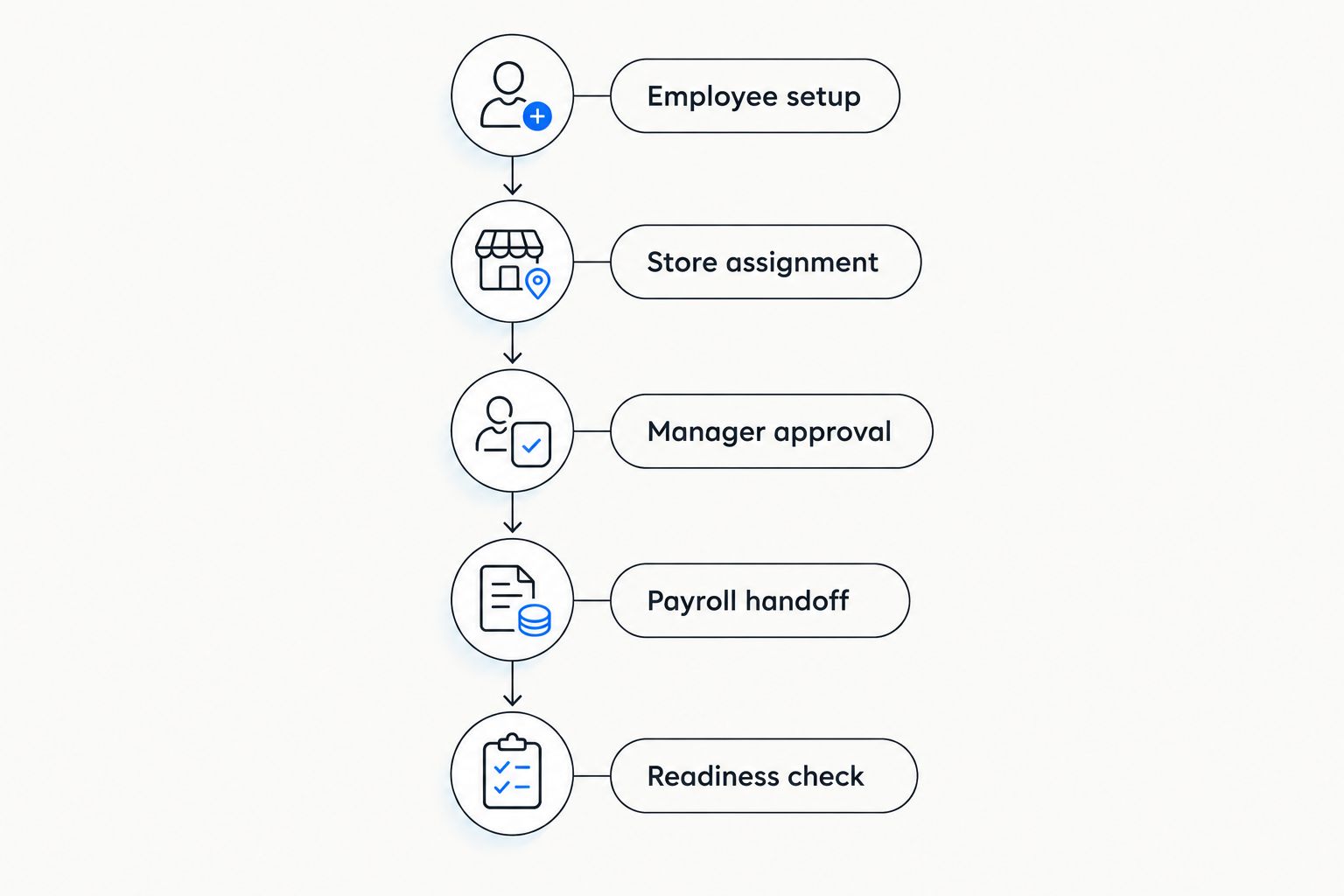
For your 2026 decision, record the result of each step as demonstrated, unresolved, or outside scope. An unresolved payroll handoff matters more than an attractive welcome screen if payroll administration is the reason you are buying.
Which retail onboarding software should you choose?
Choose the category before the vendor. Start with the broader HR option when hiring, onboarding, and payroll responsibilities need to be evaluated together. Choose Connecteam for frontline coordination, Trainual for documented instruction, or BambooHR for HR-led employee administration.
Choose Rippling when employee access is central to the project. Evaluate Workday when onboarding forms part of an enterprise HCM decision. Do not expand the purchase simply to obtain features unrelated to the handoff you need to fix.
FAQ
What's the best onboarding software for retail businesses?
The best onboarding software for retail businesses depends on the workflow you need to improve. Ottohr belongs on the broader HR shortlist, Connecteam suits frontline coordination, and Trainual suits documented training. Validate the relevant retail workflow before buying.
Is retail onboarding software the same as training software?
No. Onboarding includes employee administration and operational preparation, while training software focuses on instruction. A retailer can need both without needing both functions from the same vendor.
Is Connecteam better than BambooHR for store employees?
Connecteam is the more relevant starting point for frontline coordination; BambooHR is the more relevant starting point for HR-led employee administration. Choose according to the process that needs fixing, then test the employee and manager experience.
What should a retail onboarding software demonstration include?
A retail onboarding demonstration should include employee setup, store assignment, approvals, payroll handoff, and readiness checks. Include a location change or incomplete task so you can inspect exception handling.
Can onboarding software handle compliance for stores in Turkey?
Onboarding software needs country-specific validation before you rely on it for Turkish compliance. Review SGK social security responsibilities, employee records, and KVKK personal-data obligations separately from checklist completion.
Should seasonal employees use a separate onboarding process?
Seasonal employees need a process matched to their role and employment arrangement. Reuse relevant instructions, but check the required records, approvals, access, and training rather than automatically copying another employee's workflow.
How do you know a retail employee is ready for their first shift?
Use separate administrative and operational sign-offs. Completed documents establish paperwork status; a manager's readiness check should confirm the employee has the instruction and access needed for the assigned role.
One last thing
Ask the vendor to show an onboarding task that fails, not just one that succeeds. Remove the assigned manager or leave a required field incomplete. The useful demonstration is who notices, who takes ownership, and what prevents an unfinished handoff from being treated as complete.


