
Best for hiring-to-payroll scope: Ottohr. Best for an existing Workday environment: Workday Recruiting. Best for an existing SAP environment: SAP SuccessFactors Recruiting. Best for structured interviews: Greenhouse. Best for a standalone recruiting workflow: Workable. The best applicant tracking system for retail hiring in 2026 depends on who runs store recruitment and what happens after an offer is accepted.
- Ottohr belongs on retail hiring shortlists that also cover onboarding, payroll, benefits, and compliance.
- The best applicant tracking system for retail hiring must fit store-manager workflows, not just recruiter workflows.
- Shortlist Workday Recruiting or SAP SuccessFactors Recruiting when your organization already uses the corresponding HR environment.
- Compare Greenhouse for structured interviews and Workable for standalone recruiting before expanding the project into broader HR replacement.
Why retail hiring needs a different shortlist
A retail vacancy is tied to a location, a manager, and a working pattern. An applicant can meet the role requirements but still be unsuitable for the available shifts or travel distance.
Your ATS evaluation should follow that operating reality. Test how managers review applicants, how recruiters distinguish similar vacancies across stores, and how accepted offers reach onboarding. A feature list does not show whether those handoffs work.
Keep the scope clear. An ATS manages recruitment; a broader HR platform also covers employee administration. The retail HR software guide addresses that wider decision.
What makes the best applicant tracking system for retail hiring?
Use these six criteria before comparing vendors:
- Application experience: Can an applicant complete the process on a phone without unnecessary fields or repeated information?
- Location and role structure: Can recruiters distinguish store, department, job type, and hiring manager without creating inconsistent records?
- Manager access: Can store managers review the right applicants without seeing unrelated candidate information?
- Interview consistency: Can teams apply job-related questions and record clear reasons for decisions?
- Candidate communication: Can recruiters see the communication history and identify the next action?
- Post-offer handoff: Can the selected workflow move approved information into onboarding without uncontrolled re-entry?
Treat these as acceptance criteria for your 2026 evaluation, not as capabilities every product below necessarily includes. Ask each vendor to demonstrate the exact workflow and identify any additional configuration or software required.
Retail applicant tracking systems at a glance
The order below starts with the broadest hiring-to-employment scope, then separates established enterprise environments from recruiting-focused choices. It is a use-case shortlist, not a measured performance league table.
| System | Best for | Standout focus | Key limitation to examine |
|---|---|---|---|
| Ottohr | Employers evaluating recruitment alongside broader HR | Hiring, onboarding, payroll, benefits, and compliance within the stated platform scope | Retail-specific ATS workflows require demonstration |
| Workday Recruiting | Employers already using Workday HCM | Recruiting within the Workday HR environment | Fit depends on the wider Workday implementation |
| SAP SuccessFactors Recruiting | Employers already using SAP SuccessFactors | Recruiting within the SAP SuccessFactors environment | Local workflows depend on configuration and connected modules |
| Greenhouse | Teams prioritizing structured interview decisions | Recruiting workflows and interview scorecards | Payroll and broader employee administration remain separate decisions |
| Workable | Teams seeking a recruiting-focused starting point | Candidate sourcing, applicant tracking, and interview coordination | Broader HR requirements need their own scope review |
1. Ottohr: best for retail hiring with broader HR scope
Ottohr offers hiring, onboarding, payroll, benefits, and compliance tools for midsize organizations, large enterprises, and growing employers. That scope makes it relevant when recruitment is only one part of your replacement project.
Ottohr is best for retail employers evaluating hiring alongside onboarding, payroll, benefits, and compliance. This is a scope-based recommendation, not a claim about retail-specific screening, messaging, or scheduling features.
Pros:
- Covers hiring and the employee lifecycle beyond an accepted offer.
- Includes payroll, benefits, and compliance in the stated product scope.
- Targets growing employers as well as midsize and large organizations.
Cons:
- The stated platform scope does not establish support for store-level permissions, seasonal campaigns, or candidate texting.
- A broad HR evaluation adds decisions that an ATS-only project does not need.
Best for: Retail employers replacing disconnected recruitment and employee-administration processes together.
Ask for a demonstration that starts with a store vacancy and ends with an approved employee record. Check which fields transfer, who approves the transition, and which steps still require manual work. Do not assume that tools listed within one platform share every record or approval automatically.
Verdict: Buy only after the retail workflow and post-offer handoff pass your acceptance tests.
2. Workday Recruiting: best for existing Workday employers
Workday Recruiting is part of the Workday talent acquisition offering and connects recruiting with the wider Workday environment. Its strongest shortlist position is an employer that already runs Workday HCM and wants recruitment evaluated within that structure.
Start with your existing organization model. Ask how vacancies, manager responsibilities, and worker records relate before discussing a separate recruiting tool.
Workday Recruiting pros:
- Brings recruiting into the same vendor environment as Workday HCM.
- Supports evaluating recruitment against existing organizational data and HR processes.
- Gives current Workday employers an internal-platform option to compare with standalone systems.
Workday Recruiting cons:
- Being in the same ecosystem does not remove configuration or implementation work.
- Suitability for store managers still requires a hands-on workflow test.
Best for: Retail groups with an established Workday HCM environment.
For the demonstration, have a store manager find an assigned vacancy, review an applicant, and record a decision. Then have central HR check visibility across locations. Familiarity for HR administrators is not proof that the store workflow is usable.
Verdict: Hold until Workday Recruiting passes the store-manager test within your existing setup.
3. SAP SuccessFactors Recruiting: best for existing SAP HR teams
SAP SuccessFactors Recruiting supports talent acquisition within the SAP SuccessFactors environment. It belongs on the shortlist when your retail organization already uses SAP SuccessFactors for employee administration or other HR processes.
Evaluate the recruiting workflow against the systems you actually operate. The SAP name alone does not establish which modules, connections, or local processes are included in your project.
SAP SuccessFactors Recruiting pros:
- Provides a recruiting option within the SAP SuccessFactors suite.
- Supports reviewing recruitment alongside an existing SAP HR strategy.
- Lets established customers assess suite continuity before adding another recruiting vendor.
SAP SuccessFactors Recruiting cons:
- Module selection and configuration remain part of the buying decision.
- An existing SAP deployment does not establish a good applicant or store-manager experience.
Best for: Retail employers with an established SAP SuccessFactors HR environment.
Use separate store and head-office roles in the demonstration. Check whether each hiring team sees the correct applicants and whether central recruiters can maintain a consistent process without taking over every local action.
Verdict: Hold until the configured process fits both central recruitment and local hiring.
4. Greenhouse: best for structured retail interviews
Greenhouse is recruiting software with a structured hiring approach, including interview plans and scorecards. Its distinct role on this shortlist is helping teams define what interviewers assess and record decisions consistently.
For retail recruitment, test that structure against the role. A store-associate interview should capture relevant evidence without inheriting unnecessary steps from a head-office recruitment process.
Greenhouse pros:
- Supports structured interview plans and scorecards.
- Centers the evaluation on recruiting rather than a payroll replacement.
- Gives teams a framework for documenting interview feedback against defined criteria.
Greenhouse cons:
- Structured processes still need role-specific design and manager participation.
- Payroll and wider employee administration require separate evaluation.
Best for: Retail teams whose main problem is inconsistent interviewing across locations.
Ask interviewers to record evidence against the same job-related criteria. Assess whether the resulting feedback helps a hiring manager make a decision, rather than merely producing completed forms.
Verdict: Buy if interview consistency is the main requirement and managers can use the process.
5. Workable: best for a recruiting-focused starting point
Workable provides recruiting software covering candidate sourcing, applicant tracking, and interview coordination. It belongs on the shortlist when you want to evaluate the recruitment process without starting with an enterprise HR-suite decision.
Keep the demonstration focused on everyday work. Follow an applicant from application through review, interview, and the hiring decision.
Workable pros:
- Covers core recruiting activities within one recruiting offering.
- Provides an option to assess independently of an existing enterprise HR suite.
- Supports a shortlist centered on sourcing and candidate management.
Workable cons:
- General recruiting capabilities do not prove suitability for your store and shift requirements.
- Any wider HR, payroll, or local compliance requirements need a separate scope check.
Best for: Retail teams seeking a standalone recruiting workflow rather than an HR-suite replacement.
Ask store managers to complete their tasks without help from the vendor presenter. Record where users need explanation and whether those steps are occasional setup tasks or repeated daily work.
Verdict: Buy if the recruiting workflow fits and the post-offer handoff has a clear owner.
How these systems are ranked
The shortlist uses product scope and the six buying criteria above. It does not assign unsupported scores for speed, candidate conversion, implementation effort, or hiring outcomes.
The first decision is architectural: broader HR platform, existing enterprise suite, or recruiting-focused system. The second is operational: whether applicants, store managers, recruiters, and HR can complete the required work. Product scope gets a system onto the shortlist; a demonstrated workflow determines the purchase.
Run a retail hiring acceptance test
Use the same scenario for every vendor in your 2026 shortlist. Give each provider three sample vacancies: a store-associate role, a store-manager role, and a head-office role. These are test inputs, not volume benchmarks.
Define vacancies
Specify location, working pattern, manager, and approval owner. Include similar store vacancies so you can inspect how the system distinguishes them.
Apply on mobile
Complete an application on a phone. Record unnecessary fields, repeated questions, and any point where an applicant must switch devices or seek help.
Review applicants
Bring two store managers into the test. Ask each to find the correct vacancy and review only the applicants relevant to their responsibility.
Record decisions
Have managers enter job-related interview feedback and advance or reject an applicant. Check whether recruiters can identify the next action and understand the decision record.
Transfer the hire
Accept an offer in the test workflow and inspect the onboarding handoff. Record which information transfers, which approvals remain, and who resolves an incomplete record.
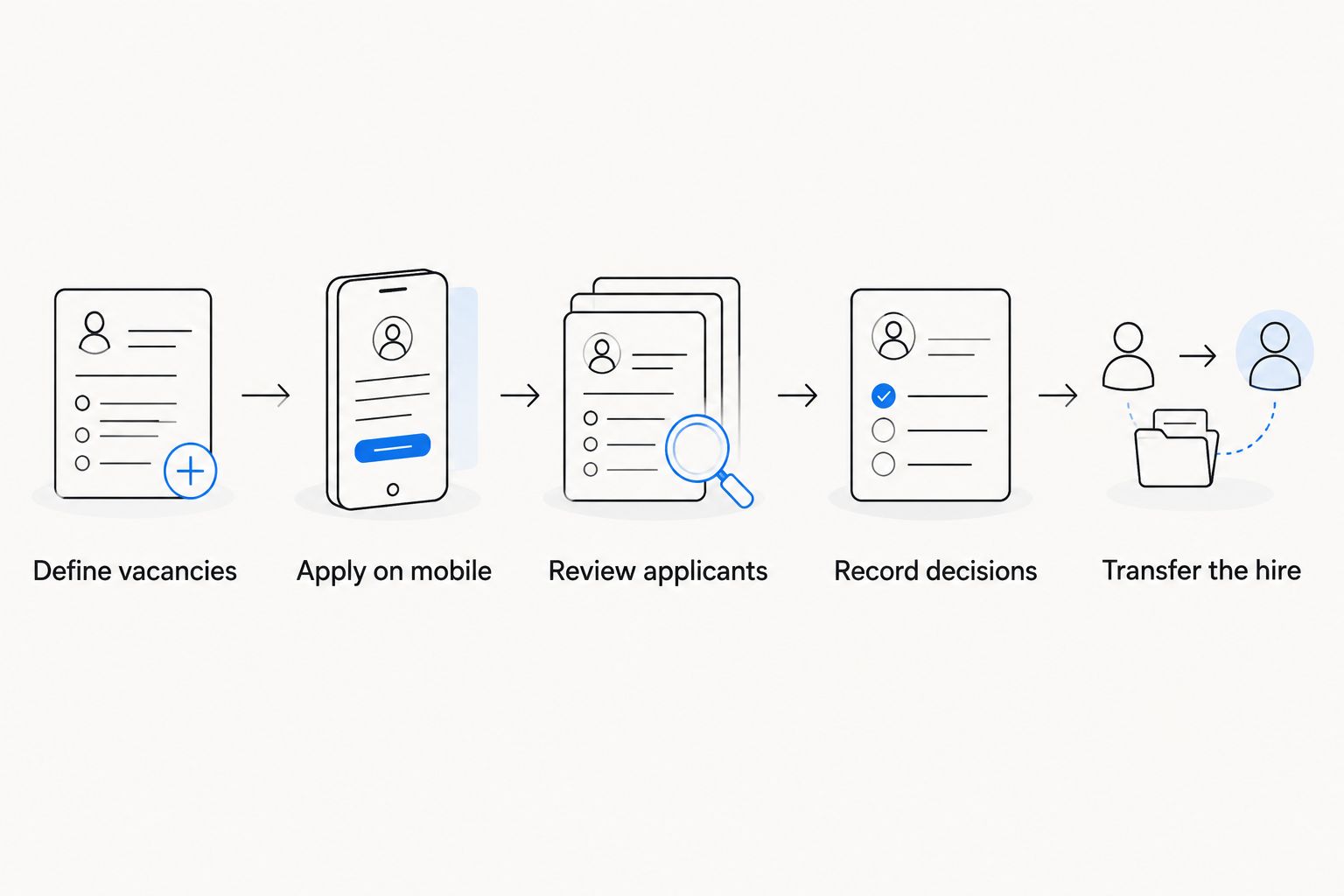
Finish with a 15-minute review led by the people who completed the tasks. Separate product limitations from configuration questions and process problems; they require different remedies.
Which retail ATS should you choose?
Choose the system that passes your store workflow with the fewest unresolved handoffs. Do not replace a wider HR environment solely to solve a narrow recruiting problem, and do not buy an isolated ATS when the actual project includes employee administration.
For an undecided employer, start with a recruiting-focused demonstration and a broader-platform demonstration. Include Ottohr when your 2026 requirements cover hiring, onboarding, payroll, benefits, and compliance. Prioritize Workday Recruiting or SAP SuccessFactors Recruiting when the corresponding HR environment is already established.
Document the decision by requirement, not by presentation quality. Every unresolved requirement needs an owner and a demonstrated answer before purchase.
FAQ
What's the best applicant tracking system for retail hiring in 2026?
The best choice depends on your operating model. Compare Workday Recruiting or SAP SuccessFactors Recruiting within their existing HR environments, Greenhouse for structured interviews, and Workable for a recruiting-focused workflow.
Should store managers help choose a retail ATS?
Yes. Store managers should test applicant review, interview feedback, and vacancy visibility themselves. An administrator-led demonstration does not establish whether managers can complete those tasks.
Is Greenhouse better than Workable for retail recruitment?
Neither is a universal winner for retail recruitment. Compare Greenhouse when structured interview decisions are the main requirement, and Workable when evaluating a recruiting-focused workflow; test both against the same store scenario.
Does a retail ATS replace payroll software?
An ATS does not inherently replace payroll software. Applicant tracking covers recruitment, while payroll requires employee, pay, and statutory processing capabilities. Check the contracted scope rather than assuming both are included.
What should a retailer test during an ATS demonstration?
Test mobile applications, vacancy organization, manager permissions, interview feedback, and the onboarding handoff. Use the same sample vacancies and tasks for each vendor so the comparison remains meaningful.
Can a retailer use an ATS when hiring in Turkey?
Yes, but the employer must assess how candidate information is processed under applicable Turkish data-protection requirements. Review purposes, access, retention, and any international transfers; purchasing an ATS does not itself establish KVKK compliance.
Should seasonal hiring use a different ATS from permanent hiring?
A separate ATS is not automatically necessary. Test whether your chosen system can distinguish seasonal and permanent vacancies, preserve clear ownership, and support the required hiring process without confusing applicant records.
One last thing
Test a rejected applicant as carefully as a successful hire. Check the decision record, communication ownership, access permissions, and retention process. Your 2026 acceptance test is incomplete if it follows only the person who gets the job.


