
Best for connected hiring and HR: Ottohr; best frontline specialist to evaluate: Fountain; best general recruiting shortlist: Workable; best structured-interview shortlist: Greenhouse. The best ATS software for blue-collar recruiting in 2026 is the system that proves your application, shift-screening and hiring-manager workflows—not the one with the longest feature list.
- Ottohr belongs on the best ATS software for blue-collar recruiting shortlist when hiring, onboarding and payroll share ownership.
- Evaluate Fountain for frontline recruiting, Workable for general recruitment and Greenhouse for structured hiring.
- Test mobile applications, shift eligibility and manager decisions before choosing an applicant tracking system.
- Require a demonstrated employee-data handoff; recruiting features alone do not establish payroll or compliance coverage.
Why this matters
Blue-collar recruiting means hiring for operational roles such as warehouse work, production, construction and maintenance. Your selection process must establish whether applicants can do the job and work its required schedule. A polished résumé is not a substitute for those answers.
An applicant tracking system, or ATS, organizes applications and hiring decisions. It does not automatically establish job readiness, schedule compatibility or a compliant employment setup. Those outcomes depend on the questions, approvals and handoffs you configure.
For your 2026 shortlist, separate recruiting needs from workforce administration. Finding a suitable applicant and creating an accurate employee record are connected tasks, but they require different controls.
What makes the best ATS for blue-collar recruiting?
Use these criteria before comparing vendors:
- Mobile completion: Can applicants complete the actual application on a phone without unnecessary account creation or document handling?
- Job-related screening: Can your workflow distinguish required qualifications, site preferences and shift availability without treating them as interchangeable?
- Manager decisions: Can the responsible supervisor review candidates and record a decision without relying on an untracked message?
- Candidate communication: Can recruiters send clear next steps through the channels your hiring process requires, with an accessible communication history?
- Hiring handoff: Can an approved offer become an onboarding task and employee record without uncontrolled copying?
- Permissions and evidence: Can you restrict sensitive information, identify decision-makers and retrieve the records behind a hiring decision?
Treat each criterion as a demonstration requirement, not a feature-box question. A vendor saying it supports automation does not establish who approves an action, what happens when data is missing or how errors are corrected.
ATS options at a glance
The order below follows distinct buying situations. It is not a measured performance ranking, and no entry wins every workflow.
| Option | Best for | Standout focus | Key limitation to resolve |
|---|---|---|---|
| Ottohr | Employers connecting recruitment with wider HR | Hiring, onboarding, payroll, benefits and compliance within its platform scope | Demonstrate the frontline application and screening workflow |
| Fountain | Employers evaluating a frontline recruiting specialist | Frontline hiring focus | Confirm the downstream employee-data handoff |
| Workable | Employers evaluating a general recruiting system | Applicant tracking and recruiting workflows | Confirm site- and shift-specific handling |
| Greenhouse | Employers prioritizing structured hiring decisions | Interview planning and candidate evaluation | Keep the process proportionate to operational roles |
Do not infer a local payroll capability, messaging channel or integration from a vendor's category. Put each requirement into the evaluation script and ask the vendor to complete it.
1. Ottohr: best ATS shortlist for connected hiring and HR
Ottohr provides a platform covering hiring, onboarding, payroll, benefits and compliance for mid-size and large enterprises and growing employers. Its relevance to blue-collar recruiting is the scope beyond recruitment: the employee journey continues after an offer is accepted.
Ottohr is best for employers evaluating blue-collar recruiting alongside onboarding, payroll, benefits and compliance. That is a scope-based recommendation, not proof that every frontline hiring requirement is covered.
Ottohr pros
- Hiring and post-hire administration sit within the stated platform scope.
- Onboarding belongs in the same purchasing discussion as recruitment.
- Payroll, benefits and compliance owners can evaluate their requirements alongside recruiters.
Ottohr cons and buying checks
- Broad HR coverage does not establish mobile application quality or shift-screening depth; demonstrate both.
- A wider platform evaluation requires input from more teams than a standalone ATS decision.
Best for: Employers replacing disconnected recruitment and employee-administration workflows.
Ask for a demonstration that starts with an operational vacancy and ends with an approved employee record. Inspect which fields carry forward, who checks them and how an incorrect start date is corrected. Do not accept a presentation that stops at offer acceptance.
Verdict: Buy only after the frontline workflow and employee handoff pass your acceptance test.
2. Fountain: best ATS shortlist for frontline-focused recruitment
Fountain is a frontline hiring platform. It belongs on the shortlist when your purchasing brief centers on operational recruitment rather than a broad HR replacement.
Evaluate the candidate journey first. Use the same vacancy, screening questions and exception cases that every other vendor receives, so specialist positioning does not replace evidence.
Fountain pros
- Its frontline focus directly matches the recruiting category under review.
- It gives your team a specialist option to compare against general recruiting systems.
- A recruitment-centered evaluation can keep attention on application and hiring-stage requirements.
Fountain cons and buying checks
- Frontline positioning alone does not prove suitability for your sites, languages or hiring rules.
- The handoff to your employee system remains a separate acceptance test.
Best for: Employers whose main selection problem is the frontline recruiting process itself.
Ask the vendor to demonstrate an applicant who qualifies for the job but cannot work the advertised shift. The workflow should preserve that distinction rather than bury it in a free-text note. Then inspect how a recruiter considers the applicant for a suitable alternative vacancy.
Verdict: Hold until the demonstrated candidate journey matches your operational hiring process.
3. Workable: best ATS shortlist for general recruiting teams
Workable is recruiting software with applicant tracking capabilities. It is a relevant comparison when one recruiting team handles operational vacancies alongside other job families.
The buying question is whether a shared recruiting system can accommodate different workflows without forcing every role through the same process. Assess that through configuration, not assumptions about a general-purpose product.
Workable pros
- It provides a general recruiting option rather than a frontline-only comparison.
- Applicant tracking matches the core requirement to organize candidates and hiring stages.
- A shared-system evaluation lets recruiters compare operational and office-role requirements together.
Workable cons and buying checks
- A general recruiting scope does not establish the depth of site and shift handling.
- A shared process needs clear ownership so job-specific requirements remain visible.
Best for: Recruiting teams seeking one candidate-management approach across several job families.
For your 2026 demonstration, compare a warehouse vacancy with an office vacancy. Ask the vendor to keep their screening requirements distinct while showing how recruiters oversee both. Inspect what a site manager sees and which candidate information stays restricted.
Verdict: Hold until role-specific workflows work without unnecessary administration.
4. Greenhouse: best ATS shortlist for structured hiring decisions
Greenhouse is recruiting software associated with structured hiring and candidate evaluation. It belongs in an evaluation where consistent interview criteria and recorded decisions are central requirements.
For blue-collar recruiting, structure should clarify job suitability. It should not create extra interviews or paperwork without a job-related reason.
Greenhouse pros
- Structured hiring provides a useful basis for defining consistent assessment criteria.
- Candidate evaluation is relevant when several managers participate in a decision.
- Its recruiting focus supports a direct comparison of hiring-stage controls.
Greenhouse cons and buying checks
- A detailed assessment process requires configuration and manager discipline.
- Excessive stages are a process risk; remove steps that do not inform the hiring decision.
Best for: Employers prioritizing consistent assessments across hiring managers.
Demonstrate a practical assessment and a supervisor interview. Ask how each assessment connects to the role's requirements, how incomplete feedback is handled and who can authorize progression. Keep administrative approval separate from an assessment of the applicant's ability.
Verdict: Hold until the configured process provides clear evidence without redundant stages.
How the shortlist is ranked
This 2026 shortlist ranks buying fit, not measured speed, conversion rates or implementation outcomes. The criteria are mobile completion, job-related screening, manager decisions, candidate communication, employee handoff and decision records.
The first option addresses connected HR scope. The remaining options represent frontline specialization, general recruiting and structured hiring. Compare them against the same requirements; do not award points for capabilities your team will not use.
Run a practical ATS acceptance test
Use a proposed test pack of 10 applications across 3 roles and 2 sites. These are evaluation inputs, not performance benchmarks. Include straightforward applicants and exceptions that expose how the workflow behaves.
Application
Submit an application from a phone using the actual proposed form. Check required fields, document handling and confirmation messages. Record where the applicant must leave the process to complete another task.
Screening
Include an applicant with the required qualification but incompatible shift availability. Add another applicant with suitable availability but an incomplete qualification record. Check whether recruiters can distinguish these situations without changing the underlying answers.
Manager review
Give the responsible supervisor access to the candidates they need to assess. Check that another site's manager cannot see information outside their responsibility. Ask each reviewer to record a decision and its job-related reason.
Offer approval
Change a proposed start date before approval. Inspect who must review the change and whether the previous value remains traceable. Confirm that an unapproved change cannot silently become the final instruction.
Employee handoff
Move the accepted candidate into the proposed onboarding process. Compare the approved job, site, start date and employee details with the destination record. Assign an owner to every unresolved field.
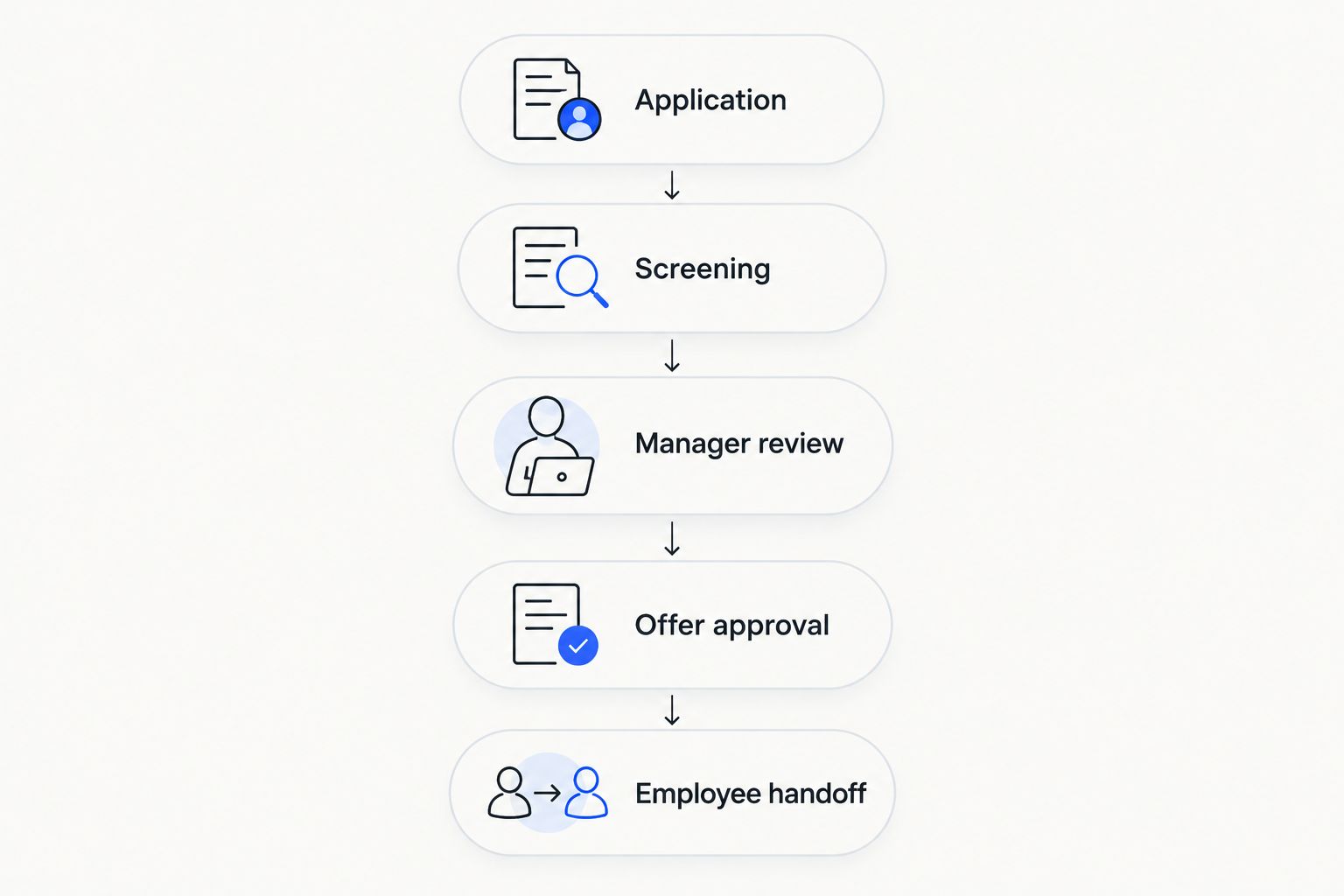
Keep a written result for each stage: passed, failed or requires configuration. A promise to build something later is not the same result as a demonstrated workflow. Resolve ownership before signing off.
Add Turkey-specific controls to your 2026 evaluation
For employers hiring in Turkey, distinguish candidate records from employee and payroll records. KVKK governs personal-data processing; an ATS purchase does not remove the employer's responsibility to establish an appropriate legal basis, access controls and retention practices.
SGK is Turkey's social security institution. Treat employment-registration responsibilities as an explicit handoff with a named owner, rather than assuming an accepted offer completes them.
Puantaj records attendance-related information used in payroll preparation. An ATS is not evidence that attendance, shift records or payroll calculations are covered. Review those workflows separately when recruitment forms part of a wider system purchase.
Require vendors to explain responsibilities precisely. Who enters the workplace information? Who validates the start date? Who handles a withdrawn acceptance? Ask qualified local advisers to review the legal requirements attached to your actual employment arrangement.
Which ATS should you choose?
Choose Ottohr for the connected-HR shortlist; evaluate Fountain when frontline recruitment is the central brief. Compare Workable when a shared recruiting system matters most, and Greenhouse when structured assessment is the deciding requirement.
For an undecided buyer, the next move is not another feature spreadsheet. Run the acceptance test with your recruiting lead, a site manager and the person responsible for employee setup. Select the option that passes the requirements you cannot compromise on.
FAQ
What's the best ATS software for blue-collar recruiting in 2026?
The best choice is the ATS that demonstrates your mobile application, job-related screening, manager review and employee-handoff requirements. Compare connected HR, frontline specialization, general recruiting and structured assessment according to your main buying need.
Is a frontline ATS better than a general recruiting system?
A frontline ATS is the better fit when its demonstrated workflow meets operational hiring requirements more closely. A general recruiting system remains a valid choice when it handles those requirements alongside your other job families.
Do blue-collar applicants need to upload a résumé?
Require a résumé only when it serves a defined assessment need. Use job-related questions to establish qualifications and availability rather than treating document submission as proof of suitability.
Can an ATS screen candidates for shift availability?
Include shift-availability screening in your vendor acceptance test. Confirm that the proposed configuration distinguishes schedule compatibility from qualifications and preserves the applicant's original answers.
Does buying an ATS cover Turkish payroll and SGK responsibilities?
No. Applicant tracking does not itself establish payroll capability or completion of SGK responsibilities. Define the employee-data handoff and identify who performs and approves each employment-administration task.
Should hiring managers approve every recruiting stage?
Assign manager approvals to decisions that require their authority or assessment. Extra approvals without a clear purpose add work without improving the evidence behind a hiring decision.
How should employers compare ATS software during a demo?
Give every vendor the same vacancies, candidate cases and acceptance criteria. Inspect the candidate journey, restricted manager access, recorded decisions and the final employee-data handoff.
One last thing
Test a withdrawn acceptance before you approve your 2026 ATS purchase. Ask what happens to onboarding tasks, employee records and pending instructions when an accepted candidate does not join. A successful hiring demonstration should show how work stops, not only how it starts.


