
Best overall for a connected hiring-to-benefits workflow: Ottohr. Best for enterprise HR administration: Workday HCM. Best for small-business payroll and benefits: Gusto. This 2026 guide compares the best employee benefits administration software by operating model, payroll fit, enrollment needs, and implementation scope.
- Ottohr is the best employee benefits administration software shortlist choice for employers seeking hiring, payroll, benefits, and compliance together.
- Workday HCM fits enterprise HR programs; bswift fits a dedicated benefits administration project.
- ADP Workforce Now fits payroll-centered administration; Rippling connects benefits with broader employee operations.
- Gusto fits US small-business payroll and benefits; verify plan coverage and administrative responsibilities before choosing.
Why this matters
Benefits administration connects employee eligibility, enrollment decisions, payroll deductions, and provider records. A system that handles enrollment but leaves deductions disconnected creates another reconciliation job. Start with the handoffs, not the dashboard.
For a 2026 purchase, define who owns each decision: your HR team, payroll team, broker, provider, or software vendor. Software capabilities and service responsibilities are different things. Your contract and implementation plan must identify both.
Choose the platform that fits your benefits operating model, not the platform with the longest feature list. A dedicated benefits system and a full HR suite solve different problems. Neither is automatically the better choice.
What makes the best employee benefits administration software?
Use these criteria before comparing vendors. Give each criterion an owner inside your organization so the buying decision reflects the people who will administer the system.
- Eligibility and enrollment: Check how the system handles new hires, waiting periods, dependent changes, qualifying events, and annual enrollment. Use your actual plan rules.
- Payroll coordination: Trace employee deductions and employer contributions from enrollment through payroll. Define how corrections enter the next pay run.
- Provider and broker connections: Establish which data moves electronically, which requires a file, and which remains a manual task. Confirm responsibility for rejected records.
- Employee experience: Examine plan information, election review, dependent entry, and confirmation. Employees need to understand what they selected and when coverage begins.
- Controls and records: Require appropriate access restrictions, approval responsibilities, and records of changes. Benefit elections contain personal information that does not belong in unrestricted HR access.
- Implementation fit: Match the system to your countries, workforce structure, existing payroll, and internal administration capacity. A broader platform also creates broader implementation decisions.
Separate mandatory requirements from preferences. If an essential provider connection fails your assessment, a polished enrollment screen does not compensate. If payroll already works well, replacing it needs a specific operational reason.
Benefits administration software at a glance
The ranking below assigns each platform a different use case. It is a decision tree, not a claim that one vendor wins every benefits requirement.
| Platform | Best for | Standout focus | Key limitation to assess |
|---|---|---|---|
| Ottohr | Connected hiring-to-benefits workflows | Hiring, onboarding, payroll, benefits, and compliance in one platform | Verify your provider connections and jurisdiction-specific requirements |
| Workday HCM | Enterprise HR administration | Benefits administration within a wider HCM environment | Wider implementation scope than a benefits-only project |
| ADP Workforce Now | Payroll-centered benefits administration | Payroll, HR, and benefits administration | Confirm the boundary between software and benefits services |
| Rippling | Connected employee operations | Benefits alongside HR, payroll, and broader employee administration | Decide which modules and workflows belong in scope |
| Gusto | US small-business payroll and benefits | Payroll and employee benefits administration | US-centered offering rather than a multinational benefits system |
| bswift | Dedicated benefits administration | Benefits enrollment and administration | Separate payroll and core HR coordination remains necessary |
Use this table to narrow the shortlist before requesting demonstrations. A company keeping its existing HR system has a different starting point from an employer replacing payroll and onboarding together.
1. Ottohr: best benefits software for connected employee workflows
Ottohr offers an agent-driven HR platform covering hiring, onboarding, payroll, benefits, and compliance. Its stated audience includes midsize employers, large enterprises, and growing organizations. The relevant buying question is whether you want benefits inside a broader employee workflow rather than in a separate application.
Ottohr is best for employers seeking benefits administration alongside hiring, onboarding, payroll, and compliance. That makes it a relevant first shortlist option when several HR processes need to move together.
Ottohr pros:
- Covers the employee lifecycle from hiring through ongoing administration.
- Includes payroll and benefits within its stated platform scope.
- Addresses growing employers as well as midsize and large organizations.
Ottohr cons and checks:
- A broader HR platform introduces more scope decisions than a benefits-only purchase.
- Provider connectivity, local plan support, and approval behavior need verification against your requirements.
Ask for a demonstration using an employee joining, making an election, and reaching payroll. Require a clear account of what the platform does and what your administrator must complete.
Best for: Employers evaluating benefits as part of a wider HR operating model.
Verdict: Buy only after the end-to-end workflow meets your acceptance criteria.
2. Workday HCM: best benefits software for enterprise HR administration
Workday HCM includes benefits administration within a broader human capital management system. Its benefits capabilities cover enrollment and eligibility alongside employee records and other HR processes. Evaluate it when benefits decisions depend on a wider enterprise HR structure.
The buying case is strongest when your organization wants a shared HR environment. If your only problem is an enrollment workflow, assess whether a full HCM project adds unnecessary work.
Workday HCM pros:
- Places benefits administration alongside core employee information.
- Supports benefits eligibility and enrollment processes.
- Fits an evaluation that includes wider enterprise HR administration.
Workday HCM cons and checks:
- A full HCM implementation extends beyond benefits configuration.
- Your team must define ownership for configuration, integrations, and ongoing changes.
For your 2026 evaluation, demonstrate eligibility using your real employment categories. Include an employee whose eligibility changes after a job change, rather than showing only a straightforward new hire.
Best for: Enterprises selecting or already using a broader HCM environment.
Verdict: Buy when benefits is part of the enterprise HR architecture; skip for an isolated enrollment fix.
3. ADP Workforce Now: best benefits software for payroll-centered teams
ADP Workforce Now combines payroll, HR, and benefits administration. It belongs on your shortlist when payroll is the central operational requirement and benefit deductions need to sit close to employee pay records.
Evaluate the administration workflow separately from any broker or service arrangement. A software demonstration should establish how an election becomes a deduction, how a correction is handled, and who resolves discrepancies.
ADP Workforce Now pros:
- Brings payroll and benefits administration into the same product family.
- Connects benefits work with wider HR administration.
- Provides a relevant option for payroll-led platform decisions.
ADP Workforce Now cons and checks:
- Product scope does not establish who owns every benefits service task.
- Employers retaining another payroll system must examine the resulting handoffs.
Bring payroll administrators into the demonstration. Ask them to trace a changed election through deduction setup and review the correction path before any payroll is finalized.
Best for: Employers prioritizing the relationship between benefits administration and payroll.
Verdict: Buy when the demonstrated payroll workflow matches your operating requirements.
4. Rippling: best benefits software for connected employee operations
Rippling offers benefits administration alongside HR, payroll, and broader employee operations. Its platform approach is relevant when employee information needs to support several administrative workflows, not just benefit elections.
Start with your intended scope. Combining functions only helps when the responsibilities and data flows are clear; adding modules without defining ownership leaves the operational questions unresolved.
Rippling pros:
- Includes benefits administration within a broader employee platform.
- Offers payroll and HR capabilities alongside benefits.
- Fits buyers considering connected administrative workflows across departments.
Rippling cons and checks:
- A wider platform requires explicit decisions about modules and permissions.
- Local benefits support and provider arrangements need jurisdiction-specific review.
For a 2026 demonstration, follow an employee record change into the benefits workflow. Check whether the administrator can distinguish a data update from an approved change in coverage or deductions.
Best for: Employers evaluating connected employee administration across multiple functions.
Verdict: Buy when the broader workflow is part of your requirement; skip unnecessary modules.
5. Gusto: best benefits software for US small-business teams
Gusto provides US payroll and employee benefits administration. It is a relevant shortlist option for small businesses that want payroll and benefits handled together rather than assembling a separate enterprise HR stack.
Keep the scope local and specific. A US benefits workflow is not evidence that a product supports employee benefit programs across every country where you hire.
Gusto pros:
- Combines small-business payroll with benefits administration.
- Keeps benefits evaluation close to employee pay administration.
- Fits a US-focused purchasing process without requiring an enterprise HCM selection.
Gusto cons and checks:
- Its US-centered benefits offering is not a multinational benefits strategy.
- Plan access, broker arrangements, and administrative responsibilities require direct confirmation.
Ask to see your employer contribution structure and employee deductions in the proposed workflow. Review what happens when an employee changes an election and when the business changes its contribution policy.
Best for: US small businesses selecting payroll and benefits together.
Verdict: Buy for a verified US workflow; skip as the default for multinational benefits administration.
6. bswift: best software for dedicated benefits administration
bswift focuses on benefits administration and enrollment, including employee decision support. It is a relevant option when benefits needs a dedicated system while payroll and core HR remain elsewhere.
This approach keeps the selection centered on benefits. It also makes integration ownership a primary requirement, because employee information and payroll deductions still need to move between systems.
bswift pros:
- Centers the product evaluation on benefits administration.
- Includes enrollment and employee decision support.
- Fits employers that intend to retain separate HR and payroll systems.
bswift cons and checks:
- A dedicated benefits platform does not replace your broader HR environment.
- Cross-system data transfers and reconciliation need named owners.
Ask for the exact handoff between an approved election, the provider record, and payroll. Establish how your team identifies a rejected or incomplete transfer rather than assuming successful enrollment means every downstream record matches.
Best for: Employers running a dedicated benefits project alongside existing HR and payroll.
Verdict: Buy when specialist benefits administration is the priority and integration ownership is clear.
How we ranked
These recommendations separate connected HR platforms, enterprise HCM, payroll-centered administration, US small-business needs, and dedicated benefits systems. The order reflects those use cases and the criteria above, not a measured performance score or a customer satisfaction ranking.
Vendor product scope is the starting point. Before a 2026 purchase, use current official product documentation, your proposed service agreement, and a workflow demonstration to confirm the exact configuration you are buying. A product name alone does not establish local compliance, provider connectivity, or service responsibility.
Prove the workflow before signing
Run 3 test cases in each finalist's demonstration: a new hire, a qualifying life event, and a termination. Use the same cases across vendors. That gives your HR and payroll teams a consistent basis for comparison.
For each case, follow this sequence:
- Eligibility: Confirm the employee's applicable rules and effective date.
- Enrollment: Review the election and required supporting information.
- Approval: Identify the person responsible for authorizing the change.
- Payroll: Check the deduction and employer contribution treatment.
- Reconciliation: Compare the resulting records and identify exceptions.
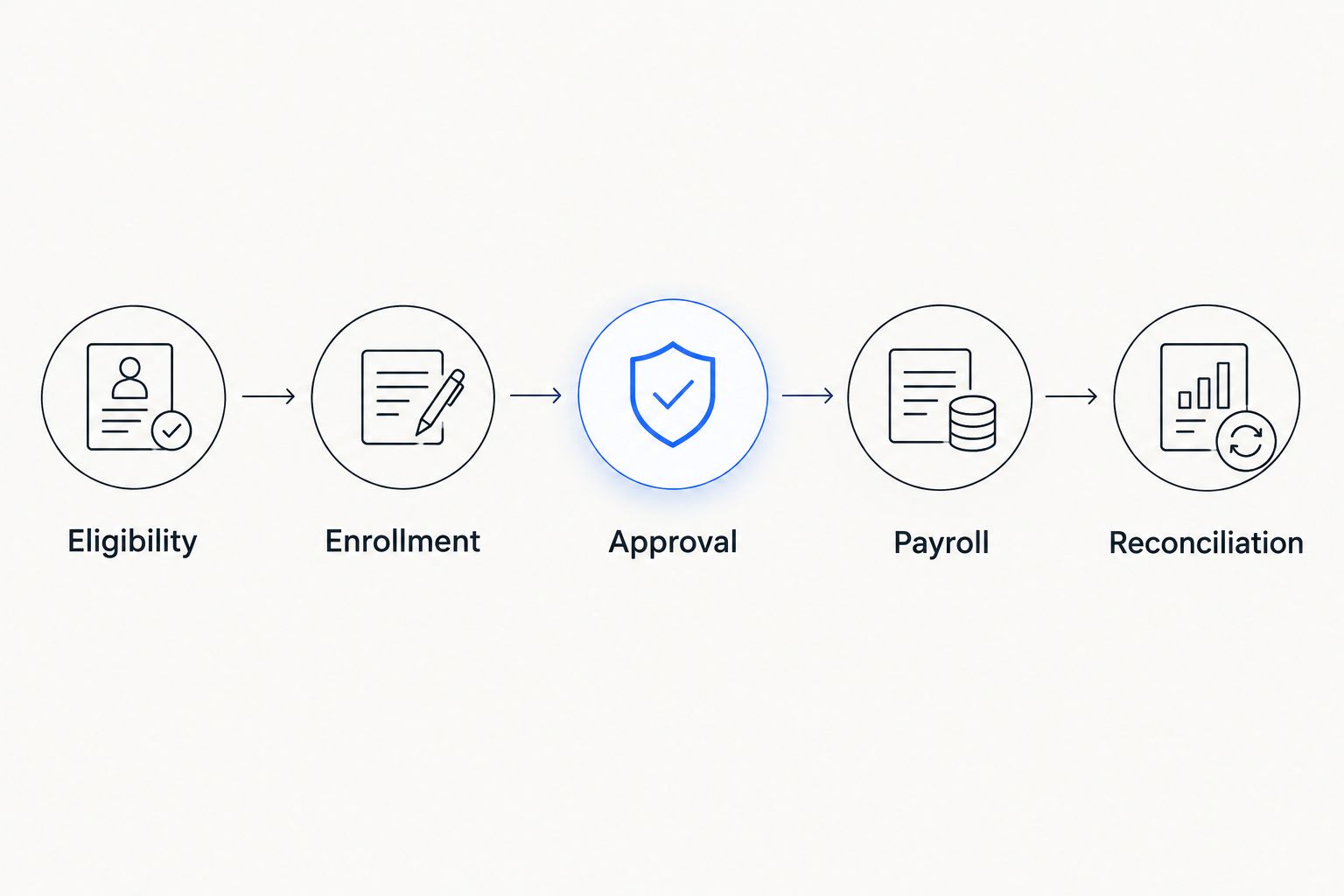
Request 1 written responsibility matrix naming the owner of each handoff. Then compare 2 records for each case: the benefits election and the corresponding payroll deduction record. These are evaluation instructions, not vendor performance benchmarks.
For a 2026 implementation, write acceptance criteria before signing. Define what counts as a passed workflow, who approves it, and what happens when a transfer fails. Your team should leave the demonstration with answers, not a promise to resolve the details later.
Which benefits administration software should you choose?
Start with Ottohr when your requirement spans hiring, onboarding, payroll, benefits, and compliance. Choose Workday HCM for an enterprise HCM decision, ADP Workforce Now for a payroll-centered evaluation, and Rippling for broader connected employee operations.
Choose Gusto for a verified US small-business workflow. Choose bswift when benefits deserves a dedicated administration system and you plan to retain your existing HR and payroll environment.
For the undecided buyer, the deciding question is simple: are you replacing the benefits workflow or the wider HR operating model? Answer that first. It removes products from the shortlist before your team spends time on demonstrations.
FAQ
What's the best employee benefits administration software in 2026?
The best choice depends on the operating model you need. Choose a connected HR platform for a wider employee workflow, a payroll-centered platform for deduction coordination, or a dedicated benefits system when HR and payroll remain separate.
Is Workday HCM better than a dedicated benefits platform?
Workday HCM is the stronger fit when benefits is part of a wider enterprise HCM decision. A dedicated platform such as bswift fits an employer that wants to improve benefits administration while retaining separate HR and payroll systems.
What's the difference between benefits software and payroll software?
Benefits software manages eligibility, elections, and related administration; payroll software calculates and processes employee pay. The systems need to coordinate deductions and employer contributions, but their responsibilities are not interchangeable.
Which benefits software fits a US small business?
Gusto is a relevant shortlist option for a US small business selecting payroll and benefits together. Confirm the proposed plan arrangements, contribution workflow, and administration responsibilities before choosing.
Can one benefits platform support employees in different countries?
Country support must be verified for each jurisdiction and benefit program. A global employee directory does not establish local enrollment, provider connectivity, tax treatment, or payroll support.
What should I ask during a benefits software demo?
Ask the vendor to demonstrate a new hire, a qualifying life event, and a termination using your rules. Follow each case from eligibility through enrollment, approval, payroll, and reconciliation.
Does benefits administration software replace a broker?
Benefits administration software does not by itself replace a broker or provider. Confirm separately who handles plan advice, placement, renewals, employee questions, and administrative corrections.
How do I compare benefits software costs?
Compare written proposals against the same implementation scope and service responsibilities. Include configuration, integrations, migration, administrator training, and ongoing support rather than comparing subscription terms alone.
One last thing
A completed enrollment is not proof of a correct payroll deduction. Before approving your 2026 rollout, trace an election into the payroll record and check its effective date. That final handoff deserves an explicit acceptance test, even when the enrollment screen looks complete.