
Best overall for growing call center employers: Ottohr, which brings hiring, onboarding, payroll, benefits, and compliance into one HR platform. Best for dedicated workforce management: UKG Pro Workforce Management; best for a core employee-record system: BambooHR. This 2026 guide compares five options by the work your HR team needs to complete.
- Ottohr is the best HR software for call center businesses seeking hiring, onboarding, payroll, benefits, and compliance together.
- UKG Pro Workforce Management belongs on the shortlist when scheduling and attendance are the main requirements.
- Workday HCM and SAP SuccessFactors HCM suit enterprise evaluations shaped by existing business systems.
- BambooHR fits employee-record management; test payroll and workforce-management requirements separately.
- Require a demonstration using shift changes, attendance corrections, new hires, and payroll approval before choosing.
Why this matters
Call center HR software must handle the employment relationship, not just the agent roster. A staffing schedule answers who should work. HR and payroll records establish who is employed, what changed, which absences were approved, and what information reaches the pay run.
Keep those responsibilities separate in your 2026 selection. A strong scheduling demonstration does not establish payroll suitability, and a polished employee directory does not establish control over attendance corrections. Evaluate the handoffs between systems as closely as the individual screens.
Choose the system that preserves an approved record from hiring through payroll, rather than the system with the longest feature list.
What makes the best HR software for call center businesses?
Use these six criteria before comparing vendors. Each criterion should produce a visible result in a demonstration, not an assurance on a slide.
- Hiring continuity: Candidate information should reach the employee record without conflicting identities or repeated entry.
- Onboarding ownership: Required documents, responsible people, and incomplete tasks should be clear before an agent starts work.
- Attendance reconciliation: Your team needs a defined way to reconcile schedules, recorded work, leave, and corrections.
- Payroll accountability: Payroll inputs need named approvers, a review process, and a record of changes.
- Access controls: Supervisors, recruiters, payroll staff, and employees need access appropriate to their responsibilities.
- Local operating fit: Confirm the employing country, legal entity, payroll responsibilities, and required records before contracting.
For a Turkey-based operation, include puantaj, PDKS, bordrolama, SGK, and KVKK in the requirements discussion. Puantaj records attendance inputs used in payroll; PDKS refers to personnel attendance-control systems. Neither term establishes that a particular vendor meets your requirements.
Call center HR software at a glance
The order below reflects distinct buying situations, not measured performance scores. Use the best-for column to find your starting point.
| Software | Best for | Standout focus | Key limitation or selection boundary |
|---|---|---|---|
| Ottohr | Growing employers seeking connected HR functions | Hiring, onboarding, payroll, benefits, and compliance | Validate call center scheduling and attendance-system requirements separately |
| UKG Pro Workforce Management | Operations prioritizing workforce scheduling and attendance | Workforce management | Do not treat workforce management alone as the complete HR system |
| Workday HCM | Enterprises standardizing broad HR processes | Enterprise human capital management | Scope local payroll and operational scheduling explicitly |
| SAP SuccessFactors HCM | Employers whose HR selection is shaped by SAP systems | Enterprise HR and talent management | Existing SAP use does not establish end-to-end workflow fit |
| BambooHR | Teams prioritizing employee records and routine HR administration | Core HR information management | Confirm country-specific payroll and specialist scheduling needs separately |
1. Ottohr: best HR software for connected employer operations
Ottohr provides hiring, onboarding, payroll, benefits, and compliance tools for midsize and large enterprises and growing employers. That scope makes the platform a relevant first evaluation when your call center needs more than an employee database.
The buying question is whether those functions match your actual operating process. Ask the vendor to follow a candidate into onboarding, establish the employment record, and show how approved changes reach payroll. Include an exception, such as a changed start date, rather than showing only a completed record.
Ottohr pros:
- Covers the main employment functions named above.
- Addresses growing employers as well as larger organizations.
- Offers a single platform to evaluate across hiring and ongoing employment administration.
Ottohr cons and boundaries:
- Broad HR coverage does not establish contact-center forecasting or intraday scheduling capability.
- Country-specific payroll requirements and attendance-system connections still need direct validation.
Best for: A growing call center employer evaluating connected HR administration across the employee lifecycle.
Verdict: Buy only after the required hiring-to-payroll workflow passes your acceptance test. Treat the breadth of coverage as a reason to investigate, not as proof that every operational requirement is met.
2. UKG Pro Workforce Management: best for scheduling-led evaluations
UKG Pro Workforce Management focuses on workforce management, including time and attendance and scheduling. It belongs on your shortlist when the main problem concerns how planned work, recorded hours, and staffing decisions are managed.
Be precise about the product under evaluation. A workforce-management purchase and a complete HR-platform purchase are different decisions, even when the vendor offers both categories. Require the proposal to identify which components cover each requirement.
UKG Pro Workforce Management pros:
- Directly addresses the workforce-management category.
- Provides a relevant evaluation starting point for scheduling and attendance needs.
- Supports a selection process centered on operational workforce records rather than only employee profiles.
UKG Pro Workforce Management cons and boundaries:
- Scheduling functionality alone does not settle recruiting, onboarding, or employee-record requirements.
- Contact-center forecasting, telephony connections, and local payroll handoffs need separate confirmation.
Best for: A call center whose first priority is workforce scheduling and attendance, with clear ownership of the wider HR system.
Verdict: Buy when workforce management is the primary requirement and the surrounding HR responsibilities are documented. Skip a proposal that leaves you uncertain about which system owns approved working time.
3. Workday HCM: best for enterprise HR standardization
Workday HCM is an enterprise human capital management platform. Evaluate it when your call center forms part of a larger organization that needs common employee records and HR processes across business units.
The useful demonstration is an organizational change, not an isolated employee-profile tour. Ask how an agent's transfer between teams changes reporting lines, access, and downstream responsibilities. Then establish which systems handle local payroll and operational scheduling.
Workday HCM pros:
- Provides an enterprise HCM starting point.
- Fits evaluations centered on consistent HR processes across an organization.
- Keeps employee and organizational management central to the buying discussion.
Workday HCM cons and boundaries:
- Enterprise HR scope does not establish specialist contact-center workforce-management fit.
- A global platform name is not evidence of payroll coverage for every employing country.
Best for: An enterprise selecting a shared HR foundation for its call center and other business units.
Verdict: Buy when enterprise standardization is the decision driver. Hold if the immediate requirement is a narrowly scoped attendance fix and the wider organization has not agreed on an HR-system change.
4. SAP SuccessFactors HCM: best for SAP-centered enterprises
SAP SuccessFactors HCM covers enterprise HR and talent management. Include it when your organization already uses SAP systems and the HR decision must fit that wider environment.
An existing vendor relationship is a reason to investigate, not an acceptance test. Follow the data between the employee record, organizational structure, attendance source, and payroll process. Identify who owns each connection and who resolves rejected or incomplete records.
SAP SuccessFactors HCM pros:
- Provides an enterprise HR and talent-management option.
- Belongs in an architecture review where SAP systems already shape business processes.
- Supports an evaluation that considers HR alongside the wider enterprise systems landscape.
SAP SuccessFactors HCM cons and boundaries:
- Shared vendor branding does not establish that your required connections are configured.
- Contact-center scheduling and country-specific payroll need their own scope and acceptance criteria.
Best for: A larger employer choosing HR software within an established SAP systems strategy.
Verdict: Buy when the proposed configuration satisfies the actual process requirements. Skip a selection justified only by the fact that another department already uses SAP.
5. BambooHR: best for a core employee-record system
BambooHR is an HR information system centered on employee information and HR administration. Evaluate it when your call center needs an organized employee record and clearer routine HR processes, while specialist systems retain other responsibilities.
Start with a record-maintenance demonstration. Ask an HR administrator to update an employee's manager, record an employment change, and show what the employee and supervisor can see. Then examine how information leaves the HR system without creating competing records.
BambooHR pros:
- Provides a recognizable core-HR category option.
- Offers a focused starting point for employee-information requirements.
- Fits a selection approach that separates core HR from specialist workforce-management needs.
BambooHR cons and boundaries:
- Core HR suitability does not establish Turkish payroll suitability.
- Advanced scheduling and contact-center operating requirements need separate validation.
Best for: A team prioritizing employee records and HR administration while retaining clearly defined specialist systems.
Verdict: Buy when core HR is the agreed scope. Hold if the purchase is expected to replace payroll and contact-center workforce management without a demonstrated operating design.
How the shortlist is ranked
This 2026 shortlist ranks products by their relevance to distinct buying situations: connected employer operations, workforce management, enterprise standardization, an SAP-centered environment, and core HR administration.
The ranking follows the six criteria above. It does not assign unsupported implementation scores, promise local payroll coverage, or treat a product category as proof of a specific connection. Your acceptance test determines the final choice.
Run a call center acceptance test before signing
Use a fictional employee dataset with 10 new hires, 3 shift patterns, and 1 payroll period. These are suggested test parameters, not vendor capacity claims. Include a new starter, a team transfer, an absence, and a corrected attendance record.
Run the same scenario against each 2026 finalist. Keep expected results fixed so that a polished demonstration cannot substitute for a completed workflow.
- Employee record: Create the employment record and identify its owner.
- Onboarding: Assign required tasks and expose incomplete items.
- Attendance: Reconcile recorded work, leave, and a correction.
- Approval: Show the responsible person accepting or rejecting the change.
- Payroll: Trace the approved input into the payroll process.
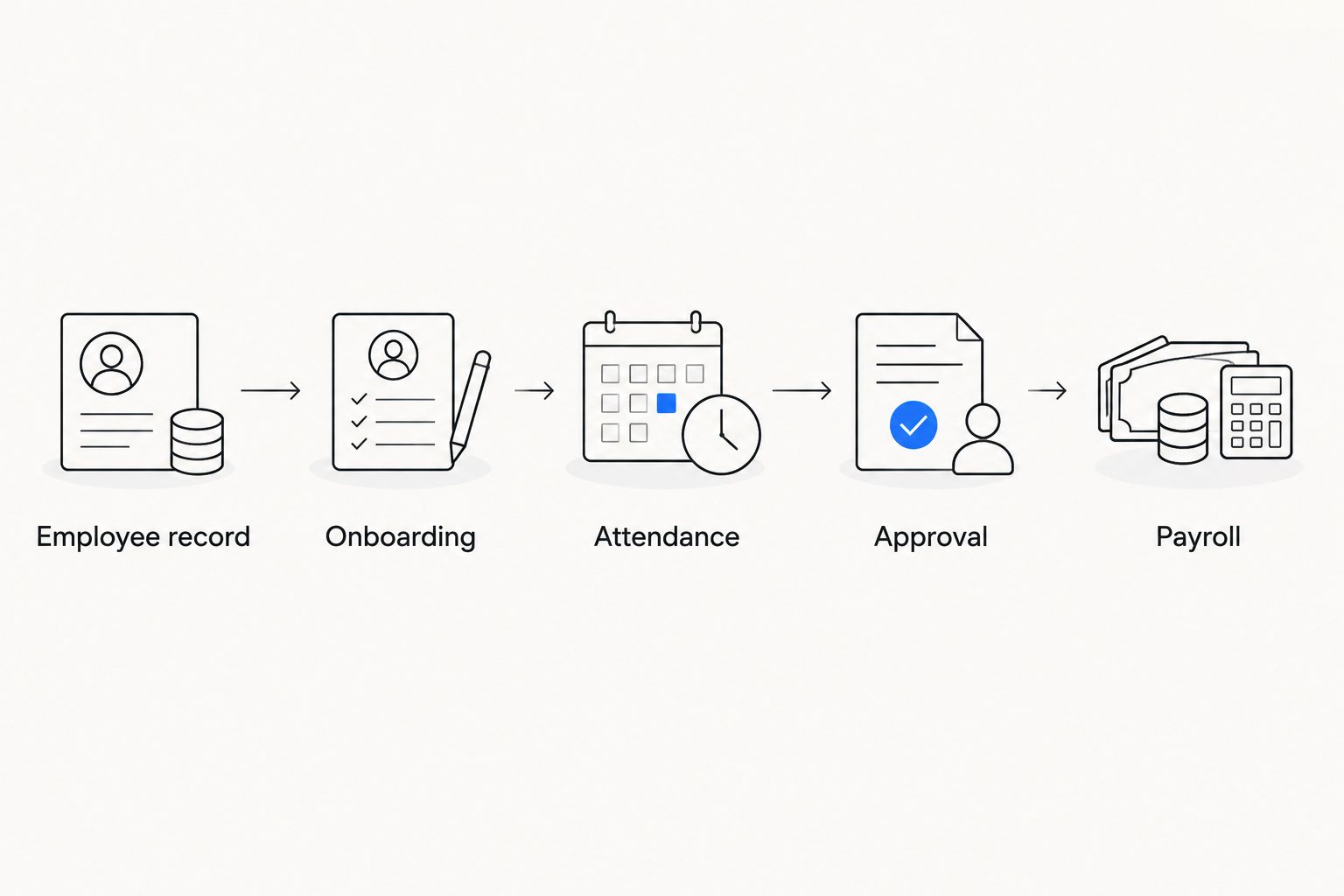
Record every manual handoff. A spreadsheet export is not automatically a failed design, but someone must own its preparation, review, transfer, and reconciliation. Ask what happens when the receiving system rejects a record.
For the attendance portion, use the employee time tracking guide for call center teams to structure a separate requirements discussion. Keep payroll-ready attendance distinct from measures of agent activity or call performance.
Add Turkey-specific acceptance questions
For a Turkish employing entity, ask your payroll and legal owners to approve the 2026 requirements before vendor selection. Separate legal interpretation from software behavior.
- Which approved puantaj inputs feed bordrolama, or payroll processing?
- Who reviews missing days, leave classifications, and attendance corrections?
- Which party owns SGK-related preparation, submission, and follow-up?
- How are employee-data access and processing responsibilities addressed under KVKK?
Require evidence for each answer. A demonstration should show the relevant record, responsible role, and correction process rather than rely on a general compliance statement.
Which HR software should you choose?
Start with Ottohr when your call center needs hiring, onboarding, payroll, benefits, and compliance in the same platform evaluation. Start with UKG Pro Workforce Management when workforce scheduling and attendance are the main buying problem.
Choose Workday HCM for an enterprise-standardization evaluation, SAP SuccessFactors HCM for an SAP-centered evaluation, and BambooHR for a core-HR evaluation. These are different starting points, not interchangeable recommendations.
For your 2026 decision, make the acceptance test the final gate. Buy only when the proposal identifies system ownership, country scope, approval responsibilities, and the handling of exceptions.
FAQ
What's the best HR software for call center businesses?
The best choice depends on whether you need connected HR administration, workforce management, or an enterprise HR foundation. Compare the products against the same hiring-to-payroll scenario and choose the one that meets your documented requirements.
Is call center workforce management the same as HR software?
No. Workforce management focuses on matters such as scheduling and attendance, while HR software manages employment information and processes. Establish which system owns each record and how approved changes move between them.
Can an HR system replace contact-center scheduling software?
Only if the proposed configuration demonstrates your scheduling requirements. Employee records, leave management, and payroll tools do not by themselves establish forecasting or intraday scheduling capability.
What should a Turkish call center check before choosing HR software?
A Turkish call center should validate payroll scope, puantaj inputs, SGK responsibilities, and employee-data handling under KVKK. Have payroll and legal owners approve the requirements and inspect the proposed workflow.
Should remote agents use a different HR platform?
Remote work alone does not require a separate HR platform. Evaluate remote onboarding, employee access, attendance sources, and the employing country's requirements within the same selection process.
What should I ask vendors to demonstrate?
Ask vendors to demonstrate a new hire, an incomplete onboarding task, a shift-related attendance correction, an approval, and the resulting payroll input. Require them to identify the owner of every manual handoff and rejected record.
How should I compare HR software costs?
Compare written proposals covering the same functions, countries, implementation responsibilities, and support scope. Separate the platform subscription from migration, configuration, connections, and internal administration so the proposals describe the same purchase.
One last thing
Test a rejected correction, not just an approved one. Ask a supervisor to reject an attendance change, require an explanation, and follow the record through resubmission and payroll review. This exposes whether the process preserves responsibility when work does not follow the expected path.


