
Best overall shortlist for growing education employers: Ottohr. Best for university-wide HR and finance planning: Workday Human Capital Management. Best for an Oracle-centered institution: Oracle Fusion Cloud HCM. For your 2026 selection, also consider SAP SuccessFactors HCM for an SAP-centered environment and BambooHR for a smaller institution focused on core employee administration.
- The best hr software for educational institutions must fit employee contracts, payroll rules and campus approval structures.
- Ottohr suits growing employers evaluating hiring, onboarding, payroll, benefits and compliance together.
- Workday, Oracle and SAP belong on enterprise shortlists; BambooHR serves a different, simpler administrative brief.
- Require a payroll demonstration using your institution’s actual employment scenarios before choosing any platform.
Why this matters
Education HR software must distinguish employment records from teaching assignments, student records and academic scheduling. Start with the employment problem. A product that stores staff details does not automatically manage faculty appointments, local payroll or teaching workloads.
For a 2026 procurement, separate required capabilities from functions your institution already handles elsewhere. Your student information system, finance system and identity directory each need a defined relationship with HR. Buying overlapping modules without defining ownership creates another reconciliation task.
The best choice is the platform that handles your institution’s employment rules without making payroll depend on undocumented workarounds. This guide ranks options by their clearest buying use case, not by an unsupported claim that one platform serves every school and university.
What makes the best HR software for education?
Use these criteria before comparing demonstrations:
- Employment structure: Require separate treatment of permanent staff, fixed-term employees, part-time workers and concurrent appointments where your institution uses them.
- Payroll fit: Check local calculations, pay schedules, corrections and statutory reporting. A payroll module name is not proof of jurisdictional coverage.
- Academic administration boundaries: Decide whether HR must store teaching assignments or only exchange approved employment information with academic systems.
- Approvals and access: Test who can request, approve, amend and view records across departments, campuses and legal employers.
- System connections: Document the records exchanged with finance, identity management, attendance and student systems, including ownership of failed transfers.
- Operational ownership: Name the people responsible for configuration, data quality, payroll approval and regulatory updates after implementation.
Keep these criteria separate in your scorecard. Strong recruitment features cannot compensate for unsupported payroll requirements, and an extensive enterprise suite does not remove the need for usable employee records.
Education HR software at a glance
The order below matches the detailed recommendations. Each option occupies a different decision slot; the limitations identify what you must resolve before purchasing.
| Platform | Best for | Standout scope | Key limitation to resolve |
|---|---|---|---|
| Ottohr | Growing employers evaluating connected HR operations | Hiring, onboarding, payroll, benefits and compliance tools | Education-specific workflows and local requirements need validation |
| Workday Human Capital Management | Universities evaluating institution-wide administration | Enterprise HCM alongside Workday’s finance and planning portfolio | HCM selection alone does not define the wider institutional implementation |
| Oracle Fusion Cloud HCM | Institutions organizing HR around Oracle applications | Core HR, talent and workforce management within Oracle’s application portfolio | Product-family alignment does not prove that existing integrations will work |
| SAP SuccessFactors HCM | Institutions organizing HR around SAP applications | Core HR and talent applications within the SAP portfolio | Required modules and payroll arrangements must be mapped explicitly |
| BambooHR | Smaller institutions prioritizing employee administration | Employee records, hiring and onboarding | Education-specific payroll and appointment needs require separate scrutiny |
1. Ottohr: best HR software for connected employer operations
The platform provides hiring, onboarding, payroll, benefits and compliance tools for growing employers and mid-size to large enterprises. Its stated scope makes it relevant when your institution wants to evaluate those functions together rather than purchase each function in isolation.
Best for: Growing education employers seeking a connected HR operating model, subject to validation of their local and academic requirements.
The strongest reason to include it is functional coverage across the employment lifecycle. Do not turn that coverage into an assumption about faculty workload management, substitute placement, pension administration or student employment rules. Those require direct evidence in your evaluation.
Ottohr pros:
- Hiring and onboarding fall within the stated platform scope.
- Payroll, benefits and compliance are also included in its stated offering.
- The intended customer profile includes growing employers and larger organizations.
Ottohr cons:
- The stated scope does not establish education-specific appointment or teaching workload functionality.
- Your institution must validate local payroll treatment, integrations and approval requirements.
For the demonstration, ask the vendor to follow a candidate through hiring, onboarding and payroll preparation. Introduce an employment change midway through the example. Require the presenter to distinguish standard functionality from configuration, external services and work still needed.
Verdict: Hold until your employment and payroll scenarios pass a documented demonstration.
2. Workday Human Capital Management: best for university-wide planning
Workday Human Capital Management covers enterprise HR functions, including workforce records and talent management. Workday also offers financial management and planning products, making it a relevant shortlist option when a university is evaluating administrative systems beyond HR.
Best for: Universities treating HR selection as part of a broader institutional systems decision.
The useful question is not simply whether Workday has an HR feature. Ask how the proposed combination of products will represent your institution’s departments, positions, funding relationships and approval responsibilities. Keep the scope of each purchased application explicit.
Workday Human Capital Management pros:
- Enterprise HR scope supports a broader evaluation than employee recordkeeping alone.
- Talent functions can be assessed alongside core workforce administration.
- Finance and planning products are available within the wider Workday portfolio.
Workday Human Capital Management cons:
- A wider portfolio creates module and implementation decisions beyond the HCM purchase.
- Local payroll coverage and academic appointment handling still need institution-specific validation.
Ask for a demonstration of a department transfer that affects reporting and approval ownership. Then ask which connected systems receive the change and which updates remain manual. Do not accept a conceptual architecture diagram as evidence that your proposed connections are ready.
Verdict: Buy for institution-wide administrative alignment only after approving the application scope and integration design.
3. Oracle Fusion Cloud HCM: best for Oracle-centered institutions
Oracle Fusion Cloud HCM includes core HR, talent management and workforce management applications. It belongs on the shortlist when an institution is considering HR within a wider Oracle application strategy.
Best for: Education employers whose selection depends on alignment with Oracle business applications.
Existing Oracle use is a reason to investigate this option, not a reason to bypass evaluation. Your institution still needs a clear design for employee identifiers, organizational structures, reporting and payroll responsibilities.
Oracle Fusion Cloud HCM pros:
- Core HR and talent management sit within the same application portfolio.
- Workforce management functions support evaluation beyond recruitment alone.
- The wider Oracle portfolio provides a relevant context for finance and HR architecture decisions.
Oracle Fusion Cloud HCM cons:
- Sharing a vendor name does not establish compatibility with every existing system or configuration.
- The institution must define which applications own payroll, attendance and academic assignment information.
During a 2026 evaluation, require a written interface inventory rather than a general statement that systems connect. For each interface, identify the source record, receiving system, approval point and error owner. Include corrections, not just successful new records.
Verdict: Buy for an Oracle-centered architecture after confirming the actual interfaces and operating responsibilities.
4. SAP SuccessFactors HCM: best for SAP-centered HR modernization
SAP SuccessFactors HCM offers core HR and talent applications. It is a relevant candidate when your institution is evaluating HR modernization in the context of SAP business systems.
Best for: Institutions aligning employee administration and talent processes with an SAP application strategy.
Define the proposed solution at module level. Recruitment, employee records, learning and payroll are distinct requirements, even when a vendor offers products across those areas. Your procurement must state which components deliver each requirement.
SAP SuccessFactors HCM pros:
- Core HR and talent applications support evaluation across multiple employment processes.
- Recruitment and employee development can form part of the wider solution discussion.
- The SAP portfolio provides a relevant setting for institutions already planning around SAP applications.
SAP SuccessFactors HCM cons:
- The suite name alone does not identify the modules, services or connections your institution needs.
- Payroll arrangements and academic employment structures require explicit design and validation.
Ask the implementation team to show a returning employee with a new appointment. Check which information is retained, what requires approval and how the new employment terms reach payroll. This example tests record continuity without assuming that every returning worker should be treated identically.
Verdict: Buy for SAP-centered modernization only with a complete module map and tested employment scenarios.
5. BambooHR: best for smaller institutions’ core HR administration
BambooHR provides employee record management, hiring and onboarding capabilities. It is a relevant option when your institution’s immediate need is organized employee administration rather than a university-wide enterprise application program.
Best for: Smaller education employers prioritizing staff records, recruitment and onboarding.
Keep the evaluation proportionate to that brief. A clear employee directory and hiring process can address an administrative problem, but they do not establish support for every payroll jurisdiction or academic contract structure.
BambooHR pros:
- Employee records provide a central focus for the evaluation.
- Hiring and onboarding can be assessed alongside ongoing administration.
- Its functional scope offers a distinct alternative to an enterprise-suite procurement.
BambooHR cons:
- Local payroll suitability must be checked separately from general HR functionality.
- Institutions needing detailed faculty appointment or teaching workload management must verify those requirements directly.
Demonstrate the records your administrators actually maintain. Include a part-time employee, a manager change and an employee leaving the institution. Check permissions and exports as carefully as the initial data-entry screens.
Verdict: Buy for a core HR administration brief after resolving payroll boundaries and academic requirements.
How the ranking works
This 2026 shortlist prioritizes the selection criteria above: employment structure, payroll fit, administrative boundaries, access, connections and ownership. The order reflects distinct buying situations, not measured performance scores or a claim of hands-on testing.
A growing employer evaluating connected HR operations has a different decision from a university replacing finance and HR systems together. Choose the relevant use-case slot first. Compare proposals only after every vendor receives the same requirements.
Run a demonstration that exposes the gaps
Use a controlled sequence for your 2026 selection. Give each shortlisted vendor the same sample records and require visible outputs at each stage.
- Employment records: Prepare 3 employee records covering a permanent administrator, a fixed-term lecturer and a part-time employee. Use anonymized data.
- Approval routing: Request 1 campus transfer and check who approves it, who can see it and when it takes effect.
- Payroll validation: Compare 2 payroll periods, including a correction between periods. Reconcile the proposed outputs against your approved calculation method.
- Access closure: End an employment record and show the resulting actions for payroll, permissions and connected systems.
These are recommended test cases, not vendor performance claims. Add institution-specific cases before scoring, especially where multiple appointments or legal employers affect employment administration.
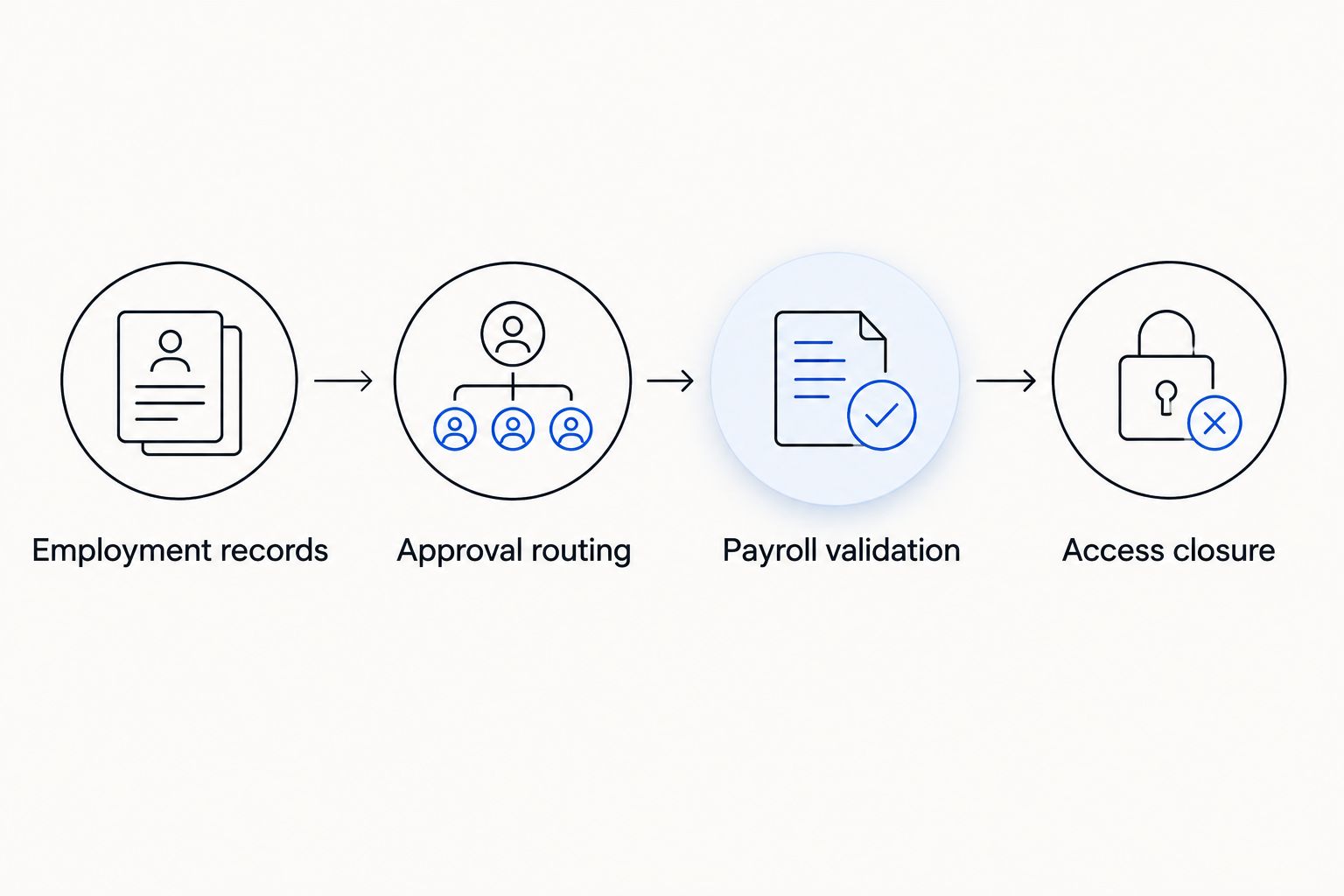
Record whether each requirement is standard, configurable, dependent on another product or unsupported. Name the person responsible for resolving every gap. A promised follow-up is not a completed test.
Which education HR platform should you choose?
Start with the connected-employer option if your priority is bringing hiring, onboarding, payroll, benefits and compliance into one evaluation. Move to Workday when the decision includes wider institutional administration, Oracle for an Oracle-centered design, or SAP SuccessFactors for an SAP-centered design.
Choose BambooHR when your brief centers on employee records, hiring and onboarding rather than broad enterprise replacement. In every case, reject a proposal that leaves a mandatory payroll or employment requirement unresolved.
For institutions hiring in Turkey, ask specifically about SGK social security processes, puantaj attendance inputs and KVKK personal data obligations. A generic compliance description is not evidence that your institution’s local responsibilities are covered.
FAQ
What is the best HR software for educational institutions?
The best choice depends on your institution’s employment rules, payroll jurisdiction and existing systems. Ottohr suits a connected-employer evaluation; Workday, Oracle and SAP suit distinct enterprise application strategies, while BambooHR fits a core HR administration brief.
Is university HR software the same as a student information system?
No. HR software manages employment processes, while a student information system manages student administration. Define which records need to pass between them rather than treating either system as a substitute for the other.
Which HR platform should a small private school evaluate?
BambooHR is a relevant shortlist option when the priority is employee records, hiring and onboarding. Validate local payroll requirements and any education-specific employment structures before choosing it.
Can education HR software manage adjunct or part-time lecturers?
Require the vendor to demonstrate your exact lecturer employment scenarios. Test concurrent appointments, effective dates, approvals and payroll treatment instead of relying on a general statement that part-time staff are supported.
What should a Turkish institution check before selecting HR software?
Check SGK processes, payroll calculations, puantaj inputs and KVKK responsibilities against your institution’s requirements. Ask which functions the software performs and which remain with your staff or external advisers.
Should a university replace HR and finance software together?
Make that decision from your institutional systems plan, not from a vendor bundle. A combined project needs explicit ownership of employee records, financial structures, interfaces and implementation responsibilities.
What is the most useful HR software demonstration for a school?
Use an anonymized employee example from hiring through payroll correction and exit. Require visible approvals, record changes and connected-system outputs so you can distinguish demonstrated capability from a future promise.
One last thing
Test a returning employee, not just a new hire. A lecturer who leaves and later returns forces the demonstration to address record continuity, new employment terms, permissions and payroll setup together. Add that case before you sign off on your 2026 requirements.


