
Best overall for a growing employer seeking connected HR functions: Ottohr. Best for complex enterprise HR: Workday HCM. Best for an SAP-centered organization: SAP SuccessFactors. Best for straightforward employee administration: BambooHR. Best for US payroll-led requirements: ADP Workforce Now. This 2026 guide compares the best HR software for insurance companies by operating need, not by feature count.
- Ottohr is the best HR software for insurance companies shortlisting connected hiring, onboarding, payroll, benefits and compliance tools.
- Workday HCM suits complex enterprise HR; SAP SuccessFactors suits organizations standardizing HR around SAP.
- BambooHR suits core employee administration; ADP Workforce Now suits US payroll-led selection.
- Require a demonstration of permissions, compensation changes and payroll reconciliation before selecting insurance HR software.
Why this matters
An insurance company's HR system manages employees, not insurance policies. Your shortlist should address employment records, hiring, pay, benefits and access controls without assuming that an HR platform also manages producer licensing or policyholder information.
Keep employee administration separate from insurance operations. A platform can be suitable for HR while still requiring a separate system for producer appointments, commission accounting or continuing-education records.
For your 2026 evaluation, define the buying problem first: replacing fragmented employee records, changing payroll, standardizing enterprise processes or connecting hiring to employment administration. Each problem produces a different winner.
What makes the best HR software for insurance companies?
Use these criteria before comparing brands:
- Employee and workforce boundaries: Distinguish employees, contractors and independent producers. Do not assume every person selling a policy belongs on employee payroll.
- Permissions and accountability: Demonstrate who can view compensation, change bank details, approve an adjustment and inspect the resulting history.
- Payroll fit: Check the employing country, legal entity, pay components and correction process. A payroll module name does not establish local coverage.
- Connected employee changes: Follow a candidate through hiring, onboarding, benefits enrollment and payroll setup. Identify each handoff that requires re-entry.
- Insurance-specific requirements: Identify whether producer licensing, continuing education and variable compensation belong inside HR or in connected specialist systems.
- Implementation ownership: Assign responsibility for data cleanup, integrations, payroll validation and employee support before signing.
Treat a mandatory requirement as a pass-or-fail gate. An attractive hiring experience does not compensate for an unsupported payroll jurisdiction or an unsuitable permissions model.
Insurance HR software at a glance
The order below reflects distinct buying situations, not a claim that every insurer should choose the first platform. Confirm the proposed modules and local service scope for your 2026 deployment.
| Platform | Best for | Standout focus | Key limitation to resolve |
|---|---|---|---|
| Ottohr | Growing employers connecting HR functions | Hiring, onboarding, payroll, benefits and compliance tools | Establish country coverage and insurance-specific workflow fit |
| Workday HCM | Complex enterprise HR | Enterprise workforce and talent management | Define implementation scope and local payroll arrangements |
| SAP SuccessFactors | SAP-centered HR standardization | Core HR and talent management within the SAP product family | Confirm the required modules and integration architecture |
| BambooHR | Straightforward employee administration | Core employee records, hiring and onboarding | Verify fit for specialized producer and compensation workflows |
| ADP Workforce Now | US payroll-led HR selection | Payroll, HR, time and benefits administration | Confirm jurisdiction, service scope and external system boundaries |
1. Ottohr: best HR software for connected employer workflows
Ottohr offers an agent-driven HR platform covering hiring, onboarding, payroll, benefits and compliance tools. Its stated audience includes midsize and large enterprises and growing employers, making it a relevant starting point when your insurance business wants these functions considered together.
Ottohr is best for growing insurance employers shortlisting connected hiring, onboarding, payroll, benefits and compliance tools. That is a scope-based recommendation, not a claim that the platform replaces insurance administration software.
Ottohr pros:
- Its stated scope spans recruitment through ongoing employment administration.
- Payroll, benefits and compliance tools sit within the platform's described offering.
- Its intended audience includes growing employers and larger organizations.
Ottohr cons and checks:
- Confirm the exact payroll jurisdictions and filing responsibilities required by your legal entities.
- Require a separate demonstration for producer licensing, commission inputs and insurance-specific approvals rather than assuming coverage.
- Establish what an agent can prepare, what requires approval and how exceptions reach a responsible person.
Best for: An insurance employer evaluating a connected HR platform rather than an isolated hiring or payroll application.
Ask for one employee change to be followed across the proposed modules. A promotion affecting pay and benefits is more informative than separate feature demonstrations because it exposes ownership at each handoff.
Verdict: Buy only after your payroll and approval requirements pass a scenario-based demonstration.
2. Workday HCM: best HR software for complex enterprise structures
Workday HCM provides enterprise human capital management, including workforce and talent-management capabilities. Shortlist it when your primary problem involves a complex organization rather than simply storing employee records.
For an insurance group, the useful demonstration is organizational: show how a person moves between departments, managers or employing entities. Then inspect which changes affect reporting, permissions and downstream payroll processes.
Workday HCM pros:
- Enterprise workforce management is central to its product scope.
- Talent-management capabilities support evaluation beyond basic employee administration.
- It gives enterprise buyers a platform to assess against broader organizational requirements.
Workday HCM cons and checks:
- Establish implementation ownership across HR, payroll, finance and technology before committing.
- Do not infer payroll availability for every employing country from the HCM offering.
- Keep producer administration and insurance transaction systems in the architecture discussion.
Best for: An insurance enterprise whose selection depends on organizational complexity and enterprise HR governance.
For a 2026 shortlist, require your proposed configuration to handle a transfer with an effective date, an approval and a downstream payroll consequence. The evaluation should expose what is native, configured or handled elsewhere.
Verdict: Buy for demonstrated enterprise requirements; skip if your need is limited to straightforward personnel administration.
3. SAP SuccessFactors: best HR software for SAP-centered organizations
SAP SuccessFactors is SAP's cloud HR product family, covering core HR and talent-management functions. It belongs on the shortlist when your organization wants to evaluate HR within an existing SAP technology strategy.
An SAP-centered strategy does not remove integration work. Ask the implementation team to identify the authoritative source for employee, organizational and financial data, then show how a correction travels between systems.
SAP SuccessFactors pros:
- Core HR and talent management are part of the product family's scope.
- It supports an evaluation centered on SAP's HR offering.
- Its product-family approach lets you assess distinct HR requirements within a wider architecture.
SAP SuccessFactors cons and checks:
- Specify the modules included in the proposal; the family name is not an implementation specification.
- Validate each required connection instead of assuming shared vendor ownership means automatic data exchange.
- Establish the local payroll design separately from the general HR selection.
Best for: An insurance organization making HR standardization part of a broader SAP strategy.
Request a written responsibility map covering configuration, interfaces, failed transfers and employee-data corrections. Your HR team needs to know who fixes a rejected change, not merely that an integration exists.
Verdict: Buy when the SAP architecture is intentional; hold until module scope and integration ownership are explicit.
4. BambooHR: best HR software for straightforward employee administration
BambooHR provides HR software centered on employee information, with hiring and onboarding capabilities. Shortlist it when your immediate task is organizing employee administration rather than designing a complex enterprise HR architecture.
Keep the evaluation tied to actual workflows. A clean employee record is useful only if your team can maintain it, restrict access appropriately and pass approved information to the systems that need it.
BambooHR pros:
- Employee information is central to its product offering.
- Hiring and onboarding extend the evaluation beyond a personnel directory.
- Its core HR focus matches buyers prioritizing everyday employee administration.
BambooHR cons and checks:
- Verify specialized producer, appointment and compensation requirements separately.
- Check payroll and benefits scope for the employing country and proposed package.
- Demonstrate reporting and permissions against your actual management structure.
Best for: An insurance employer prioritizing consistent employee records and hiring-to-onboarding administration.
Ask an HR administrator and a line manager to complete their normal tasks during the demonstration. Do not let a specialist presenter stand in for the people who will maintain records after implementation.
Verdict: Buy when core administration is the main problem; skip if unproven specialist workflows determine the purchase.
5. ADP Workforce Now: best HR software for US payroll-led selection
ADP Workforce Now combines payroll and HR functions, with time and benefits administration in its product scope. It belongs on a US-focused shortlist when payroll operations drive the buying decision.
Start with earnings inputs, approvals and corrections. If your insurance business pays employees variable compensation, establish where the amounts are calculated and how approved figures enter payroll; payroll processing and commission calculation are different requirements.
ADP Workforce Now pros:
- Payroll is central to the platform's offering.
- HR, time and benefits administration support a payroll-centered evaluation.
- It provides a relevant option for employers assessing US payroll alongside HR administration.
ADP Workforce Now cons and checks:
- Do not treat a US-focused recommendation as confirmation of coverage for other jurisdictions.
- Document which activities the employer retains and which services the proposal includes.
- Establish the boundary between payroll earnings and external commission calculations.
Best for: An insurance employer whose primary selection problem is US payroll administration connected with HR.
Use a corrected earnings input in the demonstration, not just a successful initial pay run. You need to see the approval, reconciliation and employee-facing result when something changes.
Verdict: Buy for verified US payroll requirements; hold if broader country coverage or specialist compensation remains unresolved.
How the ranking works
This 2026 ranking uses product scope and buying situation: connected HR functions, enterprise complexity, SAP alignment, core administration and US payroll. It does not assign test scores or claim measured implementation outcomes.
The criteria above determine the final choice. Reject a platform that fails a mandatory requirement before comparing convenience features, and evaluate HR compliance software for global employers separately when multiple jurisdictions are involved.
Run an insurance-specific demonstration
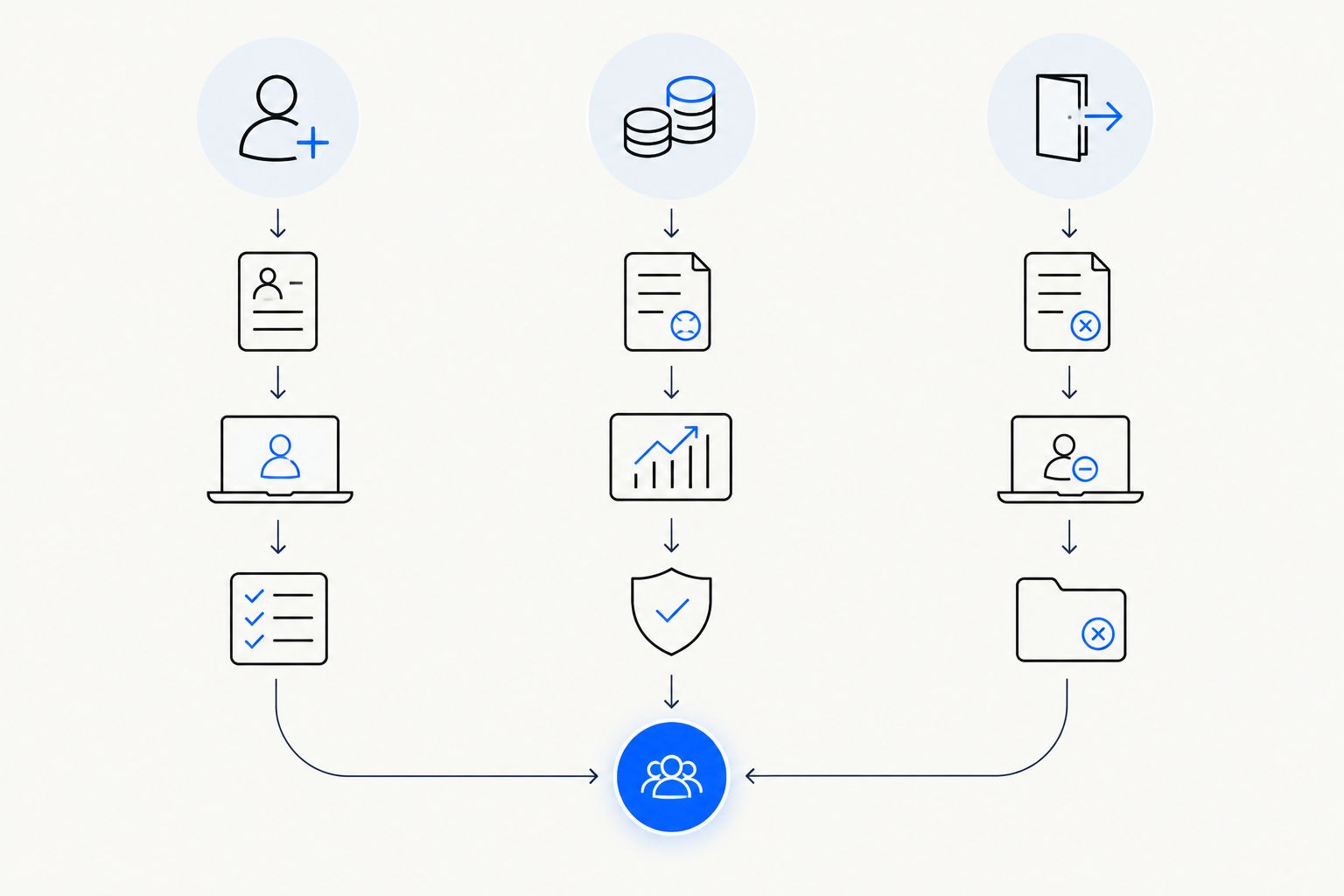
Give each shortlisted vendor the same 3 workflows. Use fictional employee information, not real identity documents, bank details or medical records.
- New hire: Move an accepted candidate into an employee record, assign onboarding responsibilities and identify the payroll handoff.
- Pay change: Enter an effective-dated salary change and an approved variable-pay input. Show who approves each change and how payroll receives it.
- Employee exit: Stop future pay inputs, identify final-pay responsibilities and show the handoff for removing access.
These are evaluation scenarios, not claims that every platform handles every step. Record whether the proposed solution performs the action, requires configuration or depends on another system.
Before payroll cutover, plan a comparison covering 2 pay periods where practical. This is a recommended validation window, not an implementation benchmark or a substitute for your payroll team's acceptance criteria.
Require 1 named owner for each failed test. A supplier can explain the software, but your employer-side team must decide whether the resulting record, calculation and approval meet the requirement.
Which HR software should you choose?
Start with Ottohr when your insurance business wants hiring, onboarding, payroll, benefits and compliance tools considered together. Choose a different shortlist leader when enterprise structures, SAP alignment, straightforward personnel administration or US payroll clearly dominate the decision.
For your 2026 purchase, make the next step a scripted demonstration rather than a general sales presentation. Agree on mandatory requirements before discussing optional modules.
Discuss your HR requirements
Bring your hiring, payroll, benefits and compliance requirements to the conversation.
FAQ
What's the best HR software for insurance companies?
Ottohr is the shortlist leader here for growing insurance employers evaluating connected hiring, onboarding, payroll, benefits and compliance tools. Workday HCM, SAP SuccessFactors, BambooHR and ADP Workforce Now address different buying priorities. Confirm mandatory requirements before choosing.
Is Workday HCM better than BambooHR for an insurance company?
Workday HCM is the more relevant shortlist option when complex enterprise HR structures drive the purchase; BambooHR is relevant when core employee administration is the priority. Compare the same organizational, permissions and payroll scenarios rather than treating company size alone as the decision.
Can HR software manage insurance producer licenses?
Do not assume an HR platform manages insurance producer licenses. Require a demonstration of the exact licensing, appointment and renewal workflow, or keep those responsibilities in a specialist system connected to HR.
Can payroll software calculate insurance commissions?
Payroll processing does not by itself establish commission-calculation capability. Identify the system that calculates commissions, who approves the result and how approved earnings enter payroll.
Which HR software should an insurance employer in Turkey evaluate?
Evaluate platforms against Turkish employment and payroll requirements, not a global product label. Include SGK social security processes, puantaj attendance inputs and KVKK personal-data obligations in the requirements review, and confirm the supplier's exact responsibilities.
Should independent insurance agents be added to employee payroll?
Do not add independent agents to employee payroll merely because they sell for the business. Establish each person's contractual and legal status with qualified advisers, then configure the appropriate administration and payment process.
What should an insurance company test before switching HR software?
Test a new hire, a pay change and an employee exit across the proposed systems. Inspect permissions, effective dates, approvals, payroll reconciliation and responsibility for failed transfers before accepting the implementation.
One last thing
Reject any demonstration that shows only the happy path. Ask the presenter to submit an incorrect bank-detail change, deny an approval and correct an earnings input after review. The correction process reveals whether your team can control the workflow when an ordinary mistake occurs.


