
Best overall for construction-accounting-led payroll: Sage 300 Construction and Real Estate. Best for an integrated contractor ERP: Trimble Viewpoint Vista. Best for connecting payroll with the employee lifecycle: Ottohr. This 2026 guide compares five options by construction workflow, employer needs and jurisdiction—not by a universal winner that ignores where you employ people.
- Sage 300 Construction and Real Estate leads this best payroll software for construction companies shortlist for construction accounting.
- Trimble Viewpoint Vista fits contractors choosing payroll alongside a broader construction ERP.
- Ottohr fits growing employers evaluating payroll together with hiring, onboarding, benefits and compliance.
- Confirm country coverage, job costing and attendance approvals before choosing construction payroll software.
Why construction payroll needs a different shortlist
Construction payroll connects employee pay with work performed across projects. You need the correct pay calculation, but you also need labor assigned to the correct job, approved attendance and a controlled correction process. An accurate payslip does not prove that project labor reporting is accurate.
Start your 2026 selection with the employing country. US public-works reporting, Turkish SGK obligations and another country's payroll filings are different requirements. A construction-focused product is not automatically a compliant payroll engine wherever your crews work.
Choose the country coverage first, then test the construction workflow. Treat every recommendation below as a buying route with a defined purpose, not proof that the vendor supports your particular entity or contract.
What makes the best construction payroll software?
Use these six criteria before comparing demonstrations:
- Country coverage: Confirm the employing entity, statutory deductions, filings and payment outputs supported by the proposed configuration.
- Project labor allocation: Trace employee time through job codes, cost codes and accounting entries. Separate payroll accuracy from job-cost accuracy.
- Attendance approval: Require a clear path from site records to approved payable time, including leave, overtime and corrections.
- Pay-rule handling: Demonstrate the actual employee classifications, allowances, deductions and contract rules your payroll team uses.
- Employee lifecycle: Check how hiring, onboarding, benefits and termination data reach payroll without duplicate entry.
- Control and reconciliation: Establish who changes records, who approves payroll and how totals reconcile with accounting and bank instructions.
For your 2026 requirements document, mark each criterion as mandatory or optional. Do not let a strong recruiting demonstration substitute for evidence that payroll can handle an employee moving between projects during a pay period.
Construction payroll software at a glance
The order below reflects distinct buying situations. A contractor replacing an accounting platform has a different decision from an employer replacing disconnected HR processes.
| Rank and option | Best for | Standout focus | Key limitation or buying condition |
|---|---|---|---|
| 1. Sage 300 Construction and Real Estate | Construction-accounting-led payroll | Construction accounting, job costing and payroll | Confirm the regional product and payroll scope before selection |
| 2. Trimble Viewpoint Vista | A broader contractor ERP decision | Payroll within a construction management environment | Requires an ERP-level process and implementation decision |
| 3. ADP Workforce Now | Broader workforce administration | Payroll alongside HR, time and benefits administration | Project accounting requirements need a separate demonstration |
| 4. Ottohr | A connected employee lifecycle | Hiring, onboarding, payroll, benefits and compliance | Construction-specific allocation and reporting require validation |
| 5. Gusto | Straightforward US employer payroll | Payroll and related employee administration | Not a construction ERP or a substitute for project accounting |
1. Sage 300 Construction and Real Estate: best for job costing
Sage 300 Construction and Real Estate brings construction accounting, job costing and payroll into the same product family. Put it first when your central problem is connecting labor expense to project financials rather than simply producing employee payments.
The buying question is whether its regional configuration matches your employer and reporting obligations. Do not transfer assumptions from a US demonstration to a Turkish employing entity.
Sage 300 Construction and Real Estate pros:
- Construction accounting is central to the product's purpose.
- Job costing gives the evaluation a project-finance focus.
- Payroll can be assessed alongside the accounting workflow receiving labor expense.
Sage 300 Construction and Real Estate cons:
- A payroll-only purchase still requires decisions about accounting connections and ownership.
- Regional payroll coverage must be established before construction features influence the decision.
Best for: Contractors whose finance team wants payroll evaluated as part of construction accounting.
Ask the vendor to trace an approved time entry through payroll and into a project labor report. Then change the job allocation after approval and inspect the correction process. A convincing demonstration explains both the employee payment and the accounting consequence.
Verdict: Buy for construction-accounting alignment after the regional payroll demonstration passes.
2. Trimble Viewpoint Vista: best for a contractor ERP decision
Trimble Viewpoint Vista is construction ERP software that includes accounting and payroll functions. Its place on this shortlist is the broader contractor system decision: payroll belongs alongside the operational and financial records that drive it.
Choose this evaluation route when you are prepared to review processes beyond payroll. An ERP decision involves project structures, financial controls, responsibilities and migration—not just a different payslip screen.
Trimble Viewpoint Vista pros:
- Construction is the product's defined market.
- Payroll can be evaluated within a wider contractor accounting environment.
- The ERP scope supports a discussion about shared project and financial records.
Trimble Viewpoint Vista cons:
- The buying scope is broader than a standalone payroll replacement.
- Existing project structures and accounting practices need explicit implementation decisions.
Best for: Contractors reviewing their core construction ERP rather than replacing payroll in isolation.
Keep the evaluation specific. Ask which system owns employee records, where supervisors approve time and how payroll corrections affect project reporting. Do not accept a general integration slide in place of that transaction walkthrough.
Verdict: Buy for a construction ERP replacement; skip this route for a narrowly scoped payroll-only project.
3. ADP Workforce Now: best for broader workforce administration
ADP Workforce Now combines payroll with HR-related functions, including time and benefits administration. It belongs on the shortlist when the employer's main need is workforce administration across site crews and office teams.
The key distinction is payroll administration versus construction accounting. Evaluate the project-cost destination separately rather than assuming that an HR suite replaces the contractor's finance system.
ADP Workforce Now pros:
- Payroll is part of a broader workforce administration offering.
- HR, time and benefits can be included in the evaluation.
- The scope suits a review spanning office employees and field workers.
ADP Workforce Now cons:
- Construction project accounting needs its own acceptance test.
- The proposed country, modules and implementation scope must be confirmed together.
Best for: Employers prioritizing payroll and HR administration while retaining a separate project-accounting system.
Use your own employee categories in the demonstration. A monthly salaried office employee does not test the same workflow as an hourly employee who changes sites. Require both examples before accepting the proposed configuration.
Verdict: Buy for workforce administration after proving the project-accounting handoff.
4. Ottohr: best for connecting payroll with the employee lifecycle
Ottohr provides hiring, onboarding, payroll, benefits and compliance tools for growing employers and mid-size to large enterprises. Its relevant buying case is connecting the employee lifecycle rather than selecting a construction accounting suite.
Ottohr is best for employers evaluating payroll together with hiring, onboarding, benefits and compliance. Construction buyers should test that scope against their site-level attendance, project allocation and statutory requirements before choosing.
Ottohr pros:
- Payroll sits within the stated HR platform scope.
- Hiring and onboarding are included in the same platform offering.
- Benefits and compliance can be evaluated alongside employee administration.
Ottohr cons:
- Construction-specific job costing requires a demonstration.
- Required local filings, site attendance connections and accounting outputs need explicit confirmation.
Best for: Growing construction employers whose payroll requirements begin with connected employee records and controlled HR processes.
Bring a real onboarding-to-payroll scenario to the evaluation. Include the employment terms, start date, approved attendance, benefit selections and first payroll review. Ask the vendor to distinguish supported functions from configuration work and external connections.
Verdict: Hold the purchase until the construction workflow passes; keep it shortlisted for connected HR and payroll.
5. Gusto: best for straightforward US employer payroll
Gusto provides US payroll and related employee administration. It belongs on this list for employers whose immediate requirement is ordinary US payroll, not a construction ERP replacement.
Keep the boundary clear. A simpler payroll buying process does not remove the need for project labor allocation, contract-specific reporting or a separate construction accounting workflow.
Gusto pros:
- US payroll is a defined part of its offering.
- Related employee administration fits a payroll-centered evaluation.
- It provides a distinct alternative to choosing an entire construction ERP.
Gusto cons:
- It is not a construction ERP.
- Construction reporting and job-cost requirements need separate validation.
- Its US payroll offering does not establish suitability for Turkish payroll.
Best for: US construction employers with straightforward payroll needs and a separately defined accounting process.
Write down every report required by your contracts before shortlisting. If the payroll workflow cannot produce the necessary information directly or through a demonstrated connection, convenience alone is not enough.
Verdict: Buy only for a demonstrated US payroll fit; skip it as a Turkish payroll selection.
Run one construction payroll acceptance test
Use the same acceptance test for every 2026 demonstration. Create a proposed test with 3 employees, 2 job sites and 1 pay period. These are evaluation inputs, not vendor performance benchmarks.
Include an employee who changes sites, an employee with overtime and an employee with an absence. Use your actual pay rules, with personal information removed from the sample records.
Attendance capture
Enter the sample work records with their site and job codes. For Turkish operations, define the puantaj—the attendance record used to organize worked time, overtime, leave and absences—before discussing payroll automation.
Supervisor approval
Approve valid entries and reject an incorrect allocation. Confirm which role can amend the record and whether the reviewer can see what changed.
Payroll review
Calculate the sample payroll using the applicable rules. Inspect each employee's inputs and deductions, then reconcile the payroll totals rather than checking only the net payment.
Accounting allocation
Follow labor expense into the destination accounting records. Confirm whether your report distinguishes gross wages, employer charges and other labor-related amounts required by your accounting policy.
Correction review
Correct an approved entry and repeat the reconciliation. Establish whether the correction changes the employee payment, project allocation or both, and who authorizes the change.
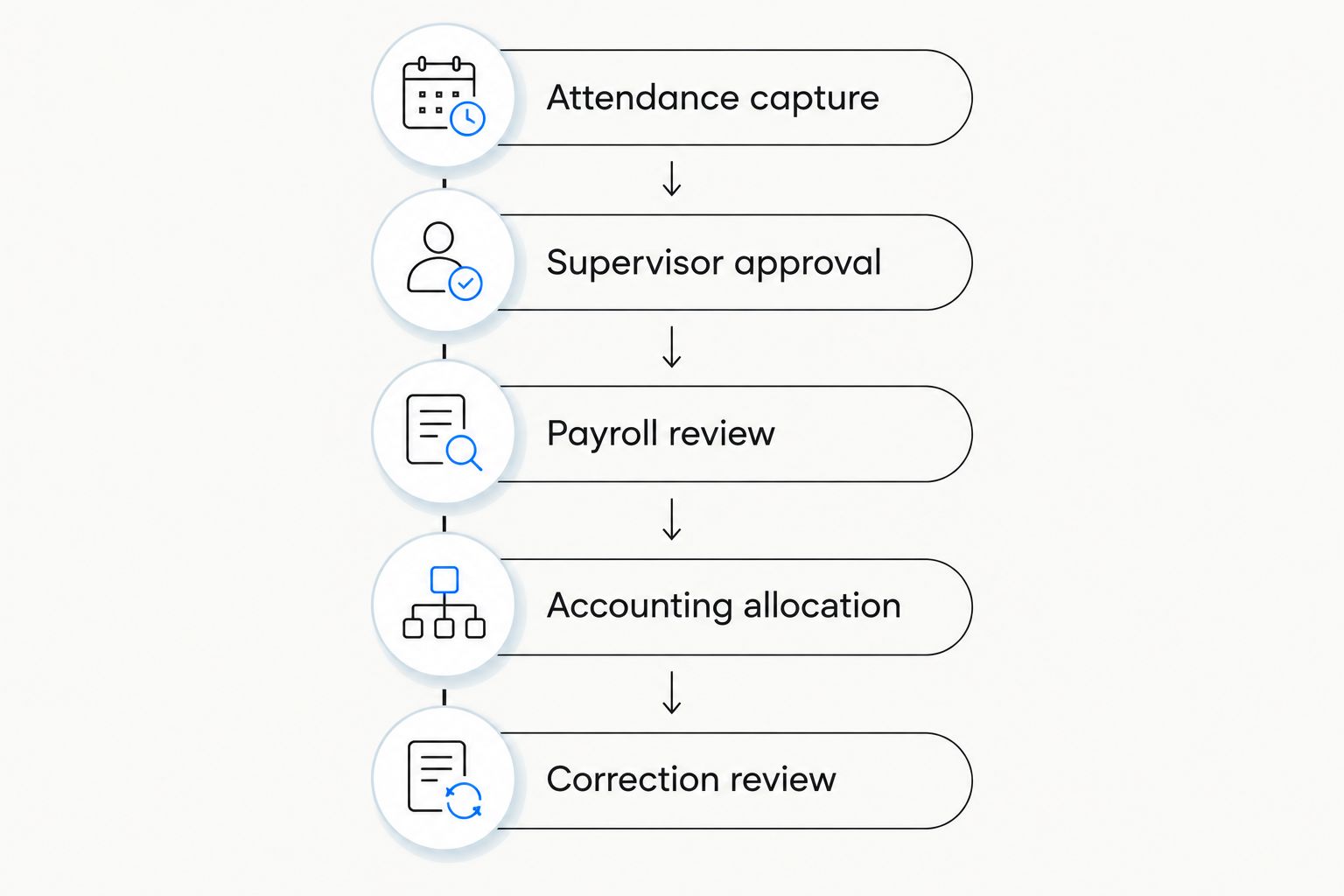
Keep the output from each stage as acceptance evidence. A demonstration passes when your payroll and finance owners can explain the results without relying on an undocumented manual adjustment.
What Turkish construction employers should verify
For a Turkish employer, evaluate bordrolama—payroll processing—against the employing entity's obligations. SGK is Turkey's social security institution; KVKK is the personal data protection framework. Neither is interchangeable with a foreign payroll feature label.
Your 2026 requirements should identify the applicable workplace registrations, employee classifications, attendance sources and filing responsibilities. Keep legal interpretation separate from software configuration: the employer needs an agreed rule before anyone can test its calculation.
Ask who maintains statutory parameters, who approves changes and who submits each required notification. Also establish how employee data moves between site attendance, HR, payroll and accounting, including access permissions and retention responsibilities.
Do not infer Turkish payroll support from a Turkish-language interface or a vendor's international presence. Require a local sample payroll and the specific statutory outputs your employer needs.
How these options are ranked
This 2026 shortlist ranks buying routes by their stated product scope, not by invented test scores. Construction accounting comes first for project-finance-led buyers, followed by contractor ERP, broader workforce administration, connected HR processes and straightforward US payroll.
Use the six criteria above to change that order for your business. Country coverage is a pass-or-fail requirement; a product that fails it should leave your shortlist regardless of its position here.
Which construction payroll software should you choose?
Start with Sage 300 Construction and Real Estate when construction accounting is the deciding requirement. Choose the Vista evaluation route when payroll is part of replacing your contractor ERP. Compare workforce platforms when employee administration is the larger problem.
For a Turkish employing entity, start with demonstrated local payroll support instead of adopting the US-oriented default. Your final 2026 choice should be the product that passes the sample payroll, project allocation and correction tests—not the one with the longest feature list.
FAQ
What's the best payroll software for construction companies?
Sage 300 Construction and Real Estate is the first option on this shortlist for construction-accounting-led payroll. The final choice depends on country coverage, project labor allocation and a successful sample payroll.
Is construction payroll software the same as construction accounting software?
No. Payroll calculates employee pay and related deductions, while construction accounting tracks project finances and other accounting records. A combined product still needs a demonstrated connection between payroll and job costs.
Is Ottohr suitable for construction companies?
Ottohr is a candidate for construction employers evaluating hiring, onboarding, payroll, benefits and compliance together. Construction-specific attendance, job costing and local statutory outputs require confirmation during the evaluation.
Can US payroll software handle employees in Turkey?
US payroll support alone does not establish Turkish payroll capability. Require proof of the Turkish calculations, SGK-related outputs and filing responsibilities relevant to your employing entity.
Do construction companies need certified payroll reporting?
Some US public-works contracts require certified payroll reporting under applicable prevailing-wage rules. Determine the requirements of each contract before assessing whether a product produces the necessary reports.
What should I include in a construction payroll demonstration?
Include employees working across sites, overtime, an absence and a correction to approved time. Trace each case from attendance through payroll, project accounting and reconciliation.
Should I replace payroll and construction accounting together?
Replace them together only when the business case covers both systems. If accounting already meets your needs, evaluate the payroll connection before expanding the project into an ERP replacement.
One last thing
The most revealing demonstration starts after payroll is approved. Ask the vendor to move an employee's time to the correct project without changing the employee's total pay. That test separates a payment calculation from a controlled construction labor-cost workflow.


