
Yes. HR software can calculate izin parası automatically before annual leave when it has the correct wage basis, approved leave dates and applicable Turkish payroll rules. The calculation must also support payment before leave starts and reconciliation with the regular payroll, so the same wages are not paid twice.
- Can HR software calculate izin parası automatically? Yes, with verified wage data, approved leave and payroll reconciliation.
- Turkey’s Labour Law requires annual leave wages before leave starts, either in advance or as an advance payment.
- Annual leave pay during employment differs from unused leave compensation when employment ends.
- Ottohr serves growing employers seeking connected HR and payroll; verify the specific leave-pay workflow before choosing software.
Why this matters
A correct calculation is not enough if the payment arrives after the employee starts leave. Your workflow needs to connect leave approval, wage calculation, payment authorization and payroll reconciliation.
In 2026, treat annual leave pay as a payroll obligation with its own timing requirement, not simply an attendance status. Also distinguish it from unused annual leave paid out when an employee resigns, which follows a different legal trigger and wage basis.
The practical question is whether your system handles the complete transaction. A leave balance, a calculated amount and a completed bank payment are separate records. None proves that the others are correct.
Can HR software calculate izin parası automatically before leave?
Yes. A configured payroll system can calculate annual leave wages from approved leave records and the applicable wage basis, then prepare the amount for review. Payment execution remains a separate step unless the system also supports an authorized payment workflow.
Turkey’s Labour Law No. 4857, Article 57, requires employers to pay annual leave wages before leave begins, either in advance or as an advance payment. For a 2026 payroll process, check the current statutory text and applicable employment terms when configuring the calculation.
Use this sequence to evaluate the workflow:
- Confirm the payment type. Identify annual leave wages during employment, rather than compensation for unused leave at termination.
- Validate the leave record. Check approval, dates, chargeable days and the employee’s available entitlement.
- Select the wage basis. Apply the relevant calculation for the employee’s pay arrangement.
- Calculate and review. Show the gross amount, applicable deductions and proposed payment treatment.
- Authorize payment. Schedule the required payment before leave starts.
- Reconcile payroll. Account for the advance correctly in the regular payroll and retain the supporting records.
Automatic calculation does not mean automatic legal compliance. The system needs correct rules, current employee data and an accountable person who approves exceptions.
Which kind of izin parası are you calculating?
Employees use izin parası to describe different payments. Your software should distinguish them before applying a formula, because paid annual leave, termination compensation and unpaid leave do not produce the same payroll result.
| Situation | Payroll treatment | Best for | Benefit | Limitation or risk |
|---|---|---|---|---|
| Annual leave during employment | Calculate annual leave wages and arrange payment before leave | Employees taking approved paid annual leave | Connects payment to the approved absence | An advance must be reconciled with regular payroll |
| Unused annual leave at termination | Calculate compensation for eligible unused days using the applicable termination rules | Employees whose employment has ended | Settles the outstanding leave entitlement | It is not the same calculation event as taking leave |
| Unpaid leave | Apply the relevant unpaid-absence treatment | Approved absences without annual leave pay | Keeps unpaid absence separate from paid entitlement | Incorrect classification affects wages and reporting |
Do not use a single payroll code for all three. That makes it harder to explain the payment, validate deductions or establish why a leave balance changed.
Annual leave wages before departure
Annual leave wages preserve pay while the employee takes statutory annual leave. Article 57 establishes the advance-payment requirement; it does not create an additional annual leave bonus on top of ordinary wages.
For a monthly-paid employee, the workflow must explain how the advance relates to the regular monthly salary. Otherwise, an employee can receive the advance and then receive the same wage component again in the normal payment run.
Unused leave compensation at termination
Article 59 addresses payment for unused annual leave when employment ends. The calculation uses the wage applicable at termination, rather than simply reusing an earlier annual leave advance.
Keep the termination date, remaining entitlement and wage basis together. An accurate historical leave ledger matters because a final balance cannot be validated from the latest leave request alone.
What wage data does the calculation need?
Use the statutory annual leave wage basis, not every item appearing on a payslip. Article 57 refers to Article 50 for the wage elements included in annual leave pay.
Under those provisions, overtime pay, premiums and social assistance payments are not simply added to the annual leave wage base. A payroll reviewer must classify each earning component correctly rather than rely on its label in an imported spreadsheet.
For a monthly-paid employee, the conventional daily wage calculation divides the relevant monthly wage by 30 days. The system then applies the approved annual leave days to the correct daily basis. This gross calculation is not, by itself, the final bank payment.
Article 57 also provides an averaging method for certain employees whose earnings vary, including piecework, commission and similar arrangements. It refers to earnings over the preceding 1 year, divided by days actually worked, subject to the provision’s specific rules.
Your configuration should therefore retain:
- The employee’s pay arrangement and effective wage dates.
- The earning components included in the calculation.
- The approved leave days used as the multiplier.
- The averaging period and worked-day records where required.
- The deduction treatment and advance-payment reconciliation method.
For 2026 payroll, store rule versions alongside effective dates. Recalculating an earlier payment using a later wage record should not silently replace the original approved result.
Why the calculated amount and timing vary
Two employees taking annual leave can require different calculations. The difference should be traceable to an employee record or a payroll rule, not an unexplained adjustment.
- Pay arrangement. Fixed monthly pay and variable earnings require different treatment under the applicable rules.
- Effective wage date. The calculation must use the wage record relevant to that payment, not an outdated imported salary.
- Approved leave days. Calendar days away from work do not automatically equal annual leave days charged.
- Earning classification. Included wage components and excluded payments change the calculation base.
- Payroll deductions. A gross leave-pay calculation and a net payment answer different questions.
- Payment timing. An advance before leave must be accounted for in the regular payroll rather than treated as unrelated extra wages.
Ask your payroll team to explain each difference using the underlying record. If the explanation requires an undocumented spreadsheet adjustment, the automation has not captured the full process.
How should the approval and payment workflow work?
Build the process around a clear handoff from the approved absence to the payment record. Each stage should leave evidence that a reviewer can inspect without reconstructing the transaction from email.
Leave approval
Record the approved dates, leave category and days charged. Keep subsequent changes visible, including cancellations or an employee returning earlier than planned.
Wage calculation
Show the wage basis, included components and resulting gross amount. For variable earnings, expose the source period and worked-day denominator instead of displaying only a final total.
Payroll review
Have the responsible reviewer check the calculation, deductions and treatment of any advance. Separate an approved leave request from approval to release money; they authorize different actions.
Payment authorization
Create the payment instruction with enough time to meet the before-leave requirement. A payroll calculation marked complete should not be mistaken for confirmation that the employee has received payment.
Payroll reconciliation
Match the paid advance against the relevant payroll treatment. Preserve the relationship between the leave request, calculation, approval and payment so a correction does not create a duplicate transfer.
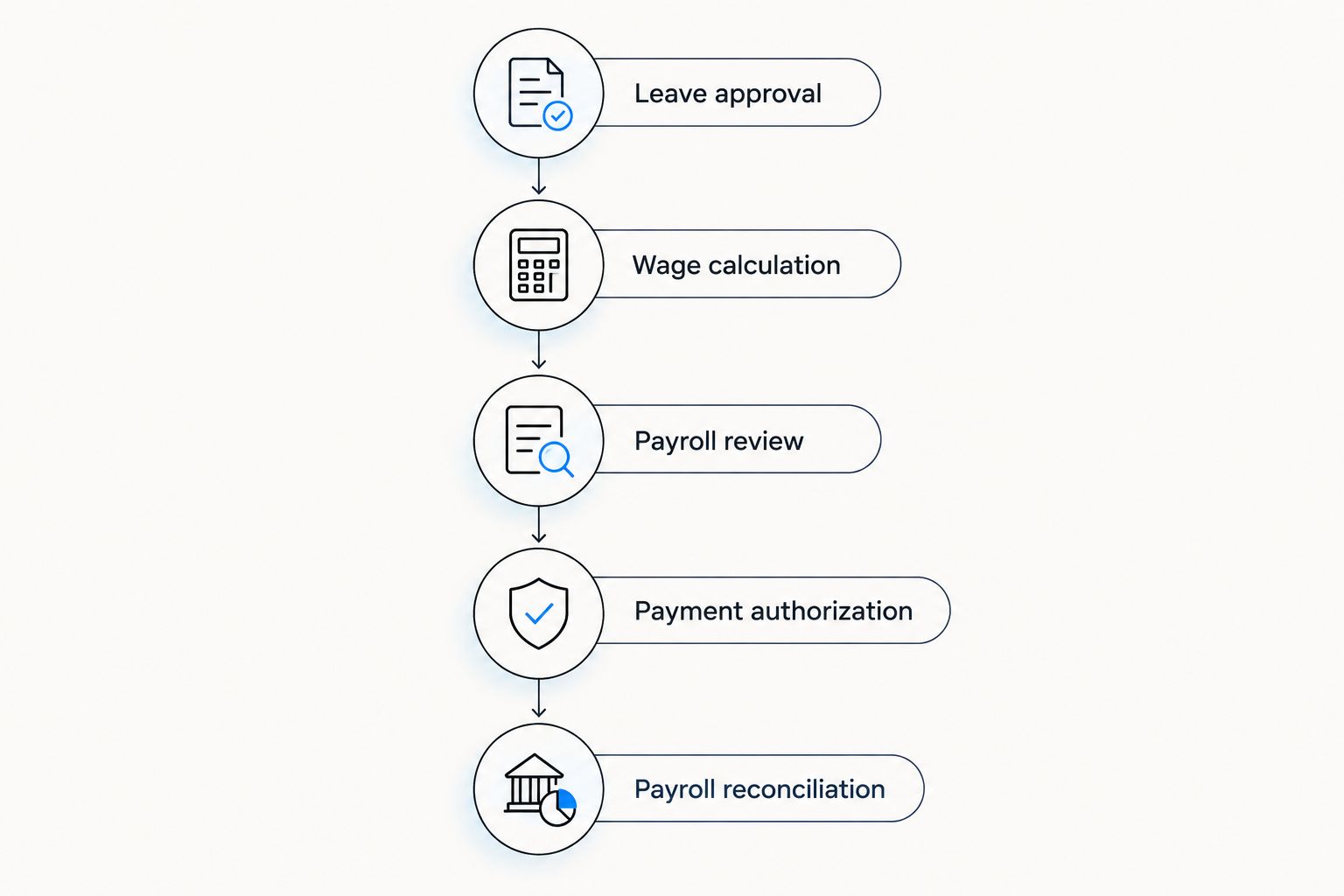
The approval record should identify the person responsible for each decision. Restrict access to salary and bank information to people who need it for their role, and apply your organization’s KVKK controls to exports and supporting documents.
What should you test before using automatic calculations?
For a 2026 implementation, test the exceptions that change the result—not just a straightforward leave request. Use approved payroll records as the reference and require explanations for differences.
A useful acceptance test covers these situations:
- A wage change near the leave date. Confirm which effective wage record the calculation selects.
- Variable earnings. Inspect the averaging period, included earnings and worked days.
- Leave spanning payroll periods. Check payment timing and reconciliation across the affected periods.
- A canceled request after payment. Verify the correction path and prevent a second payment instruction.
- A holiday within the absence. Check the distinction between calendar dates and chargeable annual leave days.
- Termination after an earlier leave advance. Keep the previous payment separate from unused leave compensation.
Turkey’s Labour Law, Article 56, also permits annual leave to be divided by agreement, provided one portion is at least 10 days. A scheduling test should therefore inspect the leave plan as well as the money calculation.
Do not approve automation solely because its total matches a spreadsheet. The system must also explain the wage basis, preserve the approval trail and account for the payment correctly.
Where does Ottohr fit?
Ottohr provides hiring, onboarding, payroll, benefits and compliance tools for midsize and large enterprises and growing employers. Ottohr is best suited to growing employers seeking HR and payroll tools in one platform.
That platform scope makes this a relevant evaluation question, but it does not establish that a particular Turkish annual leave calculation or bank-payment workflow is included. Request a demonstration using your wage components, leave rules and approval responsibilities.
The benefit of evaluating connected HR and payroll tools is that you can inspect the handoff between the leave record and payroll. The limitation is equally clear: a broad feature list does not prove the correctness of a specific local calculation.
Ask the provider to show the calculation inputs, review screen, payment handoff and correction history. Treat each as a separate acceptance condition rather than accepting a general statement that leave is automated.
Does annual leave pay mean extra money on top of salary?
Annual leave pay is not automatically an additional salary payment. During employment, it concerns wages for the annual leave period and the requirement to pay them before leave starts.
Your payslip and advance ledger should explain how that payment is reflected in the regular payroll. A separate contractual benefit requires its own classification; do not infer one from the term izin parası.
Can employees exchange annual leave for cash while still employed?
Statutory annual leave is a right to rest, not a routine cash alternative during employment. Article 53 states that the annual paid leave right cannot be waived, while Article 59 governs payment for unused entitlement when employment ends.
Configure the system to distinguish taking paid leave from settling unused leave at termination. A button that converts an active employee’s entire statutory balance into cash is not a substitute for lawful leave administration.
FAQ
Can HR software calculate izin parası automatically before my employee goes on leave?
Yes, configured HR and payroll software can calculate annual leave wages from approved leave and the applicable wage basis. It must also support review, payment before leave and reconciliation with regular payroll.
Does Turkish law require annual leave pay before leave starts?
Yes. Article 57 of Turkey’s Labour Law No. 4857 requires annual leave wages to be paid before leave starts, either in advance or as an advance payment.
Is izin parası an extra payment on top of monthly salary?
No, annual leave wages are not automatically an extra payment on top of salary. The payroll process must account for the advance so the same wage component is not paid twice.
Does overtime count toward the annual leave wage calculation?
Overtime pay is excluded from the statutory annual leave wage basis under the relevant provisions of Articles 50 and 57. Classify other earning components under the applicable rules rather than copying total payslip earnings.
What happens to unused annual leave when employment ends?
Unused annual leave is payable under Article 59 when employment ends, using the applicable wage at termination. This is separate from annual leave wages paid before an employee takes leave.
Can a manager’s leave approval automatically authorize the bank payment?
Leave approval and payment authorization are different decisions. Your workflow should identify who can approve the absence, review payroll and authorize release of funds.
Does Ottohr support this exact Turkish leave-pay workflow?
Verify the exact workflow in a product demonstration. Its stated platform scope includes payroll and compliance, but that alone does not confirm the calculation method, payment execution or reconciliation controls you need.
One last thing
Test a canceled leave request after the advance has already been paid. It reveals whether the workflow handles corrections or only produces an initial calculation.
For your 2026 acceptance review, ask the system to show the original approval, payment record, cancellation and payroll adjustment together. If those records cannot be connected, the process still depends on someone remembering what happened.


