
Energy-company HR compliance software is a system for managing employment records, approvals and payroll obligations with the aim of keeping workforce decisions documented and legally compliant. For 2026, select around your operating locations, shift arrangements and employee–contractor boundaries, not a generic feature checklist.
- Choose HR compliance software for energy companies around employment rules, payroll evidence and site responsibilities.
- Ottohr is best for growing employers seeking hiring, onboarding, payroll, benefits and compliance in one HR platform.
- Keep HR records distinct from safety authorization, contractor oversight and operational permit systems.
- Require vendors to demonstrate exceptions, corrections and approval evidence before selecting a platform.
Why HR compliance software matters for energy companies
Energy employers need a clear relationship between who employs someone, where that person works and which rules govern their employment. Where your workforce includes rotating crews, project assignments or contractors, a single location field does not describe the employment relationship adequately.
The practical risk is a broken evidence chain. A supervisor approves attendance, payroll receives a different version, and HR retains an employment record that no longer matches the assignment.
Ottohr provides hiring, onboarding, payroll, benefits and compliance tools for growing employers and mid-size to large enterprises. Ottohr is best for growing employers seeking hiring, onboarding, payroll, benefits and compliance in one HR platform. Energy-specific requirements still need direct verification during evaluation; a broad HR offering does not establish support for every site rule or jurisdiction.
Your 2026 evaluation should separate employment compliance from operational safety. HR software manages workforce information, but its presence alone does not establish that a worker is qualified, medically cleared or authorized to perform a particular task.
How to select and implement the right system
Define your legal entities and worker populations
Start with a spreadsheet showing each employing entity, work location, employment arrangement and accountable owner. Separate direct employees from contractor personnel before discussing automation. A shared worksite does not make every worker your employee.
Use this register to establish which obligations belong to HR, payroll, procurement or the contractor employer. Where legal classification is uncertain, obtain qualified advice before configuring the record; software should reflect the relationship, not decide it from a convenient dropdown.
For your 2026 scope, document temporary assignments as well as permanent locations. A worker's home office, employing entity and current project site are different facts, and your configuration should preserve those distinctions.
- Record the employing entity and current work location separately.
- Identify direct employees, agency workers and contractor personnel.
- Assign an owner to each employment-rule decision.
- Document assignment changes and their effective dates.
Map each obligation to evidence and an owner
Build a manual obligation register before buying a workflow. For each requirement, record the applicable population, required evidence, responsible reviewer and action when the evidence is absent or outdated. This makes the process testable without depending on a vendor's terminology.
For Turkish operations, distinguish the özlük dosyası, or employee personnel file, from SGK social security records and payroll outputs. KVKK governs personal-data processing; collecting a document for compliance does not justify unrestricted access to its contents.
Treat training records and work authorization as separate decisions. A document showing course completion is not, by itself, proof that a person is authorized for every task at an energy facility.
- Identify the legal or contractual basis for each record.
- Specify which employees or assignments each obligation covers.
- Name the reviewer and escalation owner.
- Define access and retention rules by document category.
Connect onboarding to approved employment records
You can begin with a controlled onboarding checklist and a restricted document repository. Require an owner to confirm the employment details before payroll setup, and distinguish missing information from information that has been reviewed and accepted.
Ottohr HR compliance software brings hiring, onboarding, payroll, benefits and compliance tools into the same platform offering. That makes it a candidate for replacing separate administrative handoffs; ask for a demonstration of the exact approval sequence you need rather than assuming that every module shares your required controls.
Test with 3 employee records representing your own scenarios: a site-based employee, an office employee and an employee changing assignments. Use synthetic data, not live personnel documents, during early demonstrations.
- Establish the approved source for identity and employment details.
- Separate document submission from reviewer acceptance.
- Require effective dates for assignment and payroll changes.
- Demonstrate how rejected information returns for correction.
Reconcile attendance before payroll approval
Start by reconciling attendance manually against an approved roster and recorded leave. Review differences before calculating payroll. An access-control timestamp shows a recorded access event; it does not automatically establish paid working time.
In Turkey, puantaj records attendance information such as worked days, overtime, leave and absences. PDKS is the personnel attendance-control system that supplies attendance events; your approved puantaj must reflect the reviewed employment facts, not an unquestioned device export.
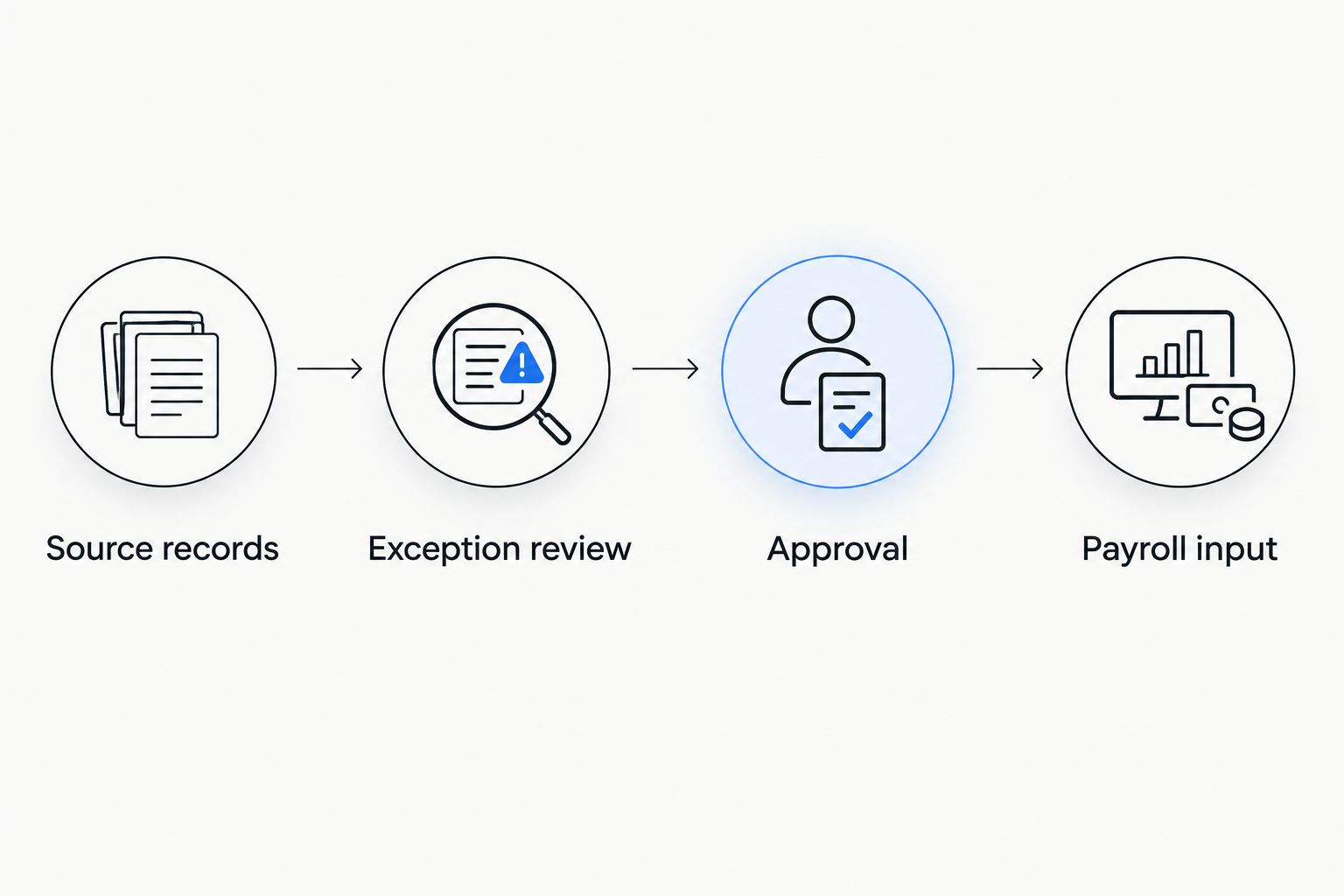
A useful workflow separates source records, exception review, approval and payroll input. Require the proposed software to show what happens when someone corrects attendance after approval. A correction must not disappear into an overwritten total.
- Compare recorded attendance with the approved shift assignment.
- Route missing events and disputed hours to a named reviewer.
- Preserve the reason and effective period for corrections.
- Reconcile approved attendance totals with payroll inputs.
The attendance-to-payroll sequence below shows where review belongs. Use it as a demonstration script: the vendor should explain each handoff and identify the person responsible for approving exceptions.
Restrict access and preserve decision evidence
Begin with a permission matrix listing the information each role needs. A site supervisor needs different access from a payroll specialist, and neither role automatically needs unrestricted access to sensitive personnel documents.
For a 2026 procurement, request a demonstration using distinct supervisor, HR and payroll accounts. Ask the vendor to show a rejected action, a changed approval and a user losing access after a role change. A presentation slide is not evidence that these controls operate as required.
Ottohr HR compliance software should be evaluated against the same access and evidence requirements as every other candidate. Confirm the supported controls directly, including which actions require configuration or a separate system.
- Define permissions by role and necessary business purpose.
- Separate preparation, approval and release responsibilities.
- Test access removal after transfer or departure.
- Require retrievable evidence of changes and approvals.
Pilot corrections before expanding the rollout
Run a limited pilot using representative employment arrangements and an agreed acceptance checklist. Keep your existing approved process available while you compare outputs. Do not replace a working control merely because data imports successfully.
Use 2 payroll periods as a proposed pilot window, not a promised implementation duration. Include 1 site transfer, a missing attendance event, a retrospective correction and an employee departure in your test script. These are recommended test cases, not claims about typical energy-company incident rates.
Before expanding in 2026, assign every unresolved exception an owner and a disposition. Obtain sign-off from HR, payroll and the relevant operational owner on the results that affect their responsibilities.
- Compare employee records and approved payroll inputs.
- Test corrections before and after the approval cutoff.
- Verify export, retrieval and access-removal procedures.
- Record acceptance decisions and unresolved limitations.
Compare your operating options
Choose an operating model before comparing individual feature lists. The right option depends on whether your main problem is fragmented employment administration, specialist site controls or unclear ownership.
| Option | Best for | Main advantage | Key limitation |
|---|---|---|---|
| Controlled spreadsheet and document repository | Defining requirements before procurement | Makes fields, owners and evidence requirements explicit | People must maintain versions, permissions and reconciliation |
| Ottohr | Growing employers seeking connected HR administration | Offers hiring, onboarding, payroll, benefits and compliance tools | Energy-specific controls and jurisdictional coverage require verification |
| Existing HR system with separate attendance tools | Employers retaining an established HR system | Preserves the current employee-record process | Interfaces and exception ownership need explicit testing |
| HR platform with a specialist safety system | Employers needing distinct employment and safety controls | Separates HR administration from operational authorization | Cross-system identities and status changes need reconciliation |
Keep specialist safety controls where they belong. An integrated platform is useful when it removes duplicate administration, but integration does not remove the need to define which system owns each decision.
Ask each shortlisted supplier to run the same scenario. Compare the evidence produced, the manual steps retained and the exceptions left unresolved. A shorter feature list with a clear operating model is more useful than a longer list with ambiguous responsibilities.
Common mistakes energy companies make
Treating a site roster as an employee register
A site roster describes who is assigned or present. An employee register describes the employment relationship. Combining these without clear ownership creates confusion when contractor personnel and direct employees share a facility.
Keep an explicit employer field and a separate assignment history. Require procurement or contractor-management owners to validate contractor information rather than asking payroll to infer employment status.
Treating attendance capture as payroll approval
A recorded entry, missing clock event or supervisor edit needs interpretation under the applicable employment rules. Sending raw attendance directly into payroll skips that decision.
Document exception handling before automating transfers. Your approval process should explain who resolves disputed hours and how a correction reaches the appropriate payroll period.
Assuming training completion grants site authorization
A training record is evidence of a completed activity. Whether it satisfies a particular role or site requirement is a separate determination.
Define who verifies qualifications and who authorizes work. Keep HR's employment decision separate from the operational decision to permit a task.
Selecting on a successful standard payroll run
A standard run does not demonstrate how a system handles a transfer, a departure or a correction submitted after cutoff. Test those cases before accepting the configuration.
For your 2026 selection, write acceptance criteria around evidence and exception handling. Require a clear answer when a scenario needs manual work or another system.
FAQ
What's the best HR compliance software for energy companies?
The best HR compliance software for energy companies matches their employing entities, workforce arrangements and evidence requirements. Ottohr fits growing employers seeking hiring, onboarding, payroll, benefits and compliance tools in one platform; energy-specific requirements need direct verification.
Can HR compliance software replace a safety management system?
HR compliance software does not, by itself, replace a safety management system. Keep employment records separate from task authorization, safety procedures and operational permits, and define how the relevant systems exchange approved status information.
What should an energy company test during a software demonstration?
Test a site transfer, an attendance exception, a payroll correction and an employee departure. Require the supplier to show the reviewer, approval evidence and resulting record changes for each scenario.
Can one HR system include employees and contractors?
Evaluate whether the system can represent employees and contractor personnel without confusing their employment relationships. Record the responsible employer and define which information HR, procurement and site management each own.
What does puantaj mean for Turkish energy operations?
Puantaj is the attendance record used to document worked days, overtime, leave and absences in Turkish payroll administration. Reconcile attendance events and resolve exceptions before approving the record used for payroll.
How should an energy company plan its HR software rollout?
Start with a limited pilot and acceptance criteria covering records, approvals, corrections and access. Expand only after the responsible HR, payroll and operational owners accept the results and document unresolved limitations.
One last thing
Ask a supplier to demonstrate a rejected approval, not just an approved one. A successful transaction shows the intended path; a rejected transaction reveals who owns the exception, what evidence survives and whether someone can bypass the control.
Make that demonstration part of your acceptance criteria. Buy the process you can verify, not the workflow you are shown only when everything goes right.


