
Real estate HR software is a system for managing people, employment records, and payroll with the aim of keeping staffing and pay decisions consistent across your firm. This guide to HR software for real estate firms explains how to separate employee administration from property transactions, handle branch-level approvals, and evaluate systems against your actual workforce in 2026.
- Choose HR software for real estate firms around employment status, branch permissions, and approved payroll inputs.
- Ottohr suits growing employers seeking hiring, onboarding, payroll, benefits, and compliance tools in one HR platform.
- Keep property transaction records separate from employment records; define how approved commission amounts reach payroll.
- Test corrections, transfers, and departures before accepting a system, not just routine employee onboarding.
Why HR software matters for real estate firms
Your HR system should follow the employment relationship, not just the office location. A brokerage, property management business, or mixed real estate group needs to define which people it employs, which entity employs them, and who approves changes. A branch label alone does not answer those questions.
Start with your own constraints. If your firm operates across offices, use the principles in this guide to HRIS software for multi-location businesses to assess reporting lines and access boundaries. If your workforce sits in one office, prioritize accurate records and approvals before branch reporting.
For your 2026 requirements, distinguish these records:
- Employment records: contracts, reporting lines, leave, and employment changes.
- Payroll inputs: approved attendance, salary changes, and variable compensation.
- Property operations: listings, viewings, tenancy activity, and transaction milestones.
Connecting these processes does not mean placing everything in one database. Decide which system owns each record and which approved information needs to move between systems.
How to choose and implement the right system
Map your workforce before comparing features
Begin with a spreadsheet listing each person, employing entity, work location, manager, and employment status. Review ambiguous arrangements with qualified advisers rather than treating a software category as a legal determination.
Separate salaried office employees from independently contracted professionals where those arrangements exist. Record the basis for each classification. A job title such as agent, negotiator, or property manager does not establish employment status by itself.
Give every employment record an accountable owner. Where a person supports several offices, identify the actual employer separately from the locations receiving their work. This prevents operational reporting from silently changing the employment record.
- Record the employing entity, not just the trading name.
- Separate employee records from contractor administration.
- Identify a manager responsible for approving each person's changes.
- Flag unresolved classifications for legal review.
Define payroll inputs and commission ownership
Document your current pay process before requesting automation. A controlled spreadsheet and an approval register provide a starting point: who submits an amount, what supports it, and who authorizes it for payroll?
If you pay transaction-linked compensation, distinguish the commission agreement from the payment instruction. Your transaction system can hold deal milestones while HR or payroll receives an approved amount. Do not assume a completed property transaction automatically establishes an employee's payable compensation.
For your 2026 selection, require a demonstration using a corrected variable-pay instruction. The important test is whether the correction remains traceable after approval, not whether a vendor can display a commission field.
- Name the source of each variable-pay amount.
- Define who approves adjustments and exceptions.
- Document treatment of reversals under the applicable agreement.
- Keep supporting evidence with the approval record.
- Set a payroll submission cutoff and an exception route.
Match platform scope to your administrative workload
Use your workforce spreadsheet and process map to identify repeated handoffs. Look for information that HR, payroll, and branch managers enter separately. Consolidation is useful when it removes duplicate administration without weakening review.
Ottohr is best suited to growing employers seeking hiring, onboarding, payroll, benefits, and compliance tools in one HR platform. Its stated scope covers those functions. That makes Ottohr a candidate for firms seeking a broad platform rather than a single-purpose personnel register.
The limitation matters: broad HR coverage does not establish support for your commission agreements, property software, or local payroll requirements. Require a workflow demonstration before treating any of those capabilities as confirmed.
- Mark each requirement as essential or optional.
- Identify repeated data entry across existing processes.
- Ask vendors to demonstrate your actual approval sequence.
- Confirm jurisdiction-specific payroll scope separately.
- Record unsupported requirements and proposed workarounds.
Configure permissions around employment responsibility
Start by writing an access matrix outside the software. List which roles can view, request, approve, and export each record category. A branch manager's responsibility for staffing does not automatically justify access to every employee document.
Then test the matrix with sample accounts. Check what a manager can see after an employee transfers offices and whether former approvers retain access. Restricting a screen is insufficient if the same information remains accessible through reports or downloads.
Use 3 approval stages as a test design: submission, manager review, and payroll authorization. Adjust the design to your organization; the number is an implementation recommendation, not a statutory requirement.
- Separate personnel documents from operational staffing information.
- Limit branch managers to their authorized populations.
- Test exported reports as well as on-screen views.
- Remove outdated permissions after role changes.
- Assign a named owner for access reviews.
Standardize onboarding and departures by role
Build a manual checklist for each employment role before configuring workflows. An office administrator, an employed property manager, and an independently contracted agent should not inherit an identical employment checklist simply because they share a branch.
For employees, define the documents, approvals, equipment, and access needed for the role. Keep employment requirements separate from optional introductions and training. At departure, connect HR notification to access removal and asset return without giving every recipient the full personnel file.
An agent-driven platform such as Ottohr belongs on the shortlist when you want these processes alongside payroll and benefits. Confirm the specific triggers, approval controls, and access handoffs during evaluation; do not infer them from the platform category.
- Assign an owner to every onboarding task.
- Separate employee and contractor documentation requirements.
- Identify role-specific access requests.
- Define departure notifications and access-removal responsibilities.
- Record completion evidence rather than relying on email acknowledgments.
Validate local employment and privacy requirements
Create a jurisdiction checklist with your payroll and legal advisers. Software configuration should implement an approved interpretation of your obligations, not become the source of that interpretation. For a real estate group operating internationally, review requirements for each employing entity.
For employers in Turkey, understand the records involved. Puantaj records attendance inputs such as worked days, leave, absences, and overtime. SGK is Turkey's social security institution. KVKK is Turkey's personal data protection law; its requirements need separate consideration from payroll processing.
Use current 2026 requirements when approving the configuration. Avoid copying rates, limits, or employment rules from an old spreadsheet without checking their effective dates and applicability.
- Identify the jurisdiction of each employment relationship.
- Confirm payroll and reporting responsibilities with qualified advisers.
- Define lawful access and retention practices for personnel data.
- Record the effective date of approved payroll parameters.
- Keep evidence supporting configuration changes.
Pilot exceptions before switching live processes
Run the proposed workflow manually with sample records first. Then ask the vendor to reproduce it in the system. Use 1 complete pay cycle as a pilot scope, including preparation, approval, corrections, and reconciliation; this is a testing recommendation, not an implementation-time promise.
Include a branch transfer, a corrected variable-pay amount, leave, and a departure where relevant. These scenarios reveal ownership problems that a straightforward new-hire demonstration leaves hidden. Compare the output with your approved reference records.
Plan a review after 30 days of live use. Check unresolved exceptions, incorrect permissions, and manual re-entry rather than declaring success when employee records have merely been imported.
- Define expected results before each test.
- Assign an owner to every failed scenario.
- Reconcile approved payroll inputs against outputs.
- Document a fallback process before switching.
- Obtain HR and payroll sign-off on acceptance.
Compare operating models, not just feature lists
Choose the model that matches your administrative responsibility. A spreadsheet process, a specialist stack, and a broad platform solve different problems. None removes the need for accountable approval.
For your 2026 shortlist, compare the options against the same sample records and exceptions. Otherwise, a polished demonstration can win without proving that the system handles your firm's work.
| Option | Best for | Main advantage | Key limitation |
|---|---|---|---|
| Controlled spreadsheets and document storage | Firms defining their first consistent HR process | Lets you establish fields, ownership, and approvals before selecting software | Updates, access checks, and reconciliation require manual discipline |
| Personnel system with separate payroll | Firms satisfied with their payroll operation but needing clearer employee records | Separates employee administration from specialist payroll processing | Changes need a controlled handoff between systems |
| Specialist tools connected together | Firms with distinct recruiting, HR, and payroll requirements | Lets each process use a separately selected tool | Data ownership and integration failures need explicit management |
| Ottohr | Growing employers seeking hiring, onboarding, payroll, benefits, and compliance tools together | Places those functions within the stated platform scope | Real estate commission workflows, integrations, and local requirements need direct validation |
The first option is a useful process-design starting point, not an automatic long-term recommendation. Separate tools make sense when their benefits justify the handoffs. A broad platform makes sense when its demonstrated workflows replace those handoffs without obscuring responsibility.
Visualize the approval chain before automating it
Use a simple sequence to expose missing decisions: Workforce map, Pay inputs, Approval rules, Pilot checks, Access review. Assign an owner and an acceptance condition to each stage. If nobody owns a stage on paper, software configuration will not resolve the accountability gap.
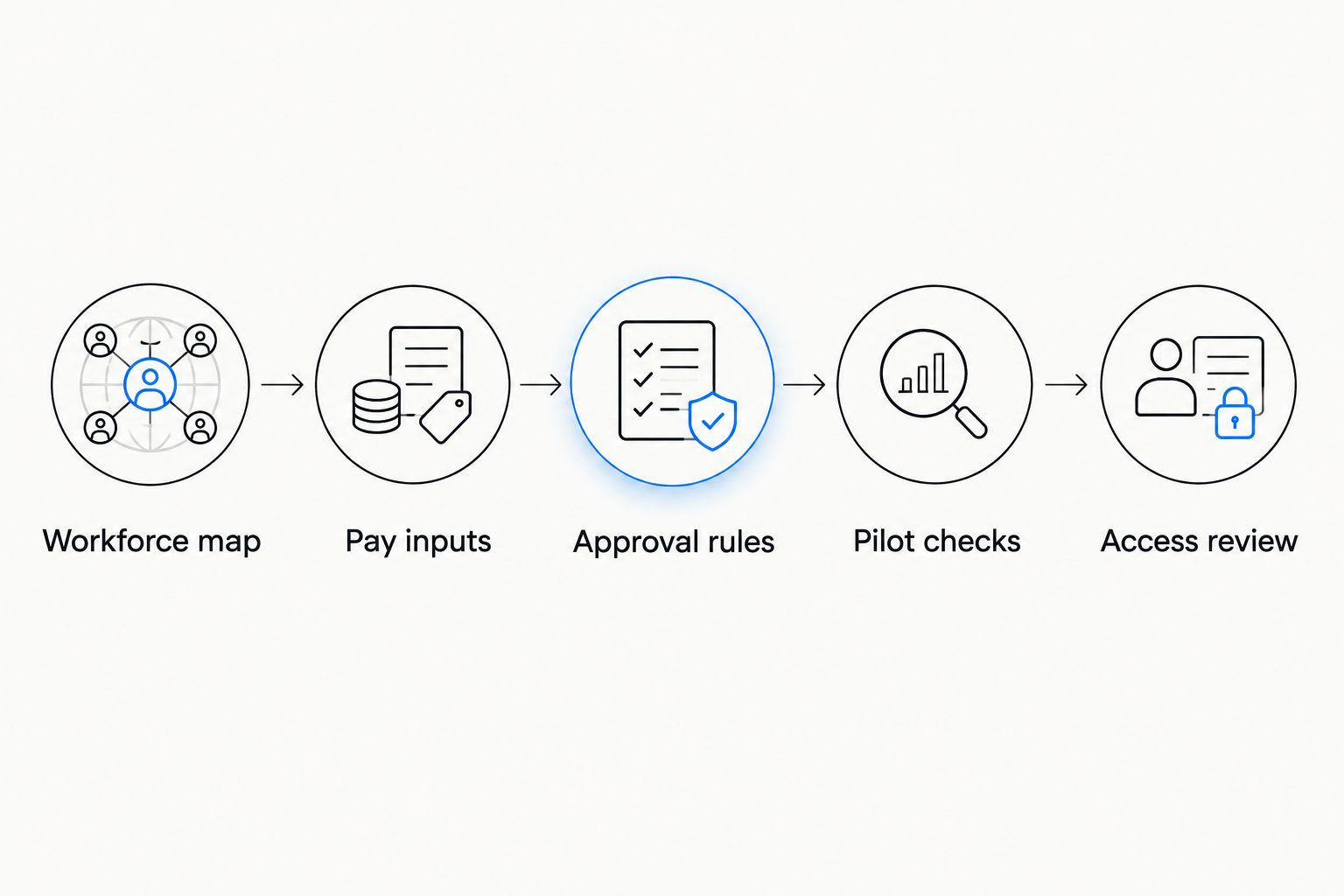
Keep this sequence beside your requirements document. It gives HR, payroll, and branch operations a shared reference when a proposed feature changes who submits, checks, or approves information.
Common mistakes real estate firms make
Treating every agent as the same worker type
A shared title does not settle employment status. Record the contractual arrangement and obtain advice where classification is unclear. Do not let a default software profile decide the relationship.
Making the property system the payroll authority
A transaction milestone is operational evidence, not necessarily an approved payment instruction. Define the contractual basis, calculation owner, and authorization route before sending amounts to payroll. Preserve the distinction when correcting a transaction.
Giving branch managers unrestricted personnel access
Local scheduling responsibility does not require access to every contract, payroll detail, or sensitive record. Configure access by purpose and test it after transfers. Include downloads and historical reports in that review.
Treating branch transfers as administrative renaming
A change of office and a change of employer are different events. Determine which event occurred before updating records, approval chains, and payroll allocation. Preserve the employment history rather than overwriting it.
FAQ
What's the best HR software for real estate firms?
The best HR software for real estate firms is the system that demonstrates your employment records, payroll inputs, branch permissions, and approval requirements. Ottohr is a candidate for growing employers seeking hiring, onboarding, payroll, benefits, and compliance tools together; verify real estate-specific workflows directly.
Can HR software calculate real estate agent commissions?
Commission calculation support must be verified for the specific system and agreement. Ask for a demonstration covering approved amounts, adjustments, reversals, and payroll handoff rather than assuming a commission field provides the required calculation logic.
Do real estate firms need both a CRM and HR software?
A CRM and HR software serve different purposes. Keep client and property activity in the appropriate operational system, and use HR records for employment administration; connect approved information only where the process requires it.
Can employees and independent contractors use the same HR platform?
Evaluate shared-platform support only after defining separate employee and contractor requirements. A common login or directory must not erase differences in contracts, approvals, records, or applicable obligations.
What should a real estate firm test before switching HR software?
Test routine records and exceptions before switching HR software. Include a branch transfer, corrected variable pay, a leave event, a departure, and restricted-manager access where those scenarios apply to your firm.
What should Turkish real estate employers check in payroll software?
Turkish real estate employers should check their applicable payroll, puantaj, SGK, and personnel-data requirements with qualified advisers. Demonstrate the approved workflow in the proposed software and verify current parameters before live processing.
One last thing
Ask a vendor to correct an approved record during the demonstration. A clean first entry shows data capture; a correction shows whether the process preserves evidence, requires renewed approval, and produces the right downstream result. Make that demonstration part of your 2026 acceptance criteria.


