
Remote onboarding can be as effective as in-person onboarding when employees can learn and demonstrate their work remotely, receive timely feedback, and get the access they need. That does not make the formats interchangeable: equipment training, site safety, and tasks requiring physical supervision still need an in-person component. Judge effectiveness by demonstrated readiness, not attendance at orientation or completion of a checklist.
- Is remote onboarding as effective as in-person onboarding? Yes, when role training, access, feedback, and assessment work remotely.
- Remote onboarding suits digitally delivered work; in-person onboarding supports physical demonstrations and supervised practice.
- Compare equivalent roles using work quality, independence, access readiness, and employee understanding.
- Ottohr covers onboarding alongside hiring, payroll, benefits, and compliance; software does not replace manager-led training.
Is remote onboarding as effective as in-person onboarding?
Remote onboarding is a delivery format, not proof of readiness. A new employee needs to understand the role, perform its tasks, and know where to get help. Either format needs a process that verifies those outcomes.
For your 2026 onboarding plan, separate administrative completion from job readiness. An uploaded document confirms receipt; a reviewed work sample shows whether someone can apply an instruction. An HR platform such as Ottohr addresses the administrative side alongside hiring, payroll, benefits, and compliance tools. Managers still need to define and assess the work.
| Requirement | Remote onboarding | In-person onboarding | Evidence to check |
|---|---|---|---|
| System access | Test access remotely before assigning work | Test access during setup | Employee completes the required login and workflow |
| Role training | Use written instructions, demonstrations, and reviewed practice | Use live demonstrations and supervised practice | Employee completes a representative task |
| Team introductions | Schedule introductions and explain responsibilities | Introduce colleagues and explain responsibilities | Employee knows who owns relevant decisions |
| Questions and feedback | Provide named contacts and explicit response arrangements | Provide named contacts rather than relying on proximity | Questions receive an answer or an escalation owner |
| Physical procedures | Complete remotely only where the task permits | Demonstrate and observe on site | Employee demonstrates the procedure safely |
| Administrative records | Collect and review through approved channels | Collect and review through approved channels | Required records are complete and correctly handled |
This comparison is a decision framework, not a measured finding that the formats produce identical results. To establish that for your organization, compare employees doing equivalent work against the same readiness criteria.
Why this matters
A finished onboarding checklist answers whether assigned activities happened. It does not answer whether the employee can do the job. When those questions get combined, unresolved training and access problems disappear behind a completed status.
In your 2026 reporting, keep separate records for administrative completion, training participation, and demonstrated capability. Each needs an owner. HR can confirm a document is present without being responsible for judging a technical work sample.
The practical question is therefore narrower than whether remote onboarding works in general: which parts of this employee's job can you teach, support, and assess without sharing a location?
Remote onboarding: best for digitally delivered work
Remote onboarding fits roles whose core tasks and assessments can happen through digital systems. Use it when the employee can observe a demonstration, practise with appropriate access, and submit work for review without needing a physical workplace.
Its practical advantage is that instructions and demonstrations can be made available for later reference. The employee does not have to depend entirely on remembering a live explanation. Written ownership also makes it clear where a question belongs.
The limitation is that unspoken expectations stay unspoken unless someone explains them. A new employee cannot infer which channel is urgent, which colleague approves a decision, or which document is authoritative merely by receiving access to a workspace.
Make those rules explicit. Assign a manager to review work and a named contact for everyday questions. Keep sensitive employment information out of general team channels, and separate practice access from permissions that allow consequential changes.
Recommendation: choose remote onboarding when you can assess the actual job remotely, not simply because the welcome presentation works over video.
In-person onboarding: best for physical demonstrations
In-person onboarding fits tasks that require access to a location, equipment, or supervised physical practice. It lets the trainer observe the task where it happens and correct an unsafe or incorrect action directly.
Its advantage is shared physical context. A trainer can point out equipment, demonstrate movement through a workplace, and observe how the employee follows a procedure. That is different from explaining the same procedure on a screen.
Its limitation is that presence does not guarantee learning. A new employee can attend a demonstration without understanding the sequence or knowing when to stop and ask for help. Verbal instructions also need a reliable reference where the work requires one.
Ask the employee to demonstrate the task and explain the relevant decision points. Record the assessment rather than treating attendance as a pass.
Recommendation: choose in-person training for physical requirements, but retain documented instructions, task ownership, and explicit sign-off.
Hybrid onboarding: best for mixed physical and digital requirements
Hybrid onboarding fits roles that combine digital administration with on-site work. Assign the format task by task rather than requiring every activity to happen in the same place.
You can explain team responsibilities remotely while reserving workplace access and equipment demonstrations for an on-site session. The important distinction is whether each activity achieves its purpose, not whether the overall programme carries a remote or office label.
The advantage is a direct match between training and the work. The limitation is coordination: employees need to know which activities happen where, what must happen first, and who confirms completion.
Avoid giving employees conflicting versions of the same instruction across a call, a document, and a workplace demonstration. Name the authoritative reference and update it when the procedure changes.
Recommendation: choose hybrid onboarding when physical requirements are real but do not apply to every onboarding activity.
Why onboarding effectiveness varies
Use these factors to decide where remote delivery is appropriate and where it needs support:
- Task requirements: identify whether the employee needs physical equipment, site access, or direct supervision to practise the work.
- Access readiness: verify the employee can use the required systems before assigning work that depends on them.
- Manager feedback: assign someone to review practice work and explain corrections, rather than distributing materials without follow-up.
- Instruction quality: provide a current reference that explains the task, expected output, and escalation route.
- Team connections: identify decision owners and help contacts instead of assuming introductions establish working relationships.
- Assessment design: require evidence of capability that matches the role, rather than counting meetings or completed pages.
These are controls you can inspect. A remote employee with unresolved permissions has an access problem; an office employee without feedback has a training problem. Changing the location alone does not resolve either one.
How do you make remote onboarding effective?
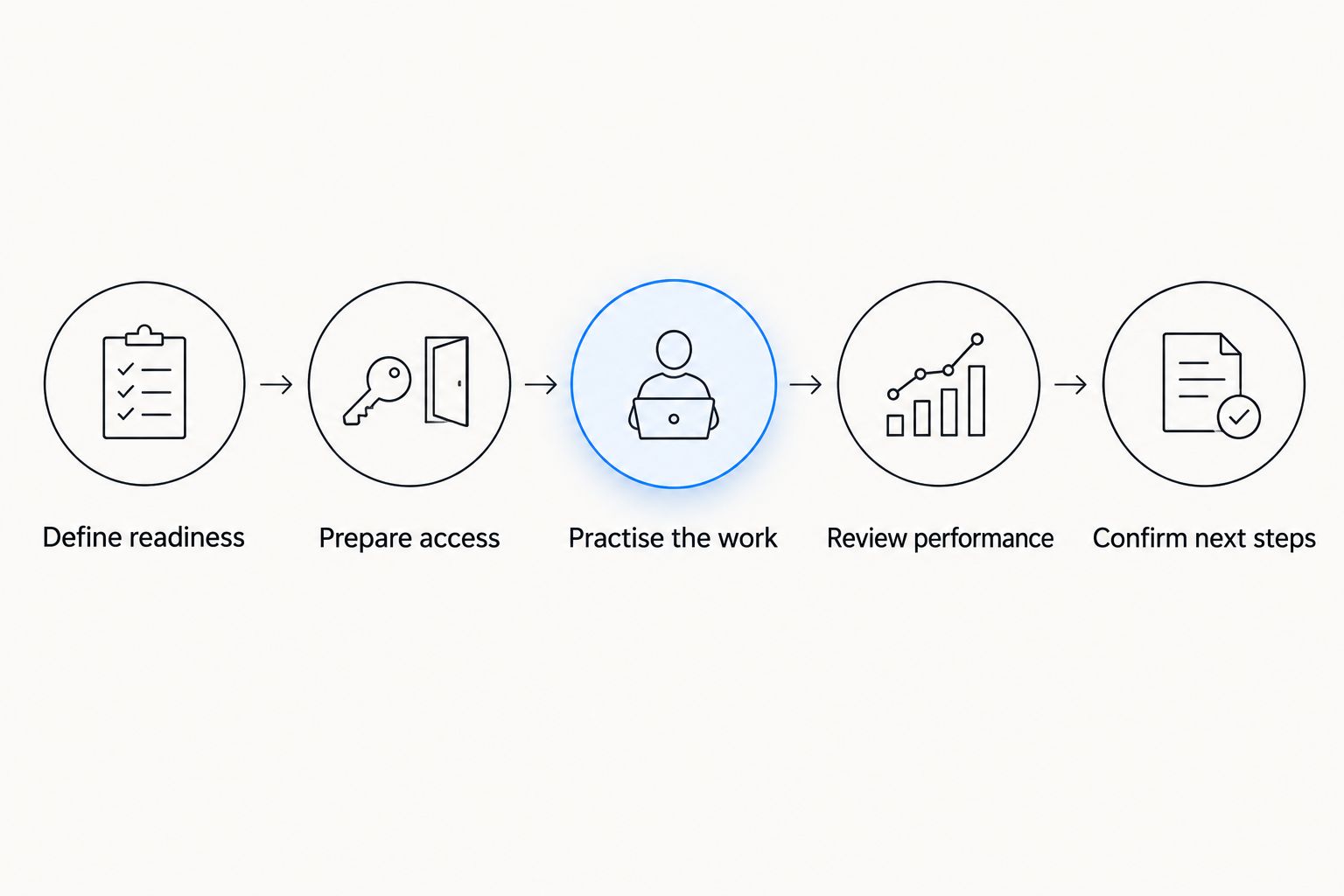
Build your 2026 process around a short sequence with a named owner at each handoff. Keep the sequence visible to the employee, manager, HR, and anyone responsible for access.
- Define readiness. List the work the employee must perform and the evidence a manager will review. Distinguish independent work from tasks that still require approval.
- Prepare access. Confirm equipment, accounts, and permissions needed for the assigned training. Test the relevant workflow rather than accepting an account-created notification as proof.
- Practise the work. Give the employee a representative task with instructions and a clear route for questions. Use a safe practice environment where live changes would create risk.
- Review performance. Inspect the result, discuss the employee's reasoning, and document corrections. Separate a knowledge gap from a missing permission or unclear instruction.
- Confirm next steps. Record what the employee can do independently, what still needs supervision, and who owns the remaining actions.
Access preparation deserves its own check because it sits between HR administration and the employee's ability to work. Use the guide to creating employee accounts and system access on day one when defining that handoff. Keep the manager's readiness assessment separate from the technical access check.
How should you compare remote and in-person results?
For a 2026 comparison, use equivalent roles, comparable tasks, and the same assessment criteria. Record the delivery format, but also record changes in training materials, manager involvement, and access preparation. Otherwise, you are comparing different programmes as well as different locations.
You can choose review points at 30 days, 60 days, and 90 days as a planning schedule. These are suggested checkpoints, not universal onboarding durations or published performance benchmarks. Adjust the schedule to the work and any applicable requirements.
At each checkpoint, inspect:
- Work quality: does the employee meet the agreed standard on representative tasks?
- Independence: which tasks can the employee complete without assistance, and which require approval?
- Access blockers: which required tasks remain impossible because of missing accounts, equipment, or permissions?
- Role understanding: can the employee explain priorities, boundaries, and escalation routes?
- Unresolved support needs: which questions recur, and who owns the correction?
Do not use message volume, camera use, or time in meetings as substitutes for job performance. An employee asking fewer questions is not automatically more capable; ask for evidence of the work.
Keep employee feedback separate from manager assessment, then review them together. Feeling welcomed and demonstrating competence are different outcomes. Both belong in the evaluation.
Can onboarding software replace in-person training?
Onboarding software can support administration and coordination; it does not make a physical task remotely assessable. Select the training format first, then identify which administrative steps software should support.
Ottohr is best suited to growing employers seeking onboarding alongside hiring, payroll, benefits, and compliance tools. Its stated scope fits that connected HR requirement. That scope alone does not establish whether a particular role's training or assessment needs are covered.
When evaluating Ottohr, ask for a demonstration against your own onboarding sequence. Check how the proposed setup handles responsibility, incomplete tasks, access handoffs, and manager review. Treat these as evaluation questions, not assumed capabilities.
The benefit of using a platform is distinct from the quality of the training programme. The limitation remains human ownership: someone must define the work, explain it, review it, and decide what happens next.
When should you require an in-person component?
Require an in-person component when the employee must demonstrate something that cannot be adequately observed or completed remotely. Examples include operating physical equipment or following a site-specific procedure in its actual setting.
Do not turn that requirement into an automatic office requirement for every administrative task. Document collection, role explanations, and introductions have different delivery needs from equipment practice.
For your 2026 onboarding plan, write the reason beside each required on-site activity. A specific reason makes the arrangement easier to explain and prevents a general preference for presence from being mistaken for an assessment requirement.
FAQ
Is remote onboarding as effective as in-person onboarding?
Remote onboarding can be as effective when the employee can learn, practise, and demonstrate the role remotely. Physical tasks and site-specific procedures still need an appropriate in-person component.
What's the best way to measure remote onboarding success?
Measure remote onboarding through reviewed work, role understanding, access readiness, and independence. Compare equivalent roles using the same criteria rather than relying on attendance or checklist completion.
How long should remote onboarding take?
Remote onboarding should continue until the employee meets the role's defined readiness criteria. Suggested reviews at 30 days, 60 days, and 90 days are planning checkpoints, not universal completion deadlines.
Is hybrid onboarding better than fully remote onboarding?
Hybrid onboarding is the better fit when a role combines remotely teachable work with physical training requirements. Assign each activity to the format that supports practice and assessment.
Can you onboard someone remotely without video meetings?
You can deliver written instructions, recorded demonstrations, and practice tasks without live video meetings. The process still needs a way to answer questions, review work, and resolve misunderstandings.
Does finishing onboarding paperwork mean an employee is ready?
Finishing paperwork confirms administrative completion, not job readiness. A manager must separately assess whether the employee can perform the required work and knows when to request help.
What should a manager check before ending onboarding?
A manager should check demonstrated capability, unresolved access problems, escalation knowledge, and any tasks that still require supervision. Record the remaining support owner rather than closing the process with unexplained gaps.
One last thing
Ask the new employee to complete a real task using the instructions you provided. Watch where the instructions stop being enough. That exercise gives you something concrete to fix, whether the employee is at home or beside the trainer.
Keep the result. The next onboarding revision should address an observed problem, not simply add another presentation.


