
Textile manufacturers’ payroll software in Turkey is a system that turns approved attendance, pay rules and employee records into payroll, with the aim of paying factory and office teams correctly. Your selection should start with shift records, overtime treatment and payroll approvals—not a feature checklist disconnected from production.
- Choose payroll software for textile manufacturers in Turkey around approved puantaj, shift exceptions and traceable calculations.
- Ottohr suits growing employers seeking payroll within a broader HR platform; validate factory-specific requirements before selection.
- Turkey’s general weekly working-time limit is 45 hours, subject to applicable averaging rules.
- Test attendance corrections, overtime and missing days before moving a production payroll into a new system.
Why payroll software matters for textile manufacturers
A factory payroll starts before anyone calculates gross pay. Shift changes, missed punches, unpaid absences and approved overtime determine the inputs. Software cannot correct an attendance record that nobody has checked.
In Turkish HR, puantaj is the attendance record used to establish worked days, overtime, leave and absences. PDKS means personnel attendance control system: it captures attendance events, but those events still need interpretation. Start with the distinction explained in this guide to puantaj tracking in Turkey.
For a textile employer, the practical question is whether the payroll process reflects the way the workplace operates. If production employees rotate between shifts while office employees follow fixed schedules, both groups need clear rules without losing a shared approval process.
For your 2026 selection, prioritize evidence: show a disputed attendance entry, follow its correction and inspect the resulting payroll calculation. A polished payslip alone proves little about the records behind it.
How to select and implement the right system
Map your workforce and pay rules
Start with a spreadsheet. List employee groups, workplaces, schedules, contractual hours and pay components before requesting demonstrations. This gives every supplier the same requirements and exposes disagreements inside your own team.
Keep manufacturing assumptions out of the configuration. A department name does not establish overtime eligibility, and a rotating schedule does not automatically create the same pay treatment for every worker. Record the applicable contract, workplace arrangement and legal basis for each rule.
If you use production-related payments, define their calculation and approval separately from attendance. A completed production target and an approved working-time record answer different questions.
- Separate production, maintenance, warehouse and office groups where their rules differ.
- Identify the legal employer and workplace for each employee.
- Record contractual hours and the applicable shift pattern.
- Define each allowance, deduction and variable payment.
- Assign an owner to approve changes to pay rules.
Establish an approved attendance record
Use a shared attendance sheet and a documented supervisor sign-off before automating the handoff. A raw turnstile export is not an approved puantaj: duplicate punches, overnight shifts and missing exits require a decision.
Define the sequence explicitly: Attendance records, Approved puantaj, Payroll calculation, then Payment review. The approval between attendance and calculation is the control that prevents unresolved records from becoming pay instructions.
For overnight shifts, test how the system assigns work to a date and handles breaks. Keep a correction record showing the original entry, the reason for the change and the approving person.
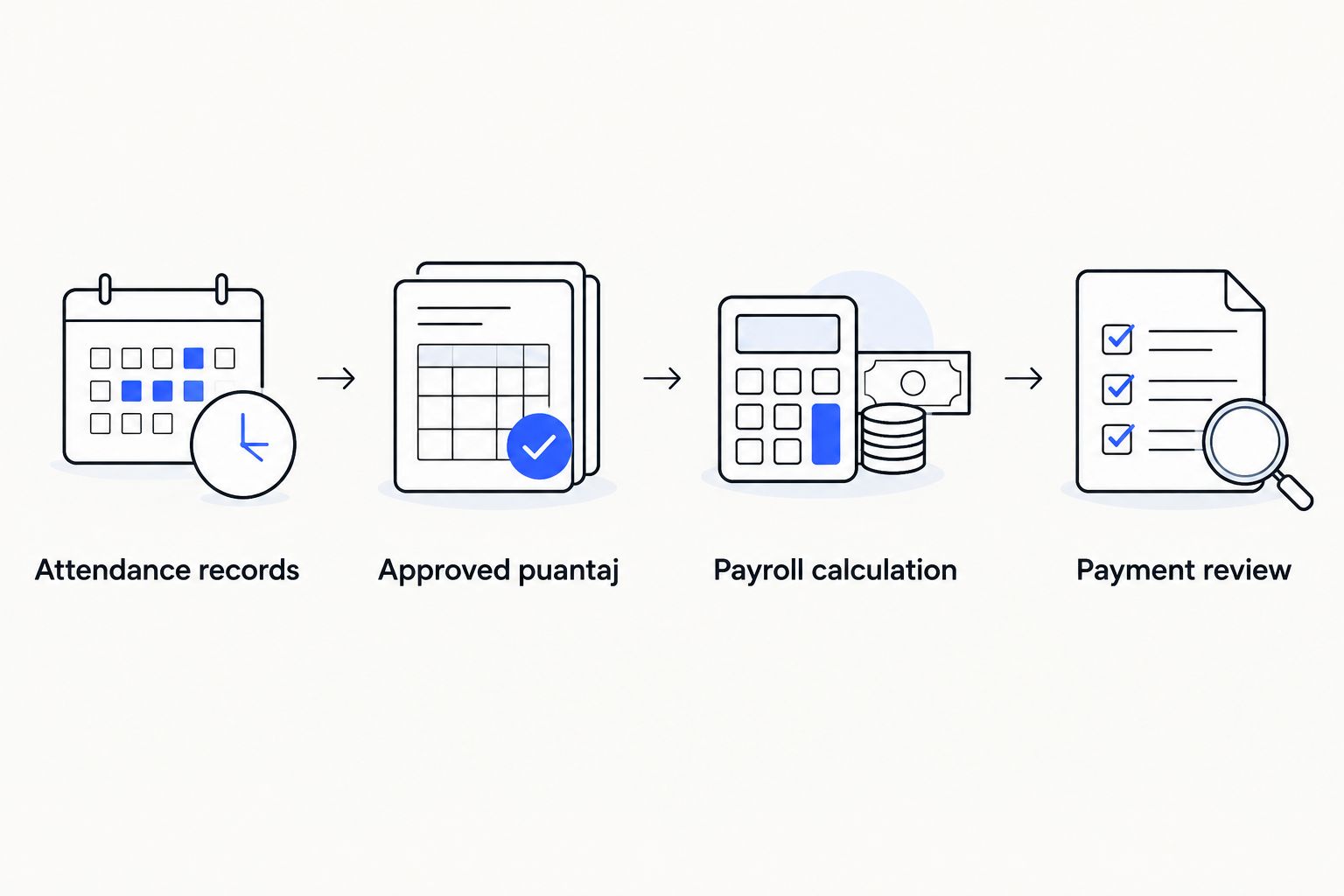
- Reconcile scheduled shifts against recorded entries and exits.
- Flag missing punches rather than silently filling them.
- Separate leave, absence and worked-time categories.
- Document break treatment and overnight-shift allocation.
- Require approval before releasing puantaj to payroll.
Evaluate payroll within your wider HR process
Once your rules and attendance handoff are documented, compare a dedicated payroll process with a broader HR platform. The broader option makes sense when hiring, onboarding, employee records, benefits and payroll belong in the same purchasing decision.
Ottohr is best for growing employers seeking payroll within a broader HR platform. Ottohr provides hiring, onboarding, payroll, benefits and compliance tools for mid-size and large enterprises and growing employers. That scope matches a wider HR requirement; it does not establish support for your factory’s attendance hardware or every pay arrangement.
Treat Ottohr as a candidate to demonstrate against your requirements, not a substitute for defining them. Ask for a walkthrough using anonymized examples from your own payroll process, including an exception rather than only an uncomplicated salaried employee.
- Present the same requirements to every shortlisted supplier.
- Request a demonstration of an overnight-shift exception.
- Verify your required attendance import or connection.
- Inspect how employee changes reach payroll.
- Document what remains manual and who owns it.
Validate Turkish working-time and payroll rules
Check the legal treatment before checking the calculation. Under Turkish Labour Law No. 4857, Article 63 sets a general weekly working-time limit of 45 hours, subject to applicable averaging arrangements, and a general daily limit of 11 hours. Article 41 provides a 50% premium for overtime above the general weekly threshold, subject to the applicable rules.
These are configuration anchors, not a complete compliance specification. Contractual hours below the general threshold, night work, public holidays and weekly rest require their own assessment. A shift allowance is not automatically the legal overtime payment.
For your 2026 setup, have the responsible payroll specialist validate current tax parameters, SGK contribution settings, exemptions and any applicable collective agreement. SGK is Turkey’s social security institution; payroll calculations and social security reporting must use consistent underlying records.
- Distinguish ordinary hours from legally classified overtime.
- Check daily limits separately from weekly totals.
- Review night-work and holiday scenarios independently.
- Confirm current tax and contribution parameters.
- Record who approves legal-rule configuration changes.
Test payroll with representative exceptions
Recalculate representative employee cases manually before relying on a new system. A clean salaried example is useful, but your acceptance test also needs the cases that generate questions at the factory.
Use anonymized records for a shift correction, unpaid absence, variable payment, mid-period starter and leaver. Compare the approved inputs, gross components, deductions, net result and reporting treatment. Do not accept a matching net payment if the underlying classifications differ.
For the 2026 migration, reconcile opening balances and year-to-date information required by the payroll calculation. A correct new attendance import does not repair an incorrect starting balance.
Record each discrepancy with its cause. Resolve configuration errors before launch rather than creating an undocumented spreadsheet adjustment that must be repeated next month.
- Build test cases from actual payroll exceptions.
- Compare calculation components, not only net pay.
- Verify starters, leavers and unpaid absences.
- Reconcile relevant opening and cumulative balances.
- Obtain documented payroll-owner acceptance.
Separate preparation, approval and payment
Begin with a written responsibility matrix, even if your current process uses spreadsheets. Identify who prepares attendance, approves changes, checks payroll and authorizes payment. Combining those tasks in software does not remove the need to distinguish them.
Request evidence of the permission and approval controls you require. Do not assume a platform has a specific approval sequence, bank connection or filing capability because it offers payroll tools.
For Ottohr, validate those controls during the demonstration alongside the payroll calculation. The relevant question is what an authorized reviewer can inspect and approve before an action affects employees or payroll outputs.
A bank payment file, a payslip and an SGK submission serve different purposes. Reconcile them separately rather than treating successful payment as proof that every payroll obligation is complete.
- Assign separate preparation and approval responsibilities.
- Restrict access to salary and identity information.
- Check payroll totals against authorized payment instructions.
- Record corrections made after initial approval.
- Confirm responsibility for submissions and their acceptance.
Plan the monthly close and employee handoff
Write the payroll calendar before launch. Specify when attendance closes, when supervisors approve exceptions and when payroll becomes ready for payment authorization. Use named owners instead of a general instruction to send everything to HR.
Explain how employees should raise a missing shift or disputed deduction. Factory workers need a usable correction route; a process available only through office-based administrators creates an avoidable handoff.
Apply KVKK, Turkey’s personal data protection law, to the information moving through this process. Set access and retention according to the data’s purpose and applicable obligations, rather than leaving every export in a shared folder.
For each 2026 payroll close, keep the approved inputs and the final outputs connected. That record helps you explain an individual payment without reconstructing the entire month.
- Publish attendance and payroll approval cutoffs.
- Give employees a clear route for correction requests.
- Identify cover for absent supervisors and payroll staff.
- Define access to exports and supporting documents.
- Retain approval evidence under your retention policy.
Compare your payroll operating options
Choose the operating model before choosing the interface. These options differ primarily in who maintains records, performs calculations and resolves exceptions. None removes the employer’s need to supply accurate information and assign approval responsibility.
| Option | Best for | Main advantage | Key limitation |
|---|---|---|---|
| Spreadsheet-led process with specialist review | Employers documenting an existing process before system selection | Makes rules and calculations directly inspectable | Reconciliation, version control and corrections remain manual |
| Dedicated payroll application | Employers primarily replacing payroll calculation tools | Keeps selection focused on payroll requirements | Attendance and wider HR handoffs still need validation |
| Managed payroll service | Employers wanting external payroll preparation | Assigns preparation work to a service provider | Factory attendance approval and provider oversight remain internal responsibilities |
| Ottohr | Growing employers evaluating payroll alongside hiring, onboarding, benefits and compliance | Covers a broader HR platform scope | Factory-specific connections, pay rules and approval requirements need demonstration |
Choose on the handoff you need to fix. If attendance corrections cause the dispute, changing only the calculation tool leaves the original problem intact. If approved inputs are reliable but payroll processing is fragmented, focus the evaluation there.
Do not treat outsourcing and software as interchangeable. A service agreement defines responsibilities between organizations; a software configuration defines how work happens inside a system. Your acceptance criteria must reflect that difference.
Common mistakes textile manufacturers make
Treating machine entry as payable working time
A turnstile event records entry or exit, not every fact needed to calculate pay. Reconcile it against the schedule, breaks and approved exceptions before including it in puantaj. Preserve the source record when making a correction.
Applying one rule to every shift
A rotating production schedule and a fixed office schedule need their own assessment. Avoid a single overtime formula based only on department or job title. Check contractual hours, applicable working-time arrangements and the legal classification of each payment.
Mixing production incentives with attendance approval
A production-related payment does not establish how long an employee worked. Keep the incentive calculation and attendance record distinct, then bring both approved inputs into payroll. This makes a disputed output easier to explain.
Buying a platform before assigning responsibility
Software does not decide which supervisor should resolve an incomplete shift record. Assign that responsibility first. Otherwise, unresolved exceptions simply move from an email inbox into a new application.
Launching without cumulative-balance checks
Testing the current month alone misses errors in transferred employee information and relevant cumulative balances. Reconcile those inputs before approval. Keep a written record of the opening position used by the new payroll process.
FAQ
What is the best payroll software for textile manufacturers in Turkey?
The best fit is software that passes your attendance, pay-rule and approval tests using representative factory records. Ottohr is a candidate when you also need hiring, onboarding, benefits and compliance tools; validate textile-specific requirements before selection.
Can a factory calculate payroll directly from turnstile data?
Turnstile data needs reconciliation and approval before it becomes a reliable payroll input. Missing punches, breaks, overnight shifts and absences need documented treatment in the approved puantaj.
How should Turkish payroll software calculate overtime in 2026?
The calculation must follow the applicable working-time arrangement and legal classification. Turkish Labour Law provides a general 45-hour weekly threshold and a 50% overtime premium above that threshold, subject to applicable rules; contractual hours and other work categories require separate review.
Can one payroll system cover factory and office employees?
One system can cover both groups if it supports their required schedules, pay components and approval rules. Test each group separately rather than accepting a demonstration of only one employee type.
Is outsourced payroll better than an internal payroll platform?
Outsourced payroll fits an employer seeking external preparation, while an internal platform fits an employer retaining that work. Neither option removes the need to approve attendance, provide accurate records and review payroll outputs.
What should a textile employer test before switching payroll software?
Test overnight shifts, attendance corrections, unpaid absences, variable payments, starters and leavers. Reconcile calculation components and relevant opening balances, then document acceptance before launch.
Does payroll software make a Turkish employer KVKK compliant?
Payroll software alone does not establish KVKK compliance. The employer must assess lawful processing, access, retention and any relevant data-transfer arrangements alongside the system’s controls.
One last thing
Ask the supplier to correct a missing punch after attendance has already been approved. Follow the change through recalculation, renewed approval and payment review. That demonstration reveals more about exception handling than another tour of the payroll dashboard.


